





The HTML table is used for arranging data into the tabular design. Tables consist of rows and columns and are often used on websites for the effective displaying of tabular data.
A table in HTML makes a lot of sense when you want to organize data that would look best in a spreadsheet. An HTML table is a great way to display things such as financial data, calendars, pricing, feature comparison, the nutrition facts information panel, bowling scores, and many other tabular data.
Tables semantically indicate tabular data and they are the best choice for displaying data of this kind.
Table elements & markup
A table in HTML basically consists of table cells inside rows and columns:
<td>(table data) - Each table cell is defined by a<td>and a</td>tag.<tr>(table row) - Each table row starts with a<tr>and end with a</tr>tag.<th>(table header) - Sometimes you want your cells to be headers, in those cases use the<th>tag instead of the<td>tag.<thead>- The<thead>tag is used to group header content in an HTML table.<tbody>- The<tbody>tag is used to group the body content in an HTML table.
Now that we have the basics, let's create an HTML card in the editor with the following markup. Here is the code that you can paste directly in the HTML card:
<table class="table-comparison tbody-bg-odd">
  <thead>
    <tr>
      <th></th>
      <th>Basic</th>
      <th>Standard</th>
    </tr>
  </thead>
  <tbody>
    <tr>
      <td>All limited links</td>
      <td>❌</td>
      <td>✅</td>
    </tr>
    <tr>
      <td>Own analytics platform</td>
      <td>❌</td>
      <td>✅</td>
    </tr>
    <tr>
      <td>Chat support</td>
      <td>❌</td>
      <td>✅</td>
    </tr>
    <tr>
      <td>Optimize hashtags</td>
      <td>❌</td>
      <td>✅</td>
    </tr>
    <tr>
      <td>Unlimited</td>
      <td>❌</td>
      <td>✅</td>
    </tr>
    </tr>
  </tbody>
</table>
A second example:
<table class="table-comparison tbody-bg-odd">
  <thead>
    <tr>
      <th></th>
      <th>iPhone 13</th>
      <th>Samsung S21</th>
      <th>Xiaomi 11</th>
    </tr>
  </thead>
  <tbody>
    <tr>
      <td>Price</td>
      <td>
        <span class="good">GOOD</span>
      </td>
      <td>
        <span class="mid">MID</span>
      </td>
      <td>
        <span class="bad">BAD</span>
      </td>
    </tr>
    <tr>
      <td>Diplay size</td>
      <td>
        <span class="good">GOOD</span>
      </td>
      <td>
        <span class="mid">MID</span>
      </td>
      <td>
        <span class="bad">BAD</span>
      </td>
    </tr>
    <tr>
      <td>RAM</td>
      <td>
        <span class="good">GOOD</span>
      </td>
      <td>
        <span class="mid">MID</span>
      </td>
      <td>
        <span class="bad">BAD</span>
      </td>
    </tr>
    <tr>
      <td>Resolution</td>
      <td>
        <span class="good">GOOD</span>
      </td>
      <td>
        <span class="mid">MID</span>
      </td>
      <td>
        <span class="bad">BAD</span>
      </td>
    </tr>
    <tr>
      <td>Processor</td>
      <td>
        <span class="good">GOOD</span>
      </td>
      <td>
        <span class="mid">MID</span>
      </td>
      <td>
        <span class="bad">BAD</span>
      </td>
    </tr>
    <tr>
      <td>Camera</td>
      <td>
        <span class="good">GOOD</span>
      </td>
      <td>
        <span class="mid">MID</span>
      </td>
      <td>
        <span class="bad">BAD</span>
      </td>
    </tr>
    <tr>
      <td>Battery</td>
      <td>
        <span class="good">GOOD</span>
      </td>
      <td>
        <span class="mid">MID</span>
      </td>
      <td>
        <span class="bad">BAD</span>
      </td>
    </tr>
  </tbody>
</table>
Table styling
Let's start styling our tables. The complete CSS is available and can be pasted in Code Injection in the Ghost Admin:
.table-comparison {
  margin-bottom: 4em;
  max-width: 100%;
}

table {
  border-collapse: collapse;
  overflow: hidden;
  display: inline-block;
  overflow-x: auto;
}

.table-comparison thead {
  background-color: none;
}

.table-comparison th {
  padding: 0.5em 1em;
}

.table-comparison td {
  text-align: center;
  padding: 0.5em 1em;
}

.table-comparison td:first-child {
  text-align: left;
}

.tbody-bg-odd tbody tr:nth-child(odd) {
  background-color: #f2f2f2;
}

.tbody-bg-even thead tr:nth-child(odd) {
  background-color: #f2f2f2;
}

.table-comparison tbody .success {
  display: flex;
  background-color: #1fcc82;
  width: 24px;
  height: 24px;
  position: relative;
  border-radius: 50%;
}

.table-comparison tbody .success::before {
  content: '';
  position: absolute;
  top: 6px;
  left: 10px;
  display: inline-block;
  width: 3px;
  height: 8px;
  border-right: 2px solid white;
  border-bottom: 2px solid white;
  -webkit-transform: rotate(45deg);
  -ms-transform: rotate(45deg);
  transform: rotate(45deg);
}

.table-comparison tbody .cancel {
  display: flex;
  background-color: #ff3b3b;
  width: 24px;
  height: 24px;
  position: relative;
  border-radius: 50%;
}

.table-comparison tbody .cancel::before,
.cancel::after {
  position: absolute;
  top: 11px;
  bottom: 0;
  left: 6.3px;
  right: 0;
  content: '';
  background-color: #fff;
  width: 11px;
  height: 2px;
  border-radius: 2px;
}

.table-comparison tbody .cancel::before {
  transform: rotate(-45deg);
}

.table-comparison tbody .cancel::after {
  transform: rotate(45deg);
}

.table-comparison tbody .mid {
  --color-accent: #fbc103;
  color: var(--color-accent);
  border-radius: 2rem;
  padding: 0.2em 1em;
  font-size: 0.8rem;
  position: relative;
  overflow: hidden;
  display: inline-flex;
  font-weight: 700;
}

.table-comparison tbody .mid::before {
  background-color: var(--color-accent);
  opacity: 0.2;
  content: '';
  position: absolute;
  width: 100%;
  height: 100%;
  top: 0;
  left: 0;
}

.table-comparison tbody .good {
  --color-accent: #16c60c;
  color: var(--color-accent);
  border-radius: 2rem;
  padding: 0.2em 1em;
  font-size: 0.8rem;
  position: relative;
  overflow: hidden;
  display: inline-flex;
  font-weight: 700;
}

.table-comparison tbody .good::before {
  background-color: var(--color-accent);
  opacity: 0.2;
  content: '';
  position: absolute;
  width: 100%;
  height: 100%;
  top: 0;
  left: 0;
}

.table-comparison tbody .bad {
  --color-accent: #f03a17;
  color: var(--color-accent);
  border-radius: 2rem;
  padding: 0.2em 1em;
  font-size: 0.8rem;
  position: relative;
  overflow: hidden;
  display: inline-flex;
  font-weight: 700;
}

.table-comparison tbody .bad::before {
  background-color: var(--color-accent);
  opacity: 0.2;
  content: '';
  position: absolute;
  width: 100%;
  height: 100%;
  top: 0;
  left: 0;
}
The rendered tables
Here is the final look of the tables:
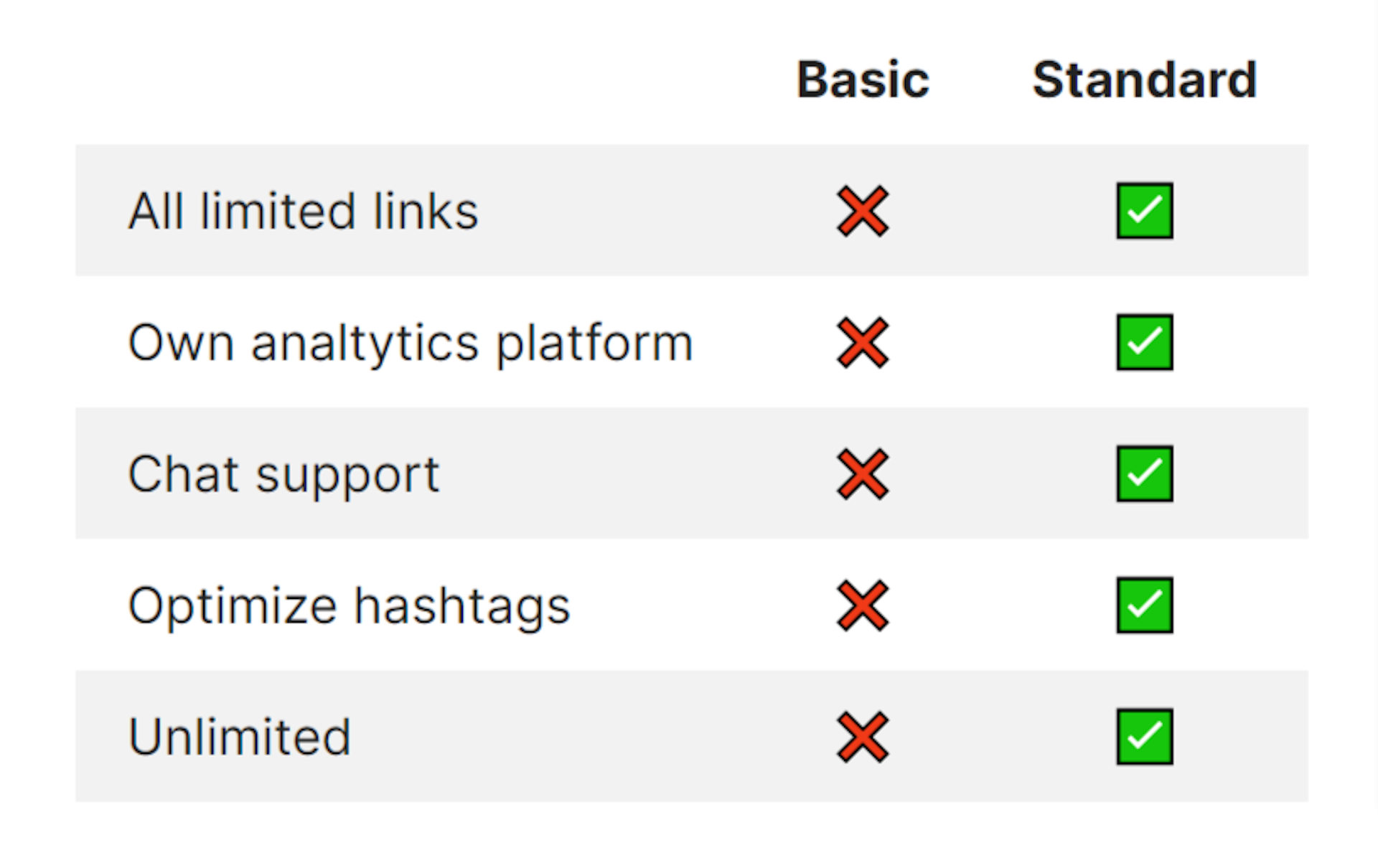
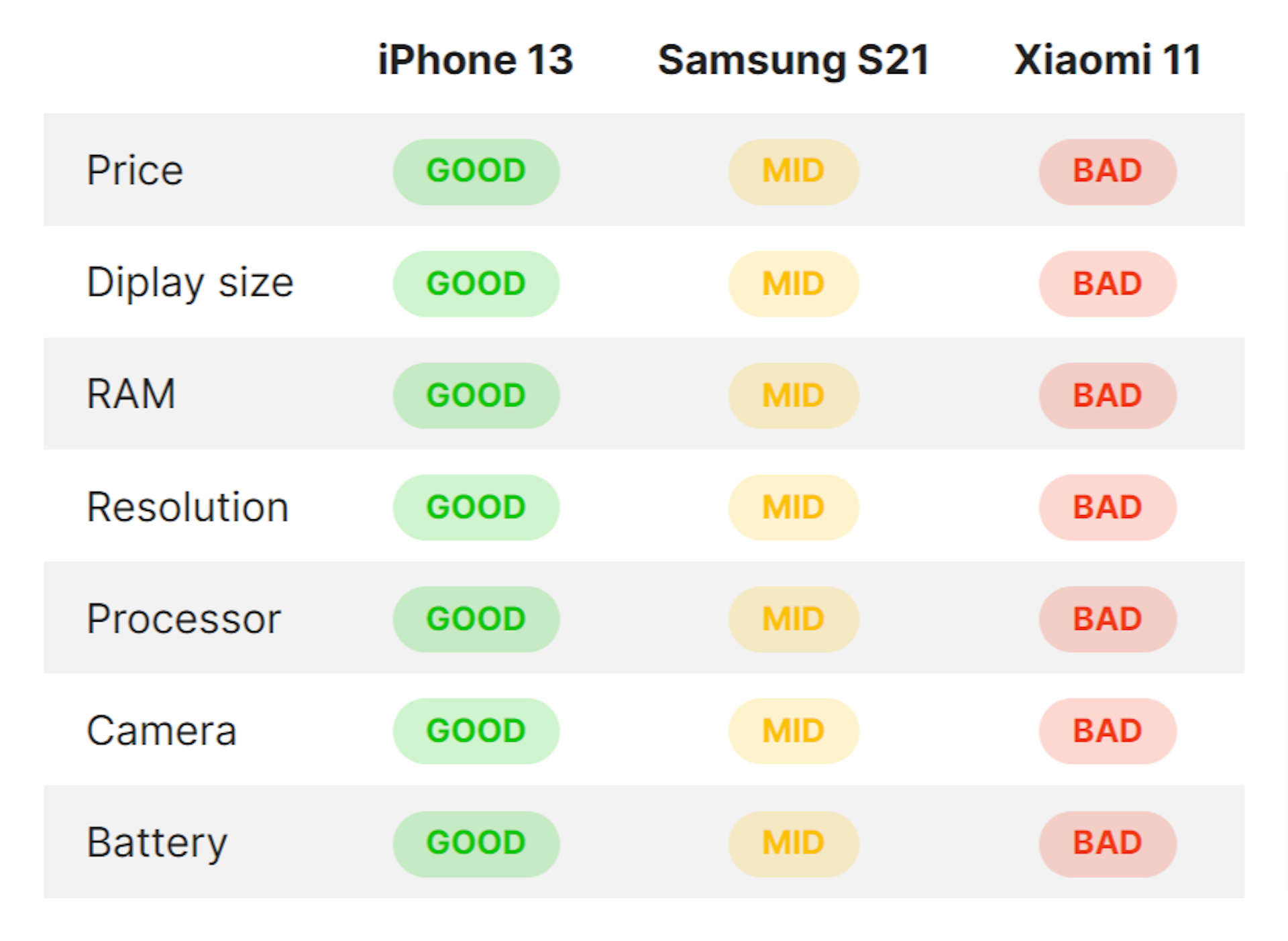
You can customize the appearance of the tables, by changing the CSS.
Creating a snippet out of the markup will make it easy to include it anywhere in your posts.