惯性聚合 高效追踪和阅读你感兴趣的博客、新闻、科技资讯
阅读原文 在惯性聚合中打开

推荐订阅源

月光博客
月光博客
云风的 BLOG
云风的 BLOG
小众软件
小众软件
雷峰网
雷峰网
博客园 - 【当耐特】
V
V2EX
WordPress大学
WordPress大学
IT之家
IT之家
Last Week in AI
Last Week in AI
罗磊的独立博客
奇客Solidot–传递最新科技情报
奇客Solidot–传递最新科技情报
Apple Machine Learning Research
钛媒体:引领未来商业与生活新知
钛媒体:引领未来商业与生活新知
V
Visual Studio Blog
freeCodeCamp Programming Tutorials: Python, JavaScript, Git & More
有赞技术团队
有赞技术团队
The Cloudflare Blog
Jina AI
Jina AI
博客园 - 司徒正美
阮一峰的网络日志
阮一峰的网络日志
博客园 - 聂微东
大猫的无限游戏
大猫的无限游戏
博客园 - 三生石上(FineUI控件)
让小产品的独立变现更简单 - ezindie.com

Step Security Blog

Announcing Dependabot Configuration Enhancements: Cooldown and Group Support - StepSecurity Securing Vibe Coding and AI Coding Agents: An End-to-End Approach with StepSecurity - StepSecurity Introducing StepSecurity Dev Machine Guard: Protecting Developer Machines from Supply Chain Attacks - StepSecurity Top 2024 Predictions for CI/CD Security - StepSecurity Dev Machine Guard Is Now Open Source: See What's Really Running on Your Developer Machine - StepSecurity Datadog's DevSecOps 2026 Report Validates What We've Been Building - StepSecurity hackerbot-claw: An AI-Powered Bot Actively Exploiting GitHub Actions - Microsoft, DataDog, and CNCF Projects Hit So Far - StepSecurity Cline Supply Chain Attack Detected: cline@2.3.0 Silently Installs OpenClaw - StepSecurity StepSecurity’s Unified Protection Across the SDLC Infrastructure Threat Framework (SITF) - StepSecurity @velora-dex/sdk Compromised on npm: Malicious Version Drops macOS Backdoor via launchctl Persistence - StepSecurity axios Compromised on npm - Malicious Versions Drop Remote Access Trojan - StepSecurity Behind the Scenes: How StepSecurity Detected and Helped Remediate the Largest npm Supply Chain Attack - StepSecurity 10 Layers Deep: How StepSecurity Stops TeamPCP's Trivy Supply Chain Attack on GitHub Actions - StepSecurity Malicious IoliteLabs VSCode Extensions Target Solidity Developers on Windows, macOS, and Linux with Backdoor - StepSecurity TeamPCP Plants WAV Steganography Credential Stealer in telnyx PyPI Package - StepSecurity litellm: Credential Stealer Hidden in PyPI Wheel - StepSecurity Checkmarx KICS GitHub Action Compromised: Malware Injected in All Git Tags - StepSecurity CanisterWorm: How a Self-Propagating npm Worm Is Spreading Backdoors Across the Ecosystem - StepSecurity Trivy Compromised a Second Time - Malicious v0.69.4 Release, aquasecurity/setup-trivy, aquasecurity/trivy-action GitHub Actions Compromised - StepSecurity bittensor-wallet 4.0.2 Compromised on PyPI - Backdoor Exfiltrates Private Keys - StepSecurity Malicious npm Releases Found in Popular React Native Packages - 130K+ Monthly Downloads Compromised - StepSecurity Malicious Polymarket Bot Hides in Hijacked dev-protocol GitHub Org and Steals Wallet Keys - StepSecurity ForceMemo: Hundreds of GitHub Python Repos Compromised via Account Takeover and Force-Push - StepSecurity xygeni-action Compromised: C2 Reverse Shell Backdoor Injected via Tag Poisoning - StepSecurity kubernetes-el Compromised: How a Pwn Request Exploited a Popular Emacs Package - StepSecurity How StepSecurity Caught a Release Storm in Microsoft’s @types Packages - StepSecurity Harden Runner Now Supports Windows and macOS GitHub Actions Runners - StepSecurity 10,000 Open-Source Projects Now Secured by Harden-Runner Community-Tier: A Milestone Three Years in the Making - StepSecurity 20+ Popular NPM Packages Compromised (Chalk, Debug, Strip-ANSI, Color-Convert, Wrap-ANSI...) - StepSecurity 2024 in Review: The Evolution of CI/CD Security & What's Next - StepSecurity
Introducing Workflow Run Policies: Guardrails for Blockin...
2025-07-08 · via Step Security Blog

The biggest threat to CI/CD security today isn’t just misconfigurations — it’s the blind trust placed in third-party GitHub Actions that can be silently compromised.

The tj-actions supply chain attack exposed how dangerous this can be. Even after the breach was discovered, organizations struggled to locate where the malicious Action was used and had to disable affected workflows manually — a time-consuming and error-prone process during a live security incident.

In another GitHub Actions security incident, attackers used stolen credentials to create a brand-new workflow in a separate branch to exfiltrate secrets. Since it didn’t touch existing workflows, it bypassed detection entirely.

From unvetted Actions and unauthorized runner labels to secrets exposed in forked pull requests, subtle deviations like these often go unnoticed until it’s too late. So far there have been tools that audit for such deviations and flag them but were not able to enforce compliance.  

Today, we’re launching a new feature to change that: Workflow Run Policies

This feature empowers security and platform teams to enforce security policies across GitHub Actions workflows to ensure that all workflow runs are compliant with their policies and block the ones that are not compliant.

🗓️ Join our upcoming webinar where we'll dive deep into these new capabilities and show you how to implement them in your organization.

👉 Register here

The Problem: Enforcing compliant GitHub Actions workflows at scale

With hundreds or even thousands of workflows running across multiple teams, visibility alone isn’t enough. We have repeatedly heard from our customers that they need guardrails - a way to enforce compliant workflows, for such scenarios:  

  • Allow only specific runner labels (e.g., self-hosted runners) in select repos
  • Enforce allowlists for internal or third-party GitHub Actions
  • Prevent an attacker from creating a new workflow to exfiltrate credentials
  • Block the use of workflows with known compromised GitHub Actions

The time between introducing a vulnerable workflow and it getting exploited is shrinking. For example, in the Grafana security incident, a workflow was exploited less than 24 hours after it became vulnerable to a Pwn Request vulnerability. Security teams can’t keep up with these misconfigurations manually — and by the time an incident occurs, the damage may already be done.

The Solution: Preventive Enforcement with Workflow Run Policies

Workflow Run Policies allow you to define and enforce guardrails for GitHub Actions workflows at the organization or repository level. If a workflow run violates a policy, StepSecurity cancels the run automatically, before it runs.

You’ll see this in your workflow logs:

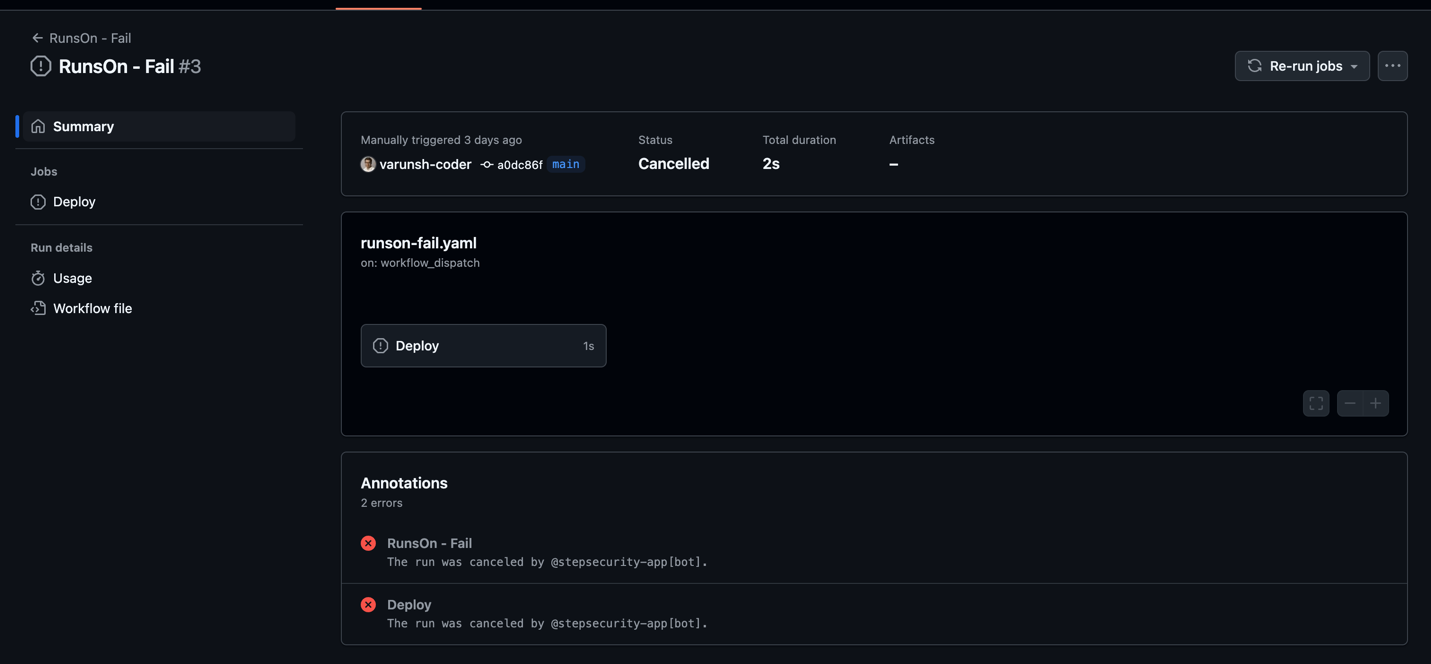
The run was canceled by @stepsecurity-app[bot]

It’s proactive, real-time enforcement that scales with your GitHub Actions footprint.

What You Can Enforce

Workflow Run Policies currently support four key policy types, all built to tackle common security gaps, with many more policies on the way:

  • Compromised Actions Policy: Block workflows that use known compromised actions
  • Secret Exfiltration Policy: Blocks modified workflows in non-default branches from using secrets unless explicitly approved.
  • Allowed Actions Policy: Enforce an allowlist of GitHub Actions that can be used in workflows.
  • Runner Label Policy: Control which runners are allowed or disallowed.

See Why a Workflow Was Blocked — In Real Time

Every blocked run includes a detailed policy evaluation, so your team can understand:
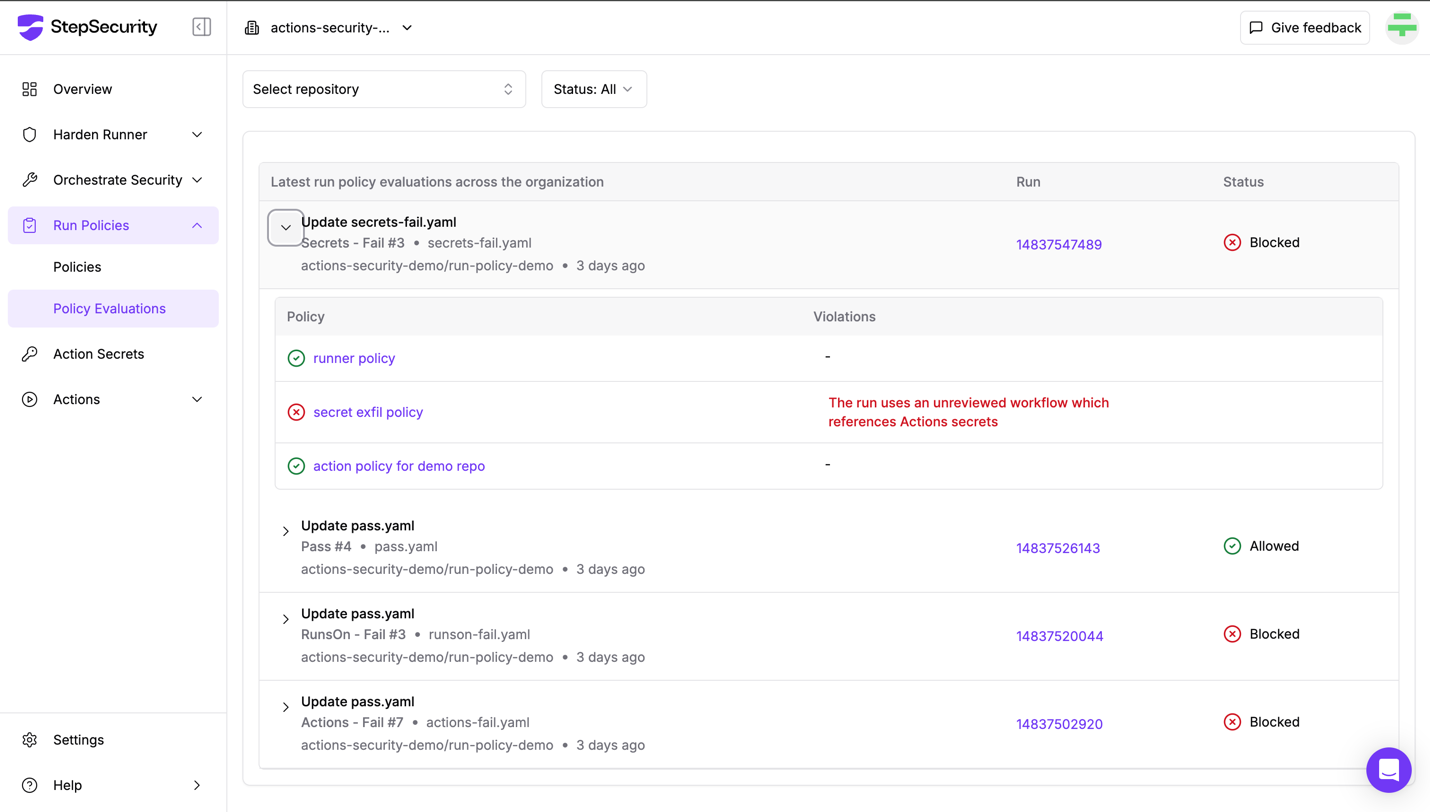
  • Which workflow run triggered the enforcement
  • What policy was violated
  • Why the violation occurred

Picture 1343567142, Picture

                                                              Policy Evaluations dashboard

The Policy Evaluations Dashboard offers a full audit trail, helping you fine-tune rules and investigate blocked workflows with ease.

How to Get Started

Workflow Run Policies are managed through the StepSecurity dashboard or API.

You can:

  • Create and edit policies through a simple UI or using the API
  • Apply policies to all or selected repositories
  • Choose between Enforce mode (block runs) or Dry Run mode (only alert)
  • View blocked workflow runs and the specific policy violations that caused them

Policy Examples in Action

Compromised Actions Policy

  • Let’s take a scenario where you want to block known compromised actions from executing workflow runs. Here is a workflow file that is using a (dummy) compromised action:
name: CI

on:
  push:
    branches: [ "main" ]
  pull_request:
    branches: [ "main" ]
  workflow_dispatch:

jobs:
  build:
    runs-on: ubuntu-latest
    steps:
      - name: Checkout code
        uses: actions/checkout@v4

      # This step uses a compromised action — should be blocked by policy
      - name: Run a one-line script
        uses: step-security/dummy-compromised-action@main
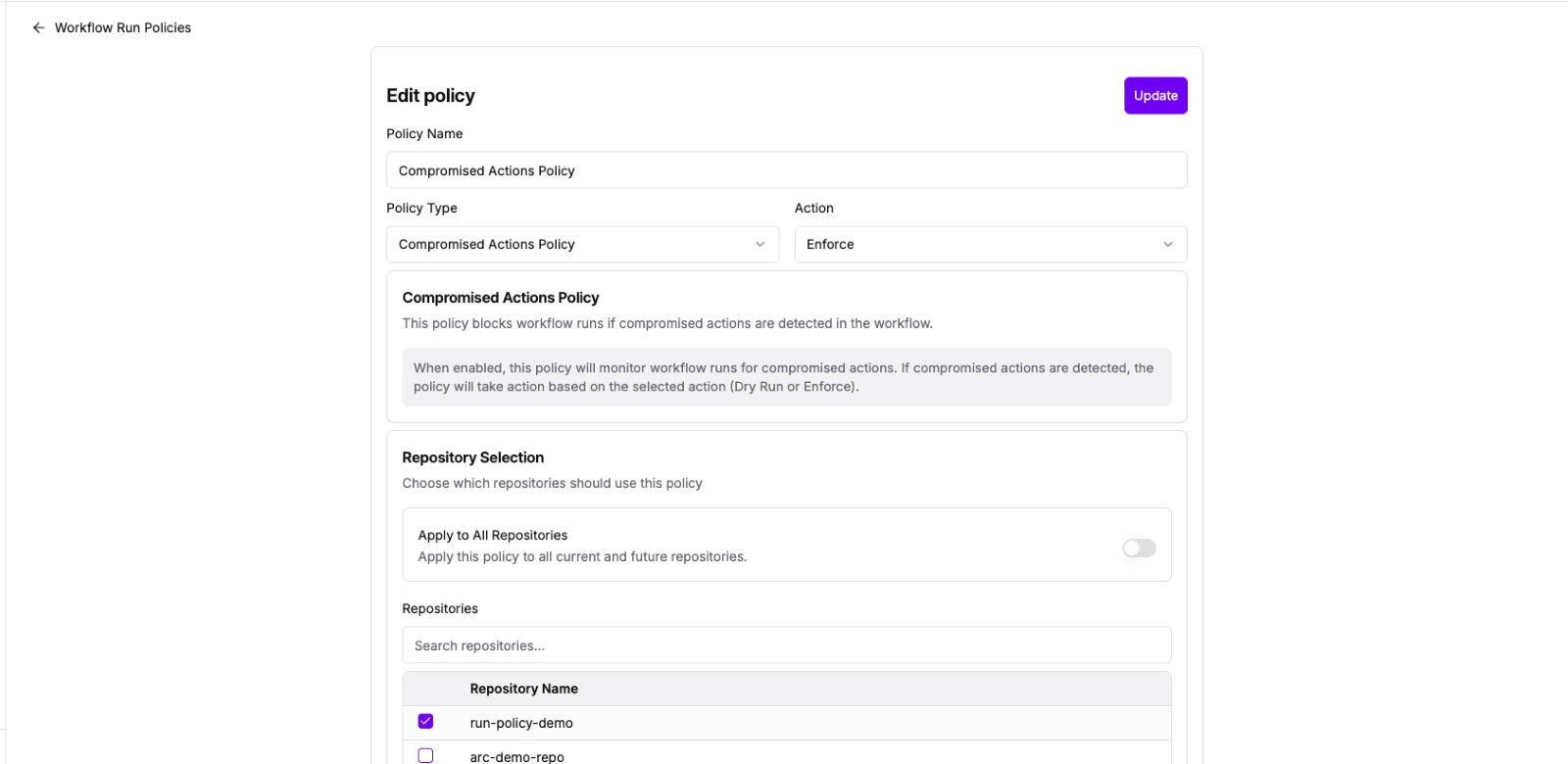
  • This is what the policy looks like for this scenario:

Picture 20431164, Picture

                                                       Compromised Actions Policy
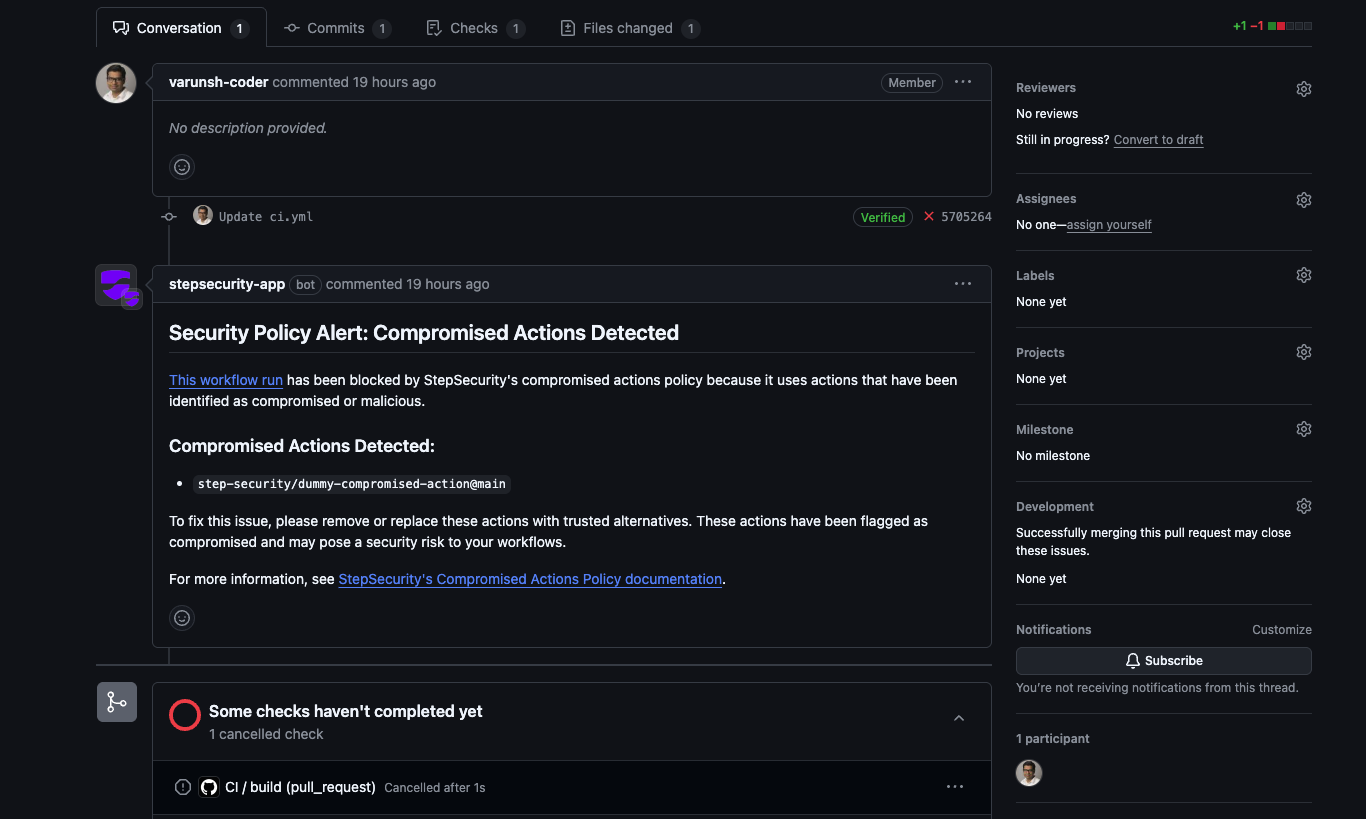
  • StepSecurity maintains a centralized list of known compromised actions. If a workflow uses an action in this list, the StepSecurity bot will automatically cancel the workflow run and leave a comment on the pull request:

Picture 132155202, Picture

                              Pull request with a cancelled workflow run and an automated comment from the StepSecurity bot
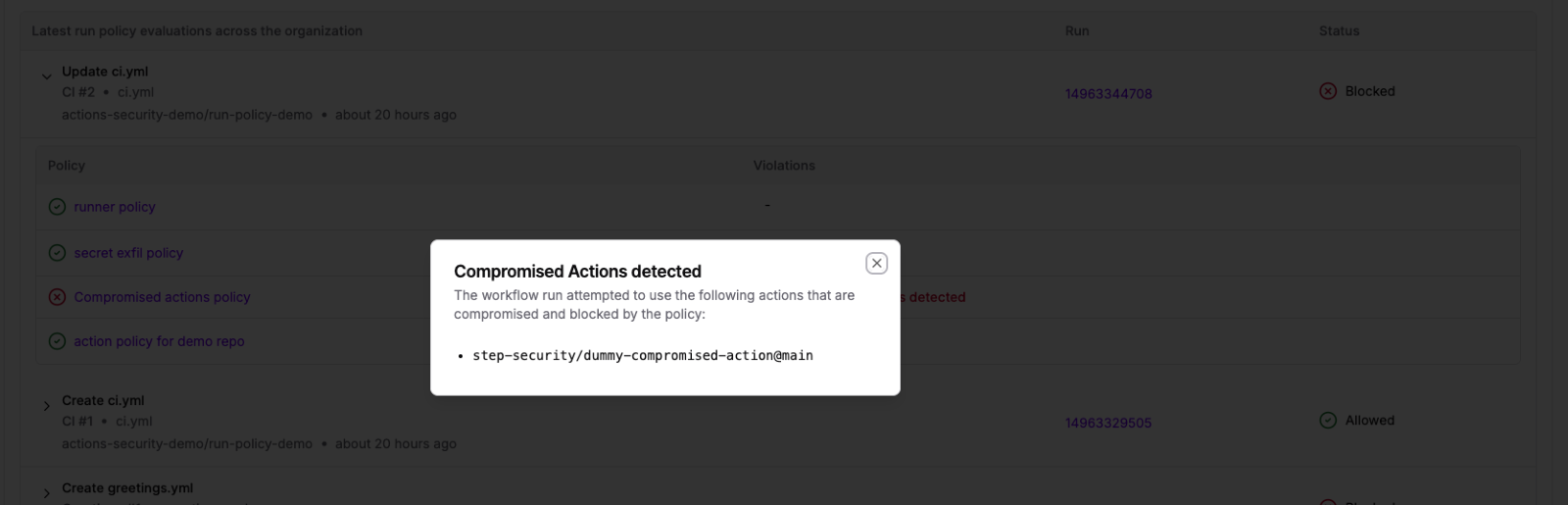
  • If a workflow run is cancelled due to a compromised Action, you can navigate to the Policy Evaluations dashboard and click on the cancelled run to view which Actions were flagged as compromised

Picture 1298316714, Picture

                                             List of Compromised Actions

Note: The list of compromised Actions is dynamic. Once an Action has been verified as repaired or no longer poses a risk, it will be removed from the list — and any workflows using that Action will resume functioning normally.

Explore our interactive demo to see how you can set up Compromised Actions Policy in your own organization:

Secrets Exfiltration Policy

Scenario 1: Attacker Tries to Exfiltrate Secrets

  • An attacker gains access to credentials and creates a new workflow in a separate branch that attempts to steal secrets. Here is an example of what the malicious workflow file will look like:
name: Secrets - Fail

on:
  push:

jobs:
  build:
    name: Deploy
    runs-on: ubuntu-latest
    steps:
      # Attacker's attempt to exfiltrate credentials using a new workflow
      # This method was used in the Grafana security incident

      - name: Convert secrets to JSON file
        env:
          VALUES: ${{ toJSON(secrets) }}
        run: |
          echo "$VALUES" > secrets.json

      - name: Upload secrets file
        uses: actions/upload-artifact@v3
        with:
          name: secret-artifact
          path: secrets.json
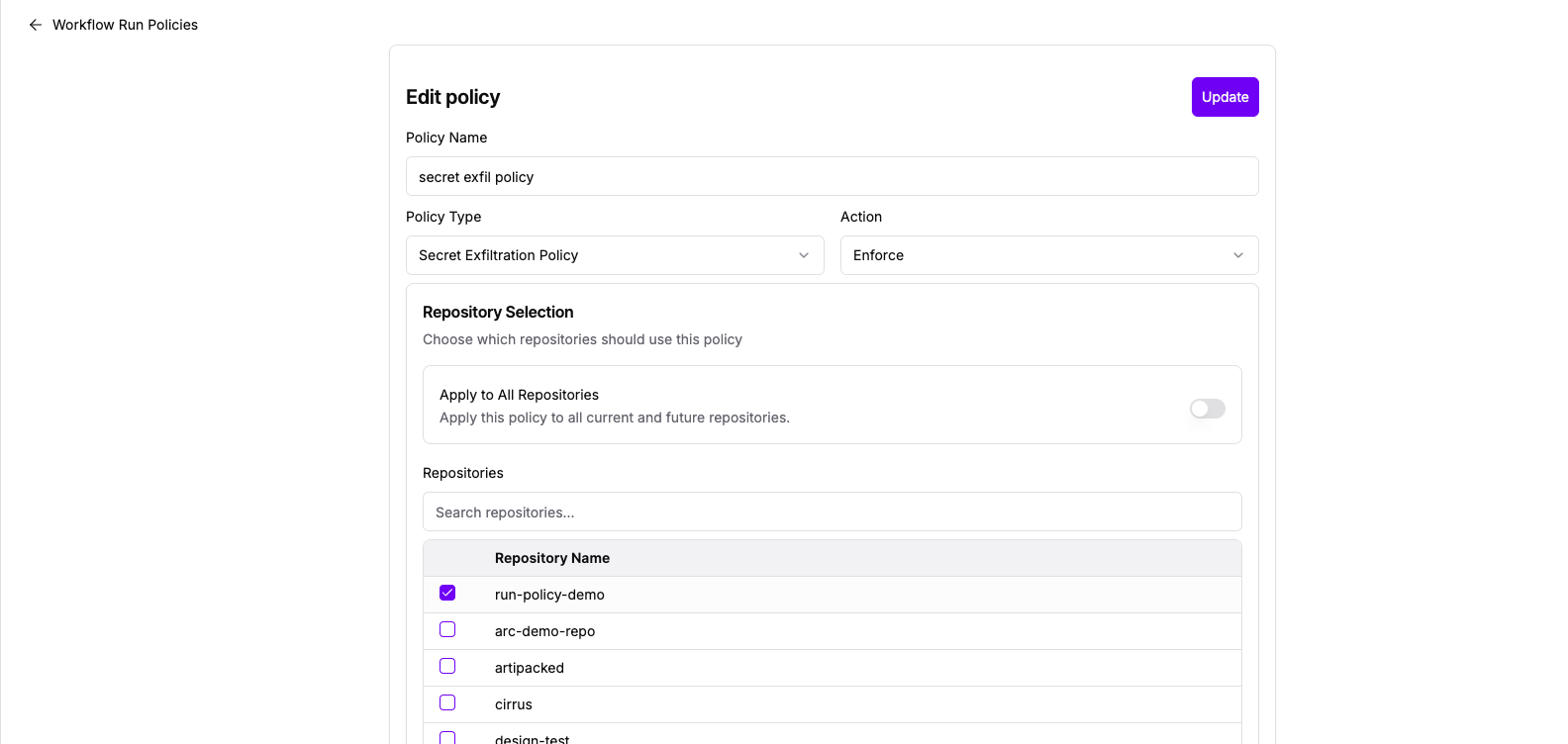
  • The Secret Exfiltration Policy detects access to secrets, and it compares the workflow with the default branch version. Here is what the policy looks like:

Picture 232097512, Picture

                                                      Secret Exfiltration Policy
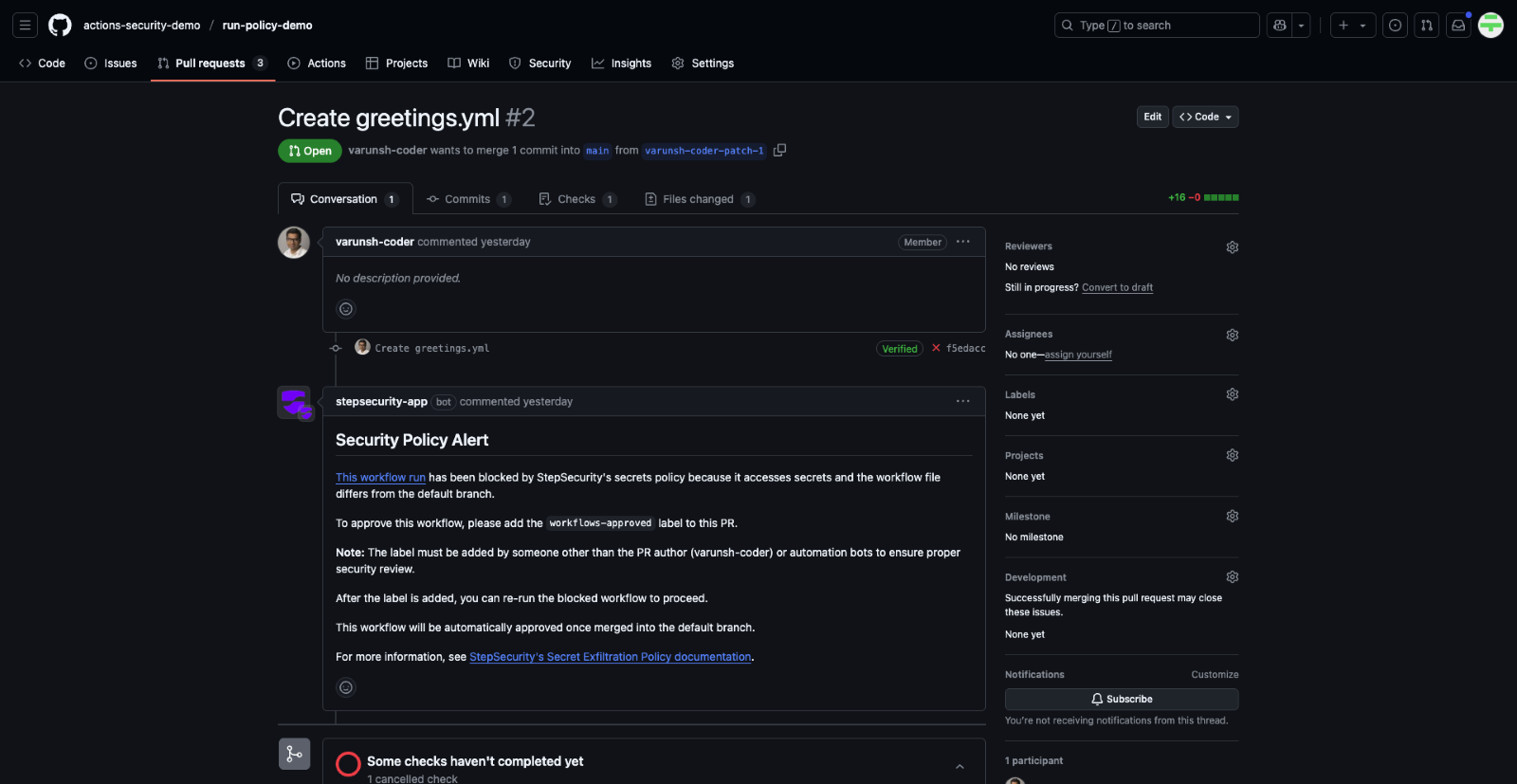
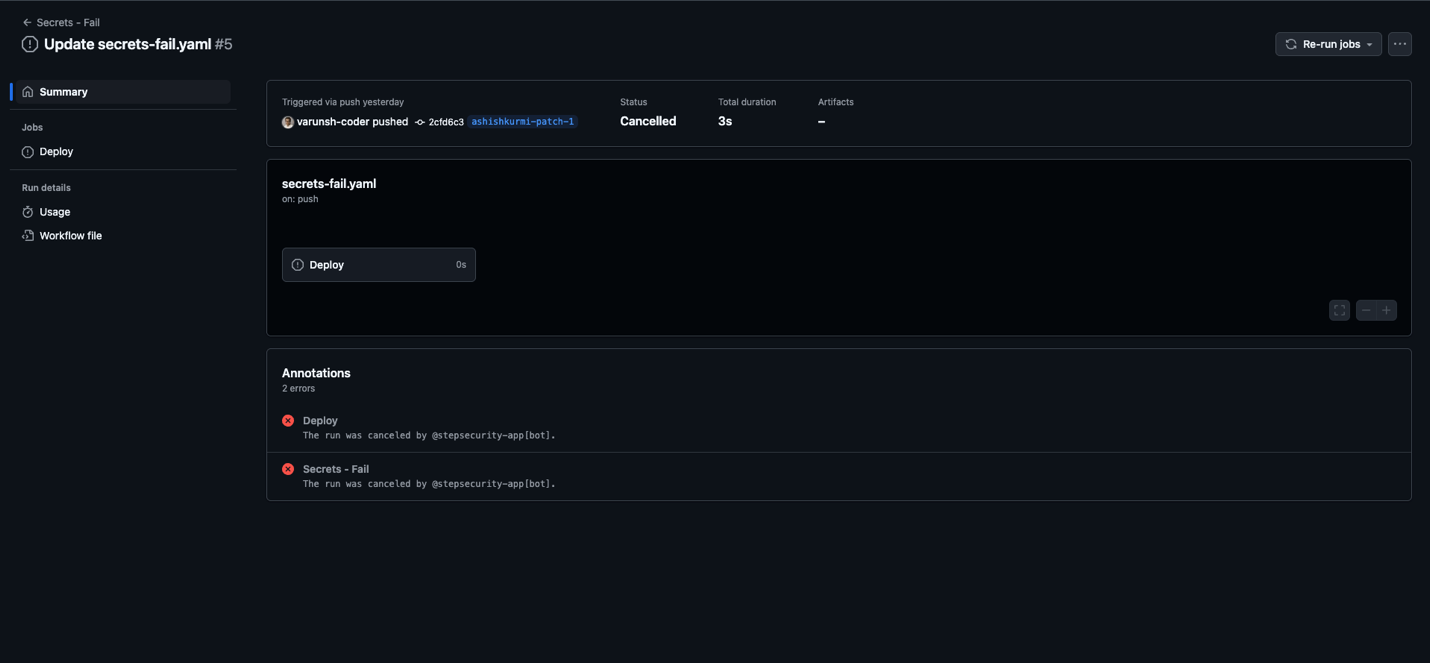
  • Since the workflow is new and unapproved, the StepSecurity bot cancels the run

Picture 291412722, Picture

                                                      Cancelled workflow run

Scenario 2: Developer Needs Access to Secrets

  • A legitimate developer opens a pull request that modifies a workflow requiring secret access. The policy blocks the run to ensure no unauthorized secret access occurs.

Picture 509601956, Picture

                     Pull request with a cancelled workflow run and an automated comment from the StepSecurity bot

How to Unblock

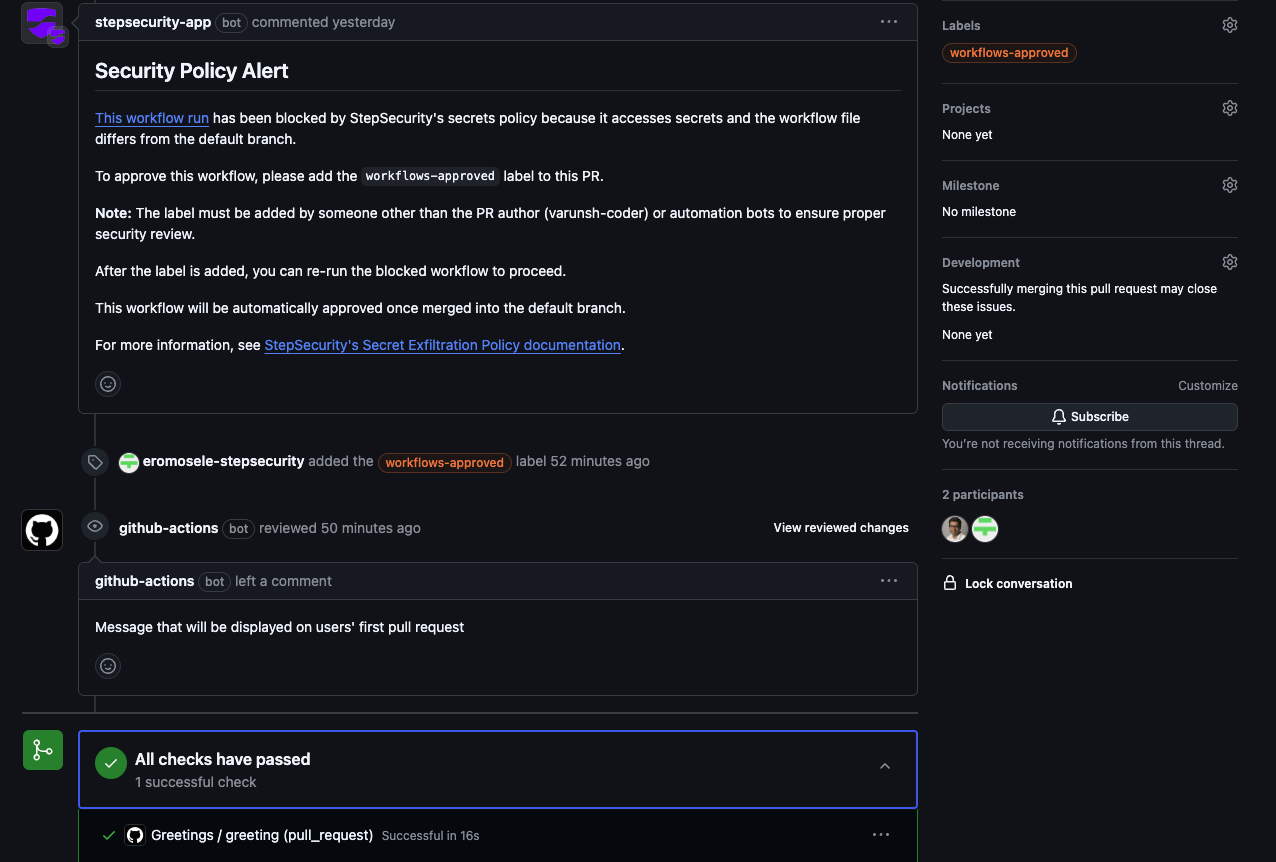
  • In the PR let another team member add the label “workflows-approved” to the PR and re-run the job and the workflow will run

Picture 81354808, Picture

                               The workflow runs because of the addition of the "workflows-approved" label
  • All approvals are recorded in the policy evaluation dashboard to maintain a full audit trail.

Explore our interactive demo to see how you can set up Secret Exfiltration Policy in your own organization:

Allowed Actions Policy

  • Let’s take a scenario where you only want to allow specific actions to run. Here is a workflow file that uses an internal action which should not be allowed.  
name: Actions - Fail

on:
  workflow_dispatch:

jobs:
  build:
    name: Deploy
    runs-on: ubuntu-latest
    steps:
      # Allowed as per policy
      - name: Harden-Runner
        uses: step-security/harden-runner@v2
        with:
          egress-policy: audit

      # Allowed as per policy
      - name: Code Checkout
        uses: actions/checkout@v2
        with:
          fetch-depth: 2

      # Internal action - not allowed as per policy
      - name: Harden-Runner Fork
        uses: actions-security-demo/harden-runner@main
        with:
          egress-policy: audit
  • This is what the policy looks like for this scenario:

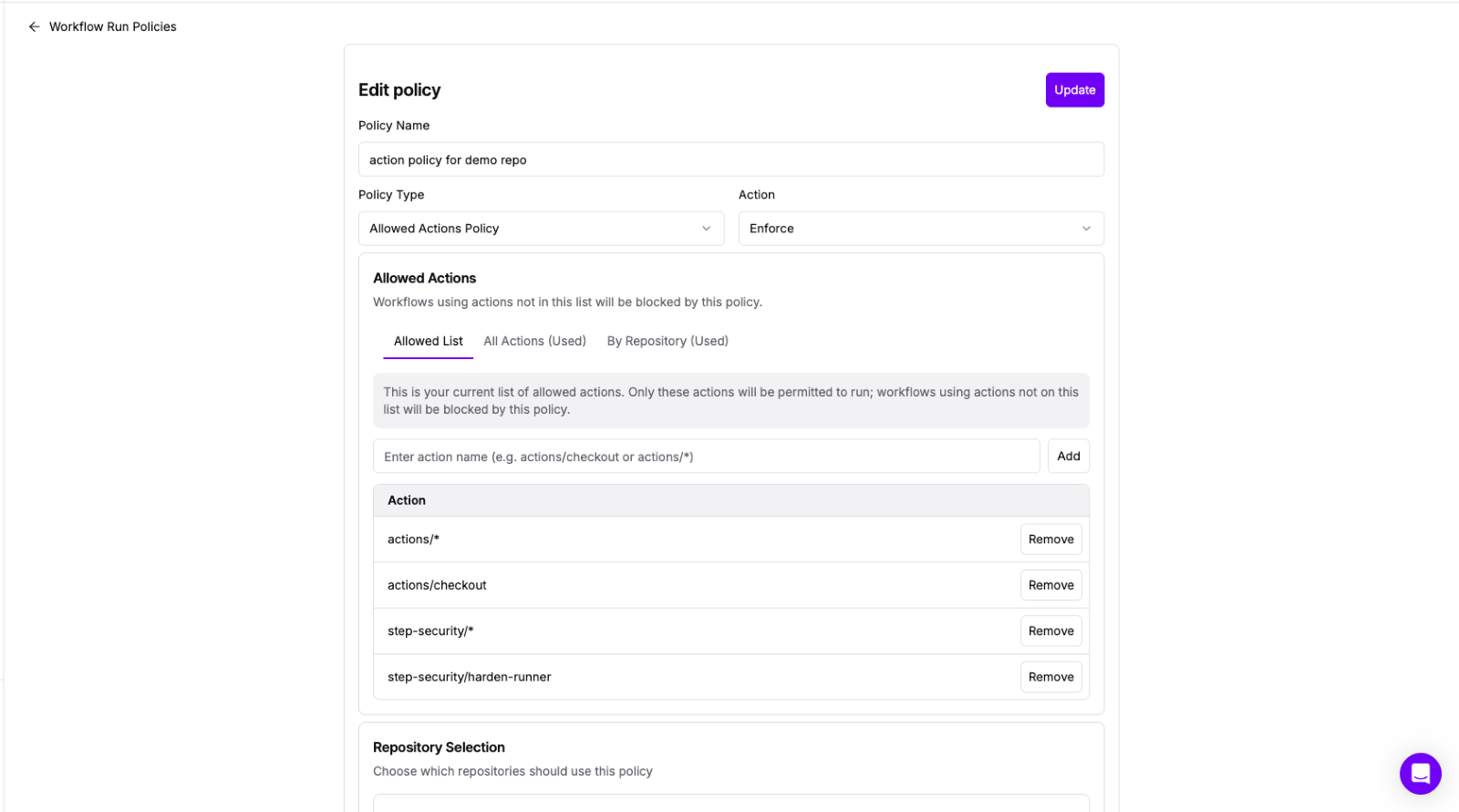
Picture 989496713, Picture

                                  Allowed Actions Policy
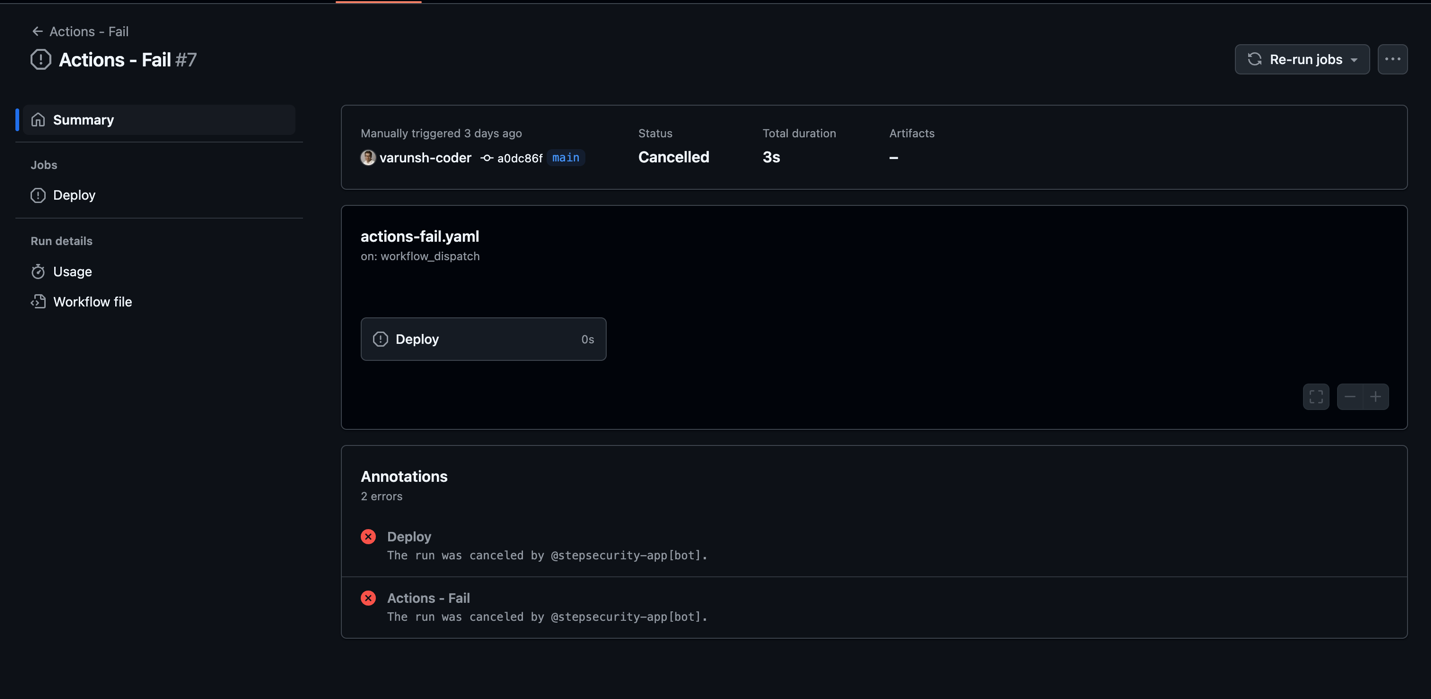
  • The workflow run is blocked:

Picture 1307209989, Picture

                         Cancelled workflow run
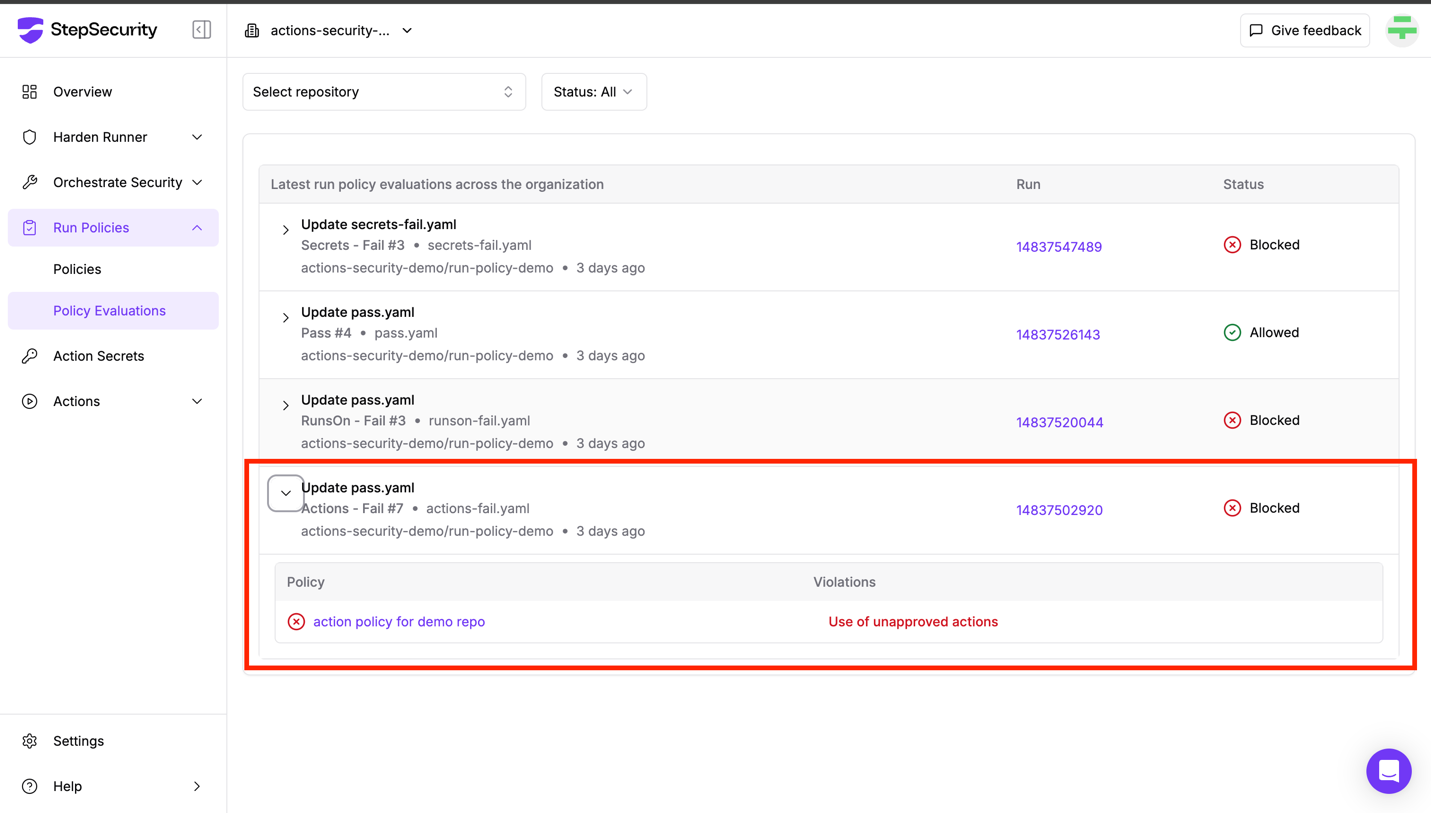
  • You can view the policy evaluation to find out more details why the workflow run was blocked

Picture 1020950558, Picture

                                  Policy Evaluation dashboard showing why the workflow run was cancelled

How is this different from what GitHub offers?

GitHub has a feature to create an allowed list of actions, and StepSecurity Workflow Run Policies have the following benefits that can be used to compliment the GitHub feature:

  • Allows setting granular policies at the repository level
  • Allows blocking the use of specific internal actions
  • Makes it easy to configure policies based on current usage of actions

Explore our interactive demo to see how you can set up Allowed Actions Policy in your own organization:

Runner Label policy

  • Let’s take a scenario where you only want to allow the use of self-hosted runners for specific repositories. Here is a workflow file that uses a GitHub-hosted which should not be allowed.
name: RunsOn - Fail

on:
  workflow_dispatch:

jobs:
  build:
    name: Deploy
    # windows-latest runner label not allowed as per policy
    runs-on: windows-latest
    steps:
      - name: Harden-Runner
        uses: step-security/harden-runner@v2
        with:
          egress-policy: audit
      - name: Code Checkout
        uses: actions/checkout@v2
        with:
          fetch-depth: 2
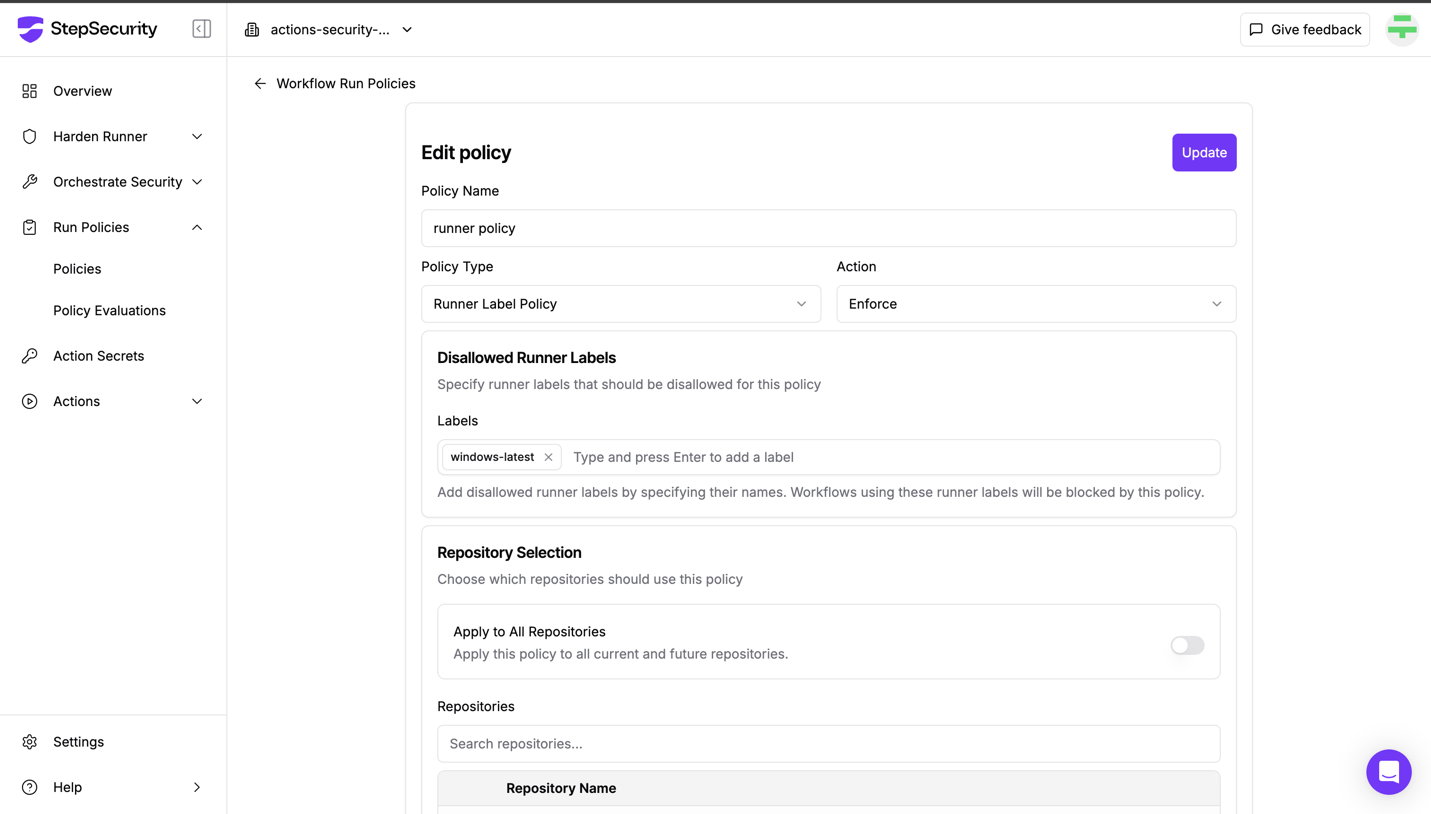
  • This is what the policy looks like for this scenario:

Picture 1421671177, Picture

                                    Runner Label Policy
  • The workflow run is blocked by the policy

Picture 503417419, Picture

                                          Cancelled Workflow Run
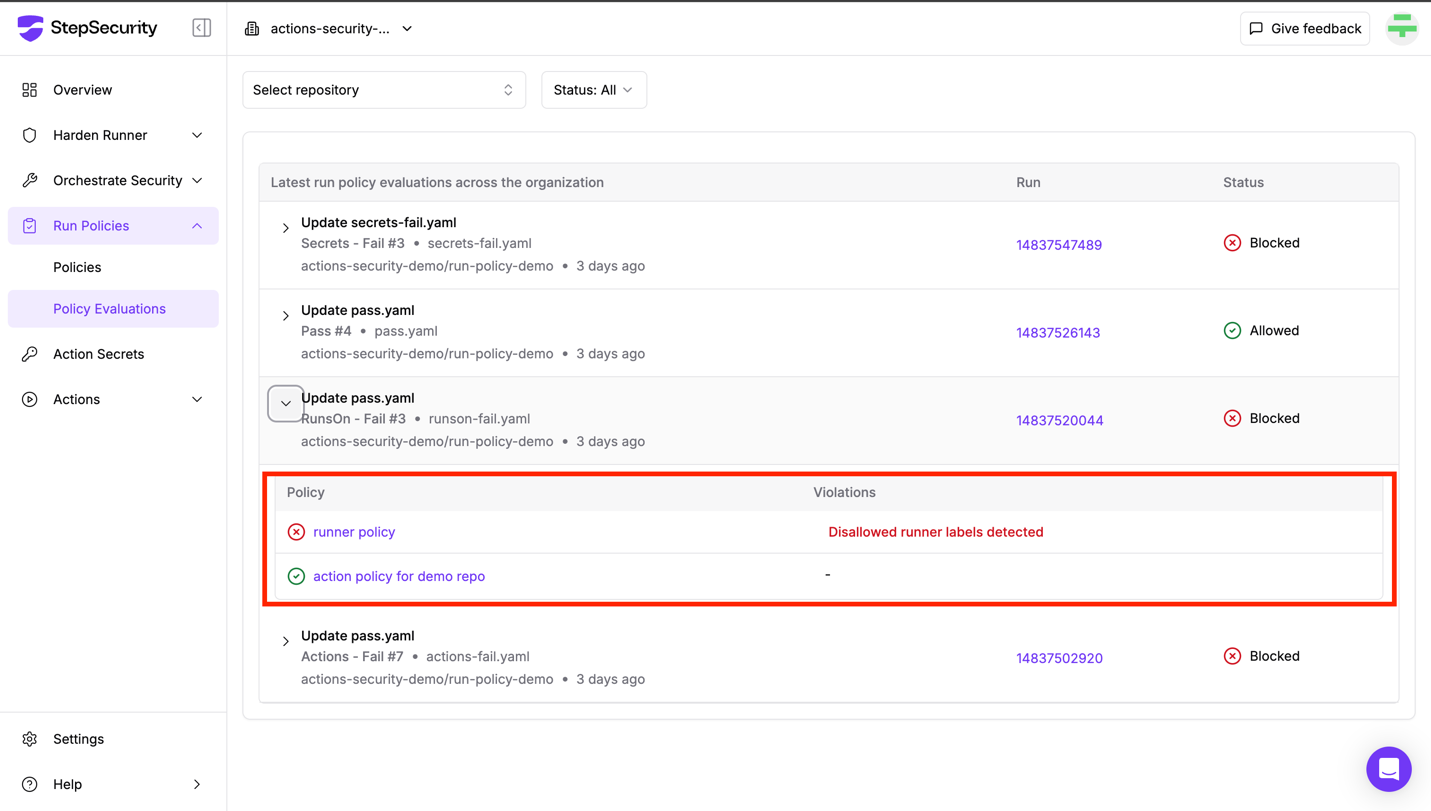
  • You can view the policy evaluation to find out more details why the workflow run was blocked

Picture 747711577, Picture

                                Policy Evaluation dashboard showing why the workflow run was cancelled

Explore our interactive demo to see how you can set up Runner Labels Policy in your own organization:

🚀 Start Your Free Trial

Want to try Workflow Run Policies in your own GitHub environment?

Start your 14 days free trial to experience proactive enforcement and safeguard your GitHub Actions workflows.

👉 Start Free Trial  

Learn More

Want to explore Workflow Run Policies in more detail?

📘 Read the Docs

Dive deeper into how each policy type works and how to configure them in your GitHub environment by checking out the Workflow Run Policies documentation.

🎙️ Join the Webinar

We’re hosting a live webinar to walk you through these new capabilities, including real-world use cases and implementation tips.

👉 Register via the link