












Ask any developer what developer tools are installed on their machine and you'll get a partial answer at best. They'll know their IDE and maybe a few extensions. But what about the MCP servers their AI coding agent is configured to connect to? The full list of globally installed npm packages? Which AI tools have access to their GitHub tokens and cloud credentials? The developer tooling layer on modern machines has grown enormously, and most of it is invisible.
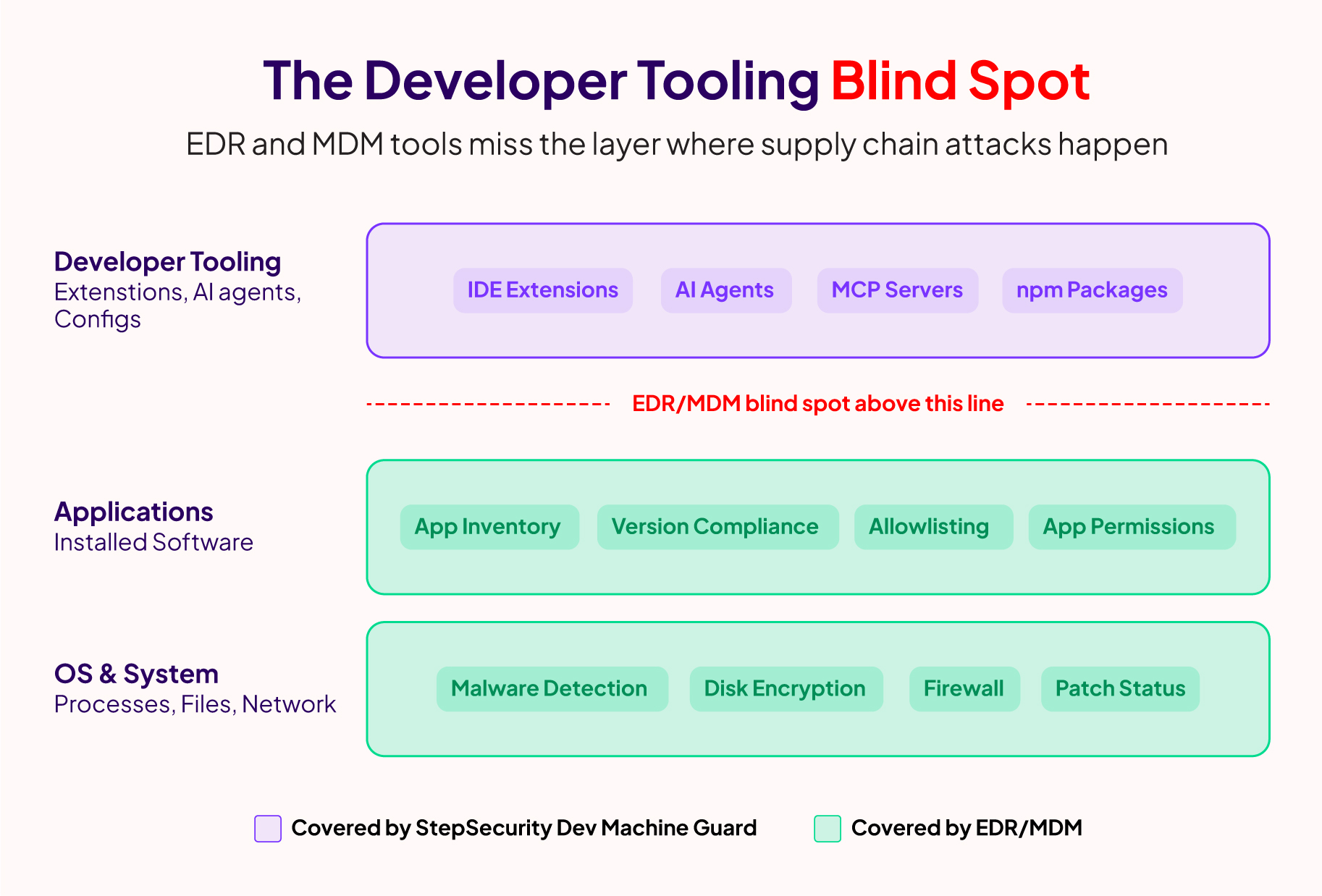
This isn't a gap that generic security tools can fill. EDR solutions can tell you what processes are running and flag suspicious behavior, but they have no understanding of IDE extensions, MCP server configurations, AI coding agents, or the npm packages installed across your projects. That context is specific to the developer workflow, and nothing in the traditional security stack covers it.
StepSecurity was one of the first to detect the Shai-Hulud npm supply chain campaign (which earned a CISA advisory after compromising 500+ packages) and the s1ngularity Nx compromise (where a build system with millions of weekly downloads was weaponized to steal credentials through AI CLI tools). In both cases, detection was only half the battle. The harder problem was figuring out which developer machines across an organization actually had the compromised packages, the affected IDE extensions, or the risky AI agent configurations. Security teams resorted to hastily written one-off scripts shared over Slack, with inconsistent results and no way to verify coverage.
To bridge this gap, we built StepSecurity Dev Machine Guard for our enterprise customers, giving them a purpose-built way to inventory and secure the developer tooling layer across their fleet.
Today, we are open-sourcing the core scanning engine as Dev Machine Guard so that every developer and every security team can get this visibility for free.
GitHub repo: github.com/step-security/dev-machine-guard
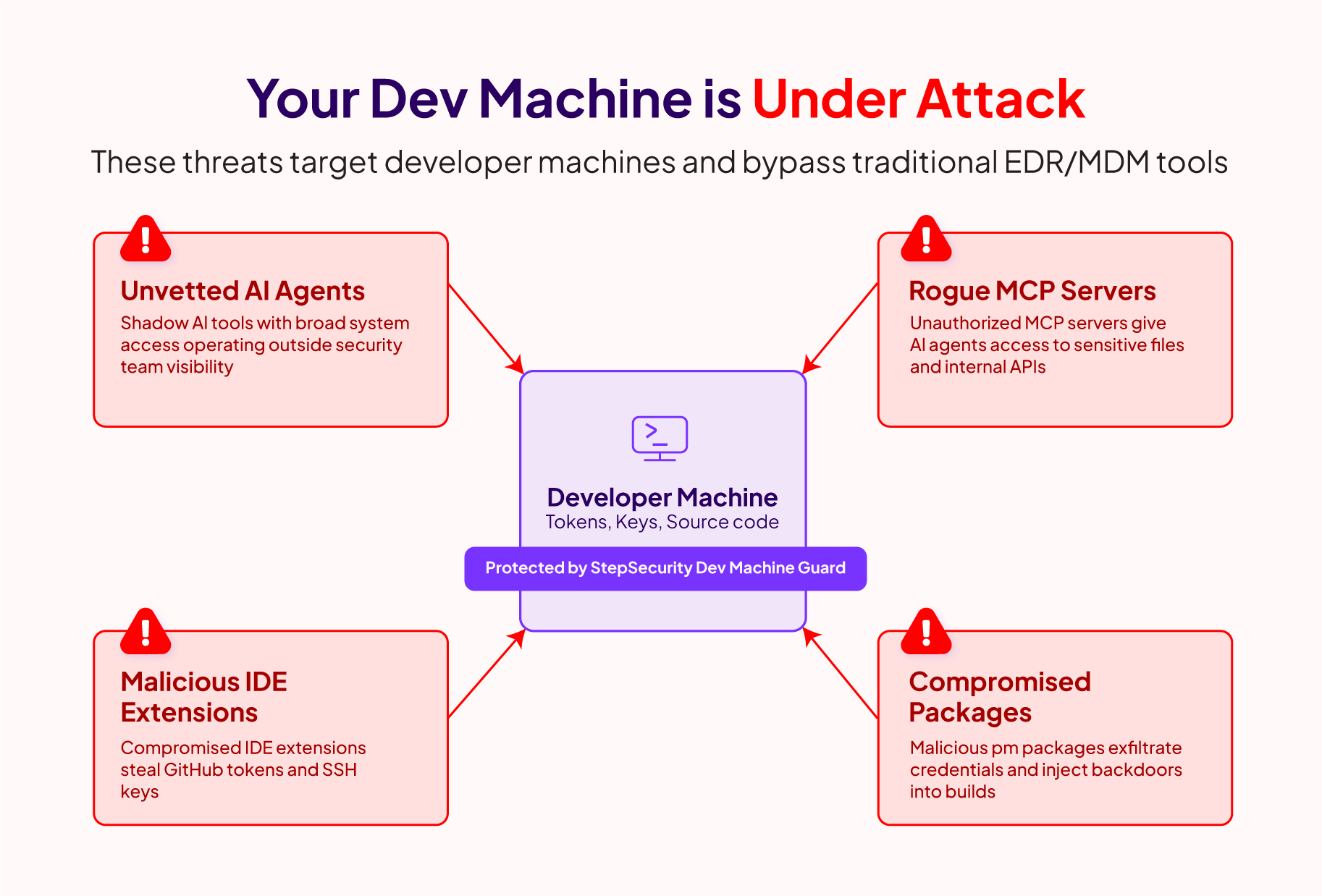
The developer tooling ecosystem has expanded rapidly. A typical developer machine today runs one or more IDEs with dozens of extensions, multiple AI coding agents, MCP servers connecting those agents to external tools and services, and thousands of npm packages across various projects. Each of these is a potential entry point for supply chain attacks, and each carries privileges that attackers covet: GitHub tokens with write permissions, npm publishing credentials, SSH keys, and cloud access.
AI coding agents have accelerated this expansion. Tools like Claude Code, GitHub Copilot, Cursor, and Codex autonomously install dependencies, execute tools, and connect to MCP servers, often with the same elevated privileges as the developer. A developer might have a compromised IDE extension auto-updating in the background, or an MCP server configured to connect to an untrusted endpoint, and nobody would know.
We wrote about this challenge in depth when we launched StepSecurity Dev Machine Guard earlier this year. The attacks keep proving the point: you can't secure what you can't see, and the developer tooling layer is where visibility is most needed.
Dev Machine Guard is a single bash script that scans your developer machine in seconds and gives you a complete inventory of developer tools, AI agents, MCP server configurations, IDE extensions, and Node.js packages.
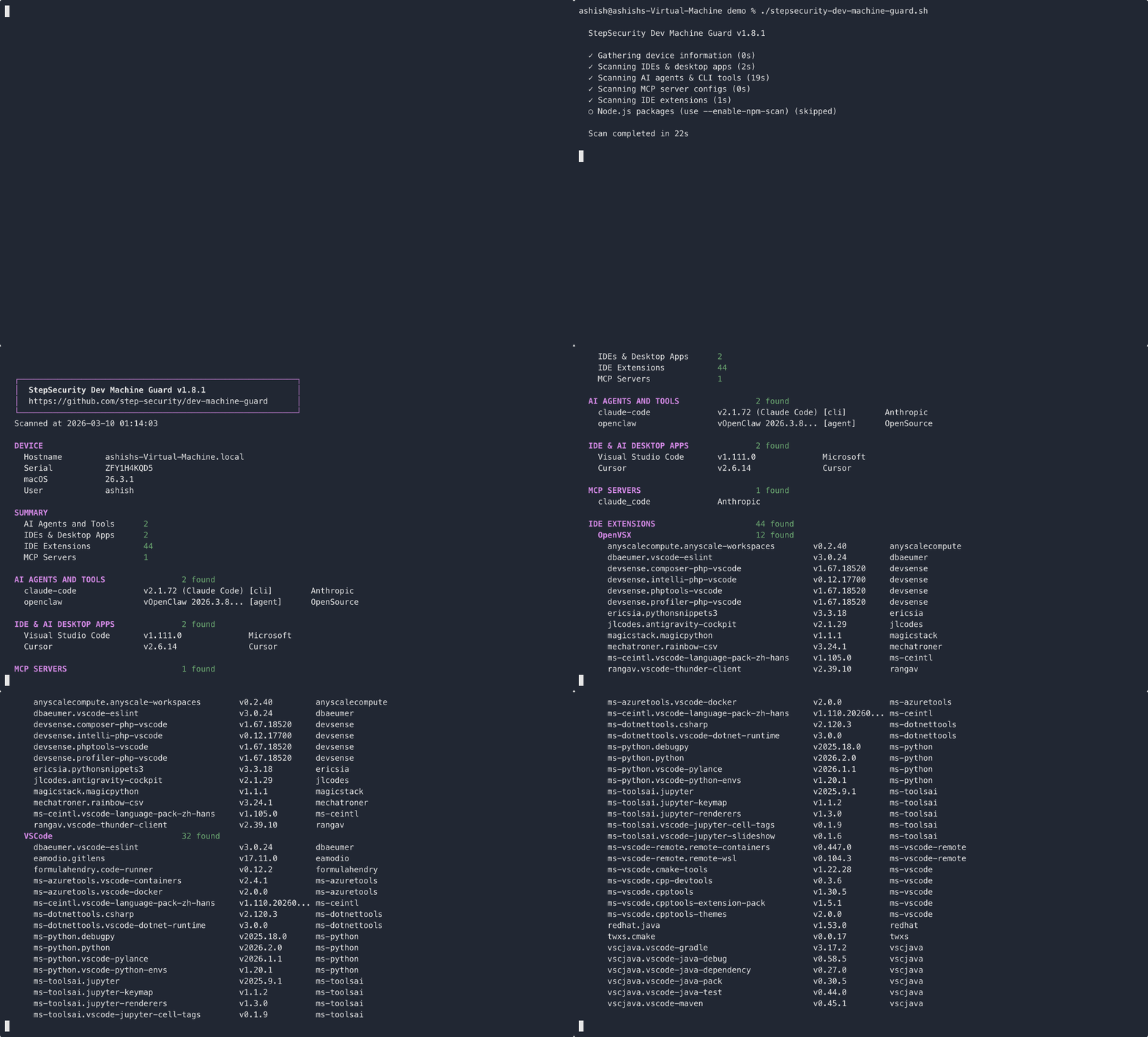
You can try it right now:
curl -sSL https://raw.githubusercontent.com/step-security/dev-machine-guard/main/stepsecurity-dev-machine-guard.sh -o stepsecurity-dev-machine-guard.sh chmod +x stepsecurity-dev-machine-guard.sh ./stepsecurity-dev-machine-guard.sh Here's what it scans:
| Category | Examples |
|---|---|
| IDEs and Desktop Apps | VS Code, Cursor, Windsurf, Zed, Claude, Copilot |
| AI CLI Tools | Claude Code, Codex, Gemini CLI, Kiro, Aider |
| AI Agents | Claude Cowork, OpenClaw, GPT-Engineer |
| AI Frameworks | Ollama, LM Studio, LocalAI |
| MCP Server Configs | Claude Desktop, Cursor, Windsurf, Zed, Codex |
| IDE Extensions | VS Code, Cursor (with publisher metadata) |
| Node.js Packages | npm, yarn, pnpm, bun (opt-in) |
The script produces output in three formats. The default is color-formatted terminal output that you can read immediately. You can also generate structured JSON (with --json) for programmatic analysis, or a self-contained HTML report (with --html report.html) that you can share with your team.
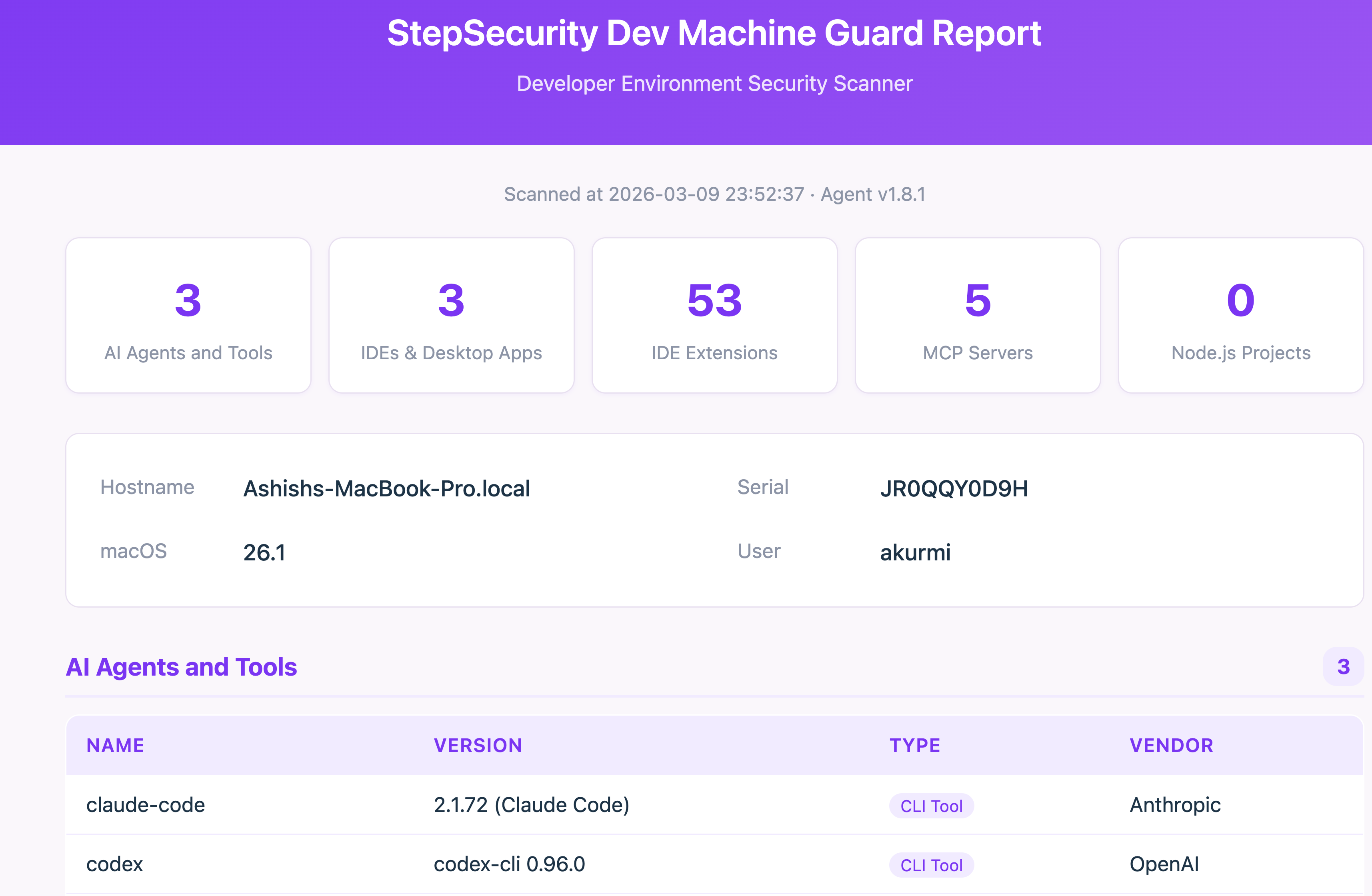
See SCAN_COVERAGE.md for the full catalog of detections.
This is a deliberate design choice, not a shortcut.
First, zero-dependency deployment. A bash script runs natively on macOS with no runtime, interpreter, or package manager required. This matters at scale: when you need to deploy a scan across hundreds of developer machines via MDM (Jamf, Kandji, Intune), you push the script and it works. No agent installation, no packaging, no compatibility issues.
Second, full transparency. Developer machines are highly privileged environments with access to source code, credentials, and cloud infrastructure. Security teams are rightfully skeptical of running opaque binaries on these machines. A readable shell script lets you review every line before deploying it. No hidden telemetry, no compiled logic you can't inspect. You can audit exactly what data is collected and where it goes (in community mode, the answer is: nowhere, everything stays local).
At StepSecurity, we believe that foundational security visibility should be accessible to everyone, not just enterprise customers. That's the same philosophy behind our other free community tools:
We also want to be transparent about an important architectural decision. Our enterprise customers will run the exact same open-source script from this GitHub repository. There is no separate closed-source version. There is no "enterprise fork." We are currently consolidating our enterprise deployment to use this open-source script directly.
The scanning engine, all the detection logic, every line of code, lives in the open. Enterprise mode activates when you provide StepSecurity tenant information and an API key. With those credentials, the script sends scan data to the StepSecurity backend for centralized visibility. Without them, the script runs fully locally and nothing leaves your machine.
Here's what each tier provides:
| Feature | Community (Free) | Enterprise |
|---|---|---|
| AI agent and tool inventory | Yes | Yes |
| IDE extension scanning | Yes | Yes |
| MCP server config audit | Yes | Yes |
| Pretty / JSON / HTML output | Yes | Yes |
| Node.js package scanning | Opt-in | Default on |
| Centralized dashboard | — | Yes |
| Policy enforcement and alerting | — | Yes |
| Scheduled scans via launchd | — | Yes |
| Historical trends and reporting | — | Yes |
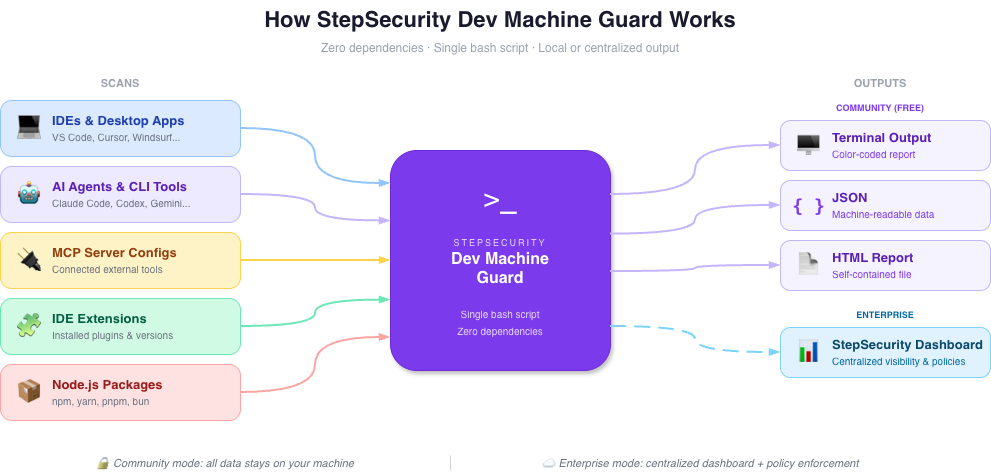
This single-script model means that every improvement contributed by the community benefits enterprise customers, and every detection we add for enterprise use cases is available to the community. It also means we have a strong incentive to keep investing in this project long-term, because our paying customers depend on the same code.
Dev Machine Guard covers the developer machine layer, but supply chain attacks rarely stop at one surface. Together with our other tools, it provides visibility across all three critical stages:
| Stage | Tool | What It Protects |
|---|---|---|
| Developer Machines | Dev Machine Guard | AI agents, IDE extensions, MCP servers, local packages |
| Code Repositories | npm Package Security | Package risk assessment, cooldown periods, compromised package detection |
| CI/CD Pipelines | Harden-Runner | Runtime monitoring, network egress control, anomaly detection |
Modern supply chain attacks cross these boundaries. The Shai-Hulud campaign is a clear example: it compromised npm packages that executed on developer machines, stole credentials, and then used those credentials to bypass release controls entirely. Defending against that kind of multi-stage attack requires visibility across all three surfaces.
Run your first scan in under 30 seconds:
curl -sSL https://raw.githubusercontent.com/step-security/dev-machine-guard/main/stepsecurity-dev-machine-guard.sh -o stepsecurity-dev-machine-guard.sh chmod +x stepsecurity-dev-machine-guard.sh ./stepsecurity-dev-machine-guard.sh If you find it useful, give the repo a star to help others discover it.
For teams that want centralized visibility, policy enforcement, and historical reporting across their developer fleet, start a 14-day free trial of the enterprise dashboard.
The project is licensed under Apache 2.0. Contributions are welcome, whether it's adding detection for a new AI tool, improving documentation, or reporting bugs. See CONTRIBUTING.md to get started.
此内容由惯性聚合(RSS阅读器)自动聚合整理,仅供阅读参考。 原文来自 — 版权归原作者所有。