





最近发现一个免费的大模型可以白嫖,支持免费的对话,文生图,图生图,速度还不错,可以无限用。且模型没有内容审核,理论上可以生成任何类型的图片和视频(你懂得)󠄐󠄹󠅀󠄪󠄡󠄢󠄩󠄞󠄢󠄢󠄦󠄞󠄢󠄠󠄧󠄞󠄡󠄦󠄨󠄬󠅒󠅢󠄟󠄮󠄐󠅅󠄹󠄴󠄪󠄾󠅟󠅤󠄐󠄼󠅟󠅗󠅙󠅞󠄬󠅒󠅢󠄟󠄮󠅄󠅙󠅝󠅕󠄪󠄡󠄧󠄨󠄣󠄠󠄠󠄦󠄩󠄣󠄦󠄬󠅒󠅢󠄟󠄮
首先注册账号:
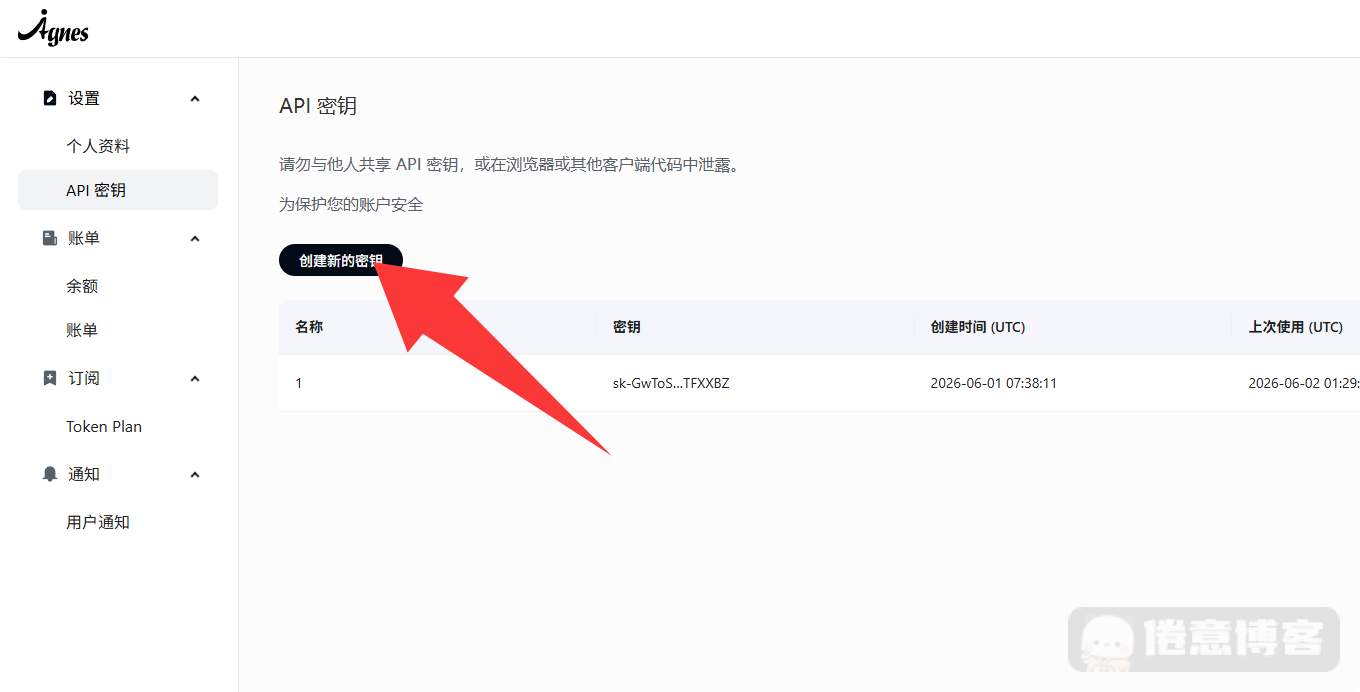
注册账号以后,进入后台,点击 创建新的密钥,生成密钥后记得保存。
调用方法:
如果是AI对话,用常用的AI对话软件,比如Cherry Studio或者ChatboxAI,输入API调用地址:https://apihub.agnes-ai.com/v1
再把Key输入进去就行了,这个很简单和OpenAI一样,不用细说。󠄐󠄹󠅀󠄪󠄡󠄢󠄩󠄞󠄢󠄢󠄦󠄞󠄢󠄠󠄧󠄞󠄡󠄦󠄨󠄬󠅒󠅢󠄟󠄮󠄐󠅅󠄹󠄴󠄪󠄾󠅟󠅤󠄐󠄼󠅟󠅗󠅙󠅞󠄬󠅒󠅢󠄟󠄮󠅄󠅙󠅝󠅕󠄪󠄡󠄧󠄨󠄣󠄠󠄠󠄦󠄩󠄣󠄦󠄬󠅒󠅢󠄟󠄮
示例如下:
curl https://apihub.agnes-ai.com/v1/chat/completions \
  -H "Authorization: Bearer YOUR_API_KEY" \
  -H "Content-Type: application/json" \
  -d '{
    "model": "agnes-2.0-flash",
    "messages": [
      {
        "role": "system",
        "content": "You are a helpful AI assistant."
      },
      {
        "role": "user",
        "content": "Explain how autonomous agents use tools to complete tasks."
      }
    ],
    "temperature": 0.7,
    "max_tokens": 1024
  }'
重点讲一下生图,目前好像主流对话软件调用他们生图模型会出现404,具体原因我也不太清楚。推荐用Curl方法。
文生图:
调用地址是:https://apihub.agnes-ai.com/v1/images/generations
示例如下:
curl https://apihub.agnes-ai.com/v1/images/generations \
  -H "Authorization: Bearer YOUR_API_KEY" \
  -H "Content-Type: application/json" \
  -d '{
    "model": "agnes-image-2.1-flash",
    "prompt": "A luminous floating city above a misty canyon at sunrise, cinematic realism",
    "size": "1024x768"
  }'
图生图:
调用地址是:https://apihub.agnes-ai.com/v1/images/generations
curl https://apihub.agnes-ai.com/v1/images/generations \
  -H "Authorization: Bearer YOUR_API_KEY" \
  -H "Content-Type: application/json" \
  -d '{
    "model": "agnes-image-2.1-flash",
    "prompt": "Transform the scene into a rain-soaked cyberpunk night with neon reflections while preserving the composition",
    "size": "1024x768",
    "extra_body": {
      "image": [
        "https://example.com/input-image.png"
      ],
      "response_format": "url"
    }
  }'
生成视频:
调用地址:https://apihub.agnes-ai.com/v1/videos
curl -X POST https://apihub.agnes-ai.com/v1/videos \
  -H "Authorization: Bearer YOUR_API_KEY" \
  -H "Content-Type: application/json" \
  -d '{
    "model": "agnes-video-v2.0",
    "prompt": "A cinematic shot of a cat walking on the beach at sunset, soft ocean waves, warm golden lighting, realistic motion",
    "height": 768,
    "width": 1152,
    "num_frames": 121,
    "frame_rate": 24
  }'
返回的内容是:
{
  "id": "task_123456",
  "object": "video",
  "model": "agnes-video-v2.0",
  "status": "queued",
  "progress": 0,
  "created_at": 1774344160
}
再将响应内容里面的id请求这个地址获取视频
https://apihub.agnes-ai.com/v1/videos/{id}即可获得视频
更多可以参考官方手册:
此内容由惯性聚合(RSS阅读器)自动聚合整理,仅供阅读参考。 原文来自 — 版权归原作者所有。