惯性聚合 高效追踪和阅读你感兴趣的博客、新闻、科技资讯
阅读原文 在惯性聚合中打开

推荐订阅源

让小产品的独立变现更简单 - ezindie.com
T
The Exploit Database - CXSecurity.com
WordPress大学
WordPress大学
L
LangChain Blog
酷 壳 – CoolShell
酷 壳 – CoolShell
博客园 - 聂微东
J
Java Code Geeks
T
Tailwind CSS Blog
大猫的无限游戏
大猫的无限游戏
博客园 - 【当耐特】
阮一峰的网络日志
阮一峰的网络日志
CTFtime.org: upcoming CTF events
Engineering at Meta
Engineering at Meta
M
MIT News - Artificial intelligence
A
About on SuperTechFans
Simon Willison's Weblog
奇客Solidot–传递最新科技情报
奇客Solidot–传递最新科技情报
博客园 - 叶小钗
D
Darknet – Hacking Tools, Hacker News & Cyber Security
T
Threatpost
T
Threat Research - Cisco Blogs
GbyAI
GbyAI
P
Proofpoint News Feed
The GitHub Blog
The GitHub Blog
AWS News Blog
AWS News Blog
Cyber Security Advisories - MS-ISAC
S
Securelist
I
InfoQ
N
News and Events Feed by Topic
I
Intezer
A
Arctic Wolf
P
Proofpoint News Feed
Martin Fowler
Martin Fowler
L
Lohrmann on Cybersecurity
S
Secure Thoughts
P
Privacy & Cybersecurity Law Blog
OSCHINA 社区最新新闻
OSCHINA 社区最新新闻
SecWiki News
SecWiki News
P
Palo Alto Networks Blog
MongoDB | Blog
MongoDB | Blog
Security Archives - TechRepublic
H
Help Net Security
B
Blog
Recent Commits to openclaw:main
V2EX - 技术
V2EX - 技术
S
SegmentFault 最新的问题
Application and Cybersecurity Blog
人人都是产品经理
人人都是产品经理
PCI Perspectives
PCI Perspectives
F
Fortinet All Blogs

Runpod Blog.

DeepSeek V4 in the wild, and how to run it on Runpod New Runpod datacenter now live: AP-IN-1 Track GPU spend across your team with Cost Centers The GPU supply supercycle is here. Here’s what AI builders need to know. Community Spotlight: One-click AI image and video generation on Runpod with SwarmUI | Runpod Blog Community Spotlight: LoRA Pilot Data Prep to Inference Introducing the Runpod Assistant: Manage Your Cloud GPU Resources with Natural Language OpenAI's Parameter Golf: Train the Best Language Model That Fits in 16MB on Runpod LLM inference optimization: techniques that actually reduce latency and cost Pruna P-Video and Vidu Q3 public endpoints now available on Runpod Runpod brand spelling guide Quickstart - Runpod Documentation The AI market looks nothing like the narrative Training StyleGAN3 with Vision-Aided GAN on Runpod KoboldAI – The Other Roleplay Front End, And Why You May Want to Use It How to Connect Cursor to LLM Pods on Runpod for Seamless AI Dev Community Spotlight: How AnonAI Scaled Its Private Chatbot Platform with Runpod Prompt Scheduling with Disco Diffusion on Runpod Runpod's Latest Innovation: Dockerless CLI for Streamlined AI Development Run Your Own AI from Your iPhone Using Runpod Introducing Flash: Run GPU workloads on Runpod Serverless: No Docker required Use Claude Code with your own model on Runpod: No Anthropic account required Avoid Errors by Selecting the Proper Resources for Your Pod What hackers built on Runpod at TreeHacks 2026 Easily Back Up and Restore Your Pod with Cloud Sync + Backblaze B2 The Complete Guide to GPU Requirements for LLM Fine-Tuning AI Guides, Tutorials & GPU Infrastructure Insights | Runpod Your first Claude Code project within Runpod: a complete setup guide 10 billion Serverless requests and counting Building for resilience: Runpod’s response to the AWS us-east-1 outage How to Connect Google Colab to Runpod Founder Series #1: The Runpod Origin Story AMD MI300X vs. NVIDIA H100: Mixtral 8x7B Inference Benchmark How to Run the FLUX Image Generator with ComfyUI on Runpod Run Llama 3.1 405B with Ollama on Runpod: Step-by-Step Deployment How to Run FLUX Image Generator with Runpod (No Coding Needed) How to Use 65B+ Language Models on Runpod Deploy Llama 3.1 with vLLM on Runpod Serverless: Fast, Scalable Inference in Minutes Open Source Video & LLM Roundup: The Best of What’s New Run vLLM on Runpod Serverless: Deploy Open Source LLMs in Minutes New update to Github integration: release rollback! | Runpod Blog A note to the developers who built Runpod with us Deploy ComfyUI as a Serverless API Endpoint Setting up Slurm on Runpod Clusters: A Technical Guide Building an OCR System Using Runpod Serverless From No-Code to Pro: Optimizing Mistral-7B on Runpod for Power Users Lessons While Using Generative Language and Audio For Practical Use Cases Runpod RoundUp 3 – AI Music and Stock Sound Effect Creation New Navigational Changes To Runpod UI Use alpha_value To Blast Through Context Limits in LLaMa-2 Models Runpod Roundup 5 – Visual/Language Comprehension, Code-Focused LLMs, and Bias Detection Runpod is Proud to Sponsor the StockDory Chess Engine Runpod Roundup 4 – Open Source LLM Evaluators, 3D Scene Reconstruction, Vector Search Meta and Microsoft Release Llama 2 as Open Source SuperHot 8k Token Context Models Are Here For Text Generation How to Manage Funding Your Runpod Account Encrypted Volumes on Runpod: Protect Your Data at Rest How to Run a "Hello World" on Runpod Serverless Runpod AI field notes: December 2025 Faster GitHub Builds: Major Performance Improvements to Our Automated Integration Partnering with Defined AI to Bridge the Data Wealth Gap How to Run Serverless AI and ML Workloads on Runpod How to fine-tune a model using Axolotl Transcribe and translate audio files with Faster Whisper Runpod Achieves SOC 2 Type II Certification: Continuing Our Compliance Journey Orchestrating GPU workloads on Runpod with dstack Exploring Runpod Serverless: Create Workers From Templates DeepSeek V3.1: A Technical Analysis of Key Changes from V3-0324 Deep Cogito Releases Suite of LLMs Trained with Iterative Policy Improvement Wan 2.2 Releases With a Plethora Of New Features Iterative Refinement Chains with Small Language Models The New Runpod.io: Clearer, Faster, Built for What’s Next Introducing Clusters: On-Demand Multi-Node AI Compute Run DeepSeek R1 on Just 480GB of VRAM How Do I Transfer Data Into My Runpod? Spot vs. On-Demand Instances: What’s the Difference? Deploy GitHub Repos to Runpod with One Click Run GGUF Quantized Models Easily with KoboldCPP on Runpod How to Work with GGUF Quantizations in KoboldCPP Introducing Better Forge: Spin Up Stable Diffusion Pods Faster Supercharge Your LLMs with SGLang: Boost Performance and Customization Mastering Serverless Scaling on Runpod: Optimize Performance and Reduce Costs RAG vs. Fine-Tuning: Which Is Best for Your LLM? Run Larger LLMs on Runpod Serverless Than Ever Before – Llama-3 70B (and beyond!) How to Run vLLM on Runpod Serverless (Beginner-Friendly Guide) Embracing New Beginnings: Welcoming Banana.dev Community to Runpod Stable Diffusion + ComfyUI on Runpod: Easy Setup Guide Runpod RoundUp 2 – 32k Token Context LLMs and New StabilityAI Offerings Runpod Roundup: High-Context LLMs, SDXL, and Llama 2 16k Context LLM Models Now Available On Runpod Savings Plans Are Here For Secure Cloud Pods – How To Purchase a Monthly Plan And Save Big Pygmalion-7b from PygmalionAI has been released, and it's amazing Ada Architecture Pods Are Here – How Do They Stack Up Against Ampere? Spin up a Text Generation Pod with Vicuna and Experience a GPT-4 Rival Using OpenPose to Annotate Poses Within Stable Diffusion Set Up a Chatbot with Oobabooga on Runpod Connect VSCode to Your Runpod Instance (Quick SSH Guide) Deploy a Stable Diffusion UI on Runpod in Minutes Google Colab Pro vs. Runpod: Best GPU Cloud for AI Workloads How to Run a GPU-Accelerated Virtual Desktop on Runpod
Introduction to vLLM and PagedAttention
Moritz Wallawitsch · 2026-02-14 · via Runpod Blog.

What is vLLM?

vLLM is an open-source LLM inference and serving engine that utilizes a novel memory allocation algorithm called PagedAttention. It can run your models with up to 24x higher throughput than HuggingFace Transformers (HF) and up to 3.5x higher throughput than HuggingFace Text Generation Inference (TGI).

How does vLLM achieve this throughput improvement? Existing systems waste 60%-80% of the KV-Cache (LLM memory), whereas vLLM achieves near-optimal memory usage with a mere waste of under 4%. Because of this improved memory usage, we require fewer GPUs to achieve the same output, so the throughput is significantly higher than that of other inference engines.

Thousands of companies use vLLM to reduce inference costs. For example, LMSYS, the organization behind Chatbot Arena and Vicuna, cut the number of GPUs used to serve their growing traffic of ~45k daily requests by 50% while serving 2-3x more requests per second. vLLM leverages PagedAttention to reduce memory waste and achieve these efficiency improvements.

What is PagedAttention, and how does it work?

In early 2023, the authors behind vLLM noticed that existing inference engines only used 20%-40% of the available GPU memory. When exploring solutions to this problem, they remembered the concept of Memory Paging from operating systems. They applied it to better utilize KV-Cache, where transformers store attention calculations during LLM inference. Let's start with understanding Memory Paging.

Inspiration—Memory Paging

In their paper, “Efficient Memory Management for Large Language Model Serving with PagedAttention,” the authors introduce PagedAttention, a novel algorithm inspired by virtual memory paging. Memory paging is used in operating systems, including Windows and Unix, to manage and allocate sections of a computer's memory, called page frames. It allows for more efficient memory usage by swapping out parts of memory that are not actively used. PagedAttention adapts this approach to optimize how memory is used in LLM serving, enabling more efficient memory allocation and reducing waste.

Segmented Memory System

Segmented Memory System (Source)

Paged Memory System

Paged Memory System (Source)

Illustration comparing Memory management within the operating system and in LLM using vLLM

Illustration comparing Memory management within the operating system and in LLM using vLLM (Source).

Understanding KV Cache

Have you noticed that the first few tokens returned from an LLM take longer than the last few? This effect is especially pronounced for longer prompts due to how LLMs calculate attention, a process heavily reliant on the efficiency of the Key-Value (KV) Cache.

The KV Cache is pivotal in how transformers process text. Transformers use an attention mechanism to determine which parts of the text are most relevant to the current tokens generated. This mechanism compares a newly generated query vector (Q) against all previously stored key vectors (K). Each key vector corresponds to earlier context the model considers, while each value vector (V) represents how important these contexts are in the current computation.

Diagram of a transformer model's KV Cache, showing Query, Key, and Value blocks in attention computation

Diagram of a transformer model's KV Cache, showing Query, Key, and Value blocks in attention computation (Source)

Instead of re-calculating these KV pairs for each new token generation, we append them to the KV cache so they can be reused in subsequent calculations.

Diagram of a transformer model's KV Cache, illustrating the interaction between new Query (Q_new) and cached Key (K_prev)

Diagram of a transformer model's KV Cache, illustrating the interaction between new Query (Q_new) and cached Key (K_prev) and Value (V_prev) pairs in computing attention (Source).

The Cache is initially empty, and the transformer needs to precompute it for the entire sequence to start generating new tokens. This explains the slow speed of the first few tokens. However, traditional implementations of KV cache waste a lot of space.

How PagedAttention Optimizes KV Cache Utilization

PagedAttention addresses these inefficiencies through a more dynamic memory allocation using the previously unused space. Let's understand how existing systems waste memory space.

The parameters of a 13B LLM like llama-13b take up about 26GB. For an A100 40GB GPU, this already takes up 65% of its memory. We now only have about 30% of the memory for managing the KV Cache.

Existing systems store KV cache pairs in continuous memory spaces. In other words, they allocate a fixed, unbroken block of space for every request. However, requests to an LLM can vary in size widely, which leads to a significant waste of memory blocks.

The researchers behind vLLM break this down further into three types of memory waste:

  1. Internal fragmentation: Slots of memory for a sequence output are allocated but never used, because the system does not know how many tokens the model will generate. The input prompt's complexity and the inherent design of autoregressive models like transformers influence the output sequence length. These models generate one token at a time, adjusting their output based on the tokens generated so far, which makes the exact sequence length variable.
  2. Reservation: To ensure sequences are processed without interruption, the system reserves the entire block of memory for the duration of the request. Even if only a part of the reserved memory is used, the rest remains blocked off and cannot be used by other requests. In other words, the system prioritizes the stability and continuity of the current processing task over memory efficiency.
  3. External fragmentation: External fragmentation occurs when fixed-size memory blocks do not match the variable lengths of sequences, leaving unused gaps between them that cannot be allocated to other processes, unlike internal fragmentation, which involves excess space within allocated blocks.

As a result, only 20-40% of the KV cache being used to store token states.
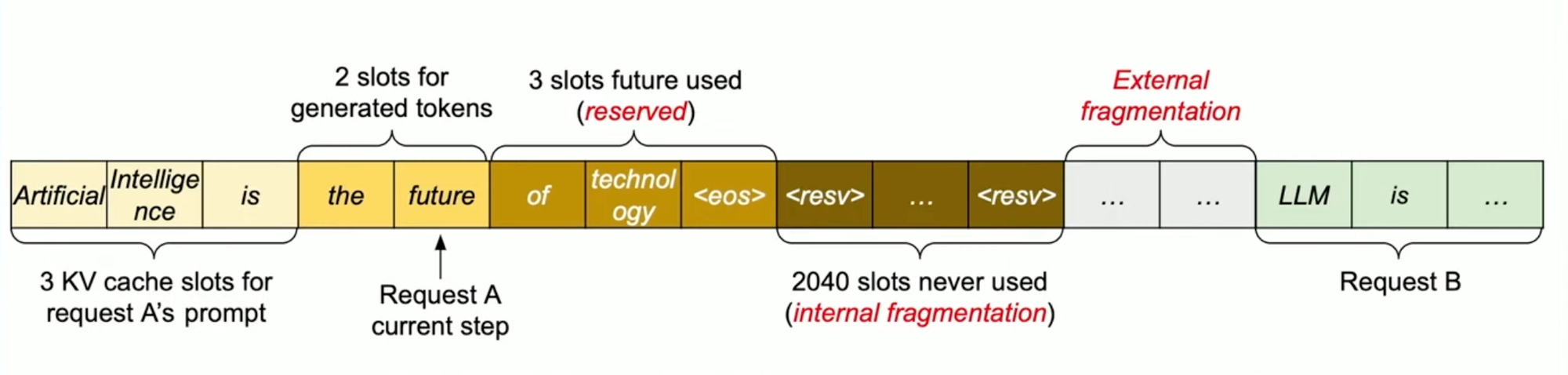
Illustration of the three types of memory waste in previous LLM KV-cache management systems: Internal fragmentation

Illustration of the three types of memory waste in previous LLM KV-cache management systems: Internal fragmentation, Reservation, and External fragmentation (Source)

This continuous or fixed memory space allocation can suffice if the input and output lengths are static and known but is inefficient if the sequence lengths are dynamic, as is the case with most LLM inference use cases.

PagedAttention applies the concept of Memory Paging to more efficiently manage the KV Cache. It allocates blocks dynamically, enabling the system to store continuous blocks in arbitrary parts of the memory space. They are allocated on demand. The mapping between the logical KV cache and the physical memory space is stored in the Block table data structure.

Illustrates an example generation process for a request with PagedAttention, including the Block table translation

Illustrates an example generation process for a request with PagedAttention, including the Block table translation (Source).

With PagedAttention, vLLM eliminates external fragmentation—where gaps between fixed memory blocks go unused—and minimizes internal fragmentation, where allocated memory exceeds the actual requirement of the sequence. This efficiency means nearly all allocated memory is effectively used, improving overall system performance.

While previous systems waste 60%-80% of the KV cache memory, vLLM achieves near-optimal memory usage with a mere waste of under 4%.

The enhanced memory efficiency achieved through PagedAttention allows for larger batch sizes during model inference. This allows for more requests to be processed simultaneously and means that GPU resources are used more completely and efficiently, reducing idle times and increasing throughput.

vLLM's efficient memory management enables higher throughput, allowing for larger request batch sizes with the same memory

vLLM's efficient memory management enables higher throughput, allowing for larger request batch sizes with the same memory usage (Source).

Memory Sharing with PagedAttention

Another advantage of PagedAttention's dynamic block mapping is memory sharing between separate requests and their corresponding sequences.

Illustration of an example generation process for a request that samples multiple outputs, i.e., stores the KV cache of two

Illustration of an example generation process for a request that samples multiple outputs, i.e., stores the KV cache of two requests at the same time by using vLLM (Source).

Let's look at two LLM-inference decoding algorithms where this memory sharing helps us:

  1. Parallel sampling/decoding: This method generates multiple output samples from the same prompt. It's particularly useful for applications where selecting the optimal response is crucial. For instance, in a content generation application, users can compare and choose the best variation. Similarly, in model testing scenarios, you can use it to compare several outputs. vLLM enables the sharing of the computation and memory for the prompt.

Illustration showing how KV-Cache memory is shared between parallel sampling outputs in a vLLM-enabled system

Illustration showing how KV-Cache memory is shared between parallel sampling outputs in a vLLM-enabled system (Source).
  1. Beam Search: Beam search is a strategy used in tasks like machine translation to find the most likely sequence of words. It expands the most promising options at each step, known as beams. As more of the sequence is generated, these options are narrowed down by continuing the paths with the highest probabilities. vLLM efficiently manages the memory of shared beam branches.

Diagram demonstrating KV-Cache memory sharing across different beams in a beam search facilitated by vLLM

Diagram demonstrating KV-Cache memory sharing across different beams in a beam search facilitated by vLLM (Source).
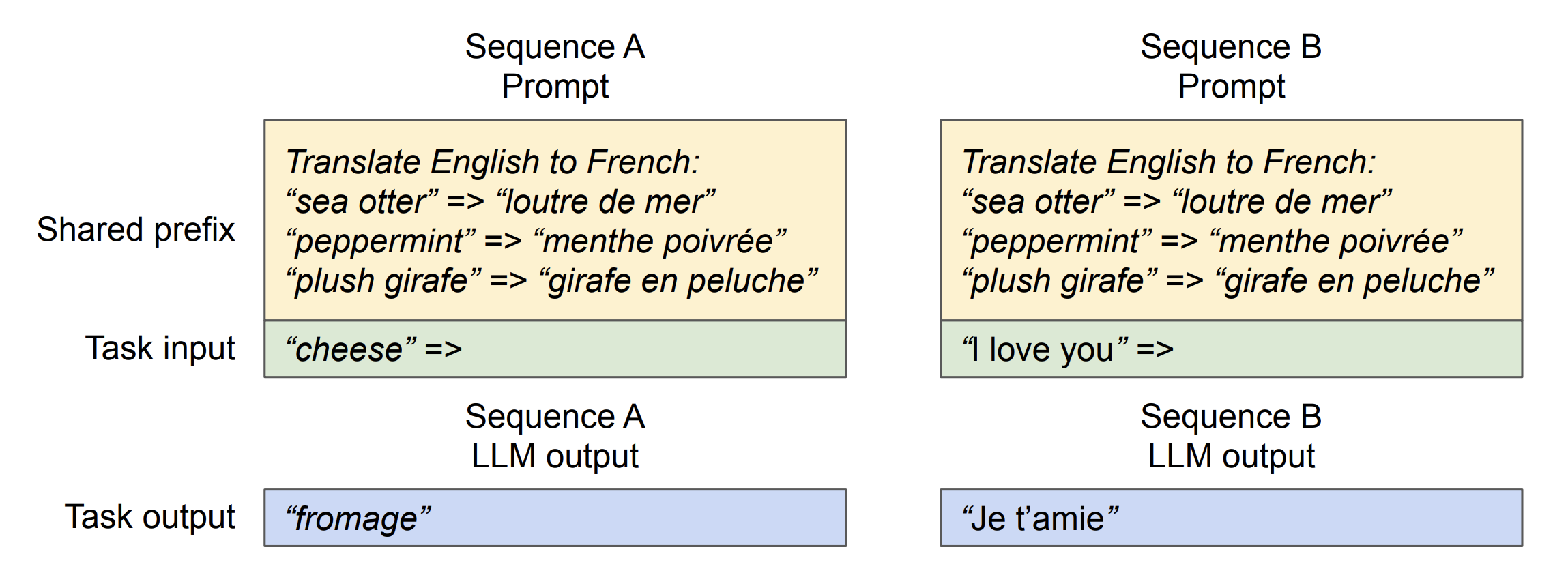
  1. Shared Prefix: Shared Prefix allows multiple users to start their requests with a common set of instructions or examples, known as a system prompt. This common starting point is pre-stored by vLLM to save computation time, enhancing efficiency and accuracy for subsequent tasks.

Illustration of Prefix memory sharing using vLLM

Illustration of Prefix memory sharing using vLLM (Source).
  1. Mixed Decoding Methods: allow vLLM to efficiently manage requests that utilize various decoding strategies, such as greedy decoding, beam search, and top-k sampling. By optimizing memory sharing, vLLM can handle these diverse preferences concurrently within its system architecture, significantly enhancing throughput and system flexibility without the need for simultaneous decoding within a single request.

Other Performance Optimizations Enabled by vLLM—Quantization, Prefix Cashing & Speculative Decoding

vLLM implements several other techniques to increase performance:

Quantization

8-bit quantization reduces the precision of the model's numerical data from the standard 32 bits to just 8 bits. Applying this technique to a large model like Llama 13B, for example, which initially requires 52 GB in a 32-bit format (13b*32 bits = 13b*4 bytes = 52GB), would now only need 13 GB post-quantization.

This reduction in size allows models to fit better in memory, enabling a model like Llama 13B to run on a single 24 GB VRAM GPU. The process usually comes at the expense of some performance loss, but the tradeoff is worth the performance bump for many LLM inference use cases.

Automatic Prefix Caching

Improves efficiency by caching repeated computation across different inference requests, particularly beneficial in scenarios with repeated prompts​, including multi-round conversations.

Illustration of Automatic Prefix Caching example in a multi-round conversation scenario

Illustration of Automatic Prefix Caching example in a multi-round conversation scenario (From vLLM presentation of Runpod's hackathon May 2024).

Speculative Decoding

Speculative decoding is when a smaller model is used to predict the output of a larger model, thus inferring responses more quickly and potentially doubling decoding speeds​​.

Multi-LoRA Support

Facilitates using Low-Rank Adaptation (LoRA) to manage multiple model adaptations efficiently. This allows a single base model to be used with various adapters, optimizing memory usage and computational efficiency across different tasks. An adapter, in this context, is a small, lower-rank matrix that fine-tunes the model on specific tasks without extensive retraining, enhancing versatility and resource efficiency​.

How does vLLM Compare With Other Inference Engines?

vLLM vs. TGI and Hugging Face Transformers

The Berkeley researchers behind vLLM compared the throughput of LLaMA-7B on an NVIDIA A10G GPU and LLaMA-13B on an NVIDIA A100 GPU (40 GB). vLLM achieves 24x higher throughput compared with HuggingFace Transformers (HF) and a 3.5x higher throughput compared with HuggingFace Text Generation Inference (TGI).
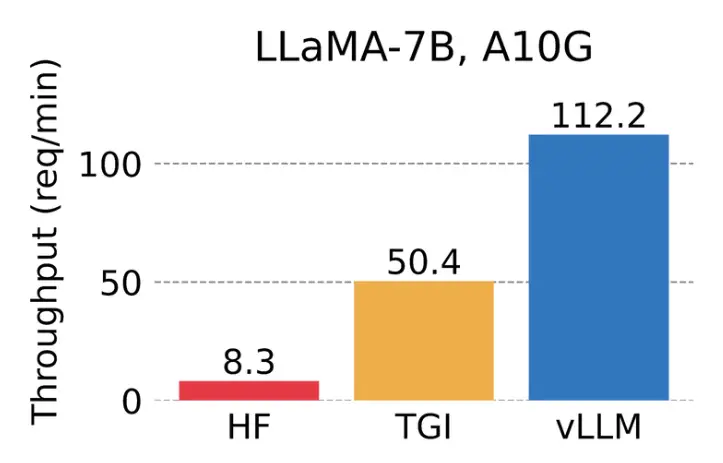
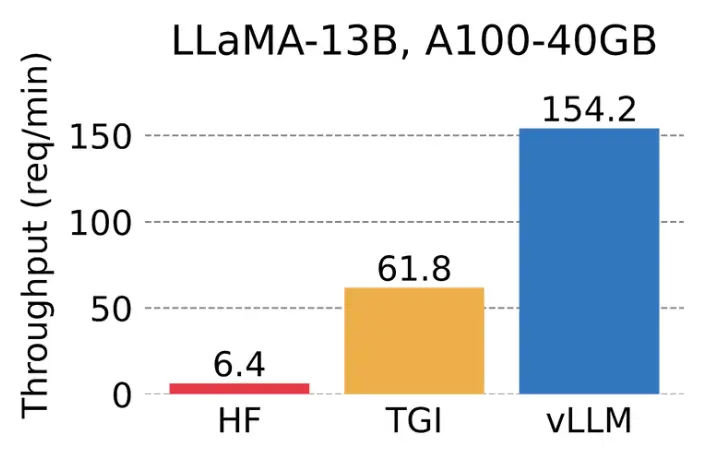
Graph showing the serving throughput when each request asks for one output completion . vLLM achieves 14x - 24x higher

Graph showing the serving throughput when each request asks for one output completion. vLLM achieves 14x - 24x higher throughput than Hugging Face Transformers (HF) and 2.2x - 2.5x higher throughput than HuggingFace Text Generation Inference (TGI). (Source).

Bar chart of LLaMA-13B throughput on an A100 40 GB: vLLM 154.2 requests per minute vs TGI 61.8 and HF 6.4

vLLM vs. TensorRT-LLM

A direct performance comparison with TensorRT-LLM is difficult as the effectiveness of each can vary based on the model configuration, quantization precision, and specific hardware used. For instance, while vLLM demonstrates robust performance with AWQ quantization, TensorRT-LLM can leverage fp8 precision, optimized for NVIDIA's latest H100 GPUs, to enhance performance.

That said, we can compare the setup time and complexity of these two inference engines:

  • vLLM: streamlined setup – simply install the Python package using pip and define the model you want to use. vLLM is also OpenAI-compatible, making it easier to integrate into your existing infrastructure. While vLLM simplifies the setup process with its straightforward installation and OpenAI-compatible API, its user-friendly approach extends beyond just installation. vLLM also excels in versatility, supporting many models to cater to various application needs.


  • TensorRT-LLM: Setting up TensorRT-LLM involves a multistep process requiring familiarity with NVIDIA's software stack, Docker, and detailed configuration settings. This setup includes compiling models into TensorRT engines and configuring the NVIDIA Triton Inference Server for deployment, which may pose a steep learning curve for inexperienced developers.

What models does vLLM support?

vLLM supports the most popular open-source LLMs on HuggingFace, including:

  • Classic Transformer LLMs (e.g., Llama, GPT-2, GPT-J)
  • Mixture-of-Expert LLMs (e.g., Mixtral, Qwen2MoE)
  • Multi-modal LLMs (e.g., LLaVA, GPT-NeoX, StableLM)

Here is the complete list of supported models

vLLM's Development & Popularity

Since July 2023, vLLM has rapidly gained over 20,000 GitHub stars and has a thriving community of 350+ open-source contributors.

Illustration of vLLM GitHub star history

Illustration of vLLM GitHub star history (From vLLM presentation of Runpod's hackathon May 2024).

Today, thousands of developers use vLLM to optimize their inference, and notable companies like AMD, AWS, Databricks, Dropbox, NVIDIA, and Roblox support it. The University of California, Berkeley, and the University of California, San Diego also directly support the project.

Deploying a vLLM API Endpoint with Runpod Serverless

With help from the vLLM team at Berkeley, Runpod has built vLLM support into their Serverless platform so you can spin up an API endpoint to host any vLLM-compatible model.

To get started, follow these steps:

  1. Create a Runpod account.
  2. Navigate to the Serverless dashboard. Under “Serverless vLLM”, click “Start”.
  3. Input your Hugging Face model. Both private and public models are supported, but you'll need to enter your Hugging Face access token if you are using a private model.
  4. Click “Next”. You are given the option to customize your vLLM model settings. For many models, this is not required to run them out of the box. But it may be required for your model if you're using a quantized version like GPTQ, for example, in which case you would need to specify the quantization type in the “Quantization” drop-down input.
  5. Select your GPU type. For testing purposes, I recommend 80GB (A100).
  6. Click “Deploy”, then test your endpoint! The "Requests" tab has a UI you can use to test your model, or you can do so via the API endpoints listed on your endpoint dashboard. It usually takes a few minutes for the model to download at first run, then once your worker is ready you should see TTFT (time to first token) latency of <250ms.

vLLM on Runpod enhances model efficiency and provides substantial cost savings, making it an excellent choice for startups scaling their LLM applications to millions of inference requests.

If you'd like to learn more about Runpod or speak with someone on the team, you can book a call from our Serverless page.

Recap – Why You Should Use vLLM

  1. Performance: vLLM achieves 24x higher throughput than HuggingFace Transformers (HF) and 3.5x higher throughput than HuggingFace Text Generation Inference (TGI).
  2. Compatibility: vLLM supports hundreds of LLMs and an ever-growing list of dozens of transformer architectures. vLLM is also GPU agnostic, working with NVIDIA and AMD GPUs, making it compatible with any GPU workload.
  3. Developer ecosystem: vLLM has a thriving community of 350+ contributors who constantly work to improve its performance, compatibility, and ease of use. Typically within a few days of a new breakthrough open-source model being released, it is vLLM compatible.
  4. Ease of use: vLLM is easy to install and get started with. With Runpod Serverless, you can deploy custom production-ready API endpoints for LLM inference in minutes.
  5. Customizability: vLLM is a versatile engine that supports OpenAI compatibility, quantization, automatic prefix caching, speculative decoding, and LoRAs.

Thanks for reading! If you want to try vLLM in a cloud GPU environment, check out Runpod Serverless.

Deploy vLLM In Serverless Today

Author profile: Moritz Wallawitsch