惯性聚合 高效追踪和阅读你感兴趣的博客、新闻、科技资讯
阅读原文 在惯性聚合中打开

推荐订阅源

D
Darknet – Hacking Tools, Hacker News & Cyber Security
爱范儿
爱范儿
GbyAI
GbyAI
A
About on SuperTechFans
阮一峰的网络日志
阮一峰的网络日志
U
Unit 42
博客园_首页
奇客Solidot–传递最新科技情报
奇客Solidot–传递最新科技情报
S
Secure Thoughts
Security Latest
Security Latest
Exploit-DB.com RSS Feed
Hacker News - Newest:
Hacker News - Newest: "LLM"
PCI Perspectives
PCI Perspectives
MyScale Blog
MyScale Blog
罗磊的独立博客
Y
Y Combinator Blog
Know Your Adversary
Know Your Adversary
月光博客
月光博客
C
CXSECURITY Database RSS Feed - CXSecurity.com
Recorded Future
Recorded Future
S
Securelist
T
Tor Project blog
Apple Machine Learning Research
人人都是产品经理
人人都是产品经理
WordPress大学
WordPress大学
The GitHub Blog
The GitHub Blog
P
Privacy & Cybersecurity Law Blog
Application and Cybersecurity Blog
雷峰网
雷峰网
Microsoft Security Blog
钛媒体:引领未来商业与生活新知
钛媒体:引领未来商业与生活新知
Project Zero
Project Zero
T
Tailwind CSS Blog
腾讯CDC
C
Cisco Blogs
T
The Exploit Database - CXSecurity.com
The Hacker News
The Hacker News
F
Full Disclosure
cs.CL updates on arXiv.org
美团技术团队
N
Netflix TechBlog - Medium
云风的 BLOG
云风的 BLOG
N
News and Events Feed by Topic
C
Cybersecurity and Infrastructure Security Agency CISA
D
Docker
酷 壳 – CoolShell
酷 壳 – CoolShell
Cyber Security Advisories - MS-ISAC
T
Threat Research - Cisco Blogs
O
OpenAI News
Cloudbric
Cloudbric

Runpod Blog.

DeepSeek V4 in the wild, and how to run it on Runpod New Runpod datacenter now live: AP-IN-1 Track GPU spend across your team with Cost Centers The GPU supply supercycle is here. Here’s what AI builders need to know. Community Spotlight: One-click AI image and video generation on Runpod with SwarmUI | Runpod Blog Community Spotlight: LoRA Pilot Data Prep to Inference Introducing the Runpod Assistant: Manage Your Cloud GPU Resources with Natural Language OpenAI's Parameter Golf: Train the Best Language Model That Fits in 16MB on Runpod LLM inference optimization: techniques that actually reduce latency and cost Pruna P-Video and Vidu Q3 public endpoints now available on Runpod Runpod brand spelling guide Quickstart - Runpod Documentation The AI market looks nothing like the narrative Training StyleGAN3 with Vision-Aided GAN on Runpod KoboldAI – The Other Roleplay Front End, And Why You May Want to Use It How to Connect Cursor to LLM Pods on Runpod for Seamless AI Dev Community Spotlight: How AnonAI Scaled Its Private Chatbot Platform with Runpod Prompt Scheduling with Disco Diffusion on Runpod Runpod's Latest Innovation: Dockerless CLI for Streamlined AI Development Run Your Own AI from Your iPhone Using Runpod Introducing Flash: Run GPU workloads on Runpod Serverless: No Docker required Use Claude Code with your own model on Runpod: No Anthropic account required Avoid Errors by Selecting the Proper Resources for Your Pod What hackers built on Runpod at TreeHacks 2026 Easily Back Up and Restore Your Pod with Cloud Sync + Backblaze B2 The Complete Guide to GPU Requirements for LLM Fine-Tuning AI Guides, Tutorials & GPU Infrastructure Insights | Runpod Your first Claude Code project within Runpod: a complete setup guide 10 billion Serverless requests and counting Building for resilience: Runpod’s response to the AWS us-east-1 outage How to Connect Google Colab to Runpod Founder Series #1: The Runpod Origin Story AMD MI300X vs. NVIDIA H100: Mixtral 8x7B Inference Benchmark How to Run the FLUX Image Generator with ComfyUI on Runpod Run Llama 3.1 405B with Ollama on Runpod: Step-by-Step Deployment How to Run FLUX Image Generator with Runpod (No Coding Needed) How to Use 65B+ Language Models on Runpod Deploy Llama 3.1 with vLLM on Runpod Serverless: Fast, Scalable Inference in Minutes Open Source Video & LLM Roundup: The Best of What’s New Run vLLM on Runpod Serverless: Deploy Open Source LLMs in Minutes Introduction to vLLM and PagedAttention New update to Github integration: release rollback! | Runpod Blog A note to the developers who built Runpod with us Deploy ComfyUI as a Serverless API Endpoint Setting up Slurm on Runpod Clusters: A Technical Guide Building an OCR System Using Runpod Serverless From No-Code to Pro: Optimizing Mistral-7B on Runpod for Power Users Lessons While Using Generative Language and Audio For Practical Use Cases Runpod RoundUp 3 – AI Music and Stock Sound Effect Creation New Navigational Changes To Runpod UI Use alpha_value To Blast Through Context Limits in LLaMa-2 Models Runpod Roundup 5 – Visual/Language Comprehension, Code-Focused LLMs, and Bias Detection Runpod is Proud to Sponsor the StockDory Chess Engine Runpod Roundup 4 – Open Source LLM Evaluators, 3D Scene Reconstruction, Vector Search Meta and Microsoft Release Llama 2 as Open Source SuperHot 8k Token Context Models Are Here For Text Generation How to Manage Funding Your Runpod Account Encrypted Volumes on Runpod: Protect Your Data at Rest How to Run a "Hello World" on Runpod Serverless Runpod AI field notes: December 2025 Faster GitHub Builds: Major Performance Improvements to Our Automated Integration Partnering with Defined AI to Bridge the Data Wealth Gap How to Run Serverless AI and ML Workloads on Runpod How to fine-tune a model using Axolotl Transcribe and translate audio files with Faster Whisper Runpod Achieves SOC 2 Type II Certification: Continuing Our Compliance Journey Orchestrating GPU workloads on Runpod with dstack Exploring Runpod Serverless: Create Workers From Templates DeepSeek V3.1: A Technical Analysis of Key Changes from V3-0324 Deep Cogito Releases Suite of LLMs Trained with Iterative Policy Improvement Wan 2.2 Releases With a Plethora Of New Features Iterative Refinement Chains with Small Language Models The New Runpod.io: Clearer, Faster, Built for What’s Next Introducing Clusters: On-Demand Multi-Node AI Compute Run DeepSeek R1 on Just 480GB of VRAM How Do I Transfer Data Into My Runpod? Spot vs. On-Demand Instances: What’s the Difference? Deploy GitHub Repos to Runpod with One Click Run GGUF Quantized Models Easily with KoboldCPP on Runpod How to Work with GGUF Quantizations in KoboldCPP Introducing Better Forge: Spin Up Stable Diffusion Pods Faster Supercharge Your LLMs with SGLang: Boost Performance and Customization Mastering Serverless Scaling on Runpod: Optimize Performance and Reduce Costs RAG vs. Fine-Tuning: Which Is Best for Your LLM? Run Larger LLMs on Runpod Serverless Than Ever Before – Llama-3 70B (and beyond!) How to Run vLLM on Runpod Serverless (Beginner-Friendly Guide) Embracing New Beginnings: Welcoming Banana.dev Community to Runpod Stable Diffusion + ComfyUI on Runpod: Easy Setup Guide Runpod RoundUp 2 – 32k Token Context LLMs and New StabilityAI Offerings Runpod Roundup: High-Context LLMs, SDXL, and Llama 2 16k Context LLM Models Now Available On Runpod Savings Plans Are Here For Secure Cloud Pods – How To Purchase a Monthly Plan And Save Big Pygmalion-7b from PygmalionAI has been released, and it's amazing Ada Architecture Pods Are Here – How Do They Stack Up Against Ampere? Spin up a Text Generation Pod with Vicuna and Experience a GPT-4 Rival Set Up a Chatbot with Oobabooga on Runpod Connect VSCode to Your Runpod Instance (Quick SSH Guide) Deploy a Stable Diffusion UI on Runpod in Minutes Google Colab Pro vs. Runpod: Best GPU Cloud for AI Workloads How to Run a GPU-Accelerated Virtual Desktop on Runpod
Using OpenPose to Annotate Poses Within Stable Diffusion
Brendan McKeag · 2023-04-03 · via Runpod Blog.

Describing poses in a text prompt, other than the most basic notation, can often feel like an exercise in frustration. "Sitting in an office chair" isn't too hard to work with, but when it comes to accurately describing things like raising arms in certain directions and proportions, leg positioning, and so on, it becomes an untenable task and you might sit there generating poses over and over and relying on RNG to finally get something close to what you want.

Fortunately, there is a way to annotate a pose in Stable Diffusion in a way that it will understand, through the magic of OpenPose. Here's how to get it set up in a fresh Runpod instance.

Installation

Go to the Extensions tab, click Available, and then "Load From." This will load the list of plugins available. Search for "3D Openpose" and click "Install." ControlNet should already be installed as a dependency, but if it is not, do the same if it is not already.
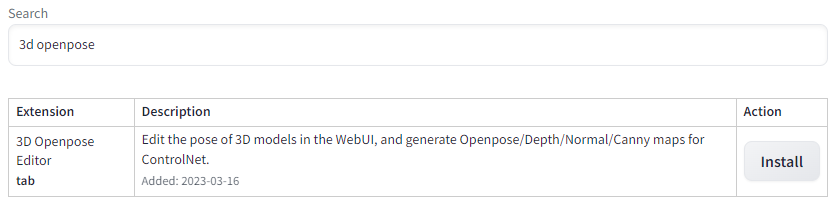
Extension search results showing the 3D Openpose Editor extension with an Install button

Then go back to the "Installed" tab and click "Apply and Restart UI." If you get a "Bad Gateway" and are unable to access your instance after this, go back to your Pod List and stop and restart the pod, and then restart Stable Diffusion.
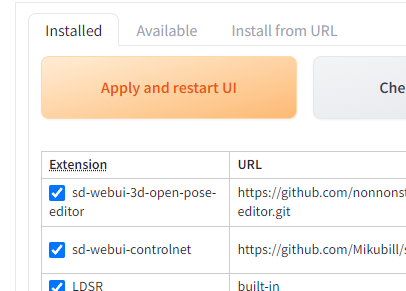
Installed extensions list with sd-webui-3d-open-pose-editor and sd-webui-controlnet checked

You will now have a 3D OpenPose tab available, with a 3D editor that allows you to control how your subject will be posed. The editor, while powerful and full-featured to the point where you can even alter the proportion and size of body parts, is also a bit finicky in moving limbs around. If I just need to do some simple pose editing and don't need need that higher functionality, I will use one of the myriad of 3D posers online - posemy.art has an in my opinion easier to use editor, along with a ton of pre-made poses to import.

Save an image of the pose you want to use (you can use a real-life photo if you prefer) and then under File -> Detect from Image, upload the pose, and then click Generate. Note that the editor will often lack depth information on how the subject is posed, so it will do its best to extrapolate on what it's given. You'll generally have the best results with a 3/4th angle pose to give it as much help as possible.  
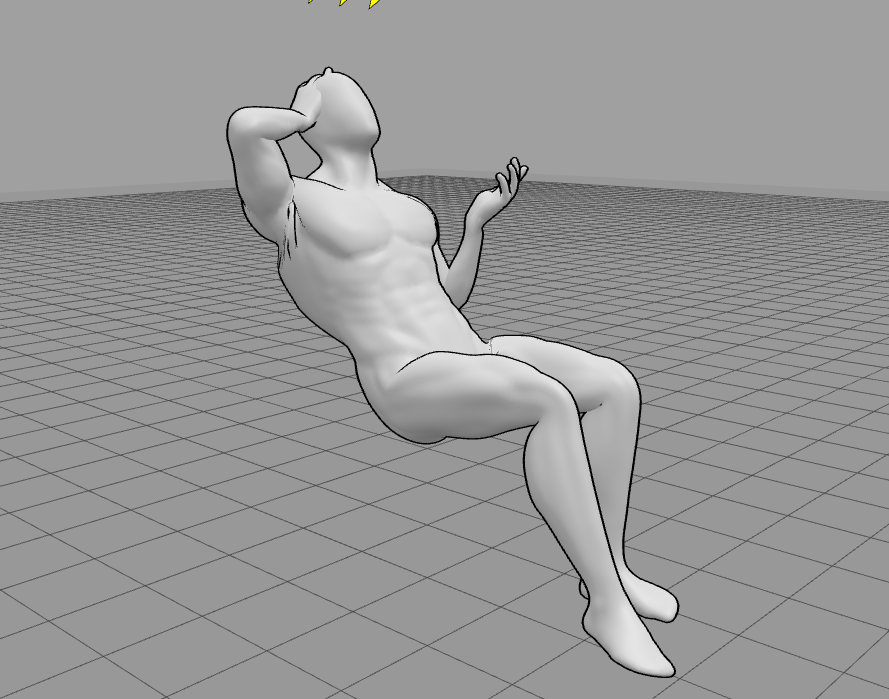
Gray 3D mannequin posed reclining with one hand behind its head in the 3D Openpose Editor

Click Generate, and then set the Control Model number to 0 and send to your preferred module (in this case, we'll use txt2img)
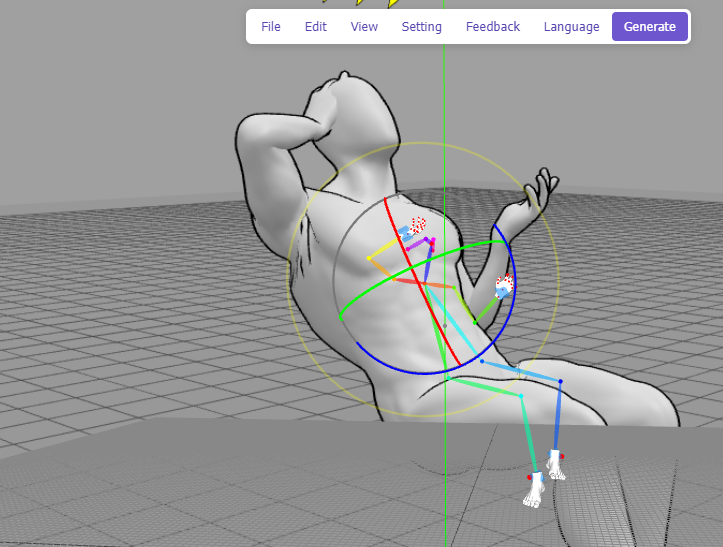
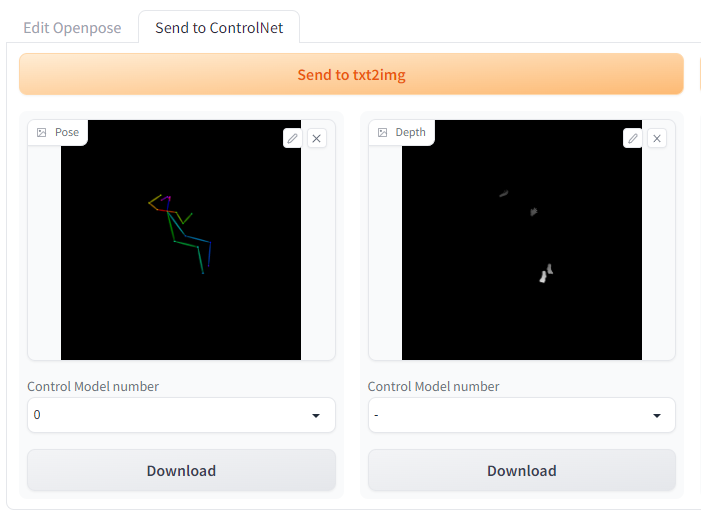
3D Openpose Editor showing colored skeleton controls overlaid on the posed mannequin

Send to ControlNet panel with generated pose and depth map previews and Download buttons

Under ControlNet, click "Enable" and then be sure to set the control_openpose model. Note that Stable Diffusion will use the level of zoom present in the pose, so zooming in closer to the image will result in the subject being closer in the image. By default, the weight will be set to 1, which should ensure pretty accurate adherence to the pose.
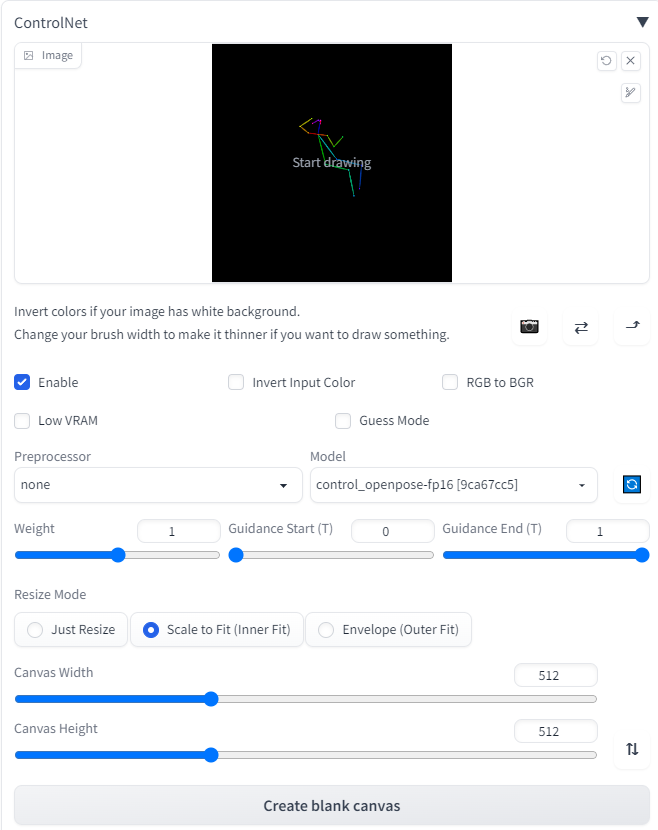
ControlNet settings with an OpenPose skeleton loaded and the control_openpose-fp16 model selected

However, much like the CFG scale, weight is a tradeoff between matching the input and introducing artifacts. Using the prompt "full-body, a young man sitting in an office chair, instagram, softbox with flash, computers in background, suit and tie, office setting" along with the following weights will give you examples like this (pay special attention to the arms):

Off:

AI-generated image of a man in a suit seated in an office chair with a hand raised to his head

0.25:

AI-generated image of a man seated in an office chair at a desk facing a computer monitor

0.5:

AI-generated image of a man working at a desk in an office chair beside large windows

1.0:

AI-generated image of a man leaning back in an office chair with a hand behind his head

Need further guidance on how to pose subjects in Stable Diffusion? Drop by and check out our artist community on our Discord!

Author profile: Brendan McKeag