惯性聚合 高效追踪和阅读你感兴趣的博客、新闻、科技资讯
阅读原文 在惯性聚合中打开

推荐订阅源

B
Blog RSS Feed
K
Kaspersky official blog
Forbes - Security
Forbes - Security
Threat Intelligence Blog | Flashpoint
P
Proofpoint News Feed
G
GRAHAM CLULEY
V
Vulnerabilities – Threatpost
Security Latest
Security Latest
Scott Helme
Scott Helme
S
Securelist
美团技术团队
T
Threat Research - Cisco Blogs
OSCHINA 社区最新新闻
OSCHINA 社区最新新闻
S
SegmentFault 最新的问题
W
WeLiveSecurity
freeCodeCamp Programming Tutorials: Python, JavaScript, Git & More
Apple Machine Learning Research
The Cloudflare Blog
AI
AI
L
Lohrmann on Cybersecurity
S
Security Affairs
Cloudbric
Cloudbric
SecWiki News
SecWiki News
爱范儿
爱范儿
雷峰网
雷峰网
Engineering at Meta
Engineering at Meta
C
Cyber Attacks, Cyber Crime and Cyber Security
大猫的无限游戏
大猫的无限游戏
N
News and Events Feed by Topic
I
InfoQ
S
Secure Thoughts
AWS News Blog
AWS News Blog
A
About on SuperTechFans
Schneier on Security
酷 壳 – CoolShell
酷 壳 – CoolShell
The Last Watchdog
The Last Watchdog
D
Darknet – Hacking Tools, Hacker News & Cyber Security
C
Check Point Blog
P
Palo Alto Networks Blog
博客园 - 【当耐特】
让小产品的独立变现更简单 - ezindie.com
Google DeepMind News
Latest news
Latest news
I
Intezer
博客园_首页
C
CXSECURITY Database RSS Feed - CXSecurity.com
V
V2EX
钛媒体:引领未来商业与生活新知
钛媒体:引领未来商业与生活新知
L
LangChain Blog
D
Docker

Runpod Blog.

DeepSeek V4 in the wild, and how to run it on Runpod New Runpod datacenter now live: AP-IN-1 Track GPU spend across your team with Cost Centers The GPU supply supercycle is here. Here’s what AI builders need to know. Community Spotlight: One-click AI image and video generation on Runpod with SwarmUI | Runpod Blog Community Spotlight: LoRA Pilot Data Prep to Inference Introducing the Runpod Assistant: Manage Your Cloud GPU Resources with Natural Language OpenAI's Parameter Golf: Train the Best Language Model That Fits in 16MB on Runpod LLM inference optimization: techniques that actually reduce latency and cost Pruna P-Video and Vidu Q3 public endpoints now available on Runpod Runpod brand spelling guide Quickstart - Runpod Documentation The AI market looks nothing like the narrative Training StyleGAN3 with Vision-Aided GAN on Runpod KoboldAI – The Other Roleplay Front End, And Why You May Want to Use It How to Connect Cursor to LLM Pods on Runpod for Seamless AI Dev Community Spotlight: How AnonAI Scaled Its Private Chatbot Platform with Runpod Prompt Scheduling with Disco Diffusion on Runpod Runpod's Latest Innovation: Dockerless CLI for Streamlined AI Development Run Your Own AI from Your iPhone Using Runpod Introducing Flash: Run GPU workloads on Runpod Serverless: No Docker required Use Claude Code with your own model on Runpod: No Anthropic account required Avoid Errors by Selecting the Proper Resources for Your Pod What hackers built on Runpod at TreeHacks 2026 Easily Back Up and Restore Your Pod with Cloud Sync + Backblaze B2 The Complete Guide to GPU Requirements for LLM Fine-Tuning AI Guides, Tutorials & GPU Infrastructure Insights | Runpod Your first Claude Code project within Runpod: a complete setup guide 10 billion Serverless requests and counting Building for resilience: Runpod’s response to the AWS us-east-1 outage How to Connect Google Colab to Runpod Founder Series #1: The Runpod Origin Story AMD MI300X vs. NVIDIA H100: Mixtral 8x7B Inference Benchmark How to Run the FLUX Image Generator with ComfyUI on Runpod Run Llama 3.1 405B with Ollama on Runpod: Step-by-Step Deployment How to Run FLUX Image Generator with Runpod (No Coding Needed) How to Use 65B+ Language Models on Runpod Deploy Llama 3.1 with vLLM on Runpod Serverless: Fast, Scalable Inference in Minutes Open Source Video & LLM Roundup: The Best of What’s New Run vLLM on Runpod Serverless: Deploy Open Source LLMs in Minutes Introduction to vLLM and PagedAttention New update to Github integration: release rollback! | Runpod Blog A note to the developers who built Runpod with us Deploy ComfyUI as a Serverless API Endpoint Setting up Slurm on Runpod Clusters: A Technical Guide Building an OCR System Using Runpod Serverless From No-Code to Pro: Optimizing Mistral-7B on Runpod for Power Users Lessons While Using Generative Language and Audio For Practical Use Cases Runpod RoundUp 3 – AI Music and Stock Sound Effect Creation New Navigational Changes To Runpod UI Use alpha_value To Blast Through Context Limits in LLaMa-2 Models Runpod Roundup 5 – Visual/Language Comprehension, Code-Focused LLMs, and Bias Detection Runpod is Proud to Sponsor the StockDory Chess Engine Runpod Roundup 4 – Open Source LLM Evaluators, 3D Scene Reconstruction, Vector Search Meta and Microsoft Release Llama 2 as Open Source SuperHot 8k Token Context Models Are Here For Text Generation Encrypted Volumes on Runpod: Protect Your Data at Rest How to Run a "Hello World" on Runpod Serverless Runpod AI field notes: December 2025 Faster GitHub Builds: Major Performance Improvements to Our Automated Integration Partnering with Defined AI to Bridge the Data Wealth Gap How to Run Serverless AI and ML Workloads on Runpod How to fine-tune a model using Axolotl Transcribe and translate audio files with Faster Whisper Runpod Achieves SOC 2 Type II Certification: Continuing Our Compliance Journey Orchestrating GPU workloads on Runpod with dstack Exploring Runpod Serverless: Create Workers From Templates DeepSeek V3.1: A Technical Analysis of Key Changes from V3-0324 Deep Cogito Releases Suite of LLMs Trained with Iterative Policy Improvement Wan 2.2 Releases With a Plethora Of New Features Iterative Refinement Chains with Small Language Models The New Runpod.io: Clearer, Faster, Built for What’s Next Introducing Clusters: On-Demand Multi-Node AI Compute Run DeepSeek R1 on Just 480GB of VRAM How Do I Transfer Data Into My Runpod? Spot vs. On-Demand Instances: What’s the Difference? Deploy GitHub Repos to Runpod with One Click Run GGUF Quantized Models Easily with KoboldCPP on Runpod How to Work with GGUF Quantizations in KoboldCPP Introducing Better Forge: Spin Up Stable Diffusion Pods Faster Supercharge Your LLMs with SGLang: Boost Performance and Customization Mastering Serverless Scaling on Runpod: Optimize Performance and Reduce Costs RAG vs. Fine-Tuning: Which Is Best for Your LLM? Run Larger LLMs on Runpod Serverless Than Ever Before – Llama-3 70B (and beyond!) How to Run vLLM on Runpod Serverless (Beginner-Friendly Guide) Embracing New Beginnings: Welcoming Banana.dev Community to Runpod Stable Diffusion + ComfyUI on Runpod: Easy Setup Guide Runpod RoundUp 2 – 32k Token Context LLMs and New StabilityAI Offerings Runpod Roundup: High-Context LLMs, SDXL, and Llama 2 16k Context LLM Models Now Available On Runpod Savings Plans Are Here For Secure Cloud Pods – How To Purchase a Monthly Plan And Save Big Pygmalion-7b from PygmalionAI has been released, and it's amazing Ada Architecture Pods Are Here – How Do They Stack Up Against Ampere? Spin up a Text Generation Pod with Vicuna and Experience a GPT-4 Rival Using OpenPose to Annotate Poses Within Stable Diffusion Set Up a Chatbot with Oobabooga on Runpod Connect VSCode to Your Runpod Instance (Quick SSH Guide) Deploy a Stable Diffusion UI on Runpod in Minutes Google Colab Pro vs. Runpod: Best GPU Cloud for AI Workloads How to Run a GPU-Accelerated Virtual Desktop on Runpod
How to Manage Funding Your Runpod Account
Brendan McKeag · 2026-01-20 · via Runpod Blog.

At Runpod, we want to be wholly transparent about how how we manage billing clients, since we know that discussing financial matters can be a very charged conversation. We want to equip you with every tool available to ensure that your pods run smoothly without interruption due to a low balance.

As discussed in our FAQ, your pods will be automatically stopped when you have about 10 minutes of runtime left at your chosen GPU spec so you can re-start the pod with 0 GPUs to retrieve your data without depositing additional funds. You should be aware that in the interim while you reload your account those GPUs will be placed up for other clients to rent, which can pose a logistic issue where you may need to pull your data down and push it to a new pod, if you're not able to get ahold of those same cards in a given machine where your data might be stored. (This can be particularly challenging if it's an A100 or other spec setup that's currently in high demand.) Although your data on disk will be retained for at least 48 hours even after your balance is completely drained, it's best to avoid service interruptions before they occur by being aware of your funding levels and potential issues you may run into while reloading.

How to ensure you don't deplete your funds

Runpod gives you several methods to keep abreast of your funding level and to prevent pod shutdown due to a low balance. If a network volume or machine storage is terminated automatically, they are not recoverable as that drive space will be allocated to other clients just as if you had clicked the Terminate button on your pod status screen yourself. Here's what you can do on your end to keep your pods running.

Enable Low Balance Threshold Messages

You'll want to be aware that your balance is running low, and if you are using Serverless and managing spiky workloads this could come sooner than you think. These messages are off by default, but you can have the platform contact you whenever your balance dips below your defined threshold. This can give you a vital heads up that your balance needs to be replenished. To enable this, go to Settings in your Runpod account and then click Edit under Notification Settings, and define whatever threshold works for you. It's recommended to give yourself at least three days' notice of your average spend to prevent your account running dry over weekends or holidays.
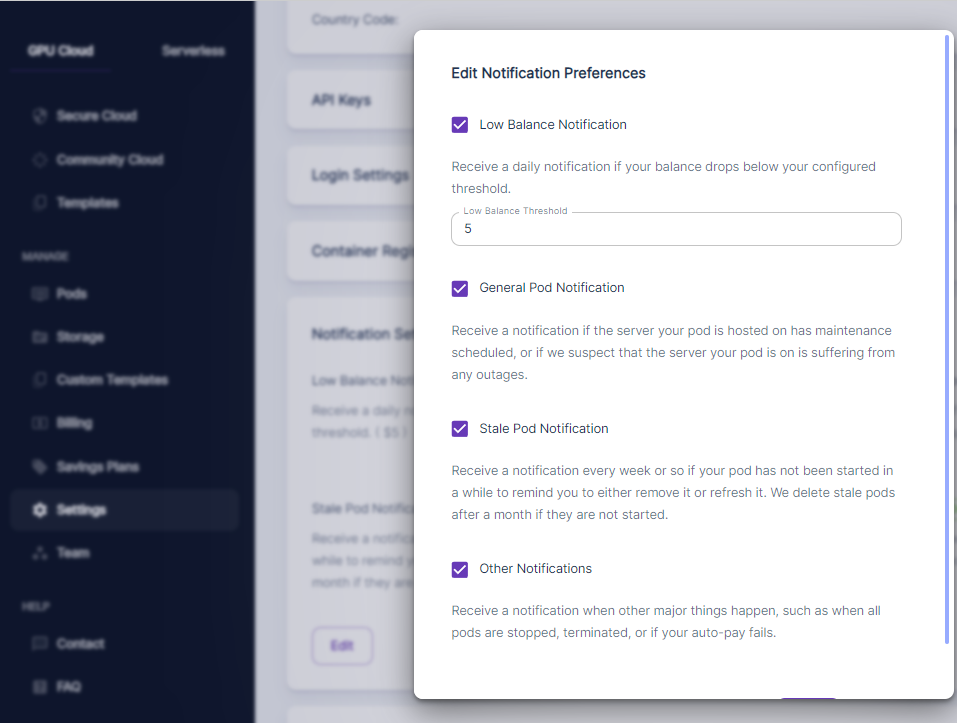
Runpod console Edit Notification Preferences dialog with low balance, pod, and other notification toggles

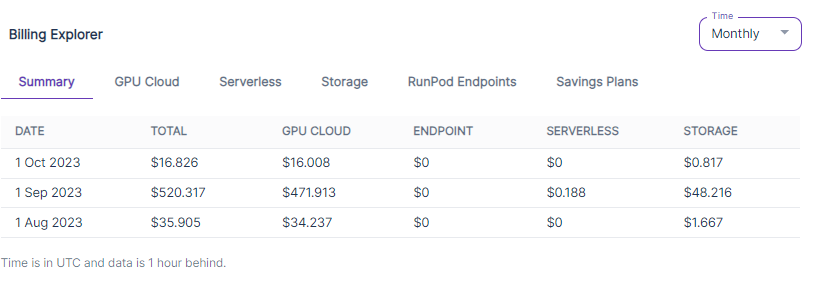
For note, you can see what your current spend is under Billing - the top of the page will show your current spend and estimated remaining funding level, and the bottom will have the Billing Explorer which will give you a breakdown of all recent spend.  
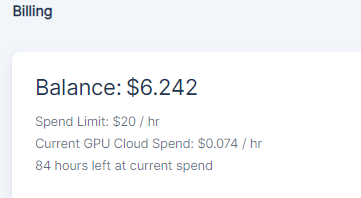
Runpod billing panel showing account balance, spend limit, current GPU cloud spend, and hours left at current spend

Runpod Billing Explorer monthly summary table with spend broken out by GPU cloud, endpoint, serverless, and storage

Enable Automatic Payments

Under Billing, you can also have the platform automatically charge your card to replenish your balance if you have a currently active balance of at least $100.
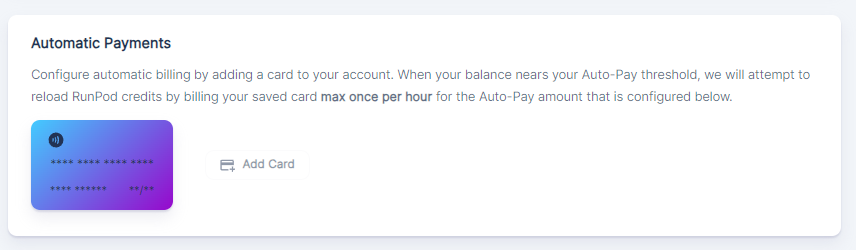
Runpod Automatic Payments settings with a saved card and Add Card button for auto-pay credit reloads

Put a kill switch on your pods

Even I've done this once or twice - I've forgotten to stop a pod before going to bed, meaning that my balance was drained when I got up in the morning. This could potentially even lead to data loss if you don't log in for a few days afterwards and the pods are automatically terminated after their retention period on an empty balance has passed. Although there's not really a way to stop a pod based on mere idleness, you can put a limit on how long a pod runs by entering this into the Docker Command field on your Edit Pod screen or within a terminal once you start your pod - just replace the "2h" with your requested timeout, and the pod will automatically stop after the requested interval.

bash -c "nohup sleep 2h; runpodctl stop pod $RUNPOD_POD_ID" &

My card keeps getting declined!

Card declines are more common than you'd think, and it may not always be clear why they occur – especially because they might be declined for different reasons, but the returned message to you might be the same for all of them. This can be a very frustrating feeling, especially if you're training a model or are running some other tasks that cannot be interrupted gracefully. You'll also want to familiarize yourself with the cards that Stripe accepts. Here are the most common reasons that your card might be declined for no apparent reason:

Prepaid card thresholds

You can deposit as little as $10 into your Runpod account by card to fund it. However, as a fraud prevention measure, Stripe has its own minimums for prepaid cards that are wholly independent of Runpod's minimum deposit and could trigger a decline when you try to fund your account. A common problem experienced by users is when they make a large deposit which doesn't run into a problem, but then try to "top up" with smaller deposits which triggers an unexpected block. It's highly recommended to deposit in transactions of at least $100 when using a prepaid card, rather than spreading it over several smaller transactions.  

Trying multiple cards

It's a common reflex to simply reach for another card when you run into an unexpected decline. The problem is it's common for fraudsters to try small deposits with a bunch of cards in a row to look for a card that works, and it's very difficult for Stripe's fraud protection to distinguish between this innocent and not-so-innocent activity. If you try another card after your first was declined for whatever reason, it may trigger a global, automated block on your accounteven if that transaction would have gone through otherwise; at this point, Stripe's fraud protection is kicking in and it's no longer even looking at whether the transaction would have gone through or not. These blocks generally clear up within 24 hours, or potentially earlier if you contact their support, but this can be a headache that you don't want to deal with. If you experience an unexpected decline, immediately call your bank to determine whether there are issues with your card before simply trying another card.

Crypto payments

Runpod also accepts crypto payments, and it's highly recommended as a course of risk management to set up a crypto.com account and go through any KYC checks they may require ahead of time so you have an alternate way of funding your account in case you run into issues funding your account with a card payment.  In general crypto payments are less vulnerable to the vagaries of the banking system so it can be a useful workaround in a punch.

Invoicing

For large transactions (over $5,000) we also offer business invoicing through ACH, credit card, Coinbase, and local and international wire transfers. Businesses with larger spending tend to prefer these for the added benefits of flexibility, discounts, and reducing the number of invoices. If you're interested in these options and meet the threshold, then reach out to us!

Contact us

If you have any ideas for additional ways we can help you manage your balance, reach out to us – we are here to help through chat or email, and we also have a Feature Suggestions thread in Discord where we are all ears! We would love to hear from you.

Author profile: Brendan McKeag