

惯性聚合 高效追踪和阅读你感兴趣的博客、新闻、科技资讯
阅读原文 在惯性聚合中打开

推荐订阅源

雷峰网
雷峰网
IT之家
IT之家
Last Week in AI
Last Week in AI
J
Java Code Geeks
L
LangChain Blog
Recent Announcements
Martin Fowler
Martin Fowler
H
Hackread – Cybersecurity News, Data Breaches, AI and More
Google DeepMind News
博客园 - Franky
博客园 - 司徒正美
月光博客
月光博客
博客园 - 叶小钗
Vercel News
Vercel News
腾讯CDC
钛媒体:引领未来商业与生活新知
钛媒体:引领未来商业与生活新知
小众软件
小众软件
Cyber Security Advisories - MS-ISAC
GbyAI
GbyAI
B
Blog RSS Feed
人人都是产品经理
人人都是产品经理
H
Help Net Security
G
Google Developers Blog
D
DataBreaches.Net

Runpod Blog.

DeepSeek V4 in the wild, and how to run it on Runpod New Runpod datacenter now live: AP-IN-1 Track GPU spend across your team with Cost Centers The GPU supply supercycle is here. Here’s what AI builders need to know. Community Spotlight: One-click AI image and video generation on Runpod with SwarmUI | Runpod Blog Community Spotlight: LoRA Pilot Data Prep to Inference Introducing the Runpod Assistant: Manage Your Cloud GPU Resources with Natural Language OpenAI's Parameter Golf: Train the Best Language Model That Fits in 16MB on Runpod LLM inference optimization: techniques that actually reduce latency and cost Pruna P-Video and Vidu Q3 public endpoints now available on Runpod Runpod brand spelling guide Quickstart - Runpod Documentation The AI market looks nothing like the narrative Training StyleGAN3 with Vision-Aided GAN on Runpod KoboldAI – The Other Roleplay Front End, And Why You May Want to Use It How to Connect Cursor to LLM Pods on Runpod for Seamless AI Dev Community Spotlight: How AnonAI Scaled Its Private Chatbot Platform with Runpod Prompt Scheduling with Disco Diffusion on Runpod Runpod's Latest Innovation: Dockerless CLI for Streamlined AI Development Run Your Own AI from Your iPhone Using Runpod Introducing Flash: Run GPU workloads on Runpod Serverless: No Docker required Use Claude Code with your own model on Runpod: No Anthropic account required Avoid Errors by Selecting the Proper Resources for Your Pod What hackers built on Runpod at TreeHacks 2026 Easily Back Up and Restore Your Pod with Cloud Sync + Backblaze B2 The Complete Guide to GPU Requirements for LLM Fine-Tuning AI Guides, Tutorials & GPU Infrastructure Insights | Runpod Your first Claude Code project within Runpod: a complete setup guide 10 billion Serverless requests and counting Building for resilience: Runpod’s response to the AWS us-east-1 outage
Savings Plans Are Here For Secure Cloud Pods – How To Pur...
Brendan McKeag · 2023-06-26 · via Runpod Blog.

If you are a frequent Runpod customer, you may be interested in our latest feature, Savings Plans. These plans allow you to invest in an up-front payment in a specific pod type that saves you more money the more you use you pod. For individuals with high workloads that anticipate needing significant GPU time over the following month, a savings plan represents an excellent opportunity to "buy in bulk."

Savings Plans are available within the Secure Cloud infrastructure only, and the option will appear  after you select a specific pod type to spin up.
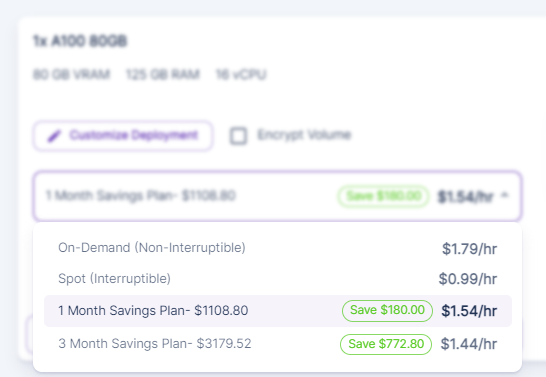
Pricing dropdown for a 1x A100 80 GB pod comparing on-demand, spot, and 1 and 3 month savings plans

The amounts shown in the savings plans factor in the amount of running a pod 24/7 for the full 30 days in a month. This gives you complete access to the pod for the entire month for a 15% discount with a 1-month commitment, and a 20% discount with a 3-month equipment. Please note that discout percentages vary depending on GPU type!

What use cases are Savings Plans useful for?

Savings Plans may not be useful for all Runpod customers, but for those that need uninterrupted access to a pod or those that plan on putting their pod through heavy workloads, Savings Plans are a compelling option. Purchasing a year's worth of three-month savings plans will in effect give you over three weeks of GPU time on that pod for free. Note that this would have to be renewed every 3 months, as we currently do not offer the option to commit for one year up-front. The savings plan will start at purchase time and expire after the length of the plan. Stopping or terminating your pod does not extend your plan!

If you are considering purchasing a savings plan, we highly suggest tracking your pod utilization over the course of a month to see how much you are using. If you are currently using multiple pods on lower end GPUs, you may also want to test your tasks on a higher-end unit to see if consolidating into a single pod with the intention of purchasing a savings plan may be worthwhile.

Questions?

Do you have any questions on what Savings Plans can do for you? Feel free to reach out to us!

Author profile: Brendan McKeag