


惯性聚合 高效追踪和阅读你感兴趣的博客、新闻、科技资讯
阅读原文 在惯性聚合中打开

推荐订阅源

GbyAI
GbyAI
Martin Fowler
Martin Fowler
云风的 BLOG
云风的 BLOG
让小产品的独立变现更简单 - ezindie.com
T
The Blog of Author Tim Ferriss
大猫的无限游戏
大猫的无限游戏
A
About on SuperTechFans
小众软件
小众软件
博客园_首页
博客园 - 聂微东
罗磊的独立博客
Recent Announcements
U
Unit 42
N
Netflix TechBlog - Medium
Blog — PlanetScale
Blog — PlanetScale
阮一峰的网络日志
阮一峰的网络日志
博客园 - 叶小钗
V
V2EX
OSCHINA 社区最新新闻
OSCHINA 社区最新新闻
IT之家
IT之家
Stack Overflow Blog
Stack Overflow Blog
博客园 - Franky
D
DataBreaches.Net
Last Week in AI
Last Week in AI

Buttondown's blog

Email could have been X.400 times better The physicists who convinced Fermilab to send Brazil's emails Better in-app previews Analytics 3.0 Subscriber ID variables Comments! Send latest premium action Automation filtering Free API subscribers Surveys in automations Reply to replies Labels for RSS feeds How Jeremy Singer-Vine curates curious datasets for readers 2023 (and what's next) Email vs web content Sort by engagement Better gift subscriptions How Andy Dehnart built a career reviewing television New email template Email-based automations Opt-in reply tracking Automatic alt text More social network integrations Sort by metadata Overlarge image warnings Automation tag actions Pause emails mid-flight Search tags and automations Gift via automations Subscriber-driving emails
Snippets
Mary · 2026-01-23 · via Buttondown's blog

Reusable content blocks you can insert into any email.

Mary

Mary

January 23, 2026

You can now create snippets — reusable chunks of content you can drop into any email with a few keystrokes.

Think of snippets as your personal content library. Maybe you've got a promo block for your latest project — a poster, a trailer link, a quick blurb — that you want to drop into different emails without rebuilding it each time. Or a sign-off you use every week, or a disclaimer for sponsored posts. Instead of copying and pasting (and inevitably forgetting to update one of them), you can create a snippet once and insert it wherever you need it.

To get started, head to Settings → Snippets and create your first snippet. Give it a name and an identifier (that's what you'll use to insert it), then write whatever content you want.

When you're writing an email in Fancy mode, type / to open the command menu and search for your snippet by name. Select it, and the content gets inserted right where your cursor is.
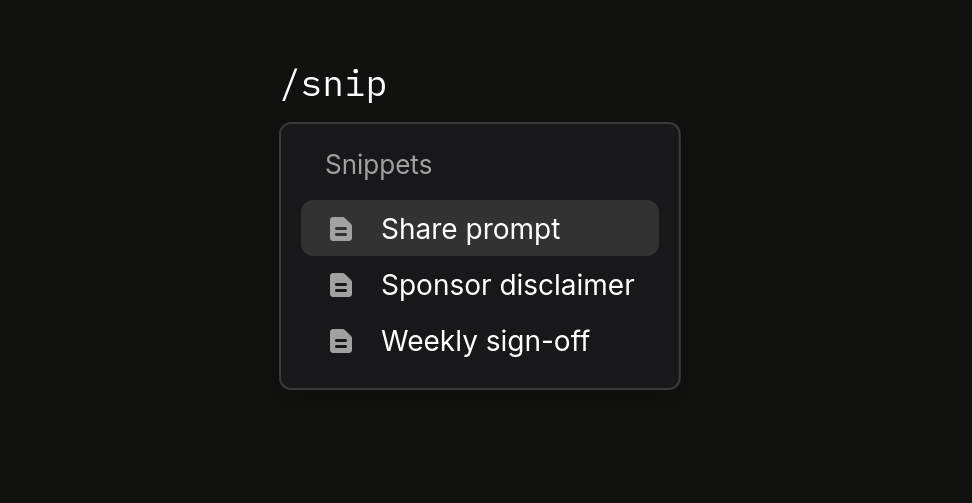
If you're writing in Markdown mode, you can insert a snippet using the <buttondown-snippet> tag:

<buttondown-snippet name="your-identifier"></buttondown-snippet>

Snippets can even include other snippets — useful if you want to build up modular content blocks. (We cap it at 4 levels deep to prevent infinite loops, but that should be plenty for most use cases.)

If you reference a snippet that doesn't exist, you'll see a warning in your draft so you can fix it before sending. No more accidentally sending emails with broken placeholders.