









A new release of NetworkManager, everybody’s favorite Linux network management service, has been released and is available for download from our download page. It’s also likely to be included in your favorite Linux distribution soon.
If you’re a sort of person that’s curious enough to read about a new release of a networking management daemon then read on. This article points out some of the most interesting changes in the release and it has been written just for you (and some others).
Various improvements have been made that affect selection of source address in presence of multiple addresses on a single interface.
In new version of NetworkManager, IPv6 addresses will be ordered consistently with IPv4: with everything else being equal (metric, lifetime), addresses that come first have a higher priority. Statically configured adresses always have a higher priority than automatically configured ones.
The release contains a fair amount of wireless-related fixes and changes.
NetworkManager 1.38 will no longer claim to support frequencies that are not available for use in user’s country. Previously it exposed all frequencies the hardware was capable of using, but an attempt to use the unlicensed ones would fail anyway due to regulatory domain enforcement in kernel.
The Access Point functionality will pick a frequency band (channel number) at random, lowering the chance of collisions. It will also no longer pretend to support SAE (WPA3 Personal).
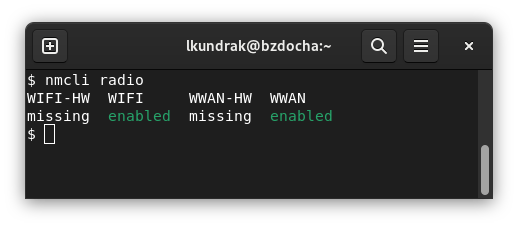
The “nmcli radio” subcommand controls various ways of disabling hardware equipped with radio antennae (known as “Airplane Mode”). Without more arguments it prints overview of availability of the radios. In NetworkManager 1.38 it was extended to also indicate when the radio hardware, be it Wi-Fi or wireless modems, is missing altogether.
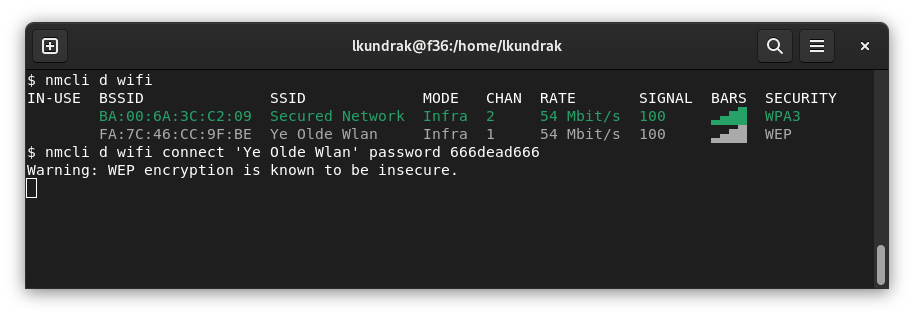
The WEP algorithm for securing Wi-Fi networks has been long superseded by better alternatives due to having known security flaws. Finally the time has come for various Linux distributions to start disabling its support in wpa_supplicant, the daemon that deals with maintaining Wi-Fi network connectivity, authentication and encryption. In version 1.38, NetworkManager will warn about its use in “nmcli” and provide a better diagnostics if the support in wpa_supplicant is unavailable.
In the new NetworkManager version, Internet connectivity checking works more reliably. It behaves correctly if the endpoint resolves to multiple addresses and avoids a hang due to a bug in libcurl that could cause blocking during domain name resolution.
The “nmcli connection” command gained a “migrate” subcommand to help migrating from ifcfg files (used on Fedora Linux and similar systems) to keyfiles. More details in this Fedora Magazine Article.
As always, bugs have been fixed and many small improvements have been done all over the place. This wouldn’t be possible without those who’ve spent their time improving NetworkManager and have been kind and brave enough to submit their patches:
Ana Cabral, Bastien Nocera, Beniamino Galvani, Bryan Jacobs, ChristianEggers, Daisuke Matsuda, Emmanuel Grumbach, Fernando Fernandez Mancera, Francisco Blas Izquierdo Riera (klondike), Javier Jardón, Lubomir Rintel, luokai, muzena, Nathan Follens, Sergiu Bivol, Sigurd Rønningen Jenssen, Thomas Haller, Till Maas, Val Och, Vojtech Bubela, Wen Liang, Yi Zhao, Yuri Chornoivan and 谢致邦 (XIE Zhibang).
If you want to join us, submit a merge request in our GitLab project.
The Red Hat Quality Engineers have been diligently pointing out mistakes and failures of ours so that we could fix them before they could ruin anyone’s day:
Vladimír Beneš, Filip Pokryvka, David Jasa and Matej Berezny.
If you’ve reached this point and still didn’t satisfy your hunger for news about NetworkManager, check out the NEWS file!
There’s more to maintianing network connectivity than NetworkManager. Hostile forces have invaded the country of Ukraine and its citizens need to stay connected more than ever. Luckily there are volunteers helping with just that. They accept donations of money and hardware, especially fiber optics splicers. If you’d like to help, please visit NOG’s Keep Ukraine Connected web site.
此内容由惯性聚合(RSS阅读器)自动聚合整理,仅供阅读参考。 原文来自 — 版权归原作者所有。