









After a little over 5 months and 407 commits since NetworkManager 1.56, the new release is ready: NetworkManager 1.58.
Let’s take a look at the most interesting parts!
This release brings a batch of usability work to nmtui, the text user interface.
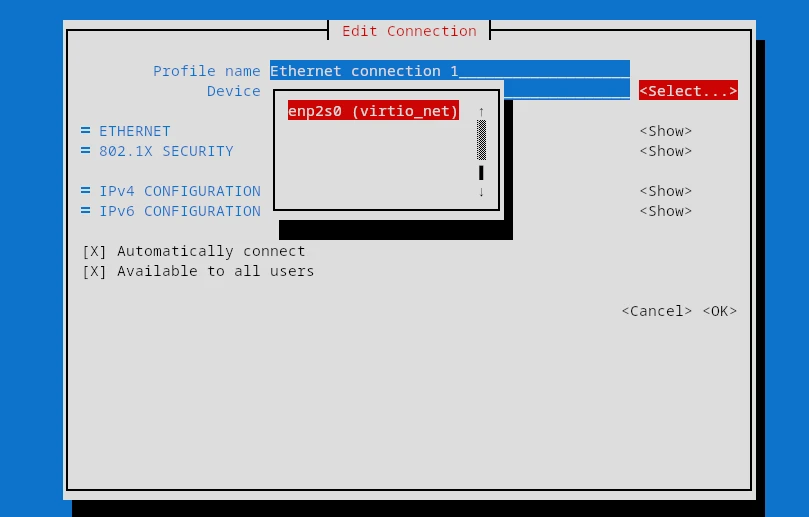
When creating a profile for a physical interface (Ethernet, Wi-Fi, and so on),
a new <Select...> button lets you pick from the available devices instead of
typing the interface name by hand.
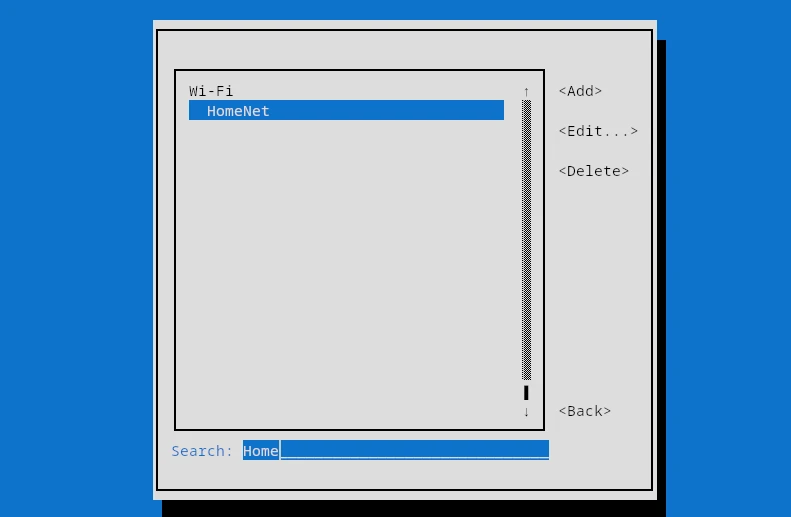
The connection lists in nmtui connect and nmtui edit now support a vim-style
/ search that filters the list to matching entries as you type.
The “Activate a connection” screen gained a “Rescan Wi-Fi” button that scans for nearby networks on demand, and the secret prompt shown when activating a connection now has a “Show password” checkbox, matching the connection editor.
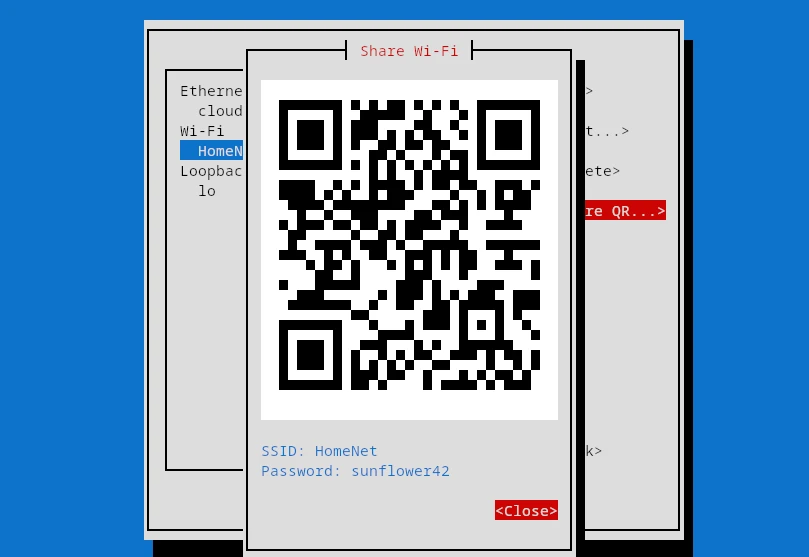
You can also share a Wi-Fi network as a QR code straight from nmtui: the new
“Share QR…” button in “Edit a connection” mirrors nmcli device wifi show-password.
Finally, configuring bonds is more complete thanks to a new “other options” field that covers bond options without a dedicated input, and nmtui forms now redraw when the terminal is resized instead of staying clipped or off-center until you reopen them.
Continuing the march towards IPv6-only networks, NetworkManager now supports CLAT (464XLAT), implemented with a BPF program. CLAT lets an IPv6-only host reach IPv4-only destinations.
To go with it, the default of the ipv4.dhcp-ipv6-only-preferred property
changed to a new auto value, which automatically enables the option when CLAT
is enabled (yes or auto) in the connection profile.
NetworkManager can now create and manage GENEVE (Generic Network Virtualization Encapsulation) interfaces.
Several Wi-Fi improvements landed in this release:
band property of Wi-Fi connections now accepts the 6GHz value.powersave property now works with the iwd backend.connection.auth-retry and only prompt for new
secrets on the last authentication attempt before failing.The managed state of a device can now be persisted across reboots via nmcli and the D-Bus API. On top of that, you can change the device’s administrative state in the kernel at the same time as the managed state.
This release fixes two vulnerabilities and tightens several defaults:
connection.permissions),
NetworkManager now verifies that the user can access the 802.1X certificates
and keys referenced by the connection. A new libnm function lets VPN plugins
perform the same check.modify_system build option, which set up polkit permissions
allowing non-admin users to create system-wide connections. That configuration
is discouraged because it can be used to bypass filesystem permissions.check-connectivity configuration option can disable the check for selected
interfaces, and a bug that left stale global connectivity state was fixed.connection.gateway-ping-timeout or connection.ip-ping-addresses are set,
instead of relying on the ping tool.ipv6.method=shared.ipv6.ignore-auto-dns, ipv6.ignore-auto-routes and
ipv6.never-default properties even when DHCPv6 is not restarted, so
DHCPv6-provided DNS and routes are correctly suppressed without a connection
restart.-rcX and -dev suffixes
everywhere they apply, including the release tarball URL and filename and the
version reported by nmcli and the daemon. The C API keeps the 90+ scheme for
RC versions.Many thanks to all contributors who provided feedback, ideas or patches.
Anders Jonsson, Andrej Kozemcak, Antonio Alvarez Feijoo, Baurzhan Muftakhidinov, Ben Hagen, Beniamino Galvani, Cédric Bellegarde, Christian Krause, Daniel Nylander, David Ward, Federico Ton, filmsi, François Horta, Gris Ge, Günther Noack, Hiroyuki Yasuhara, Íñigo Huguet, Jan Fooken, Jan Vaclav, Josephine Pfeiffer, Leon M. Busch-George, Lubomir Rintel, Marko M. Kostić, Mary Strodl, Matthieu Baerts, Mattia Dal Ben, Mitchell Augustin, Muhammet Kara, Paul Menzel, Popax21, Pradyumn Rahar, Rafael Fontenelle, Rahul Rajesh, Rishabh Garg, Robert Schlabbach, Thomas Makin, Till Maas, Tim Spriggs, twlvnn, Vicki Pfau, Vladimír Beneš and Vladislav Tsisyk.
Also thanks to our Quality Engineers from Red Hat for all the testing: Vladimír Beneš, Filip Pokryvka and Mingyu Shi.
Join us on our GitLab project.
As usual, the next release of your favorite Linux distribution will surely ship the new version.
In case you’re too impatient to wait, or you are, in fact, responsible for keeping NetworkManager up to date in a distribution, get the tarball from our download page.
Thanks for tuning in and goodbye!
此内容由惯性聚合(RSS阅读器)自动聚合整理,仅供阅读参考。 原文来自 — 版权归原作者所有。