

惯性聚合 高效追踪和阅读你感兴趣的博客、新闻、科技资讯
阅读原文 在惯性聚合中打开

推荐订阅源

Google DeepMind News
N
Netflix TechBlog - Medium
The Register - Security
C
Cybersecurity and Infrastructure Security Agency CISA
H
Hackread – Cybersecurity News, Data Breaches, AI and More
The Hacker News
The Hacker News
P
Proofpoint News Feed
Project Zero
Project Zero
The GitHub Blog
The GitHub Blog
The Last Watchdog
The Last Watchdog
F
Fortinet All Blogs
S
Schneier on Security
Help Net Security
Help Net Security
Security Archives - TechRepublic
C
Check Point Blog
让小产品的独立变现更简单 - ezindie.com
P
Proofpoint News Feed
I
InfoQ
T
The Blog of Author Tim Ferriss
Cisco Talos Blog
Cisco Talos Blog
Stack Overflow Blog
Stack Overflow Blog
T
Troy Hunt's Blog
人人都是产品经理
人人都是产品经理
T
Threatpost
www.infosecurity-magazine.com
C
Cyber Attacks, Cyber Crime and Cyber Security
雷峰网
雷峰网
cs.AI updates on arXiv.org
Threat Intelligence Blog | Flashpoint
爱范儿
爱范儿
Forbes - Security
Forbes - Security
Vercel News
Vercel News
S
Security Affairs
美团技术团队
P
Privacy & Cybersecurity Law Blog
N
News and Events Feed by Topic
Cyberwarzone
Cyberwarzone
Recent Commits to openclaw:main
Jina AI
Jina AI
Spread Privacy
Spread Privacy
Attack and Defense Labs
IT之家
IT之家
U
Unit 42
Recorded Future
Recorded Future
W
WeLiveSecurity
PCI Perspectives
PCI Perspectives
P
Palo Alto Networks Blog
H
Hacker News: Front Page
S
Security @ Cisco Blogs
博客园 - 【当耐特】

Inoreader blog

A cleaner top bar and quicker access to key features Introducing shared feature pools for Inoreader Teams Choose your AI platform for Intelligence features New combined filter quotas Inoreader Q1 highlights: Upgrades to Teams and automated insights Automated Intelligence reports for insights delivered to you Introducing new collaboration features for Inoreader Teams Connect tools and distribute content Get insights with Inoreader Intelligence
Sign in with passkeys
Rada Raitche · 2026-05-26 · via Inoreader blog

Passwords are easy to forget, verification codes can slow you down, and signing in across devices isn’t always seamless. That’s why we’ve added a new way to access your Inoreader account with passkeys.

Passkeys let you sign in quickly and securely using the authentication already built into your device, such as Face ID, Touch ID, or Windows Hello. No passwords to remember, no verification codes to enter – just a faster, more seamless sign-in experience.

What are passkeys?

Passkeys are a modern authentication method designed to make sign-ins both more secure and easier to use. Instead of relying on passwords, they use cryptographic credentials stored securely on your device and protected by biometric authentication or your device PIN.

They’re resistant to phishing attacks, eliminate the need for one-time authentication codes, and work across devices thanks to secure syncing through services like password managers and device ecosystems.

In most cases, if your device supports biometric authentication and you’re using a recent version of your browser, you’re ready to use passkeys.

Passkeys are becoming increasingly supported across the web and are expected to play a major role in the future of online authentication, making this a great time to start using them.

Set up passkeys in Inoreader

To get started, head to Preferences > Account, where you’ll find the new Passkeys section.

From there, you can:
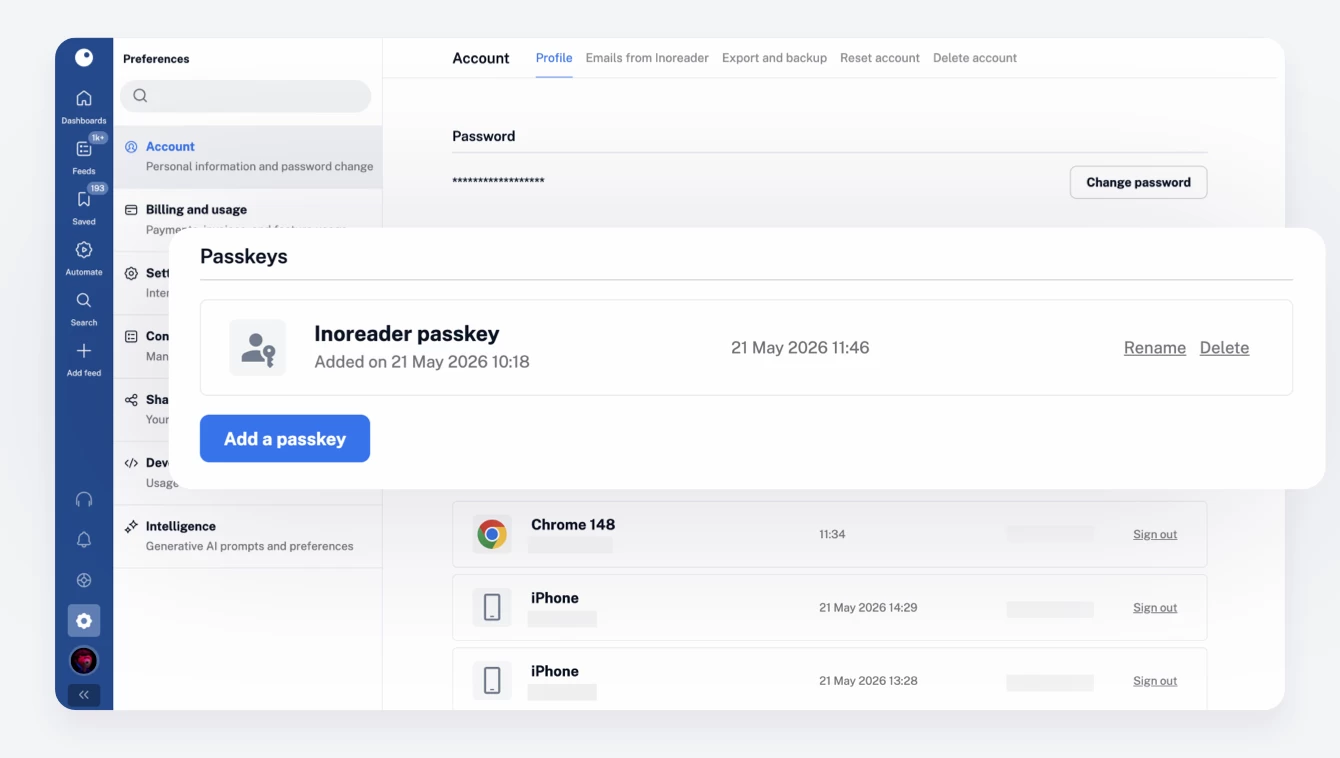
  • Add a new passkey
  • Rename existing passkeys
  • Delete passkeys you no longer use

Inoreader will only show passkey-related functionality if your device and browser support it. Passkey sign-in is available to all Inoreader users in the web app, with support for other platforms planned for the future.

Signing in with a passkey

Once you’ve added a passkey to your account, you’ll see a new Sign in with a passkey option on the login screen, alongside the traditional email and password form. This gives you the flexibility to choose the sign-in method that works best for you.
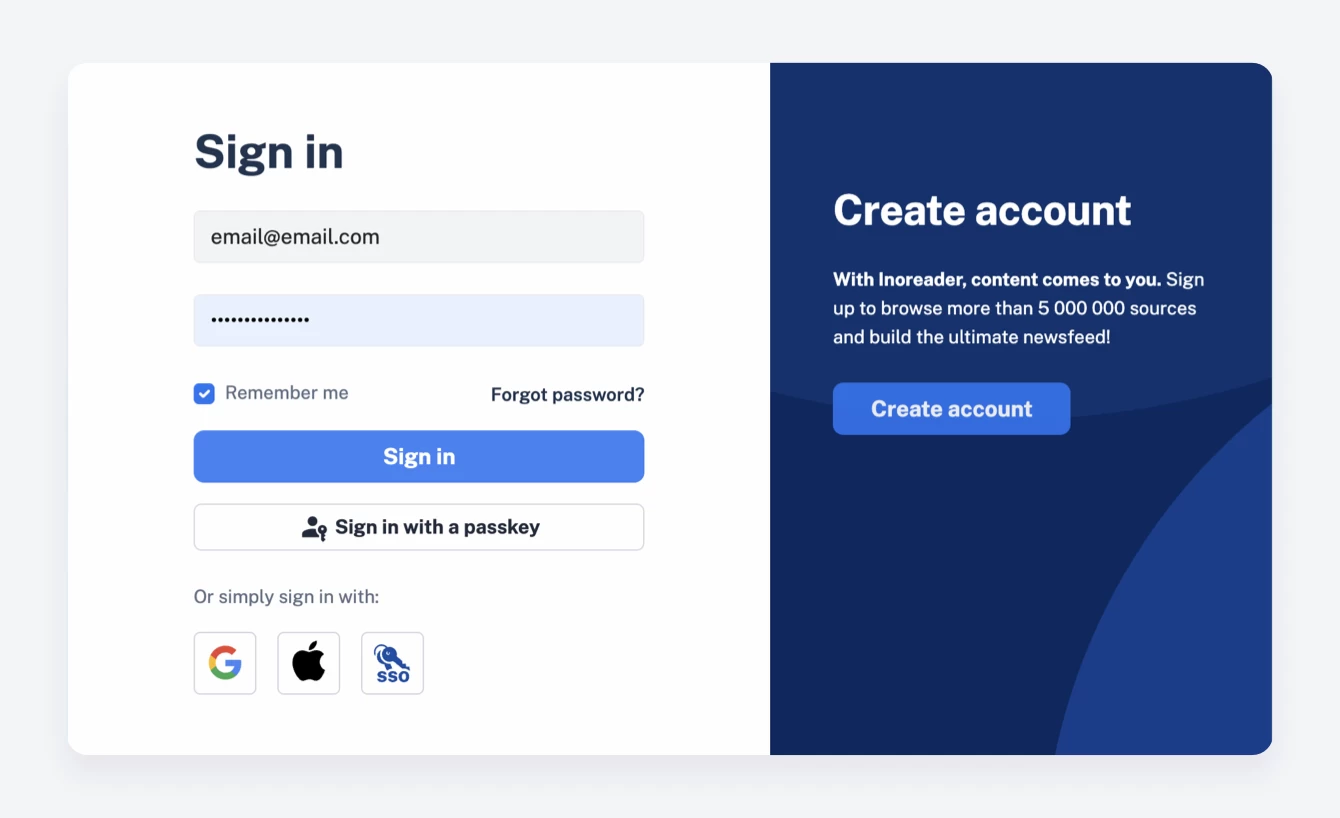
After you successfully sign in with a passkey on a supported browser, future logins become even smoother. When you sign out, you’ll see a simplified passkey sign-in screen that helps you get back into your account in a single step.

Need to switch accounts or prefer another sign-in method? No problem, you can always return to the standard login form whenever needed.

A few things to keep in mind

  • You can add multiple passkeys to your account.
  • Passkeys can be used across multiple Inoreader accounts.
  • Passkeys currently work as an additional sign-in method, not a replacement for your password.
  • You’ll still need a traditional login method for account creation and recovery.

Ready to give passkeys a try?

If you’re looking for a faster, smoother, and more secure way to sign in, passkeys are a great place to start. Add one to your Inoreader account today and enjoy password-free access across your devices!