







The second quarter of 2026 brought a series of updates designed to make Inoreader more intuitive and efficient. We introduced more flexible filter management, expanded the customization options for Intelligence features, simplified resource management for Teams, refreshed key parts of the interface, and added a more secure way to sign in.
Here’s what’s new:
Filters are one of the easiest ways to cut through the noise, automatically hiding articles you don’t want to see before they reach your reading list. This quarter, we made them even more flexible by introducing new combined filter quotas.
Instead of separate limits for content and duplicate filters, Pro users now have a shared pool of 50 filters per account. That means you’re free to use any combination that fits your workflow, whether you rely more on keyword-based filtering, duplicate detection, or both.
The new quota system gives you greater flexibility without changing the powerful filtering capabilities you already rely on.
Read more:

Filters are one of Inoreader’s most powerful tools for reducing noise. They automatically hide irrelevant content the moment it arrives, so you can focus only on what matters…
Q2 also brought one of the biggest upgrades to Inoreader Intelligence so far: the ability to choose how your AI-powered features work.
You can now choose between OpenAI, Anthropic, and Mistral AI as your preferred AI provider. If you’re using the Intelligence reports add-on or a Team Intelligence plan, you can also connect your own API key and select the models you’d like to use.
This gives you greater control over performance, pricing, and the AI ecosystem you already use. Team owners can configure a default platform for all members while still allowing individuals to use their own preferred setup when needed.
The result is a more customizable Intelligence experience that adapts to your preferred tools and workflows.
Learn more:

Managing Team resources became much simpler with the introduction of shared feature pools.
Instead of individual member quotas, Teams now use a shared pool for features such as rules, filters, and Intelligence tokens. Everyone draws from the same pool, making resources easier to manage and ensuring they’re used where they’re needed most.
This approach offers a more flexible and scalable way to allocate resources, especially for Teams whose members have different responsibilities and workloads.
Read the full announcement:

We also refreshed one of the most frequently used parts of Inoreader – the top navigation bar.
The redesigned top bar offers a cleaner layout, better organization, and faster access to the tools you use every day. By reducing visual clutter and improving the placement of key actions, the new design helps you navigate Inoreader more efficiently without changing the workflows you’re already familiar with.
This refreshed design makes everyday navigation feel faster, cleaner, and more intuitive.
See what’s changed:
Keeping your Inoreader account secure is now easier than ever thanks to passkey support.
Passkeys let you sign in using your device’s built-in authentication, such as Face ID, Touch ID, Windows Hello, or your device PIN, without having to remember or enter a password. Besides making sign-in faster, they also provide stronger protection against phishing and credential theft.
Passkeys work across desktop and mobile devices, making every sign-in both quicker and more secure.
Find out how to enable passkeys:

Passwords are easy to forget, verification codes can slow you down, and signing in across devices isn’t always seamless. That’s why we’ve added a new way to access your Inoreader account with passkeys.
Along with these larger updates, we introduced several smaller improvements to make everyday workflows even smoother.
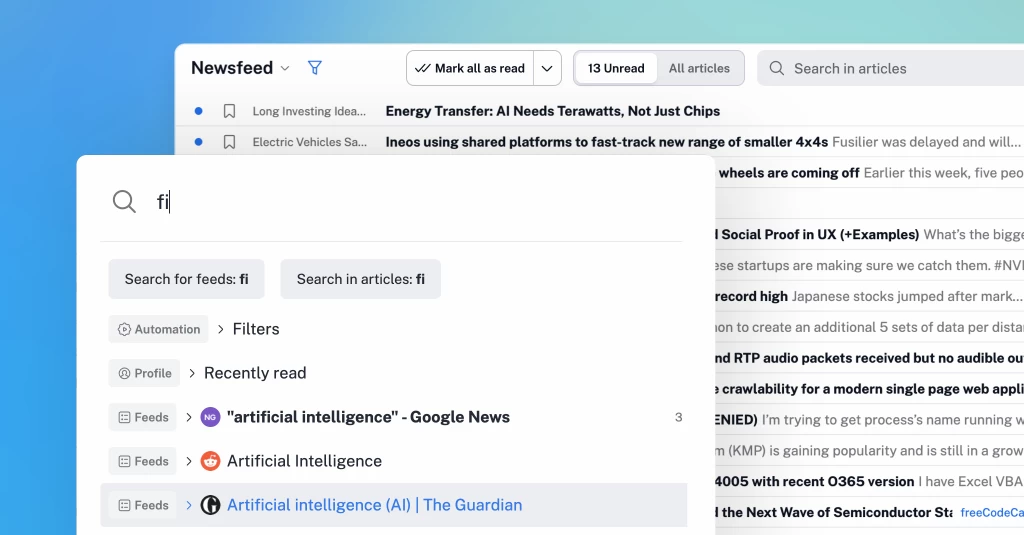
We redesigned the quick access menu to help you find what you need faster. Press . (dot) on your keyboard, start typing, and jump instantly to feeds, folders, dashboards, settings, automation tools, Team resources, and more. You can even add new RSS feeds directly from the menu by pasting a URL.
Another frequently requested addition now lets you open article web pages directly instead of loading them in Inoreader. Available globally or on a per-feed basis, this option gives you more control over how links open while browsing.
You can now start a free trial of the email digests and Intelligence reports add-ons directly. There’s no need to contact us or wait for approval anymore – just click the trial button and begin exploring the features right away.
We also refreshed the Inoreader bookmarklets, making it easier to save web pages to your account as you browse the web.
Finally, we added copy-to-clipboard buttons to the feed properties dialog, allowing you to copy a feed’s website or XML URL with a single click.
Every update this quarter had the same goal: making Inoreader easier to adapt to the way you work. More flexible filters, customizable Intelligence features, shared Team resources, a refreshed interface, and passkey support to help remove friction so you can focus on the information that matters most.
We’ll continue building on these improvements in the months ahead, and we look forward to sharing what’s next.
Follow the Inoreader blog to stay up to date with the latest features, product improvements, and workflow tips.
此内容由惯性聚合(RSS阅读器)自动聚合整理,仅供阅读参考。 原文来自 — 版权归原作者所有。