


惯性聚合 高效追踪和阅读你感兴趣的博客、新闻、科技资讯
阅读原文 在惯性聚合中打开

推荐订阅源

MyScale Blog
MyScale Blog
爱范儿
爱范儿
The Register - Security
小众软件
小众软件
D
DataBreaches.Net
雷峰网
雷峰网
S
Secure Thoughts
L
LINUX DO - 最新话题
M
MIT News - Artificial intelligence
Application and Cybersecurity Blog
罗磊的独立博客
F
Fortinet All Blogs
博客园 - 叶小钗
TaoSecurity Blog
TaoSecurity Blog
博客园 - Franky
aimingoo的专栏
aimingoo的专栏
S
SegmentFault 最新的问题
Hacker News: Ask HN
Hacker News: Ask HN
Help Net Security
Help Net Security
N
News and Events Feed by Topic
S
Security Affairs
The Last Watchdog
The Last Watchdog
Forbes - Security
Forbes - Security
S
Security @ Cisco Blogs
Latest news
Latest news
O
OpenAI News
N
Netflix TechBlog - Medium
云风的 BLOG
云风的 BLOG
Blog — PlanetScale
Blog — PlanetScale
Google Online Security Blog
S
Securelist
博客园 - 司徒正美
Exploit-DB.com RSS Feed
P
Proofpoint News Feed
T
Threat Research - Cisco Blogs
C
CXSECURITY Database RSS Feed - CXSecurity.com
P
Palo Alto Networks Blog
T
The Blog of Author Tim Ferriss
Stack Overflow Blog
Stack Overflow Blog
I
InfoQ
阮一峰的网络日志
阮一峰的网络日志
AI
AI
SecWiki News
SecWiki News
G
GRAHAM CLULEY
Cloudbric
Cloudbric
freeCodeCamp Programming Tutorials: Python, JavaScript, Git & More
让小产品的独立变现更简单 - ezindie.com
L
LINUX DO - 热门话题
C
Cybersecurity and Infrastructure Security Agency CISA
B
Blog RSS Feed

Cirry's Blog

前端框架搭建需要注意的版本问题 - Cirry's Blog Vue3项目对接阿里云滑动验证功能 - Cirry's Blog Windows下使用Scoop包管理器 - Cirry's Blog 记录PayPal账户被盗刷后的资金找回过程 - Cirry's Blog 前端AI应用-SSE流式渲染 - Cirry's Blog S15总决赛KT vs T1的观后感 - Cirry's Blog 在上家公司工作五年离职了 - Cirry's Blog 解决前端打印痛点 - Cirry's Blog FC游戏《仙剑奇侠》攻略 - Cirry's Blog FilesGallery-0.13.1破解版无弹窗 - Cirry's Blog FC游戏《黄金太阳》通关 - Cirry's Blog FC《荆轲新传》迷宫全地图 - Cirry's Blog 群晖安装acme.sh自动更新证书 - Cirry's Blog 群晖使用docker部署transmission - Cirry's Blog 群晖使用docker部署moviepilot-v2 - Cirry's Blog 父亲 - Cirry's Blog Rollup配置和常用插件 - Cirry's Blog 《机械迷城》通关图鉴和攻略 - Cirry's Blog Docker安装CI/CD工具Drone实现自动化部署博客 - Cirry's Blog
Docker安搭建rustdesk中继服务器 - Cirry's Blog
2025-06-05 · via Cirry's Blog

官方网址

rustdesk官方网站

rustdesk自建指南

搭建

1

services:

2

hbbs:

3

container_name: hbbs

4

image: rustdesk/rustdesk-server:latest

5

environment:

6

- ALWAYS_USE_RELAY=Y

7

command: hbbs

8

volumes:

9

- ./data:/root

10

network_mode: "host"

11

12

depends_on:

13

- hbbr

14

restart: unless-stopped

15

8 collapsed lines

16

hbbr:

17

container_name: hbbr

18

image: rustdesk/rustdesk-server:latest

19

command: hbbr

20

volumes:

21

- ./data:/root

22

network_mode: "host"

23

restart: unless-stopped

创建data目录

1

root@VM-12-5-debian:~/docker-compose/rustdesk# tree

2

# .

3

# ├── data # 新建这个目录,目录里的文件在容器启动会生成

4

# │ ├── db_v2.sqlite3

5

# │ ├── db_v2.sqlite3-shm

6

# │ ├── db_v2.sqlite3-wal

7

# │ ├── id_ed25519

8

# │ └── id_ed25519.pub # 客户端配置KEY需要用到

9

# └── docker-compose.yml

10

#

11

# 2 directories, 6 files

启动

防火墙修改

放行TCP端口:21115-21119,放行UDP端口:21116。

default

客户端配置

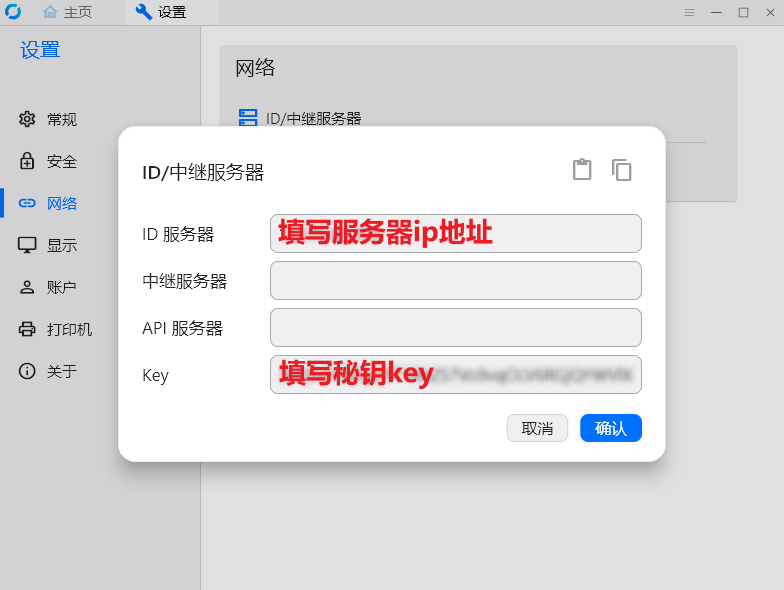
在rustdesk客户端的 设置 -> 网络 -> ID/中继服务器中配置如下:

  • ID服务器:填写服务器ip地址
  • KEY:在data/id_ed25519.pub中获取

1

root@VM-12-5-debian:~/docker-compose/rustdesk# cat data/id_ed25519.pub

2

38K9vF4SZqxxxxxxxxxxxxxxxxxxxxxxxWVlX3CuHs= #复制这一段文本填写到KEY中
default

到这里就算配置完成了,比向日靠流畅多了。