人生苦短,我用Python![1]
这个系列是一个帮助零基础的人入门编程的教程,本文承接上一篇,介绍Python的另外两个重要的数据类型(字典dict和集合set)。另外,break, continue, 注释和IO也会在本文的下半部分介绍。
上一篇 介绍了集合数据类型中的字符串、列表和元组,在这篇我们将补齐剩下的两个(字典和集合)。
集合(set)是一个无序并且包含不重复元素的数据类型。
创建一个集合:
空集合: a_set = set()
带有元素的集合: a_set = {"one", 2}
列表转换为集合: a_set = set([1,2,2,3]) 结果为 {1,2,3}
由于集合是无序排列的,所以集合不能通过下标读写。
添加元素:
删除元素:
a_set.remove(item) 接受一个参数,从这个集合中删除它,如果没有这个元素会抛出KeyError异常a_set.discard(item) 和a_set.remove一样删除元素,但是不会抛出异常a_set.pop() 随意返回一个元素并从集合中删除a_set.clear() 删除全部元素
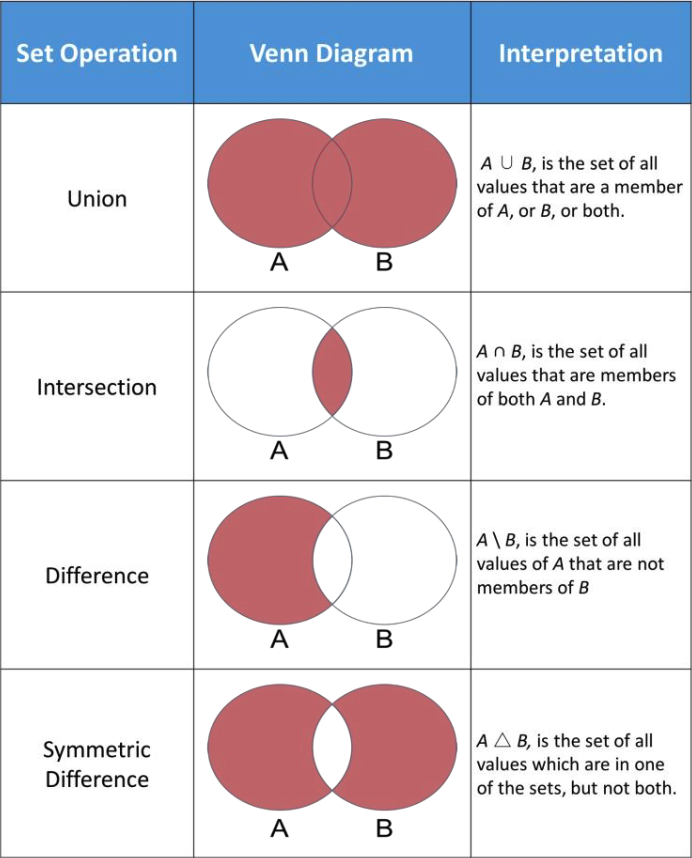
集合的数学操作:
并集(Union)
a_set.union(b_set)a_set | b_set
交集(Intersection)
a_set.intersection(b_set)a_set & b_set
差集(Difference)
a_set.difference(b_set)a_set - b_set
对称差(Symmetric difference)
a_set.symmetric_difference(b_set)a_set ^ b_set
一些集合操作的例子
1
2
3
4
5
6
7
8
9
10
11
12
13
14
15
16
17
first_set = set () print (len (first_set)) first_set.add("a" ) first_set.add("b" ) first_set.add("b" ) print (first_set) char_list = ["b" , "c" , "c" , "d" , "d" , "e" ] second_set = set (char_list) print (char_list) intersection = first_set * second_set print (intersection) union = first_set | second_set print (union)
集合和列表的不同
更多的集合方法可以参考Python官方文档 [2]
字典(dict)是一种数据结构将key(键)映射为value(值)。其中key必须是不可变类型,value可以是任何类型。每一个元素可以表示为key: value。
创建一个字典:
空字典: a_dict = {}
带有元素的字典: a_dict = {"one": 1, "two": 2}
从键值对元组列表中创建: a_dict = dict([("a", 1), ("b", 1)])
添加元素:
a_dict[new_key] = new_value如果new_key已经存在于这个字典中了,则会用new_value覆盖原先的value。
删除元素:
检查一个key是否在字典中:
a_key in a_dict 或者 a_key not in a_dict
一些字典操作的例子
1
2
3
4
5
6
7
8
9
10
11
12
13
14
15
16
17
18
19
20
simple_dict = {} print (len (simple_dict)) simple_dict = {"a" : 0 , "b" : 0 , "c" : 0 } print (simple_dict["b" ]) simple_dict["b" ] = 1 print (simple_dict["b" ]) simple_dict["d" ] = 2 print (simple_dict) item_list = list (simple_dict.items()) print (item_list[1 ]) keys_list = list (simple_dict.keys()) print (key_list[3 ]) del simple_dict["d" ] print (simple_dict)
通过for循环遍历整个字典
1
2
3
simple_dict = {"a" : 0 , "b" : 1 , "c" : 2 } for key, value in simple_dict.items(): print (key, value)
更多的字典方法可以参考Python官方文档 [3]
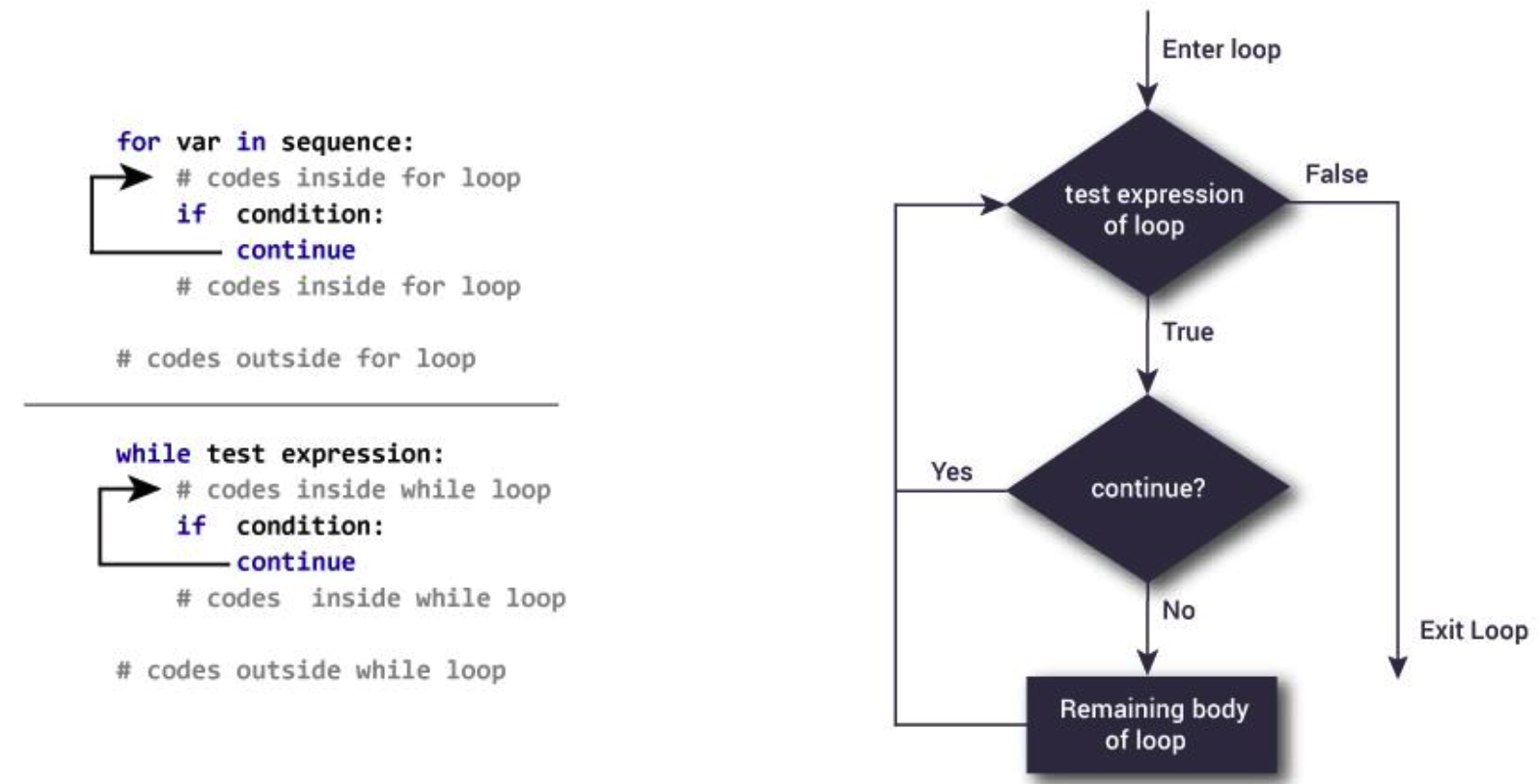
Python中的continue关键字用于跳过循环中的这一轮,并且开始下一轮循环。
从图中可以看到经过了continue语句,代码会直接进入下轮循环。
举一个使用continue的例子。有一个字符串和一个字符,想要从字符串中删除全部这个字符。
1
2
3
4
5
6
7
8
a_str = "helloWorld" char_to_remove = "e" new_str = "" for char in a_str: if char == char_to_remove: continue new_str += char print (new_str)
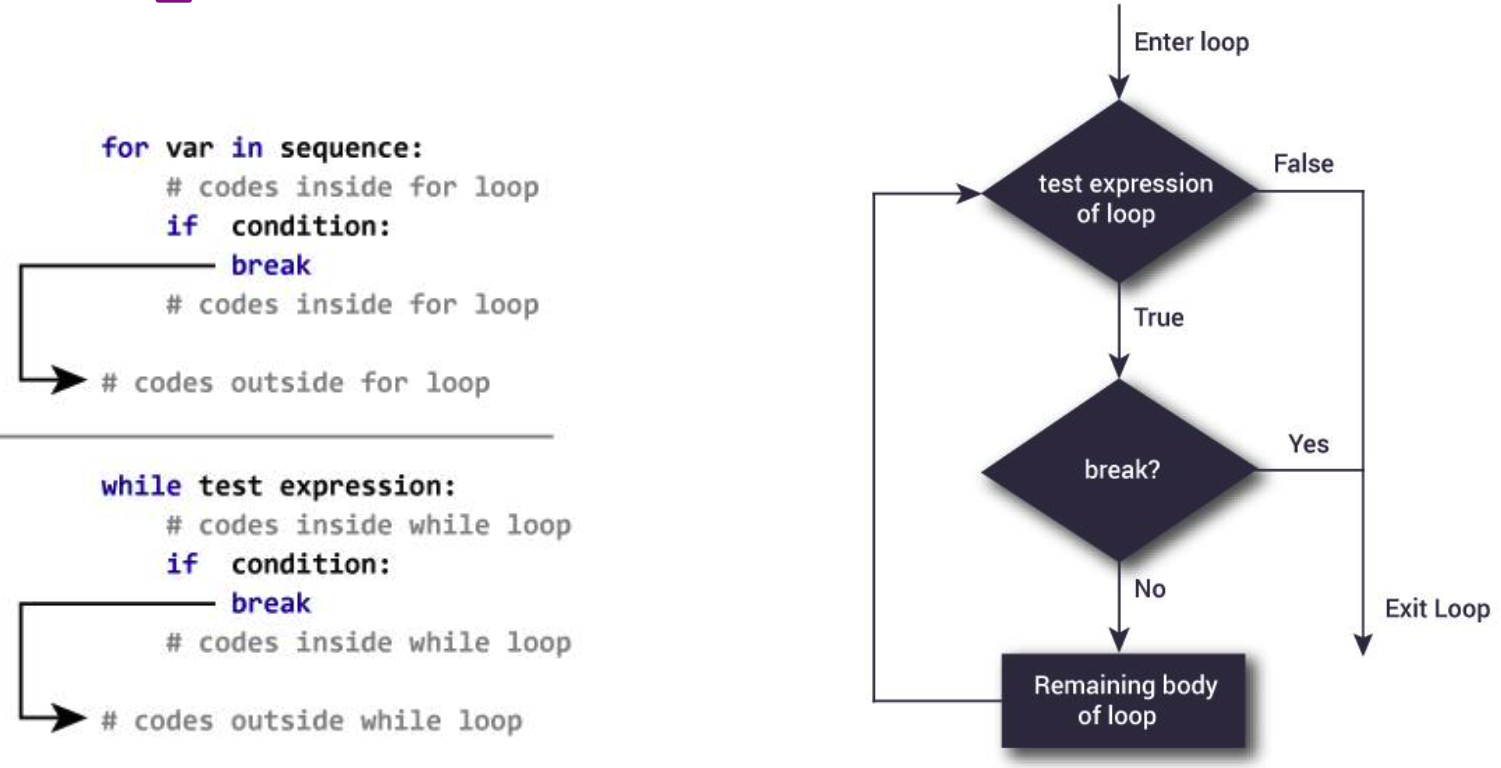
Python中的break关键字将会直接跳出这个循环。
举一个使用break的例子,比如我们想要在一个列表中找到一个元素。当然这个例子可以用in表达式,但是这次用for循环和break来试试。
1
2
3
4
5
6
number_list = [3 , 11 , 9 , 7 , 6 , 5 , 100 , 20 , 9 , 6 , 3 , 1 , 0 ] target = 9 for number in number_list: if number == target: print ("The target number is in the list" ) break
当使用break和continue的时候,请多注意缩进。通过缩进,我们可以清楚的找到我们想要跳出的是哪个循环。
1
2
3
4
5
6
7
a_list = [1 , 2 , 3 ] b_list = [2 , 5 , 6 ] for itemA in a_list: for itemB in b_list: if itemA == itemB: break print (itemA, itemB)
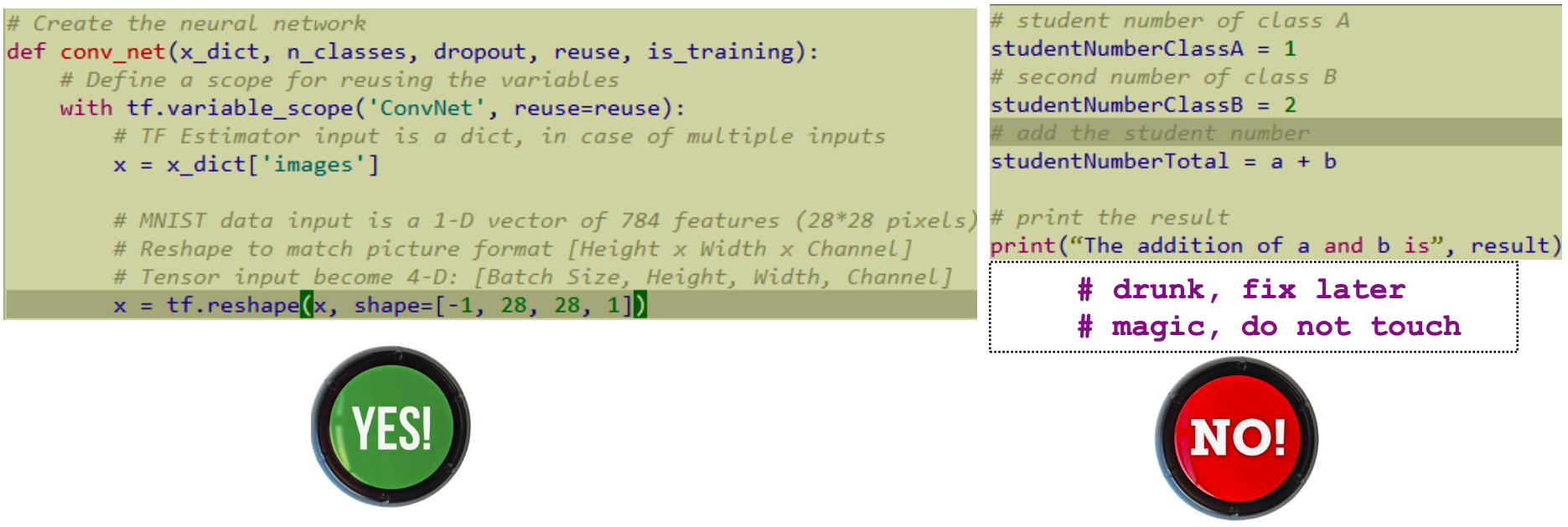
无论是使用什么编程语言写什么东西,注释(comment)都是极为重要的。它既可以提升代码的可读性 ,也可以解释此处代码的功能和含义。如果没有注释,将会极大的打击阅读别人代码的热情,同时在自己想要回顾自己的代码的时候忘了在写什么。
Python中的注释:
1
2
3
4
5
6
a = 1 b = 2 result = a + b print ("The addition of a and b is" , result)
行内注释:
在代码的同一行写上注释
r = 1 # radius of the circle
单行注释
块注释
多行注释,使用三引号"""
一般多用于代码的开头介绍,或者函数和类的介绍1 2 3 4 5 6 """ Program description: This code is for ... Author: ... First created: ... Last modified: ... """
Python官方PEP8 [4] 和Google代码风格 [5] 都有对Python注释的写法提供了风格指南。
请注意,注释是为了强调和理解,不是直接进行冗长和模糊的翻译。
开发者最讨厌的两个事情:
讨厌在自己的代码中写注释
讨厌别人的代码中没有注释
输入(Input)和输出(Output)是程序中的两个重要部分。
输入是需要用于解决某个特定计算任务的数据。
输出是用于展示计算结果。
1 2 3 4 a = 1 b = 2 result = a + b print ("The addition of a and b is" , result)
1 2 3 4 a = int (input ("Enter the first number: " )) b = int (input ("Enter the second number: " )) result = a + b print ("The addition of a and b is" , result)
input用于从键盘接受输入的数据。
input("prompt statement:") 或者 input()input是一个Python的内置函数,它的返回值是str。如果想要转换为int可以使用int()函数。
标准输出是用于在控制台或者终端中显示一些信息,比如说计算结果。
print函数:
print("output string")默认情况下是用"\n"换行符结尾,所以每一个print语句会显示为一行。
如果想要用print函数同时显示多个参数,有两种办法,
在print中使用两个参数
print("The addition of a and b is", result)
�将两个参数重新拼接为一个字符串
print("The addition of a and b is " + str(result))注意,这里的+是用于拼接字符串,是Python内置的功能,加号两侧都需要是字符串类型。
在上一章 中,我们使用了字符串和列表给俳句做字符统计。这次我们学习了字典和集合之类的更加高级的数据类型,就可以对上一章节的代码做改进。
先来回顾一下上一章我们是怎么写的,
1 2 3 4 5 6 7 8 9 10 11 list_of_strings = ["This blog teaches code" , "Code that will be useful soon" , "Let me try this out" ] haiku = list_of_strings[0 ] + '\n' + list_of_strings[1 ] + '\n' + list_of_strings[2 ] items = ['a' ,'b' ,'c' ,'d' ,'e' ,'f' ,'g' ,'h' ,'i' ,'j' ,'k' ,'l' ,'m' ,'n' ,'o' ,'p' ,'q' ,'r' ,'s' ,'t' ,'u' ,'v' ,'w' ,'x' ,'y' ,'z' ] count = [0 ] * 26 for character in haiku: if character.lower() in items: count[items.index(character.lower())] += 1
在上一章节中,熟悉了for循环的使用,我们通过它遍历每一个字符来进行统计。以后循环结构将会非常常用。
很多人可能已经意识到了,对每个字符进行计数的这个需求非常适合字典。所以我们需要把上一章实现的列表方案升级到字典。我们可以使用zip()函数对把两个列表打包成一个二元元组的列表,就可以轻松的转换为字典了。来试试看吧。
1 2 3 4 5 6 7 8 9 10 dictionary = {} zipped_haiku = zip (items, count) dictionary = dict (list (zipped_haiku)) print (dictionary['a' ])
这样就可以很容易地更新每个字符的计数,而不必使用search来找到两个列表的索引。
1 2 3 4 5 6 7 8 9 10 11 12 13 items = ['a' ,'b' ,'c' ,'d' ,'e' ,'f' ,'g' ,'h' ,'i' ,'j' ,'k' ,'l' ,'m' ,'n' ,'o' ,'p' ,'q' ,'r' ,'s' ,'t' ,'u' ,'v' ,'w' ,'x' ,'y' ,'z' ] count = [0 ] * 26 quote = "Life is short You need Python" for character in quote: if character.lower() in items: count[items.index(character.lower())] += 1 zipped_tuple = zip (items, count) new_dictionary = dict (list (zipped_tuple)) print (new_dictionary)
建立了统计字符计数的字典之后,我们现在就可以分析这些文本了。两个集合set可以从刚才的字典创建出来。我们需要使用两个循环去把字典中出现频率大于1的字符添加到集合中。
1 2 3 4 5 6 7 8 9 10 11 haiku_set = set () quote_set = set () for character in items: if dictionary[character] > 0 : haiku_set.add(character) if new_dictionary[character] > 0 : quote_set.add(character)
使用这两个集合,运行下面的代码,它将执行一些测试,以找到两个文本之间的比较。完成之后,尝试使用其他两个文本,看看是否有任何差异,甚至添加更多的测试。如果在添加字符时设置一个阈值(比如出现超过10次的字符,或者恰好出现5次的字符,等等),那么可能会看到更加有趣的结果。
1 2 3 4 5 6 7 8 9 10 11 12 13 14 15 16 17 18 19 20 21 22 23 24 25 26 27 28 29 30 31 32 33 34 set_1 = haiku_set set_2 = quote_set if set_1 <= set_2: if set_1 < set_2: print ("All characters in Set 1 are in Set 2, but not every character in Set 2 is in Set 1." ) print ("The extra characters in Set 2 are:" ) print (set_2.difference(set_1)) else : print ("All characters in Set 1 are in Set 2." ) else : print ("Not all characters in Set 1 are in Set 2." ) print ("Characters in Set 1 that are not in Set 2 are:" ) print (set_1.difference(set_2)) if set_1 >= set_2: if set_1 > set_2: print ("All characters in Set 2 are in Set 1, but not every character in Set 1 is in Set 2." ) print ("The extra characters in Set 1 are:" ) print (set_1 - set_2) else : print ("All characters in Set 2 are in Set 1." ) else : print ("Not all characters in Set 2 are in Set 1." ) print ("Characters in Set 2 that are not in Set 1 are:" ) print (set_2 - set_1)
这是一个让我们开始考虑这些数据类型的可能性的简单例子。这些例子中没有使用的最后一种数据类型是元组tuple。可以想想元组的一些性质,以及如何将其应用到实际的例子中。
[1] B. Eckel, “sebsauvage.net - Python”, Sebsauvage.net, 2021. [Online]. Available: http://sebsauvage.net/python/. [2] “Built-in Types — Python 3.9.1 documentation”, Docs.python.org, 2021. [Online]. Available: https://docs.python.org/3/library/stdtypes.html#set-types-set-frozenset. [3] “Built-in Types — Python 3.9.1 documentation”, Docs.python.org, 2021. [Online]. Available: https://docs.python.org/3/library/stdtypes.html#mapping-types-dict. [4] "PEP 8 -- Style Guide for Python Code", Python.org, 2021. [Online]. Available: https://www.python.org/dev/peps/pep-0008/#comments. [5] "styleguide", styleguide, 2021. [Online]. Available: https://google.github.io/styleguide/pyguide.html#38-comments-and-docstrings.