人生苦短,我用Python![1]
这次的主要内容主要是介绍Python中的过程分解和文件IO。过程分解包括了函数(function),模块(module)。而文件IO主要是介绍使用Python打开文件并进行读写操作。
过程分解是一种解决编程问题的策略。它将一个复杂的问题分解为一个一个的小问题,这些小问题更简单,更独立,并且更易于管理,然后通过某种方式来解决这些小问题。通过使用这种方法,编程也会变得简单,更容易理解,更方便做规划和实现。
Fig. 1. 台式机的硬件可拆分也是一种分解思维. Adapted from [2]
要合理的分解这些组件,需要清晰的认识每一个部件的输入和输出。在Python中,过程分解是主要由函数(Function),模块(Module)和类(Class)组成。其中最主要的关键,是提升整体代码的复用性(Reusability)。
函数(Function)是Python中的重要组成部分。函数是一种独立的语句集合,是为完成某一个特定的任务,解决一个特定的问题而定义的。
它可以使用任意数量的参数作为输入,并且返回任意数量任意类型的值。函数需要先创建,然后再进行调用。
函数是对过程或者功能的一种抽象。用户只需要知道怎么把函数用起来去解决问题,而不需要知道函数内部是怎么工作的。
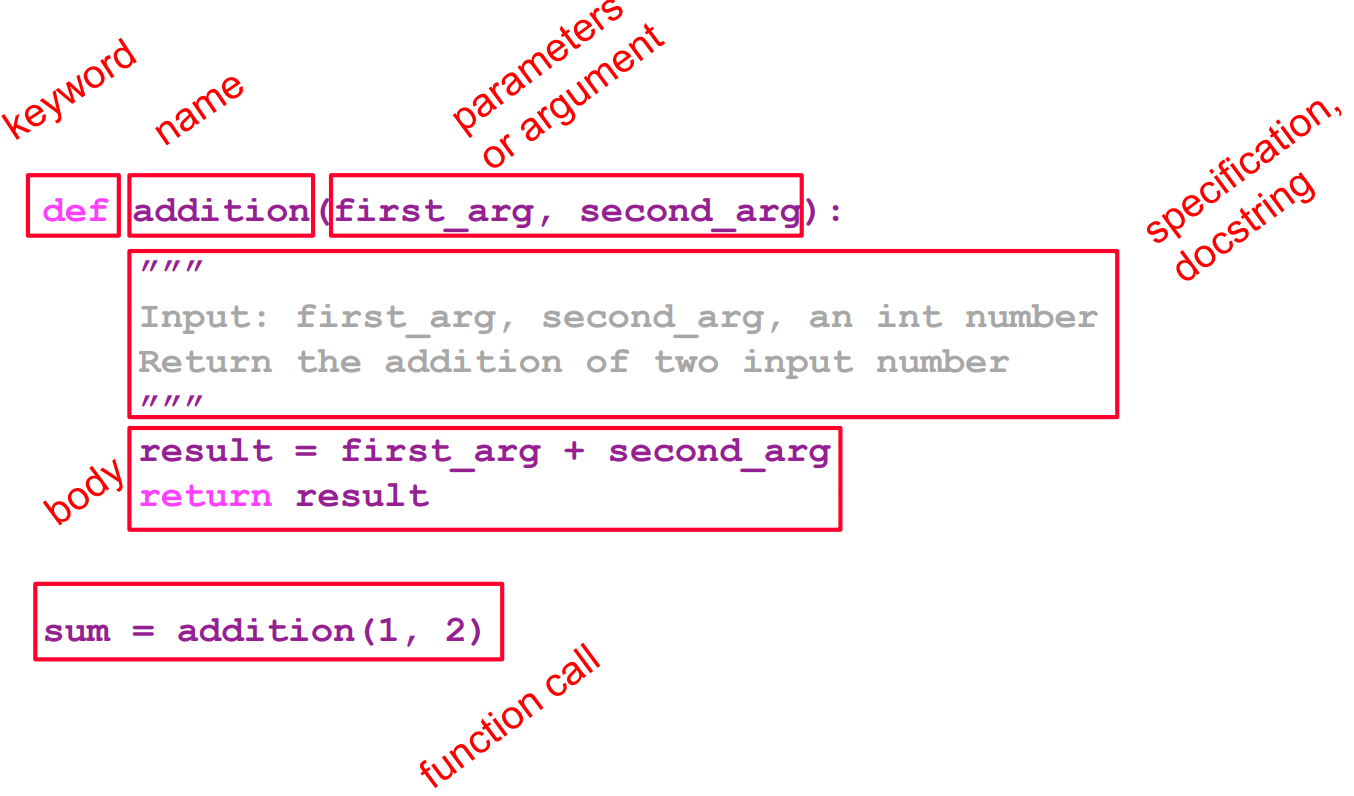
在Python中,函数是使用关键字def定义的。在函数的开头,需要定义函数的名称和参数(Argument)。函数的名称,参数和返回值构成了函数签名。
函数的组成部分:
函数名
参数(0或多个)
文档注释(可选)
函数体
返回值(可选)
函数的命名规范:
与变量名相同
使用camelCase或者underscore
必须以字母或者下划线开头,并且只能包含字母、数字或者下划线
Fig. 2. 创建一个函数.
定义一个函数(有参数)
1
2
3
def addition_func (first_arg, second_arg ): result = first_arg + second_arg return result
定义一个函数(默认参数)
1
2
3
def addition_func (first_arg=0 , second_arg=0 ): result = first_arg + second_arg return result
调用函数:
位置参数(不带关键字): 得按照函数定义的顺序来调用
关键字参数: 使用关键字来调用1 2 3 4 5 6 7 8 9 10 11 sum = addition_func(10 , 8 )print ("The result is" , sum )sum = addition_func(second_arg=8 )print ("The result is" , sum )sum = addition_func(2 , second_arg=8 )print ("The result is" , sum )
return:
return只能用在函数内部,否则会有语法错误在一个函数中只会运行一次return
在函数里return后面的代码将不会被运行
这个return的值将会赋予函数的调用者
print:
print可以用在函数外部,也可以用在函数内部可以在函数内部执行多次
在函数里print后面的代码可以继续运行
这个print的值将会输出至控制台
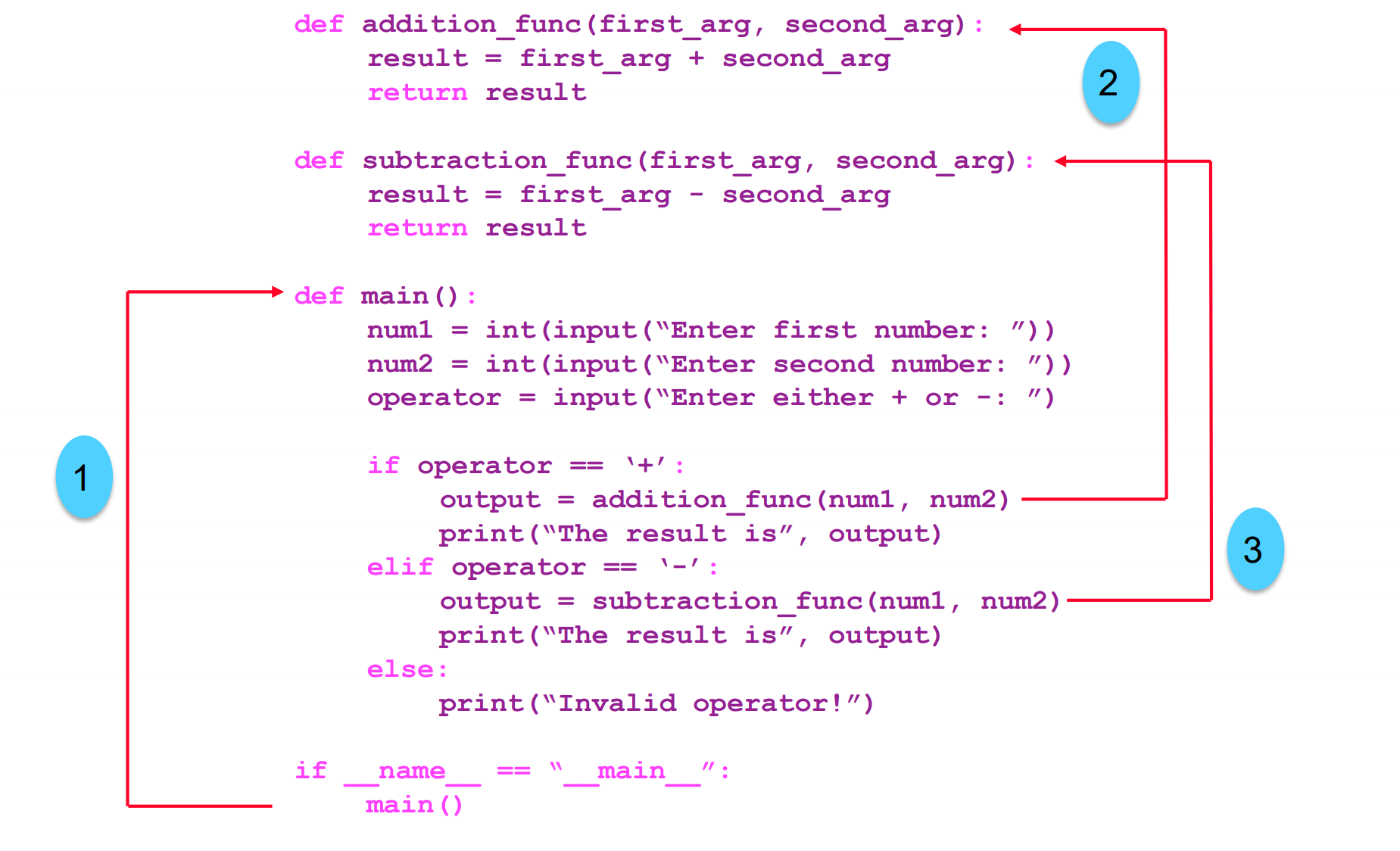
main函数是一个特殊的函数,它指示程序的执行流程,定义了程序的入口点。
1 2 3 4 5 6 7 8 9 10 11 12 13 14 15 16 def function1 (): ... def function2 (): ... def function3 (): ... def main (): function2() function3() function1() if __name__ == "__main__" : main()
Fig. 3. 函数的执行流程.
Python中的模块(module)是一个包含了定义和语句的Python源代码文件。模块可以被其他程序引用,以使用它们中的函数,类,以及变量。
为了在另一个Python程序中使用别的模块(.py文件):
使用import关键字
语法:
import <module_name>import <module_name> as alias
使用已导入模块中的某一个函数:
语法:
<module_name>.<function_name> <alias>.<function_name>
1 2 3 4 5 6 7 8 9 10 11 12 13 14 def addition_func (first_arg, second_arg ): result = first_arg + second_arg return result def subtraction_func (first_arg, second_arg ): result = first_arg - second_arg return result def multiplication_func (first_arg, second_arg ): result = first_arg * second_arg return result def division_func (first_arg, second_arg ): result = first_arg // second_arg return result
1 2 3 4 5 6 7 8 9 10 11 12 13 14 15 16 17 18 19 20 21 22 23 import arithmetic as armdef main (): num1 = int (input ("Enter first number: " )) num2 = int (input ("Enter second number: " )) operator = input ("Enter +, -, *, or /: " ) if operator == "+" : output = arm.addition_func(num1, num2) print ("The result is" , output) elif operator == "-" : output = arm.subtraction_func(num1, num2) print ("The result is" , output) elif operator == "*" : output = arm.multiplication_func(num1, num2) print ("The result is" , output) elif operator == "/" : output = arm.division_func(num1, num2) print ("The result is" , output) else : print ("Invalid operator!" ) if __name__ == "__main__" : main()
DRY法则: 不要重复你的代码(Don’t Repeat Yourself)
将复杂任务分解为一系列简单任务
提升代码的可读性
代码复用
打开文件: open(file, mode)
创建一个文件句柄(对文件进行各种操作的对象)
两个关键的参数:
file: 文件路径(可以是绝对路径,也可以是相对路径)mode: 文件的操作模式(如下所示)[3]
在中文的Windows系统中,可能需要使用encoding="UTF-8"来指定文件的编码方式,否则可能会出现乱码。因为文件的写入格式和读取格式需要相同。
mode
含义
"r"读取(默认)
"w"覆盖写入
"x"新建文件并写入
"a"在文件末尾追加写入
"b"二进制
"+"打开文件用于更新(可读可写)
读取一个文件: input_handle = open(file, "r")
input_handle.readline(): 从文件中读取一行(包含\n)for line in input_handle: 遍历文件中的每一行input_handle.readlines(): 读取整个文件,返回一个列表,每个元素为一行input_handle.read(): 读取整个文件,返回一整个字符串
关闭一个文件: input_handle.close()
1 2 3 4 5 6 7 8 9 10 11 file_handle = open ("input_file.txt" , "r" ) list_of_lines = [] for line in file_handle: list_of_lines.append(line) print (list_of_lines)file_handle.close()
也可以使用with关键字
1 2 3 4 5 6 7 8 9 with open ("input_file.txt" , "r" ) as file_handle: list_of_lines = [] for line in file_handle: list_of_lines.append(line) print (list_of_lines)
打开一个文件用于写入:
open(file, "w"): 覆盖原有文件中的内容open(file, "a"): 在文件的末尾追加写入
写入文件:
file_handle.write(the_line): 写入一行注意: \n作为换行符,需要手动添加到每行的末尾。
1 2 3 4 5 6 7 8 9 10 11 12 input_handle = open (input_file, "r" ) output_handle = open (output_file, "w" ) for line in input_handle: line = line.lower() output_handle.write(line) input_handle.close() output_handle.close()
也可以使用with关键词
1 2 3 4 5 with open (input_file, "r" ) as input_handle, open (output_file, "w" ) as output_handle: for line in input_handle: line = line.lower() output_handle.write(line)
这次我们来试试看使用学到的文件IO和Python函数的知识。使用Jupyter Notebook来试试看吧。
我们有一个文本文件simple_file.txt,里面包含了以下内容。
1 2 3 4 1 2 five 5 7 one 6 9 three 9 8 four
文件的每一行中包含三个值,前两个是数字,第三个是表示数字的英文字符串,比如说”one”。我们需要做的是将第三个值转换为数字,并且将整个文件的结果写入到output_file.txt里,我们只拿1~5作为例子。
1 2 3 4 5 6 7 8 9 10 11 12 13 14 15 16 17 18 19 20 21 with open ("simple_file.txt" ,"r" ) as input_handle, open ("output_file.txt" ,"w" ) as output_handle: for line in input_handle: line = line.strip("\n" ) line_number = line.split(" " ) if line_number[2 ] == "one" : line_number[2 ] = "1" elif line_number[2 ] == "two" : line_number[2 ] = "2" elif line_number[2 ] == "three" : line_number[2 ] = "3" elif line_number[2 ] == "four" : line_number[2 ] = "4" elif line_number[2 ] == "five" : line_number[2 ] = "5" new_line = line_number[0 ] + " " + line_number[1 ] + " " + line_number[2 ] + "\n" output_handle.write(new_line)
这里有两个文件,一个是student_data.txt,里面包含着学生的ID,名字和课程。如下所示。
1 2 3 4 5 1,tom,clayton 2,alex,caulfield 3,sarah,clayton 4,philip,clayton 5,david,caulfield
另一个文件是enrollment.txt,包含着学生选课的记录,每一行分别是学生ID和课程名称。
1 2 3 4 5 6 7 8 9 10 1 mathematics 1 english 2 programming 3 mathematics 3 physics 4 mathematics 4 chemistry 4 literature 5 english 5 history
我们的任务是建立一个基础的查询系统,这个系统通过输入学生的名字,先判断学生在不在这个系统中,如果在,再输出学生选的课程列表。
1 2 3 4 5 6 7 8 9 10 11 12 13 14 15 16 17 18 19 20 def query (student_name ): unit_list = [] with open ("student_data.txt" ,"r" ) as student_file, open ("enrollment.txt" ,"r" ) as enrollment_file: for student_line in student_file: student_line = student_line.strip("\n" ) student_list = student_line.split("," ) if student_name in student_list: student_no = student_list[0 ] for enrollment_line in enrollment_file: enrollment_list = enrollment_line.split(" " ) if student_no in enrollment_list: unit_list.append(enrollment_list[1 ].strip("\n" )) if unit_list == []: print ("Cannot find the student" ) return unit_list name = input ("enter the student name. " ) print (query(name))
在求解一个数学表达式的时候,括号代表着计算的更高优先级。比如说:
$$(5+3)+((6-9)/(5+7))$$
其中$(6-9)$和$(5+7)$会在除法运算之前计算。
为了使这个能正常工作,我们需要检查括号是否匹配。匹配的括号意思是,对于每一个左括号都有一个对应的右括号,而且括号也需要正确嵌套。例如,以下是正确的括号字符串:
()()()()()(()())((()))
而以下的字符串是错误的:((()()()()(()((()))(
区分正确的括号匹配是编程语言中的重要部分。编写一个程序,从左到右读取一串括号,并检查括号是否平衡。提示:可以使用一个叫做栈(Stack)的数据结构。
1 2 3 4 5 6 7 8 9 10 11 12 13 14 15 16 def check_for_balanced_parenthesis (string_of_parenthesis ): stack = [] for char in string_of_parenthesis: if char == '(' : stack.append(char) elif char == ')' : if len (stack) == 0 : return False else : stack.pop() if len (stack) == 0 : return True else : return False check_for_balanced_parenthesis(input ("Please enter a string to check parenthesis balance." ))
像这样将一段逻辑包装在代码中,可以方便以后在其他地方进行调用,提高代码的可读性和复用性。
[1] B. Eckel, “sebsauvage.net - Python”, Sebsauvage.net, 2021. [Online]. Available: http://sebsauvage.net/python/. [2] A. Bell, "Standard 1 - Objective 1: Demonstrate understanding of computer hardware, peripherals and troubleshooting.", slideplayer, 2021. [Online]. Available: https://slideplayer.com/slide/5809212/. [3] "Python3 File 方法 | 菜鸟教程", Runoob.com, 2021. [Online]. Available: https://www.runoob.com/python3/python3-file-methods.html.