





Today we are releasing Deno 1.8.0. This release contains a massive amount of new features and stabilizations:
Intl
APIs are available out of the boxlcov reportsIf you already have Deno installed you can upgrade to 1.8 by running
deno upgrade. If you are installing Deno for the first time, you can use one
of the methods listed below:
curl -fsSL https://deno.land/x/install/install.sh | sh


iwr https://deno.land/x/install/install.ps1 -useb | iex


brew install deno


scoop install deno


choco install deno
The WebGPU API gives developers a low level, high performance, cross architecture way to program GPU hardware from JavaScript. It is the effective successor to WebGL on the Web. The spec has not yet been finalized, but support is currently being added to Firefox, Chromium, and Safari; and now also in Deno.
This API gives you access to GPU rendering and general purpose GPU compute right from within Deno. Once finished, stabilized, and unflagged, this will provide a portable way to access GPU resources from web, server, and developer machine.
GPUs allow programmers to make some numerical algorithms highly parallel. This is useful beyond rendering graphics and games. Effective use of GPUs in Machine Learning has enabled more complex neural networks - what is called Deep Learning. The rapid progress in computer vision, translation, image generation, re-enforcement learning, and more all stem from making effective use of GPU hardware.
These days, most neural networks are defined in Python with the computation offloaded to GPUs. We believe JavaScript, instead of Python, could act as an ideal language for expressing mathematical ideas if the proper infrastructure existed. Providing WebGPU support out-of-the-box in Deno is a step in this direction. Our goal is to run Tensorflow.js on Deno, with GPU acceleration. We expect this to be achieved in the coming weeks or months.
Here is a basic example that demonstrates accessing an attached GPU device, and reading out the name and supported features:
const adapter = await navigator.gpu.requestAdapter();
if (adapter) {

  console.log(`Found adapter: ${adapter.name}`);
  const features = [...adapter.features.values()];
  console.log(`Supported features: ${features.join(", ")}`);
} else {
  console.error("No adapter found");
}
Here is a little example that demonstrates the GPU rendering a simple red triangle on a green background using a render shader:
$ deno run --unstable --allow-write=output.png https://raw.githubusercontent.com/crowlKats/webgpu-examples/f3b979f57fd471b11a28c5b0c91d0447221ba77b/hello-triangle/mod.ts

Note the use of WebAssembly to write the PNG. For more examples visit this repository: https://github.com/crowlKats/webgpu-examples.
The final PR weighed in at a whopping 15.5k lines of code, and took a whole 5 months to merge after opening. Many thanks to crowlKats who led the integration of WebGPU into Deno. We would also like to thank to all contributors to the wgpu and gfx-rs projects that underpin the WebGPU implementation in Deno. Special thanks also to kvark, editor on the WebGPU spec, and the lead developer of wgpu and gfx-rs, for the great guidance while implementing the WebGPU API.
ICU support has been the second most requested feature in Deno repository. We’re happy to announce that Deno v1.8 ships with full ICU support.
All JavaScript APIs depending on ICU should now match browser APIs.
Try it in the REPL:
$ deno
Deno 1.8.0
exit using ctrl+d or close()
> const d = new Date(Date.UTC(2020, 5, 26, 7, 0, 0));
undefined
> d.toLocaleString("de-DE", {
    weekday: "long",
    year: "numeric",
    month: "long",
    day: "numeric",
});
"Freitag, 26. Juni 2020"
This release expands our coverage infrastructure to add some great new capabilities. The main change in this release is that coverage handling is now split into coverage collection and coverage reporting.
Previously coverage collection and reporting would all happen in a single
subcommand, by specifying the --coverage flag when starting deno test. Now
the --coverage flag for deno test takes an argument - a path to a directory
where to store the collected profiles. This is the coverage collection. In a
second step you now call deno coverage with the path to the directory storing
the coverage profiles. This subcommand can either return a report as pretty text
output right on the console, or it can output an
lcov file (--lcov
flag) for use with tools like genhtml, coveralls.io, or codecov.io.
We have been dogfooding this feature on
deno_std for a few days now. We upload
a coverage report to codecov.io for each commit. You can view these here
https://codecov.io/gh/denoland/deno_std. Adding this was trivial, with only a 10
line change to our GitHub Actions workflow:
- name: Run tests
-        run: deno test --unstable --allow-all
+        run: deno test --coverage=./cov --unstable --allow-all
+
+      - name: Generate lcov
+        run: deno coverage --unstable --lcov ./cov > cov.lcov
+
+      - name: Upload coverage
+        uses: codecov/codecov-action@v1
+        with:
+          name: ${{ matrix.os }}-${{ matrix.deno }}
+          files: cov.lcov
For an example of integration with coveralls.io, see this repository: https://github.com/lucacasonato/deno_s3
Import maps were stabilized in Chrome 89,
and following that our implementation has been updated to match the latest
revision of the specification and is now also considered stable. This means that
the --unstable flag is no longer required when using --import-map.
$ deno run --import-map=./import_map.json ./mod.tsAdditionally the --import-map flag now accepts not only local paths, but also
URLs, allowing you to load import maps from remote servers.
$ deno run --import-map=https://example.com/import_map.json ./mod.tsImport maps allow a user to use so-called “bare” specifiers for dependencies, instead of relative or absolute file / http URLs:
import * as http from "std/http";
{
  "imports": {
    "std/http": "https://deno.land/std@0.85.0/http/mod.ts"
  }
}
Users should keep in mind that import maps are not composable: this means
you can only provide a single import map to deno run / deno test. Because of
this library authors should still use regular, non-bare specifiers (relative or
absolute file / http URLs); otherwise the users of the library will manually
need to add your libraries (and your libraries dependencies) bare specifiers
into their import map.
A much more useful feature for import maps is ability to remap regular specifiers to completely different ones. For example if you have some broken dependency that is deeply nested in your module graph you can replace it with fixed version before it’s fixed upstream, or if you use a build process that adds hashes to your modules filenames, you can refer to the file without hashes in your source code and remap the specifiers only at runtime using an import map.
For more examples and a detailed explanation refer to the specification.
Not all code is openly available on the public internet. Previously Deno had no capability to download code from a server that required authentication. In this release we have added the ability for users to specify per domain auth tokens that are used when fetching modules for the first time.
To do this the Deno CLI will look for an environment variable named
DENO_AUTH_TOKENS to determine what authentication tokens it should consider
using when requesting remote modules. The value of the environment variable is
in the format of a n number of tokens delimited by a semi-colon (;) where each
token is in the format of {token}@{hostname[:port]}.
For example a single token for would look something like this:
DENO_AUTH_TOKENS=a1b2c3d4e5f6@deno.landAnd multiple tokens would look like this:
DENO_AUTH_TOKENS=a1b2c3d4e5f6@deno.land;f1e2d3c4b5a6@example.com:8080When Deno goes to fetch a remote module, where the hostname matches the hostname
of the remote module, Deno will set the Authorization header of the request to
the value of Bearer {token}. This allows the remote server to recognize that
the request is an authorized request tied to a specific authenticated user, and
provide access to the appropriate resources and modules on the server.
For a more detailed usage guide and instructions for configuring your environment to pull from private GitHub repos, see the related manual entry.
Deno.testThe Deno.test API already has
two sanitizers
that help ensure that your code is not “leaking” ops or resources - ie. that all
open file/network handles are closed before test case ends, and that there are
no more pending syscalls.
Deno 1.8 adds a new sanitizer that ensures that tested code doesn’t call
Deno.exit(). Rogue exit statements can signal false positive test results and
are most often misused or were forgotten to be removed.
This sanitizer is enabled by default for all tests, but can be disabled by
setting the sanitizeExit boolean to false in the test definition.
Deno.test({
  name: "false success",
  fn() {
    Deno.exit(0);
  },
  sanitizeExit: false,
});


Deno.test({
  name: "failing test",
  fn() {
    throw new Error("this test fails");
  },
});
You can run this script yourself:
deno test https://deno.land/blog/v1.8/exit_sanitizer.ts.
Deno.permissions APIs are now stableDeno’s security model is based on permissions. Currently these permissions can only be granted when the application is started. This works well for most scenarios, but in some cases it is a better user experience to request / revoke permissions at runtime.
In Deno 1.8 there is now a stable API to query, request, and revoke
permissions. These APIs are contained in the Deno.permissions object. Here is
an example of how this works:
function homedir() {
  try {
    console.log(`Your home dir is: ${Deno.env.get("HOME")}`);
  } catch (err) {
    console.log(`Failed to get the home directory: ${err}`);
  }
}


homedir();

const { granted } = await Deno.permissions.request({ name: "env" });
if (granted) {
  console.log(`You have granted the "env" permission.`);
} else {
  console.log(`You have not granted the "env" permission.`);
}


homedir();

await Deno.permissions.revoke({ name: "env" });


homedir();
You can run this script yourself:
deno run https://deno.land/blog/v1.8/permission_api.ts.
Deno.link and Deno.symlink APIs have been stabilizedThis release brings stabilization four APIs related to symlinks:
Deno.linkDeno.linkSyncDeno.symlinkDeno.symlinkSyncBefore stabilization these APIs went through a security review and proper permissions are required to use them.
Deno.link and Deno.linkSync require both read and write permissions for both
source and target paths.
Deno.symlink and Deno.symlinkSync require write permissions for target path.
Deno.metricsAs Deno becomes more stable it is becoming more important have easy ways for
developers to instrument their applications. This starts at the lowest level, at
the runtime itself. In Deno all privileged operations in JS (the ones that go to
Rust), are done via a single central interface between JS and Rust. We call the
requests going over that interface “ops”. For example, calling Deno.open would
invoke the op_open_async op to the privileged side, which would return the
resource id of the opened file (or an error).
More than two years ago, on Oct 11, 2018 we added a way for you to view metrics
for all of the ops between Rust and JS: Deno.metrics. This API currently
exposes the count of started, and completed synchronous and asynchronous ops,
and the amount of data that has been sent over the ops interface. So far this
has been limited to combined data for all of the different ops. There was no way
to figure out which ops were invoked how many times, only all ops in general.
When running with --unstable, this release adds a new field to Deno.metrics
called ops. This field contains per op information about how often the API was
invoked and how much data has been transmitted over it. This allows for far more
granular instrumentation of the runtime.
Here is an example of this working:
$ deno --unstable
Deno 1.8.0
exit using ctrl+d or close()
> Deno.metrics().ops["op_open_async"]
undefined
> await Deno.open("./README.md")
File {}
> Deno.metrics().ops["op_open_async"]
{
  opsDispatched: 1,
  opsDispatchedSync: 0,
  opsDispatchedAsync: 1,
  opsDispatchedAsyncUnref: 0,
  opsCompleted: 1,
  opsCompletedSync: 0,
  opsCompletedAsync: 1,
  opsCompletedAsyncUnref: 0,
  bytesSentControl: 54,
  bytesSentData: 0,
  bytesReceived: 22
}
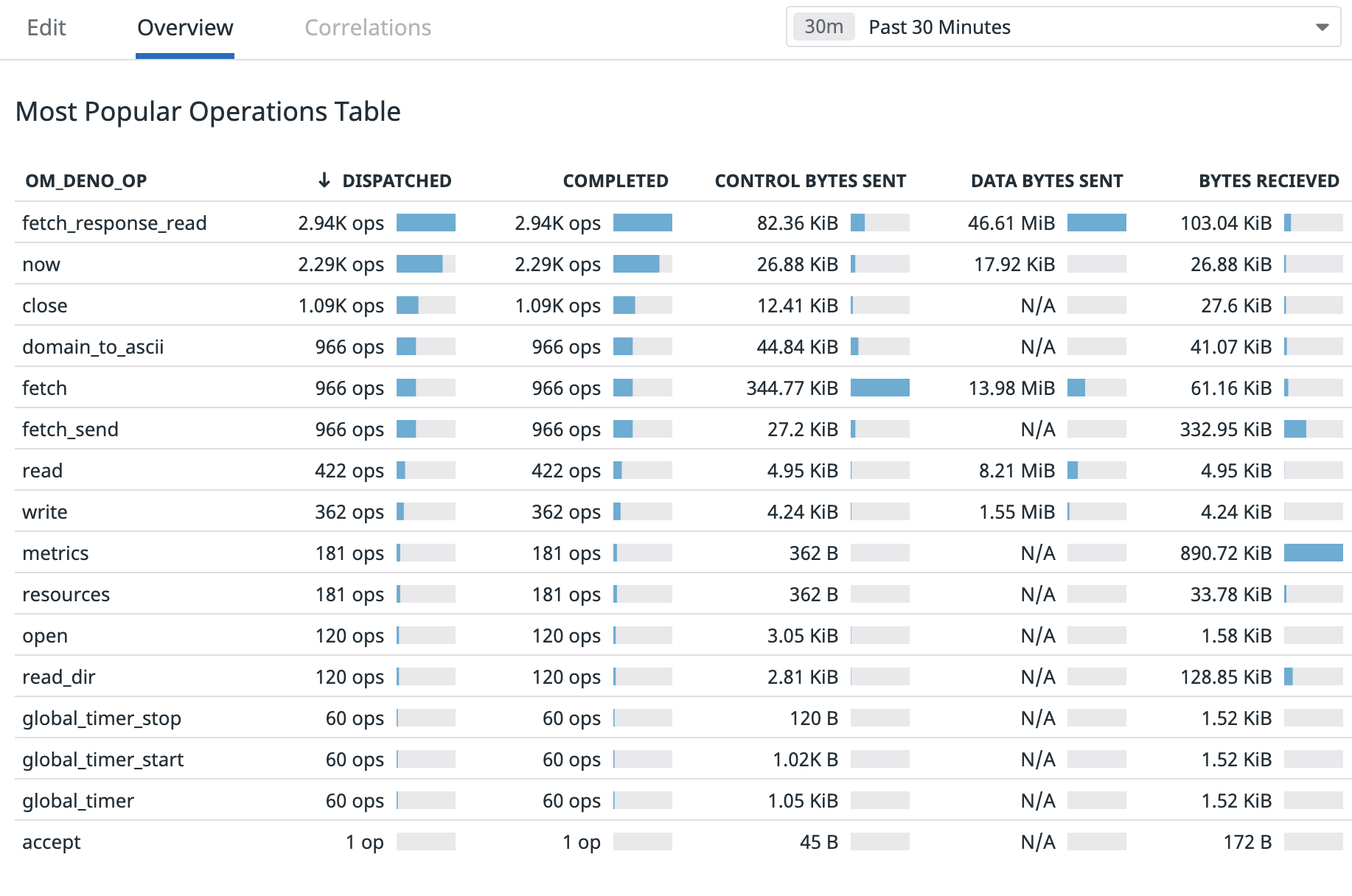
In an upcoming release this new information will be used by the async op
sanitizer in Deno.test to give more actionable errors when an async op is not
completed before test completion. We have already seen this feature being used
to instrument applications and pipe the data into monitoring software:
deno fmtdeno fmt can now format .json and .jsonc files. Just like with JS/TS, the
formatter will also format json and jsonc codeblocks inside of markdown files.
Deno.emitThe built-in bundler can now emit bundles in Immediately Invoked Function Expression (IIFE) format.
By default output format will still be esm, but users can change this by
setting the EmitOptions.bundle option to iife:
const { files } = await Deno.emit("/a.ts", {
  bundle: "iife",
  sources: {
    "/a.ts": `import { b } from "./b.ts";
        console.log(b);`,
    "/b.ts": `export const b = "b";`,
  },
});

console.log(files["deno:///bundle.js"]);
Results in:
(function() {
    const b = "b";
    console.log(b);
    return {
    };
})();
You can run this script yourself:
deno run --unstable https://deno.land/blog/v1.8/emit_iife.ts.
This is particularly useful for creating bundles for older browsers that do not support ESM.
deno lsp is now stableWe have been working on a replacement for our old editor integration for VS Code, the Deno extension for the last few months. The old extension only worked for VS Code, and the resolved types did not always match the ones in the Deno CLI.
In Deno 1.6 we released deno lsp in canary - a builtin language server for
Deno. LSP allows us to provide editor integration to all LSP capable editors
from just a single codebase. The built in language server is built on the same
architecture as the rest of the Deno CLI - it thus provides TypeScript
diagnostics the same way as the rest of the CLI.
Two weeks ago, in Deno 1.7.5 we stabilized deno lsp and switched our
official VS Code extension
to use it. So far we have gotten some great feedback, and will be working to
address all reported issues. If you are running into issues with the extension,
please report it on our issue tracker. We can not fix issues that we do not know
about.
In addition to the official VS Code integration, more community integrations
have been created that are built on deno lsp:
Deno 1.8 ships with the latest stable version of TypeScript.
For more information on new features in Typescript 4.2 see Announcing TypeScript 4.2
此内容由惯性聚合(RSS阅读器)自动聚合整理,仅供阅读参考。 原文来自 — 版权归原作者所有。