









To upgrade to Deno 2.3, run the following in your terminal:
If Deno is not yet installed, run one of the following commands to install or learn how to install it here.
curl -fsSL https://deno.land/install.sh | sh


iwr https://deno.land/install.ps1 -useb | iex
What’s New in Deno 2.3
Deno 2.3 adds new features for useful subcommands like deno compile and
deno fmt, support for using local npm packages, as well as several performance
improvements with deno install, LSP, and much more. Here’s the list of items
we think you’ll want to learn about the most:
- Improved
deno compile - Local npm packages
- Improvements to
deno fmt - Registry flags for
deno add - More robust OpenTelemetry support
- Code signing on Windows
- More intuitive use of
deno check - Test coverage improvements
- Improved type checking in Jupyter notebooks
- Faster dependency resolution and installation
- Explicit resource management and the
usingkeyword - Performance and LSP
- TypeScript 5.8 and V8 13.5
- Other quality of life improvements
- Acknowledgements
Improved deno compile
If you haven’t tried,
deno compile will
compile your project into a single binary, making it easy to distribute
ready-to-run program without needing to install Deno or dependencies.
Deno 2.3 extends deno compile to support programs that use
Foreign Function Interface
(FFI) and Node native add-ons. This means compiled Deno binaries can include and
work with native libraries or Node plugins.
main.ts
import * as bcrypt from "npm:bcrypt@5.1.1";

const password = "my-secure-password";
const salt = await bcrypt.genSalt(10);
const hash = await bcrypt.hash(password, salt);
console.log(`bcrypt result: generated hash: ${hash}`);

const isMatch = await bcrypt.compare(password, hash);
console.log(`Password verification: ${isMatch ? "Success" : "Failed"}`);
Compile the above code with:
deno compile --allow-ffi --allow-env main.ts
Once compiled, you can run the binary:
$ ./main

bcrypt result: generated hash: $2b$10$IfAuXu/y8hWhwweaXZ8/suHb0JTxe2V4ABOsT1qPuBvxpg5/ITQ8W
Password verification: Success
In addition, deno compile now has the ability to exclude specific files from
being embedded during the compilation process. This gives you more control over
which files get packaged into the standalone executable.
This can be useful for reducing executable size by excluding unnecessary files and excluding development or test files from production builds.
$ deno compile --include folder --exclude folder/sub_folder main.ts
2.3 also introduces a new
Deno.build.standalone
boolean that indicates if the code is running in a self-contained compiled
binary. This can be useful for error reporting, feature toggling, user
messaging, and more, in build specific environments.
console.log("Am I in a compiled binary?", Deno.build.standalone);
Local npm packages
Deno 2.3 adds support for using a local npm package, making testing and developing an npm package locally possible.
To use local npm modules, you’ll need a local node_modules folder, which you
can achieve with either "nodeModulesDir": "auto" or
"nodeModulesDir": "manual". (If you choose the latter, you will need to run
deno install each time you update your local npm package.)
Add the path to the directory of your local npm package in deno.json under
patch:
deno.json
{
  "patch": [
    "../path/to/local_npm_package"
  ]
}
Note that, at the moment, your local npm package name must also exist in the npm registry.
For more information, please refer to our docs or check out this working example.
Improvements to deno fmt
Deno 2.3 will format embedded CSS, HTML, and SQL in tagged templates:
before.ts
const Div = styled.div`margin:
5px;
  padding:         ${padding}    px;
`;


document.body.innerHTML = html`


<main>
            <h1>
Hello
${name}!
<h1></main>
`;


const query = sql`
SELECT ${table}.${field}
FROM
${table};
`;
after.ts
const Div = styled.div`
  margin: 5px;
  padding: ${padding}px;
`;


document.body.innerHTML = html`
  <main>
    <h1>Hello ${name}!<h1>
  </main>
`;


const query = sql`
  SELECT
    ${table}.${field}
  FROM
    ${table};
`;
In addition, Deno 2.3 adds support for 14 new
deno fmt options:
bracePositionjsx.bracketPositionjsx.forceNewLinesSurroundingContentjsx.multiLineParensnewLineKindnextControlFlowPositionoperatorPositionquotePropssingleBodyPositionspaceAroundspaceSurroundingPropertiestrailingCommastypeLiteral.separatorKinduseBraces
You can set your formatter options in deno.json:
deno.json
{
  "fmt": {
    "quoteProps": "asNeeded",
    "useBraces": "always",
    "trailingCommas": "always"
  }
}
Learn more about these 14 formatter options and what they mean.
Registry flags for deno add
Deno 2.3 provides a new way to install packages from npm and
JSR with the addition of registry flags --npm and --jsr ,
respectively. This is especially good for when you need to add multiple packages
from a given registry in a single command. Note that you can still add
dependencies with specifiers.
deno add npm:react jsr:@std/fs


deno add --npm chalk react


deno add --jsr @std/fs


deno add --npm chalk react jsr:@std/fs
More robust OpenTelemetry support
In Deno’s last minor release, we introduced built-in OpenTelemetry support, allowing you to automatically capture logs, metrics, and traces from your Deno (or Node.js) programs and export to your favorite data visualization tool like Grafana, Honeycomb, or Hyperdx.
In 2.3, we’re expanding Deno’s OpenTelemetry support with basic event recording,
span context propagators, node:http auto-instrumentation, and V8 JS engine
metrics. Let’s dig into each of them below.
Basic event recording
You can now attach custom events to a span, improving debugging with finer grain details and context:
import { trace } from "npm:@opentelemetry/api@1";

await trace.getTracer("payment-service").startActiveSpan(
  "processPayment",
  async (span) => {

    span.addEvent("payment_initiated", {
      userId: "user-123",
      amount: 99.99,
      currency: "USD",
    });


    const startTime = performance.now();
    await processPayment();
    span.addEvent("payment_gateway_response", {
      provider: "my-provider",
      success: true,
    });

    span.end();
  },
);
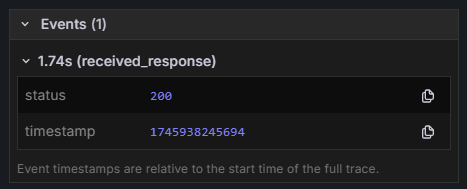
For more details on defining custom telemetry data, refer to our documentation.
Better tracing in distributed services with span context propagators
Deno’s built-in OpenTelemetry support automatically preserves trace context across logs and spans, so your traces represent a single request, making them easier to understand. In 2.3, we’ve added preserving trace context across services, enabling simpler end-to-end tracing in distributed systems.
Check out this tutorial on how to trace a request that flows through distributed services.
Tracing in node:http client
One major benefit of Deno’s built-in OpenTelemetry support is that logs, traces,
and metrics are
automatically captured without any additional code changes.
Deno will automatically instrument and export telemetry data from console.log,
Deno.serve, and fetch.
Deno 2.3 extends auto-instrumentation with the addition of node:http module.
HTTP requests made with the node:http module will be automatically exported as
traces and metrics to your data visualization tool.
V8 JS engine metrics
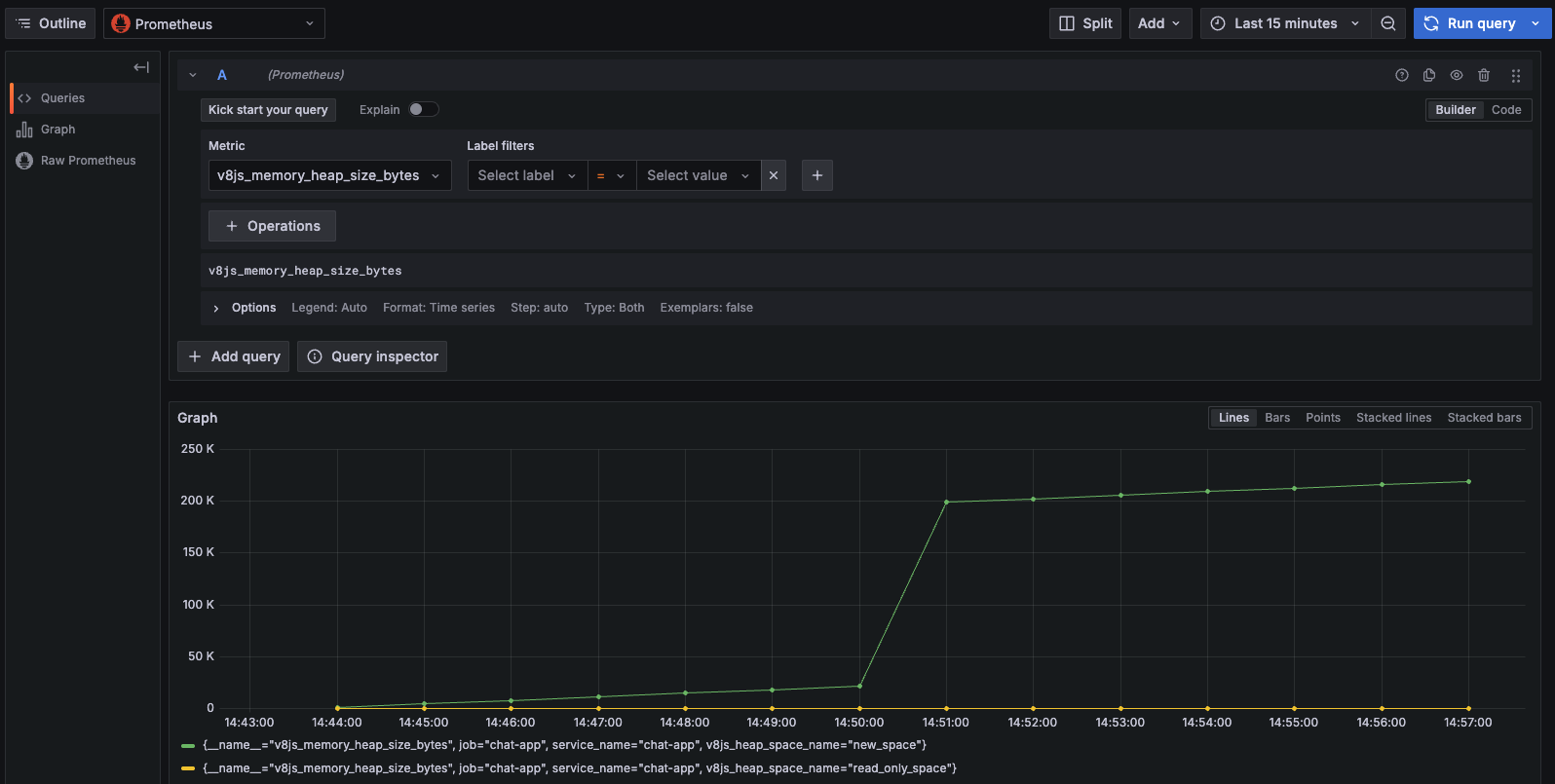
Deno 2.3’s OpenTelemetry support now includes automatically collecting runtime metrics from the V8 engine, which can be helpful for monitoring core vitals of your program.
Here’s an example of visualizing v8js_memory_heap_size_bytes over time for a
simple app in Prometheus:
Code signing on Windows
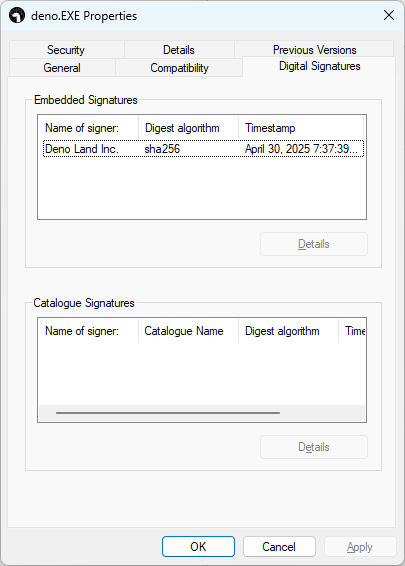
The deno executable is now
signed on Windows,
which will make Microsoft Defender trust Deno. This allows you to use Deno in
production environments and on Windows servers as it ensures your binary is
verified and trustworthy.

More intuitive use of deno check
Deno’s complete toolchain for JavaScript and TypeScript includes type checking
with deno check.
You can target specific files to type check by being explicit like this:
deno check main.ts but now, in 2.3, deno check no longer requires an
explicit argument and will behave like deno check .. This will make it simpler
to quickly type check your entire directory.
$ deno init
✅ Project initialized

Run these commands to get started


  deno run main.ts


  deno task dev


  deno test

$ ls
deno.json	main.ts		main_test.ts

$ deno check
Check file:///dev/main.ts
Check file:///private/tmp/2.3/init/main_test.ts
Test coverage improvements
This minor release introduces three quality of life improvements to Deno’s coverage reports generator that simplify ergonomics and improve flexibility.
Automatic coverage reports in testing
Running tests with deno test --coverage now auto-generates a coverage report
when tests finish. This streamlines coverage workflows by eliminating the
separate deno coverage step:
$ deno test --coverage
$ deno coverage --lcov --output=lcov.info
$ deno coverage --html


$ deno test --coverage


$ deno test --coverage --coverage-raw-data-only
DENO_COVERAGE_DIR for test coverage
A new DENO_COVERAGE_DIR environment variable determines where coverage
information is stored when using the --coverage flag. You can now direct
coverage output to a specific directory of your choice.
Deno’s code coverage tool now recognizes special “ignore” comments. You can ignore a single line, a block of lines, and an entire file.
console.log("This line is ignored");
if (condition) {
  console.log("Both the branch and lines are ignored");
}
console.log("All of the code in this file are ignored.");
This allows you to exclude certain lines or blocks of code from coverage reports so they don’t count against your coverage metrics. Shout out to bcheidemann for contributing this.
Improved type checking in Jupyter notebooks
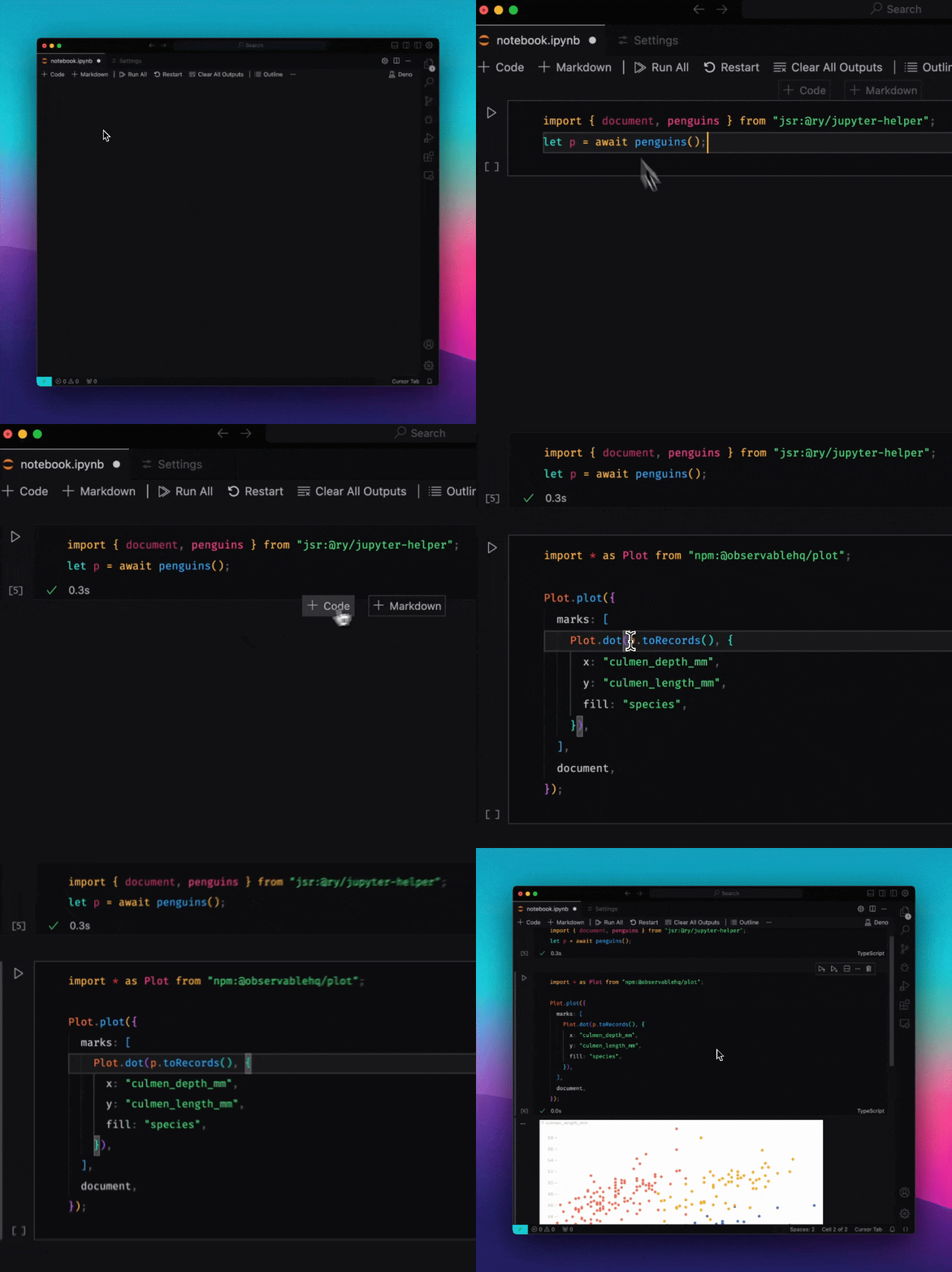
Deno’s Jupyter support allows you to use JavaScript and TypeScript not only to explore and visualize data, but also just as a upgraded REPL for prototyping and trying things out. One of the best ways to use Deno and Jupyter is with VSCode’s Jupyter extension, which allows you create and run Jupyter notebooks in VSCode.
Deno 2.3 improves on the VSCode Jupyter experience by ensuring that variables, modules, and type definitions are shared between Jupyter cells. Variables and type definitions that have previously appeared unrecognizeable by VSCode will now be recognized.
Faster dependency resolution and installation
Installing dependencies with deno install and deno add are now about 2x
faster in most situations where npm dependencies have been cached.
- Caching npm info in memory: This improves package installation performance by caching parsed npm package information in memory during execution. Deno avoids re-reading and re-parsing the same data multiple times, making installations faster.
- Prevent re-caching npm packages: previously, in certain scenarios, Deno will repeatedly try to cache npm packages during resolution. Now, Deno will not attempt to re-cache npm packages, avoiding redundant work and speeding up installation considerably.
- Improved lockfile v5: The new lockfile format includes extra npm package metadata to speed up dependency resolution and installation.
A quick benchmark using the template generated from
deno run -A npm:create-vite --template react-ts shows a 2.5x speed increase
when running deno install:
$ hyperfine --warmup 5 -N --prepare "rm -rf node_modules" --setup "rm -rf deno.lock" "./deno-2.3 i" "./deno-2.2 i"
Benchmark 1: ./deno-2.3 i
  Time (mean ± σ):     189.0 ms ±  19.1 ms    [User: 59.6 ms, System: 221.9 ms]
  Range (min … max):   167.0 ms … 221.3 ms    10 runs

Benchmark 2: ./deno-2.2 i
  Time (mean ± σ):     474.8 ms ±  19.6 ms    [User: 301.6 ms, System: 252.8 ms]
  Range (min … max):   444.4 ms … 507.8 ms    10 runs

Summary
  ./deno-2.3 i ran
    2.51 ± 0.27 times faster than ./deno-2.2 i
Explicit resource management and the using keyword
Deno now supports the new JavaScript
“explicit resource management” proposal
(e.g. the using keyword), allowing you to more easily manage and dispose of
resources in code. Note this feature was supported
in TypeScript since Deno v1.37,
but is now available in JavaScript, thanks to native support in V8.
const file = Deno.createSync("data.txt");
try {
  const encoder = new TextEncoder();
  for (let i = 0; i < 100; i++) {
    file.writeSync(encoder.encode(`${i}\n`));
  }
} finally {
  file.close();
}


{
  using file = Deno.createSync("data.txt");
  const encoder = new TextEncoder();
  for (let i = 0; i < 100; i++) {
    file.writeSync(encoder.encode(`${i}\n`));
  }
}
Performance and LSP
Deno 2.3 comes with a few performance improvements as well:
Deno.serveand HTTP server gets a speed boost, thanks to using a higher compiler optimization level- Statically analyzable dynamic imports can now be lazily loaded, improving startup performance
Additionally, we’ve made a few performance improvements to the Deno language server:
- Reduces idle memory usage by lazily starting up the TypeScript server and registering semantic tokens on-demand when a Deno-enabled file is opened
- Improves speed in large monorepo projects with npm dependencies by avoiding redundant npm resolution
TypeScript 5.8 and V8 13.5
Deno 2.3 upgrades to TypeScript 5.8 and V8 13.5, bringing new language features and performance improvements.
Other quality of life improvements
This minor release includes many other quality of life improvements:
- Adds
support for
FORCE_COLORenvironment variable to force colored terminal output - Extends the flag
--permit-no-filestodeno fmtanddeno lint, which will not return an error if no files were found (good for CI) - Deno programs can communicate via Linux vsock (virtual sockets)
- Introduces
DENO_SERVE_ADDRESSenvironment variable to set a defaulthost:portfordeno servecommand - Adds WebGPU methods
deviceStartCaptureanddeviceStopCapture - Adds
support for field selectors,
e.g.
.<field>, in the lint plugin API
Acknowledgments
We couldn’t build Deno without the help of our community! Whether by answering questions in our community Discord server or reporting bugs, we are incredibly grateful for your support. In particular, we’d like to thank the following people for their contributions to Deno 2.3: 0hmX, Adakite, Arsh, Asher Gomez, Ben Heidemann, Benjamin Swerdlow, Bert Belder, Dan, Dan Dascalescu, Dimitris Apostolou, Efe, Gene Parmesan Thomas, Gowtham K, Hajime-san, Jake Champion, James Bronder, Jim Buzbee, Kenta Moriuchi, KnorpelSenf, Lach, Laurence Rowe, Lucas Wasilewski, Luke Edwards, Manish Sahani, Max, Mohammad Sulaiman, MujahedSafaa, Muthuraj Ramalingakumar, Paolo Barbolini, Sebastien Guillemot, Toma, WWRS, c00kie17, chirsz, letianpailove, roman, and ryu.
Would you like to join the ranks of Deno contributors? Check out our contribution docs here, and we’ll see you on the list next time.
Believe it or not, the changes listed above still don’t tell you everything that got better in 2.3. You can view the full list of pull requests merged in Deno 2.3 on GitHub.
Thank you for catching up with our 2.3 release, and we hope you love building with Deno!
Get technical support, share your project, or simply say hi on Twitter, Discord, BlueSky, and Mastodon.