








To upgrade to Deno 2.6, run the following in your terminal:
If Deno is not yet installed, run one of the following commands to install or learn how to install it here.
curl -fsSL https://deno.land/install.sh | sh


iwr https://deno.land/install.ps1 -useb | iex
What’s new in Deno 2.6
- Run package binaries with
dx - More granular permissions
- Faster typechecking with tsgo and LSP improvements
- Wasm source phase imports
- Run CommonJS with
--require - Security auditing with
deno audit - Dependency management
- Bundler improvements
- Node.js compatibility
- API changes
- Performance improvements
- Quality of life improvements
- V8 14.2
- Acknowledgments
Run package binaries with dx
Deno 2.6 introduces a new tool, dx, that is an equivalent to npx and is a
convenient way to run binaries from npm and JSR packages.
$ dx cowsay "Hello, Deno!"
 ______________
< Hello, Deno! >
 --------------
        \   ^__^
         \  (oo)\_______
            (__)\       )\/\
                ||----w |
                ||     ||
Make sure to install the dx alias: deno x --install-alias
More experienced users might recognize that dx works similarly to deno run,
but with the following differences:
dxdefaults to--allow-allpermissions, unless another permission flag is passeddxprompts you before downloading a packagedxruns lifecycle scripts automatically if you accept the aforementioned promptdxdefaults tonpm:<package_name>unless otherwise specifieddxerrors if you try to use it to run a local file
With the addition of dx, users should find it easier to run package binaries
in already known fashion. You can enjoy the convenience of npx while
leveraging Deno’s robust security model and performance optimizations.
Learn more about dx at the Deno docs.
More granular permissions
This release brings more granular control over permissions. We’ve introduced
--ignore-read and --ignore-env flags, which allow you to selectively ignore
certain file reads or environment variable access. Instead of throwing
NotCapable error, you can instead direct Deno to return NotFound error and
undefined respectively.
Let’s see an example of how this works:
main.ts
const awsSecretKey = Deno.env.get("AWS_SECRET_KEY");
console.log(awsSecretKey);

const passwd = await Deno.readTextFile("/etc/passwd");
console.log(passwd);
$ deno run --ignore-read=/etc --ignore-env=AWS_SECRET_KEY main.ts
undefined
error: Uncaught (in promise) NotFound: No such file or directory (os error 2)
const passwd = await Deno.readTextFile("/etc/passwd");
                          ^
    at Object.readTextFile (ext:deno_fs/30_fs.js:799:24)
    at file:///dev/main.ts:4:27
These new flags allow more flexibility when running untrusted code. Often times
you might not want to open up a sandbox, but a certain dependency is insisting
on reading 20 env vars or config files from your home directory. These
dependencies handle missing env vars or files gracefully, but they were not able
to handle Deno’s NotCapable errors. With these new flags, you can now run such
code without granting full permissions.
In addition,
Deno.env.toObject() now
works with partial environment permissions. If you only grant access to a subset
of environment variables, Deno.env.toObject() will only return the allowed
variables.
main.ts
console.log(Deno.env.toObject());
$ SOME_SECRET=foo deno run --allow-env=SOME_SECRET main.ts
{ SOME_SECRET: "foo" }
This release also includes an experimental permission broker. A new feature that allows for advanced controls over permissions with a separate process responsible for managing permission requests.
$ DENO_PERMISSION_BROKER_PATH=/perm_broker.sock deno run untrusted_code.ts
This can be useful for platform authors that would like to run untrusted code but have a higher-level process to mediate permission requests.
When permission broker is active, all --allow-*, --deny-* and --ignore-*
permission flags are ignored, and all permission requests are sent to the broker
process instead.
Faster type checking with tsgo and language server improvements
Deno 2.6 integrates tsgo, a new
experimental type checker for TypeScript written in Go. This new type checker is
significantly faster than the previous implementation, which was written in
TypeScript.
You can enable tsgo by using the --unstable-tsgo flag or
DENO_UNSTABLE_TSGO=1 env variable with deno check:
$ deno check --unstable-tsgo main.ts
We’ve seen 2x speed improvements in type checking times for internal projects when using TSGO.
On the type checking side, several long-standing pain points have been fixed. Deno is now more tolerant of non-standard import schemes and bare ambient module declarations, which means fewer false-positive errors when working with framework tooling or custom module loaders.
Support for common tsconfig.json options has also improved:
compilerOptions.pathsnow works as expected for module resolution,skipLibCheckis respected for graph errors,advanced settings like
isolatedDeclarationsare supported.
All of this adds up to a more predictable check experience, especially in multi-package workspaces.
The language server (LSP) also saw some quality-of-life upgrades. The
source.organizeImports action is now supported, helping you automatically sort
and clean up imports from within your editor. Deno will use the editor’s native
implementation when available and avoid unnecessary resolution work, making the
feature feel native. Test authoring also gets a boost with improved integration
for describe and it style test functions — editors can now understand and
surface information about individual test cases.
Several behind-the-scenes fixes make the language server less intrusive:
configuration updates are detected immediately when tsconfig.json changes,
lockfiles aren’t written during “cache on save”, and lint-ignore directives
behave more consistently with leading comments. These refinements reduce
friction and help the language tools stay out of your way while you work.
Source phase imports
Deno 2.6 ships with a new JavaScript feature called “source phase imports”.
Source phase imports are a new kind of import. Instead of giving you a live
module instance — like import normally does — they give you the raw source
representation of a module. In the case of Wasm, that means you can import the
compiled Wasm.Module directly as part of your build step, without having to
fetch the file at runtime.
Here’s an example of how you can use it today:
main.ts
import source addModule from "./add.wasm";

const addInstance = WebAssembly.instantiate(addModule);
const add = addInstance.exports.add;
console.log(add(1, 2));
With this addition and the Wasm imports shipped in Deno v2.1, working with WebAssembly in Deno is now more ergonomic and efficient.
Run CommonJS with --require
Deno v2.4 shipped with --preload flag
which allows you to load files before executing the main module, making it
possible to customize the execution environment.
This release adds the --require flag that serves the same purpose but is meant
for executing CommonJS modules instead of ES modules.
$ deno run --require ./setup.cjs main.tsThis brings Deno closer to Node.js compatibility by supporting a common pattern for preloading modules. The next step on our roadmap is support for custom module loaders, which is planned for a future release.
Security auditing with deno audit
One of the most important additions is the new
deno audit subcommand,
which helps you identify security vulnerabilities in your dependencies by
checking GitHub CVE database. This command scans and generates a report for both
JSR and npm packages.
For another layer of security, we’ve also added the experimental
deno audit --socket flag that integrates with
socket.dev:
$ deno install npm:lodahs
Add npm:lodahs@0.0.1-security

Dependencies:
+ npm:lodahs 0.0.1-security

$ deno audit --socket

No known vulnerabilities found

Socket.dev firewall report

╭ pkg:npm/lodahs@0.0.1-security
│ Supply Chain Risk: 0
│ Maintenance: 76
│ Quality: 41
│ Vulnerabilities: 100
│ License: 100
╰ Alerts (1/0/0): [critical] malware

Found 1 alerts across 1 packages
Severity: 0 low, 0 medium, 0 high, 1 critical
The deno audit command scans through your entire dependency graph, checking
each package against the GitHub CVE database and, if --socket is present,
socket.dev’s vulnerability database. This is particularly valuable in CI/CD
pipelines where you want to fail builds if vulnerabilities are found.
If Deno discovers the SOCKET_API_KEY environment variable, it will use it when
talking to socket.dev for even more detailed reports, applying your
organization’s policies and access rules.
Dependency management
Deno 2.6 continues to improve Deno’s dependency management features, bringing several significant improvements to how you manage, audit, and control your project dependencies. These enhancements address common pain points in dependency management and provide better visibility into your supply chain security.
Granular control over postinstall scripts with deno approve-scripts
Many npm packages run lifecycle scripts (like postinstall, install, or
preinstall) that execute arbitrary code during installation. While these
scripts are often legitimate, e.g. compiling native addons or setting up package
configurations, they can also be a security risk.
The new deno approve-scripts replaces the deno install --allow-scripts flag
to give you more ergonomic and granular control over which packages can run
these scripts.
When you run
deno install and
encounter packages with lifecycle scripts that aren’t approved, Deno will warn
you and suggest running deno approve-scripts. This command presents an
interactive picker where you can review each package that wants to run scripts
and selectively approve or deny them:
$ deno approve-scripts
? Select which packages to approve lifecycle scripts for (<space> to select, ↑/↓/j/k to navigate, a to select all, i to
invert selection, enter to accept, <Ctrl-c> to cancel)
  ○ npm:@denotest/node-addon@1.0.0
  ● npm:chalk@5.0.0
Your choices are saved to deno.json in the allowScripts configuration,
creating an audit trail of which packages you trust to execute code during
installation.
Controlling dependency stability
Additionally, you can now control the minimum age of dependencies, ensuring that your project only uses dependencies that have been vetted. This helps reduce the risk of using newly published packages that may contain malware or breaking changes shortly after release.
You can specify the minimum age in your configuration:
deno.json
{

  "minimumDependencyAge": "120"
}
Or via a --minimum-dependency-age=120 flag.
You can specify the minimum age in minutes, ISO-8601 duration, or RFC3339
absolute timestamp - e.g. "120" for two hours, "P2D" for two days,
"2025-09-16" for a cutoff date, or "2025-09-16T12:00:00+00:00" for a cutoff
time.
Improved lockfile and install workflows
The --lockfile-only flag for deno install allows you to update your lockfile
without downloading or installing the actual packages. This is particularly
useful in CI environments where you want to verify dependency changes without
modifying your node_modules or cache. This separation of concerns makes it
easier to parallelize builds and reduces unnecessary downloads:
$ deno install --lockfile-only


$ deno install
We’ve also improved how npm packages are installed and reported, making it
easier to understand what’s being added to your project. The install output now
provides clearer feedback about which packages were added, updated, or reused
from cache, even when not using a traditional node_modules directory.
Additionally, we’ve fixed several edge cases around package.bin resolution and
shimming on Windows to match npm’s behavior more closely, ensuring better
compatibility with npm ecosystem tools and scripts. Finally, subpath imports
starting with '#/' are now supported for better Node.js compatibility.
Bundler improvements
Deno 2.6 brings several important refinements to the bundler, making it more
reliable and compatible with more use cases. The bundler now works seamlessly
within Web Workers, allowing you to dynamically bundle code even in
multithreaded contexts. We’ve improved handling of different target
platforms—when bundling for the browser with --platform browser, the bundler
now correctly avoids using createRequire and other Node.js-specific APIs to
ensure your bundles run cleanly in browser environments.
Runtime-specific specifiers like cloudflare: and bun: are now treated as
external dependencies by default, preventing them from being bundled and causing
import errors:
main.ts
import { serve } from "jsr:@std/http";
import { toml } from "bun:toml";
import { parseEnv } from "cloudflare:workers";

export default {
  fetch(req) {
    return new Response("Hello from Cloudflare Workers");
  },
};
$ deno bundle --platform browser main.ts bundle.js
We’ve also fixed the transformation of import.meta.main when bundling JSR
entrypoints, improved type safety by properly typing the output file from
Deno.bundle() as Uint8Array<ArrayBuffer>, and enhanced development workflows
so that HTML entrypoints properly reload with --watch. Additional reliability
improvements include better handling of failed esbuild cleanup operations and
fixes for internal name clashing that could cause mysterious build failures.
Node.js compatibility
Deno’s Node.js compatibility layer continues to mature in Deno 2.6, with dozens of improvements across file operations, cryptography, process management, and database APIs. This release is a testament to our commitment to making Node.js code “just work” in Deno.
@types/node included by default
TypeScript developers get a major quality-of-life improvement: @types/node
type declarations are now included by default. Previously, you’d need to
manually import @types/node to get proper type hints for Node.js APIs. Now
Deno handles this automatically, giving you IDE autocompletion and type safety
for all Node.js compatibility features without any setup:
import { readFile } from "node:fs/promises";


const data = await readFile("./file.txt", "utf-8");
Deno will still respect your project’s existing @types/node version if you
have it installed, ensuring compatibility with your specific type requirements.
Node.js API fixes and changes:
node:crypto- respect
authTagLengthincreateCipherivfor GCM ciphers (#31253) - autopadding behavior on
crypto.Cipheriv(#31389) - crypto
CipherivandDecipherivbase64 encoding (#30806) - inspect
X509Certificateclass (#30882) - prevent cipher operations after finalize (#31533)
- accept
ArrayBufferoncrypto.timingSafeEqual(#30773)
- respect
node:fs- implement
FileHandle.appendFile(data[, options])(#31301) - implement
FileHandle.readLines()(#31107) - missing
statfsexport fromnode:fs/promises(#31528) fs.cpandfs.cpSynccompatibility (#30502)fs.read/fs.readSyncandfs.write/fs.writeSynccompatibility (#31013)fs.readFile,fs.readFileSyncassert encoding (#30830)fs.statandfs.statSynccompatibility (#30637)fs.statandfs.statSynccompatibility (#30866)fs.statfsSyncandfs.statfscompatibility (#30662)FileHandlecompatibility (#31164, #31094)fs.realpathbuffer encoding (#30885)- respect abort signal option on
FileHandle.readFile(#31462) - respects
flagoption onfs.readfileandfs.readfilesync(#31129) - set default callback for
fs.close(#30720) - validate
fs.closecallback function (#30679) - validate
fs.readon empty buffer (#30706) - validate
readlinkarguments (#30691) - support option object parameter on
fs.writeandfs.writeSync(#30999) - make
fs.globacceptsURLcwd (#30705)
- implement
node:process- define
process.versions.sqlite(#31277) - export
process.ppid(#31137) - false deprecation warning on
crypto.createHmac(#31025) - implement
process:seteuid()(#31160) - implement
process.setegid()(#31155) - implement
process.setgid()andprocess.setuid()(#31162) process.moduleLoadListas undefined (#31022)- ensure
process.argvis an array of strings (#31322) - stub missing
process.sourceMapsEnabled(#31358) - make
process.stdin.isTTYwritable (#31464) - checking
Symbolinenvshould not ask for permission (#30965) - handle falsy values enumerability in process.env (#30708)
- define
node:sqlite- implement ‘backup’ capability (#29842)
StatementSync.iterate()should resetis_iter_finishedflag on every call (#31361)- allow ATTACH DATABASE with
--allow-all(#30763) - fix
sqliteextension used for testing; ensure related tests are actually meaningful (#31455) - implement
DatabaseSync.aggregate()(#31461) - implement
DatabaseSync.function()and better error details (#31386) - implement
StatementSync#columns()method (#31119) setAllowUnknownNamedParameterserror message (#31319)sqlite.DatabaseSyncexplicit resource management compatibility (#31311)- fix segfault on calling
StatementSyncmethods after connection has closed (#31331) - add
setAllowUnknownNamedParametersoption (#31202)
Other assorted changes include:
- fix misused
napi_callback_infoinCallbackInfo(#30983) - ensure that the
node:consoleimplementation has an implementation foremitWarningin scope (#31263) - support advanced serialization in IPC (#31380)
deepStrictEqualnow correctly handlesNumberobjects (#31233)- return string
familyinserver.address()(#31465) - ensure active timers entry is deleted on
Timeout.prototype.refresh(#31436) dns.resolve6compatibility (#30974)path.matchesGlobcompatibility (#30976)url.domainToASCIIreturns empty string for invalid domains (#31219)- avoid stack overflow in
node:zlib’sgunzip(#30865) cpus()should not error when there’s no cpu info (#31097)- ensure
'exit'event is fired only once forworker_threads(#31231) - handle empty writes in chunked HTTP requests (#31066)
- handle multiple calls in
inspector.Session.post()(#31067) - implement
dns.lookupService(#31310) - implement
fchmodon windows (#30704) - implement
performance.timerify()(#31238) - implement
util.getSystemErrorMessage()(#31147) - inconsistent error message thrown by
AssertionError(#31089) - make
kReinitializeHandlework for TLS wrap (#31079) - map BadResource error to the corresponding node error (#30926)
- omit
smifromzlib.crc32op function (#30907) - reimplement
setImmediateAPI (#30328) setTimeoutpromisified to handle abort signal (#30855)- truncate first non-hex value on
Buffer.from(#31227)
API changes
Deno 2.6 introduces several new APIs and stabilizations that expand what you can
do with the platform. The BroadcastChannel API is now stable after being
experimental, making it easier to communicate across workers and contexts:
main.ts
const channel = new BroadcastChannel("my-channel");

channel.onmessage = (event) => {
  console.log("Message from worker:", event.data);
};

const worker = new Worker("./worker.ts");
worker.postMessage("Hello from main");
worker.ts
const channel = new BroadcastChannel("my-channel");
channel.postMessage("Hello from worker");
Web streams like ReadableStream, WritableStream, and TransformStream now
support transferability, allowing you to efficiently pass these streams between
workers without copying:
transfer.ts
const INDEX_HTML = Deno.readTextFileSync("./index.html");
const worker = new Worker("./the_algorithm.js", { type: "module" });

Deno.serve(async (req) => {
  if (req.method === "POST" && req.path === "/the-algorithm") {
    const { port1, port2 } = new MessageChannel();
    worker.postMessage({ stream: req.body, port: port1 }, {
      transfer: [req.body, port1],
    });
    const res = await new Promise((resolve) => {
      port1.onmessage = (e) => resolve(e.data);
    });
    return new Response(res);
  }
  if (req.path === "/") {
    return new Response(INDEX_HTML, { "content-type": "text/html" });
  }
  return new Response(null, { status: 404 });
});
ImageData now supports Float16Array, enabling more efficient memory usage
for certain image processing workflows:
image_data.ts
const imageData = new ImageData(
  new Float16Array(width * height * 4),
  width,
  height,
);
Signal handling has been improved with support for integer signals in
Deno.kill() and child process kill methods, and Deno.HttpClient now works
with WebSocket connections, including new TCP proxy support:
main.ts
const client = new Deno.HttpClient({
  allowHost: true,
  proxy: { url: new URL("http://proxy.example.com:8080") },
});

const ws = new WebSocket("wss://api.example.com/socket", {
  httpClient: client,
});
Performance improvements
Deno 2.6 delivers performance improvements across the board.
Most notably, we fixed a memory leak in the fetch API that increased memory
usage in multi-threaded programs.
We’ve also optimized the V8 engine integration by implementing stack-allocated scopes, reducing memory allocation overhead and improving garbage collection efficiency.
On the Node.js compatibility side, we’ve moved critical operations like
getOwnNonIndexProperties and Buffer.compare into native code, delivering
performance improvements for code relying on these APIs.
Quality of life improvements
Beyond the major features, Deno 2.6 includes many small but meaningful
improvements that make your day-to-day development smoother. The
deno install -g command now requires a -- separator when passing arguments
to your installed scripts, preventing confusion between flags for deno itself
and flags for your script. Additionally, you can now install multiple global
packages in a single command:
deno install -g npm:prettier npm:typescript
If you’re publishing packages to JSR, you can now add "publish": false to your
deno.json to prevent accidental publishes of monorepo packages or private
modules that shouldn’t be released:
deno.json
{
  "name": "@myorg/private-tools",
  "publish": false
}
Test coverage improvements make it easier to measure code quality.
Coverage data is now collected from workers—previously, any code running in worker threads wouldn’t count toward your coverage report, giving you incomplete metrics. Blob URLs are also now properly excluded from coverage, avoiding noise from dynamically generated code.
HTML coverage reports now include a dark mode toggle, so you can review coverage reports comfortably in any lighting.
JUnit test reports are now properly formatted without ANSI escape codes, making them compatible with CI/CD systems that expect clean XML output.
Stack traces have been dramatically improved with better filtering of internal frames. Deno now filters out noisy internal frames, dims internal Deno runtime frames in grey to distinguish them from your code, and shows relative paths for better readability:
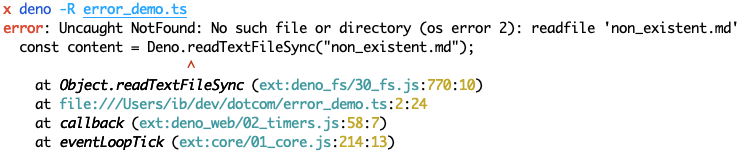

Command-line completions for deno task are now dynamic and context-aware. As
you define more tasks in your deno.json, shell autocompletion will
automatically discover and suggest them.
Make sure to re-generate your shell completions after upgrading, use
deno completions --dynamic.
The lint plugin API now has access to env and read permissions, enabling
more sophisticated linting rules that can access environment configuration and
read files.
A small but useful feature in this release is the --empty flag for
deno init. This flag creates an empty deno.json file, which can be useful
when you want to start a new project from scratch.
$ deno init --empty
✅ Project initialized

$ cat deno.json
{}
From the very first release, Deno shipped with support for source maps,
especially automatically generated source maps for TypeScript files. This
release improves source map support by adding native runtime support—any time an
exception is thrown, Deno will check for “magic” comments like
//# sourceMappingURL=... and apply the source map to the stack trace.
V8 14.2
Deno 2.6 upgrades the V8 engine to version 14.2, bringing the latest performance improvements, bug fixes, and new JavaScript features from the V8 team.
Acknowledgments
We couldn’t build Deno without the help of our community! Whether by answering questions in our community Discord server or reporting bugs, we are incredibly grateful for your support. In particular, we’d like to thank the following people for their contributions to Deno 2.6: Adriano, amitihere, Asher Gomez, Azeem Pinjari, Charles Duffy, codepage949, CPunisher, ctrl+d, Daniel Osvaldo Rahmanto, Edilson Pateguana, Felipe Cardozo, geogrego, Ishita SIngh, j-k, Jake Champion, James McNally, Kenta Moriuchi, Kisaragi Hiu, Lach, Lucas Wang, Maksim Bondarenkov, Murat Kirazkaya, Nassim Z, Nicholas R, Ohkubo KOHEI, prempyla, ryu, Sahil H. Mobaidin, Shannon Poole, Sravanth, Takumi Akimoto, TarikSogukpinar, Tugrul Ates, ud2, Uday Kumar Choudhary, valentin richard, Vamshi Krishna Pendyala, withtimezone, xBZZZZ, and xtqqczze.
Would you like to join the ranks of Deno contributors? Check out our contribution docs here, and we’ll see you on the list next time.
Believe it or not, the changes listed above still don’t tell you everything that got better in 2.6. You can view the full list of pull requests merged in Deno 2.6 on GitHub.
Thank you for catching up with our 2.6 release, and we hope you love building with Deno!
🚨️ There have been major updates to Deno Deploy! 🚨️
- Database connections and data explorer right in the UI
- Connect to AWS and GCP via Cloud Connections
- Automatic and immediate observability and telemetry
and much more!