











Deploying to the edge is becoming more common, with multiple services that offer serverless edge computing. One of the most important factors is speed of deployment, since context switching and waiting for code to build and deploy can halt momentum, flow state, and developer productivity.
So, which serverless edge compute platform handles deployments the fastest?
I decided to setup a micro app to each of the following serverless edge providers and hook it up to GitHub Actions, so you don’t have to. (Believe me, you don’t want to spend an afternoon futzing around IAM roles and permissions for the sake of a blog post.)
* I struggled with using GitHub Actions to programmatically update the Cloudfront distribution trigger with the newly deployed lambda function. If anyone has tips on this, please let us know.
(All the micro apps and corresponding GitHub Action scripts can be viewed here.)
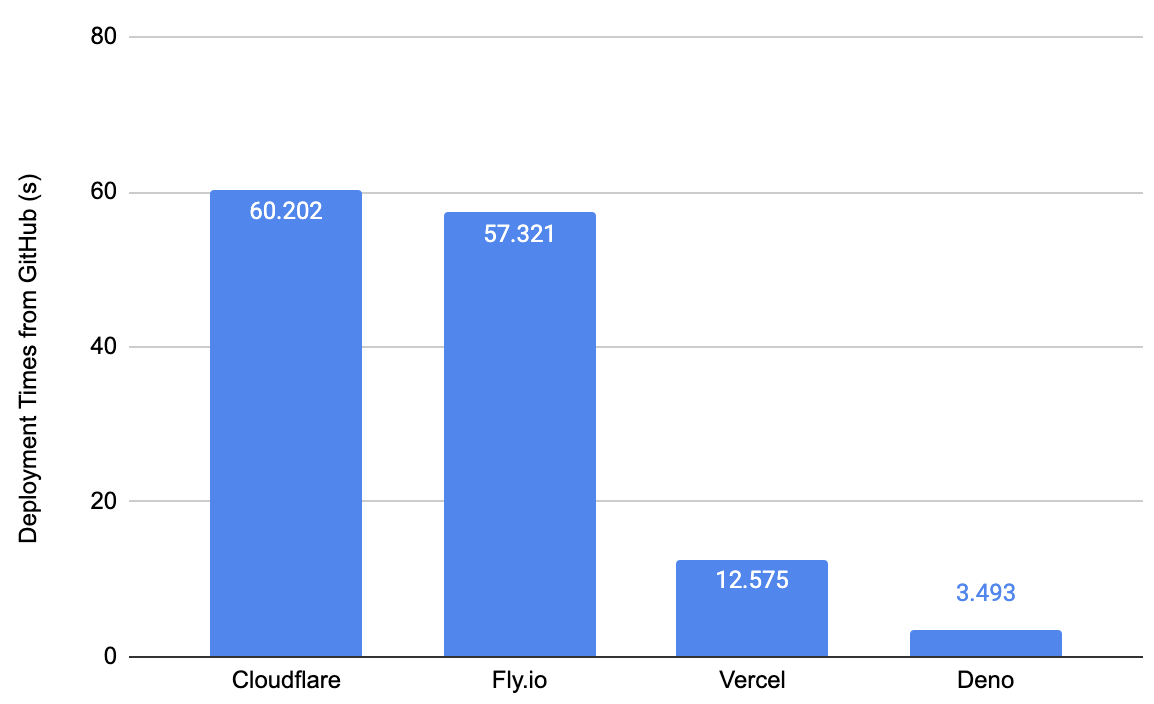
The deployment times for other edge providers hover around the minute mark, whereas Deno Deploy is magnitudes faster. The bulk of the deployment time for the other providers is spent provisioning a machine, installing tooling, and running a build. Deploy simply uploads the code and does any HTML generation or bundling of client JavaScript in Deploy itself.
Admittedly, we’re evaluating these serverless edge platforms on a narrow criteria (deploy speed), as there are certainly other reasons why developers would use them. Nonetheless, deployment speed for CI/CD processes is critical for developer productivity and agility.
Below, we’ll dive into the setup process for each platform, as well as show the break down in total time between pushing to GitHub and seeing the effects take place.
But first… how do we consistently measure how fast a CI/CD git deployment takes?
To make sure we’re comparing apples to apples on deployment speed for CI/CD,
we’ll focus on the time between when the main git branch is updated and a
change is detected on the website for the following reasons:
main: though git is not the only way to run a CI/CD
server, all these vendors have git integration or a GitHub Action, so we’ll
use that in order to remove any variation through CI/CD server. This is also a
good place to start the timer since updates on main typically marks the
start of a CI/CD build process.In order to measure the time consistently, we use a script that starts a timer, pings the website repeatedly until a change is detected, then outputs the time difference. All of the tests will be conducted off my machine and my internet, removing those variabilities from the results.
The first step is to update the edge function to include the string
phrase_to_search_for.
Then, we run this command:
$ deno task ping {app_url} {phrase_to_search_for}
This command does three things:
git to update and push to main branch/tasks/ping.ts, which starts a timer and pings the the public edge
function address app_url until the string phrase_to_search_for is detectedThe ping.ts script is:
const url = Deno.args[0];
const keyPhrase = Deno.args[1];


const startTimeStamp = Date.now();

console.log("");
console.log("");
console.log(`Starting the timer...`);

let noChangeDetected = true;
while (noChangeDetected) {
  const res = await fetch(url);
  const body = await res.text();
  if (body.includes(keyPhrase)) {
    noChangeDetected = false;
    console.log(`${keyPhrase} detected on website...`);
  }
}


const endTimeStamp = Date.now();
const differenceInTimeStamp = endTimeStamp - startTimeStamp;
console.log(`Total deployment time: ${differenceInTimeStamp / 1000}s`);
This script accepts two parameters:
app_url: the publicly accessible address of the deployed app, andphrase_to_search_for_in_next_deployment: a string that should appear in the
updated app, which this script will use to detect a changeFor instance, I’ll add “hazelthenuttypug” to the Vercel function and run:
$ deno task ping https://nextjs-vercel-demo-gules.vercel.app/ hazelthenuttypugLet’s dive into the results of each platform.
Cloudflare Workers is a common approach to deploying and executing code on the edge.
Getting this setup was fairly trivial (thanks to
this short guide).
Clicking a few buttons on their interface, setting up the GitHub repo, then
adding the
cloudflare/wrangler-action GitHub Action
with the requisite secret tokens. Within 10 minutes, I was able to update my
function to Cloudflare Workers by pushing to main.
Let’s see how long a git deploy takes.
deno task --cwd cloudflare ping https://test_project.andyjiang.workers.dev/ hazelthenuttypug
Warning deno task is unstable and may drastically change in the future
Task ping git add . && git commit -am 'update' && git push origin main && deno run -A ../tasks/ping.ts "https://test_project.andyjiang.workers.dev/" "hazelthenuttypug"
[main bd9760a] update
 1 file changed, 1 insertion(+), 1 deletion(-)
Enumerating objects: 7, done.
Counting objects: 100% (7/7), done.
Delta compression using up to 8 threads
Compressing objects: 100% (3/3), done.
Writing objects: 100% (4/4), 339 bytes | 339.00 KiB/s, done.
Total 4 (delta 2), reused 0 (delta 0), pack-reused 0
remote: Resolving deltas: 100% (2/2), completed with 2 local objects.
To github.com:lambtron/cloudflare-workers-git-deploy-demo.git
   41efcdf..bd9760a  main -> main


Starting the timer...
hazelthenuttypug detected on website...
Total deployment time: 60.202s
I tried this several times and they all were around the minute mark. Digging
into this number, it appears that the GitHub Action itself was pretty quick, at
22 seconds (13 seconds of “Publish”, which uses a Docker container to execute
wrangler publish):
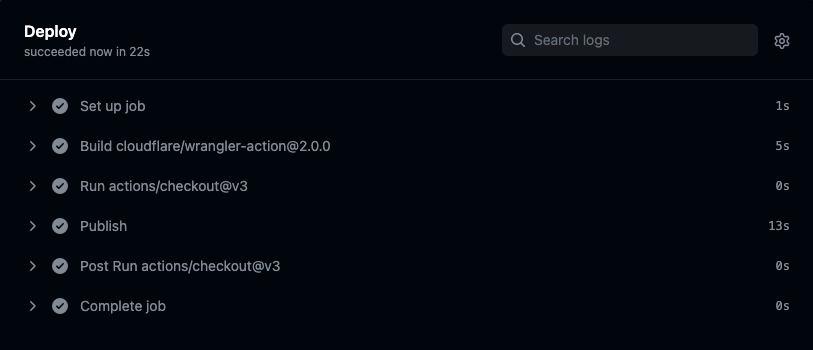
The remaining 40 or so seconds is the time it took for the changes to take effect on Cloudflare Workers network.
After having to use AWS Lambda and Cloudflare Workers, Fly.io
was simple to setup. I went through
this quickstart, installed
flyctl, and deployed from the command line within minutes.
Setting up CI/CD via GitHub Actions was also fairly trivial. I copied and pasted
.github/workflows/main.yml from
this Fly.io continuous deployment quickstart,
added FLY_API_TOKEN to my GitHub secrets, and it worked on the first try.
Overall, a smooth and painless setup experience.
Now let’s test how fast the deployments are.
deno task --cwd fly.io ping https://falling-bush-2722.fly.dev/ hazelthenuttypug
Warning deno task is unstable and may drastically change in the future
Task ping git add . && git commit -am 'update' && git push origin main && deno run -A ../tasks/ping.ts "https://falling-bush-2722.fly.dev/" "hazelthenuttypug"
[main 1b2adda] update
 1 file changed, 1 insertion(+), 1 deletion(-)
Enumerating objects: 5, done.
Counting objects: 100% (5/5), done.
Delta compression using up to 8 threads
Compressing objects: 100% (3/3), done.
Writing objects: 100% (3/3), 312 bytes | 312.00 KiB/s, done.
Total 3 (delta 2), reused 0 (delta 0), pack-reused 0
remote: Resolving deltas: 100% (2/2), completed with 2 local objects.
To github.com:lambtron/fly-io-git-deploy-demo.git
   bc0ab29..1b2adda  main -> main


Starting the timer...
hazelthenuttypug detected on website...
Total deployment time: 57.321s
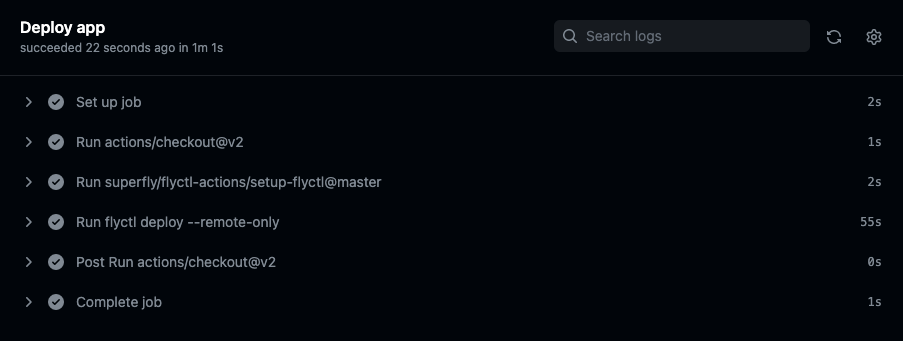
57.3 seconds is faster than deploying to Cloudflare Workers, though not by a
meaningful margin. But looking under the hood, we see that the bulk of the time
(~55 seconds) was spent on flyctl deploy, which builds Docker images and
pushes it to the fly.io registry:
Vercel’s Edge Network is another popular service for edge deployments. Note that most deployments on Vercel are not on their Edge Network. In order to deploy to their edge requires a couple of additional steps.
Getting a regular project setup here, however, was simple. There are several
ways to get started quickly, such as cloning a template, importing a git repo,
etc. I cloned a template, and then they let me create a GitHub repo directly on
the next page. The best part is that CI/CD is automatically setup with the
project – no need to create a .github workflow.
Next, I had to create a Vercel
edge function as a
route in my project by following
this thorough guide.
This simply meant including additional configuration code in
/pages/api/hello.ts, so all in all not too difficult.
You can view the website here and the edge function here.
If I had more patience, I’m sure there is a way to make the edge function return HTML, instead of JSON.
Either way, this has been the simplest and easiest way to setup an app on the edge with built in CI/CD.
Update on 2023/01/23: Huge shoutout to Ethan-Arrowood, who submitted a PR to simplify this example to only deploy an edge function (vs. an entire NextJS site).
The updated median deployment speed for 20 tests detected by the ping.ts
script is 12.575s.
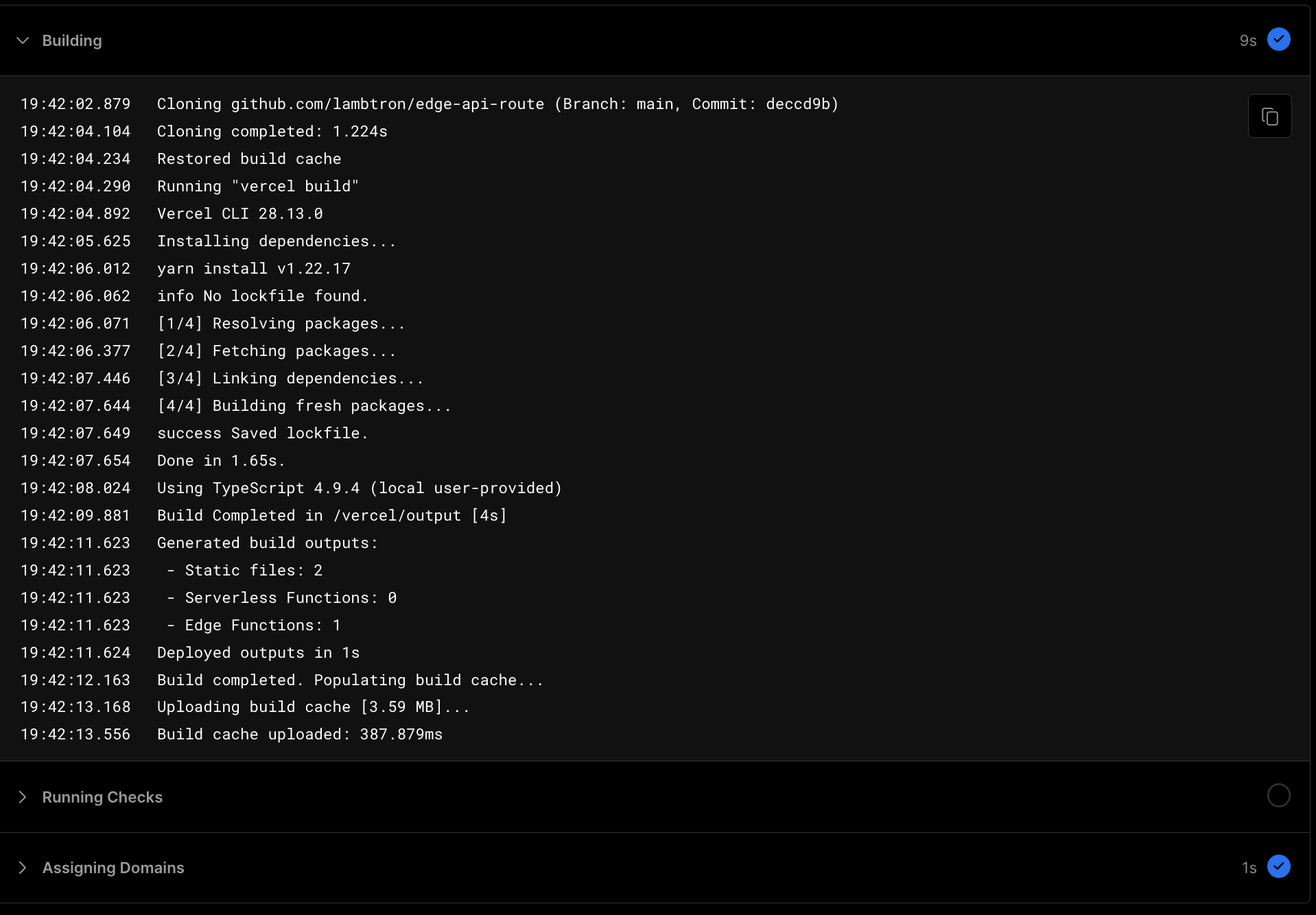
Checking the deployment logs for one of the random deployments in Vercel:
Not sure why the outputted seconds in the deployment logs don’t all have consistent significant figures, but the sum is roughly around 10 seconds.
Deploying just an edge function to Vercel is simple and pretty fast at ~10 seconds.
End update
Let’s test its deployment speed.
deno task --cwd vercel ping https://nextjs-vercel-demo-gules.vercel.app/api/hello/ hazelthenuttypug
Warning deno task is unstable and may drastically change in the future
Task ping git add . && git commit -am 'update' && git push origin main && deno run -A ../tasks/ping.ts "https://nextjs-vercel-demo-gules.vercel.app/api/hello/" "hazelthenuttypug"
[main 5d4b286] update
 2 files changed, 1 insertion(+), 5187 deletions(-)
 delete mode 100644 package-lock.json
Enumerating objects: 9, done.
Counting objects: 100% (9/9), done.
Delta compression using up to 8 threads
Compressing objects: 100% (4/4), done.
Writing objects: 100% (5/5), 462 bytes | 462.00 KiB/s, done.
Total 5 (delta 2), reused 0 (delta 0), pack-reused 0
remote: Resolving deltas: 100% (2/2), completed with 2 local objects.
To github.com:lambtron/vercel-edge-git-deploy-demo.git
   5699276..5d4b286  main -> main


Starting the timer...
hazelthenuttypug detected on website...
Total deployment time: 54.041s
Checking the Vercel dashboard, we see that the build process alone took 46 seconds:
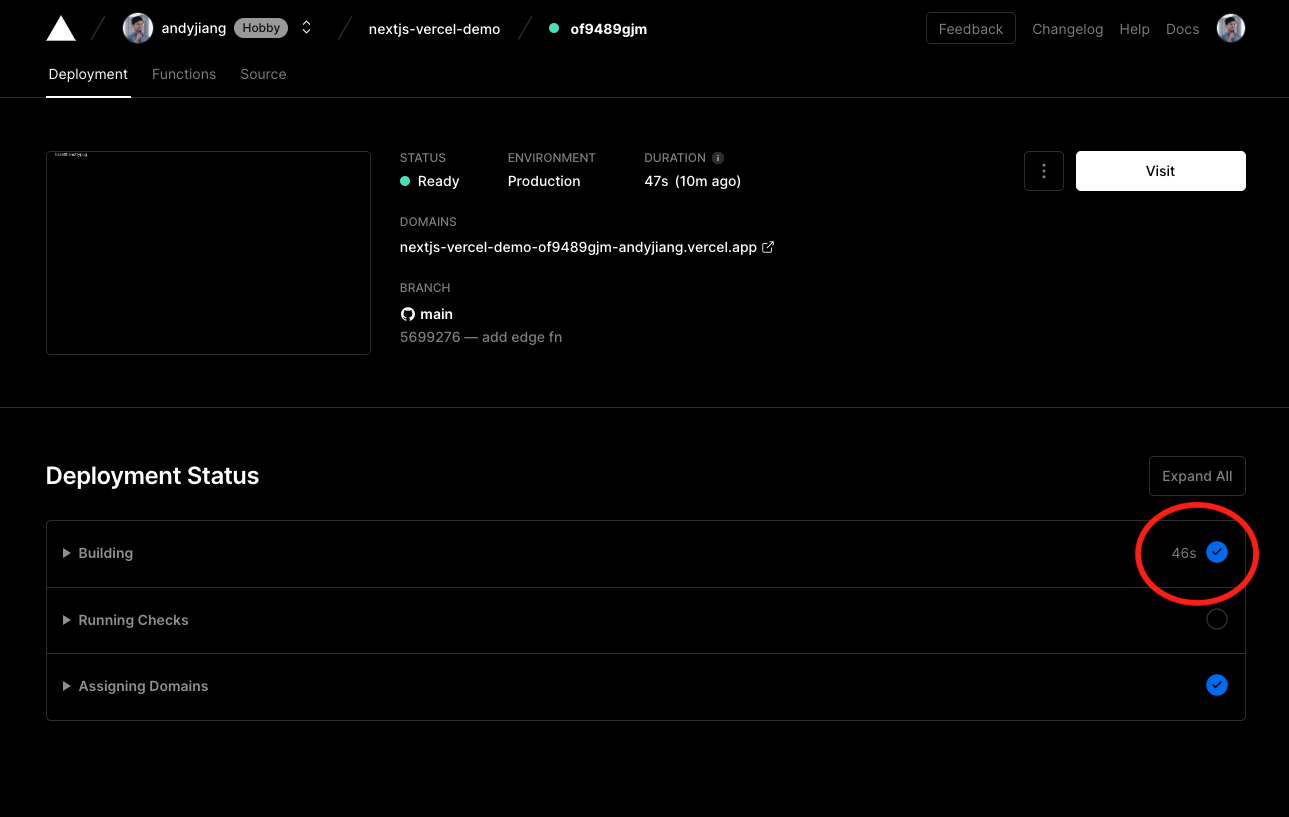
Which can be further broken down to:
vercel build (resolving, fetching, linking, building dependencies):
22.25snext build (compiling, generating static pages, finalizing page
optimizations): 11.12sDeno Deploy is our multi-tenant distributed JavaScript isolate cloud.
Getting setup is a breeze — though not as simple as Vercel. We still have to move off the Deno Deploy website to create a GitHub repo. But after the GitHub repo is created, it’s a few dropdown selects and we’ve hooked up our project to Deno Deploy.
Aside from the simplicity of connecting Deno Deploy to GitHub, Deno Deploy only
requires an entry point file. In this example, our entire repo only has a single
main.ts file.
Check out the source code and the website here.
Let’s test the deployment speed.
deno task --cwd deno ping https://deno-git-deploy-demo.deno.dev/ hazelthenuttypug
Warning deno task is unstable and may drastically change in the future
Task ping git add . && git commit -am 'update' && git push origin main && deno run -A ../tasks/ping.ts "https://deno-git-deploy-demo.deno.dev/" "hazelthenuttypug"
[main bb0233e] update
 1 file changed, 1 insertion(+), 1 deletion(-)
Enumerating objects: 5, done.
Counting objects: 100% (5/5), done.
Delta compression using up to 8 threads
Compressing objects: 100% (2/2), done.
Writing objects: 100% (3/3), 273 bytes | 273.00 KiB/s, done.
Total 3 (delta 1), reused 0 (delta 0), pack-reused 0
remote: Resolving deltas: 100% (1/1), completed with 1 local object.
To github.com:lambtron/deno-git-deploy-demo.git
   ef7e42a..bb0233e  main -> main


Starting the timer...
hazelthenuttypug detected on website...
Total deployment time: 3.493s
Deployed globally via git in 3.5 seconds is astoundingly fast. This magical deployment speed is attributed to our architectural decisions behind building Deno Deploy: instead of spinning up VMs or Docker containers, Deploy uses V8 isolates, which allows us to securely run untrusted code with less overhead.
We want to make building for the web fun and simple — which includes an incredibly fast, magical deployment experience. Minimal context switching means being a more productive developer.
Where do you host your websites or apps? Let us know on Twitter or on Discord.
此内容由惯性聚合(RSS阅读器)自动聚合整理,仅供阅读参考。 原文来自 — 版权归原作者所有。