









WordPress is the most successful content management system (CMS), powering 65.2% of CMS-based websites and 43.2% of all websites (on the internet) in 2022—and continues to grow.
But building on WordPress comes with some challenges. You can either modify an
available theme based off old technologies (e.g. jQuery) or spend time setting
up WordPress’s REST API (“headless” mode) with a modern
web framework like React or Vue. We believe there’s an even better approach.
Fresh is a modern web framework that embraces progressive enhancement through server-side rendering and islands architecture (it sends zero JavaScript to the client by default). Using a Fresh theme on headless WordPress not only allows for more productive development (native TypeScript support, no build step), but also provides a faster website experience for visitors.
We’ve open sourced two WordPress Themes built on Fresh to show you how easy it is to get started.
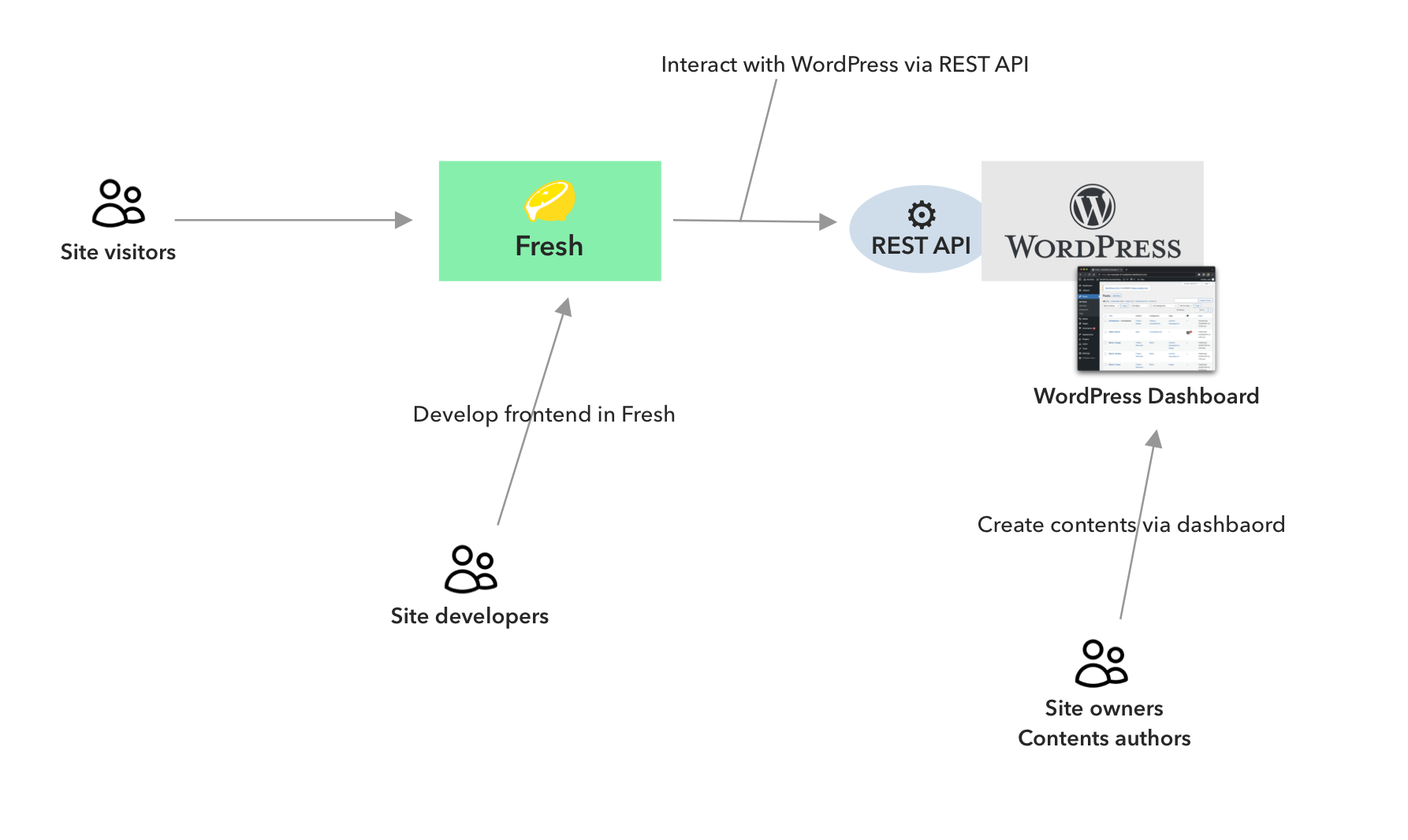
The above diagram shows the suggested site development workflow. Developers develop the frontend in Fresh, while site owners/content authors create and manage content in the WordPress dashboard. Note that there’s no need of additional development of WordPress dashboard, as it won’t be visible to visitors.
We released the stable version of Fresh in June and also released v1.1 with a lot of improvements in September.
Fresh is a good fit as a frontend of headless WordPress for the following reasons:
Fresh doesn’t have a build step. Upon each request, Fresh compiles everything
and sends it to the browser just-in-time. There’s no separate install step
either - all dependencies are installed and cached when its run the first time.
On the other hand, most Node.js based frameworks (such as Next.js, Nuxt, Remix, etc.) require you to first install the dependencies of your app, and then to build the assets before deploying.
The required mental model for developing the site is very similar between Fresh and PHP/WordPress, so existing PHP/WordPress developers can quickly adapt to Fresh dev environment.
TypeScript is very important for developing apps efficiently, since it catches lots of errors before running any code. However, when using other JavaScript frameworks, setting up and configurating TypeScript can be tedious.
Because Fresh is based on Deno, Fresh supports TypeScript out of the box. It allows you to quickly start using TypeScript without any configuration. Especially with our robust VS Code support, you can start writing TypeScript immediately.
Fresh integrates Preact, a lightweight version of React. You can write the interaction of webpage in a reactive style. Fresh also has official twind plugin, which allows you to write Tailwind classes for styling in your code.
You can also import npm modules for frontend development via CDNs such as https://esm.sh/. These modules come with type annotation by default thanks to X-TypeScript-Types custom HTTP header. For examples of which modules can be used with Fresh, check out our Fresh Showcase page.
We have open sourced two WordPress themes built on Fresh, powered by headless WordPress. These themes allow you to start developing a website using Fresh and WordPress.
Source Code: https://github.com/denoland/fresh-wordpress-themes
Blog live demo: https://wp-blog-example.deno.dev/

Shop live demo: https://wp-sweets-co.deno.dev/

You can try these themes on your own machine with the following steps:
Blog
git clone https://github.com/denoland/fresh-wordpress-themes.git
cd fresh-wordpress-themes/blog
deno task docker
Then open another terminal in the same directory:
Then visit http://localhost:8000/. You can manage its contents via the WordPress
dashboard at http://localhost/wp-admin (username: user, password: password).
Shop
git clone https://github.com/denoland/fresh-wordpress-themes.git
cd fresh-wordpress-themes/corporate
deno task docker
Then open another terminal in the same directory:
Then visit http://localhost:8000/. You can manage its contents via the WordPress
dashboard at http://localhost/wp-admin (username: user, password: password).
Note that Blog and Shop themes use different setups for WordPress server.
Make sure you run deno task docker command in the right directory.
There are a lot of options for hosting WordPress on the internet. Many cloud providers have special guides and templates dedicated to WordPress. There are also dedicated hosting services for WordPress, such as Bluehost, DreamHost, SiteGround, etc. You can choose which is the best fit for your needs from these options.
There are also many resources on the internet about how to scale your WordPress instances.
We plan to develop more themes based on this architecture, which cover more wider ranges of websites, such as e-commerce, reservation platforms, etc.
If you’re interested building with Fresh + WordPress, please try Fresh WordPress themes and give us any feedback on GitHub issues, Discord, or Twitter.
此内容由惯性聚合(RSS阅读器)自动聚合整理,仅供阅读参考。 原文来自 — 版权归原作者所有。