





2021 年才做 IOS 应用开发,你觉得晚了吗?我认为时间刚刚好。Swift 发布 (2014 年) 才不到 10 年, ABI 稳定还不到两年。SwiftUI 也不到两年,势头正浓。Swift 的成熟让新人彻底抛弃 Objective-C 的历史包袱。再考虑到苹果努力打通各个平台的雄心壮志,未来无限可能,绝对值得投资。
本文带你从 0 到 1 开发一款类 Notes 应用,并使用 MVVM 模式构建程序。
为了更好的理解本文的内容,强烈建议先自学以下内容:
- SwiftUI Tutorials, 练习并使用 SwiftUI 实现 Landmark 程序
- Combine
目标
学完本文,你将会实现一个如下图所示的 Notes 应用。
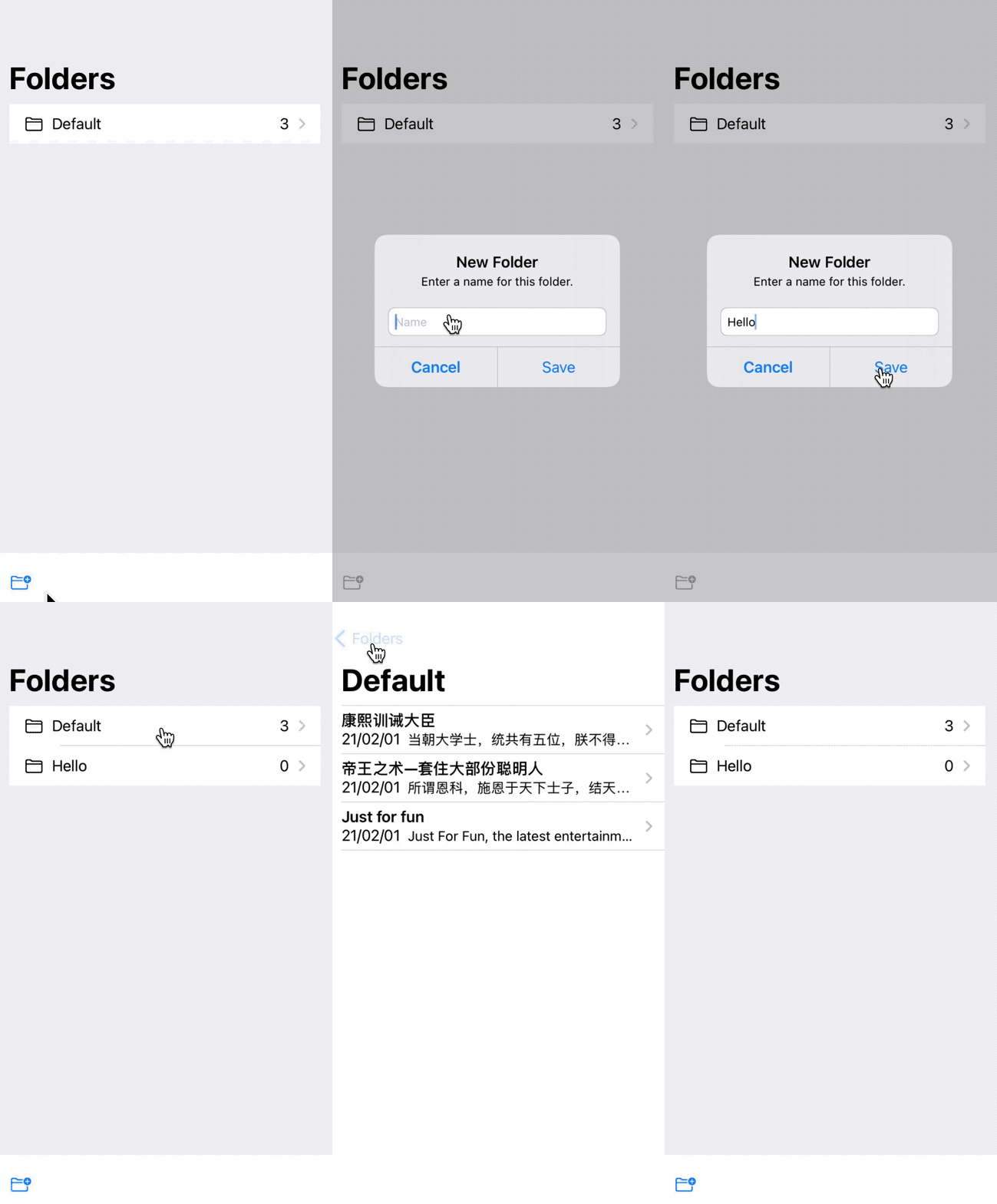
该版本支持的功能:
- 文件夹列表:列出所有文件夹,支持新增文件夹
- 查看文件夹中的 Notes 列表
步骤
程序 = 算法 + 数据结构。对于 Notes 这类应用来说,还用不上什么算法,主要的就是数据结构,想清楚应用的需求后,我一般分三步走来实现一个程序:
- 定义数据结构
- 画界面
- 响应交互和逻辑
这三步走完后,MVP 就有了,接下来进一步迭代,最终完成程序。
1. 数据结构 - Model
本文实现的 Notes 只支持文字编辑,不支持画图,插入照片等功能,所以数据结构非常简单,只需要两个 Model 就可以了。
- Folder - 存储目录
struct Folder: Identifiable {
    var id: UUID = UUID()
    var name: String
    var createdAt: Date
    var updatedAt: Date
}
- Note - 存储记事本
struct Note: Identifiable {
    var id: UUID = UUID()
    var title: String
    var content: String
    var folderId: UUID
    var createdAt: Date
    var updatedAt: Date
    var deletedAt: Date?
}
为了方便对 Model 的操作,这里提供一个 NoteService 协议,用来封装对 Model 的 CRUD。其定义如下:
protocol NoteService {
    func folderList() -> [Folder]

    func noteList(folderId: UUID) -> [Note]

    func addNote(_ node: Note) -> Void

    func updateNote(noteId: UUID, newContent: String) -> Note

    func addFolder(_ name: String) -> Void
}
为了快速实现原型,第一版使用一个 MockNoteService 来实现这个协议:
class MockNoteService: NoteService {
    func folderList() -> [Folder] {
        return folders
    }

    func noteList(folderId: UUID) -> [Note] {
        return notes.filter { (note: Note) -> Bool in
            note.folderId == folderId
        }
    }

    func addNote(_ node: Note) {
        notes.append(node)
    }

    func updateNote(noteId: UUID, newContent: String) -> Note {
        let contents = newContent.split(separator: "\n")
        let index: Int = notes.firstIndex { $0.id == noteId }!
        notes[index].title = String(contents.first!)
        if contents.count > 1 {
            notes[index].content = contents[1..<contents.count].joined(separator: "\n")
        }
        return notes[index]
    }

    func addFolder(_ name: String) -> Void {
        let folder = Folder(name: name, createdAt: Date(), updatedAt: Date())
        folders.append(folder)
    }

    // MARK: Mock data
    var folders: [Folder]
    var notes: [Note]

    init() {
        self.folders = [
            Folder(name: "Default", createdAt: Date(), updatedAt: Date())
        ]

        self.notes = [...]
    }
}
Pre-2. ViewState MVVM 架构
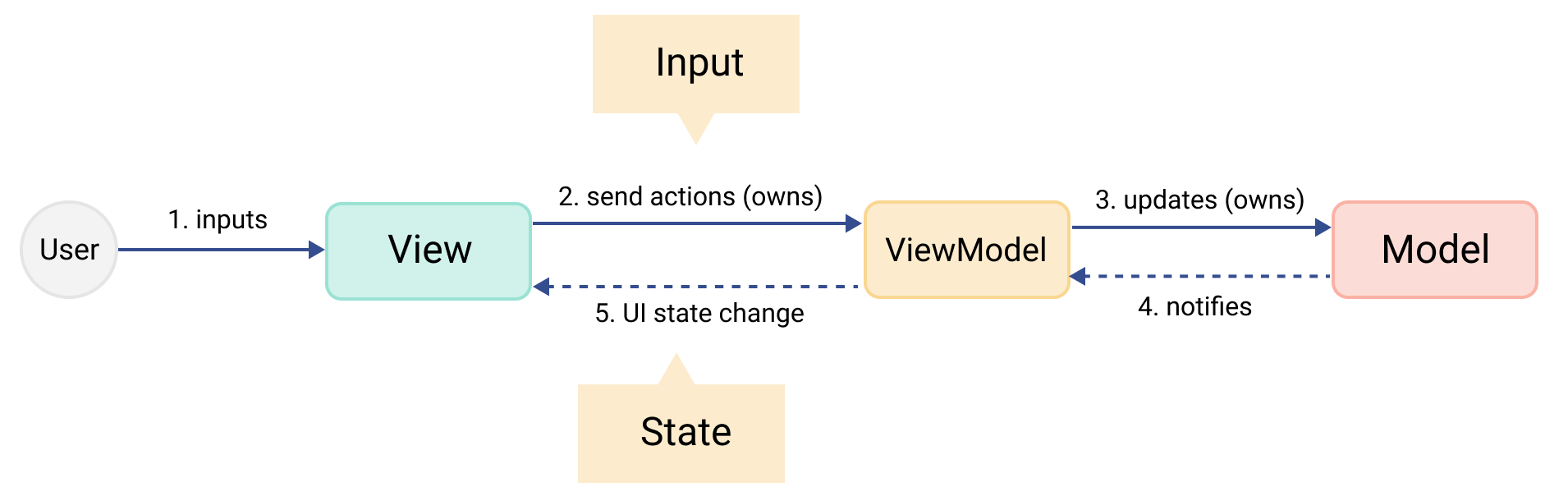
界面当然选择使用 SwiftUI 实现。学过的 SwiftUI Tutorials 使用 MV 架构,我们的 Notes 也简单到可以选用这种架构,但 MV 架构会把业务逻辑分散在 Model 和 View 层,并且在不同层次的 View 中使用全局状态,在复杂应用中难于维护。本文练习使用 ViewState MVVM 架构。
ViewState MVVM 架构 是 QuickBird Studios 团队基于 MVVM 架构,适配 SwiftUI 的一种实现。
ViewState MVVM 架构 为每个 View 实现一个 ViewModel 类,该 ViewModel 类用来管理对应 View 的状态和输入,不同的输入对应不同的行为。架构图如下:
ViewModel 的实现
引入 ViewModel 有两个目的:
- 使 View 和 Model 解耦,View 不直接操作 Model,通过 ViewModel 来完成。
- ViewModel 负责业务逻辑,业务逻辑的改变不会影响到 View。View 也不会/不能直接修改 ViewModel 封装的状态,需要触发行为实现状态改变,这点和 Redux 思想类似。
因此,实现一个 ViewModel 协议,View 持有遵循该协议的 ViewModel 类。ViewModel 类封装了 View 的状态和行为,state 只实现了 get 方法,在外部不可写。如下所示:
protocol ViewModel: ObservableObject where ObjectWillChangePublisher.Output == Void {
    associatedtype State
    associatedtype Input

    var state: State { get }
    func trigger(_ input: Input)
}
Input 具体实现成枚举型,表示不同的行为,通过触发不同的行为来更改状态。
2. 画界面
NoteListView 持有一个 NoteListState,包含绘制 Note List 的所有数据。
struct NoteListView: View {
    @ObservedObject
    var viewModel: AnyViewModel<NoteListState, NoteListInput>

    var body: some View {
        List(viewModel.state.notes) { note in
            NavigationLink(destination: NoteDetailView(service: viewModel.state.service, note: note).navigationBarTitleDisplayMode(.inline)) {
                NoteRowView(note: note)
            }
        }
        .navigationBarTitle(viewModel.state.folder.name)
    }

    init(service: NoteService, folder: Folder) {
        self.viewModel = AnyViewModel(NoteListViewModel(service: service, folder: folder))
    }
}
每一个 Item 都是一个 NoteRowView, 具体包含 Note 的 title,更新时间和摘要。
struct NoteRowState {
    var note: Note
    var updatedAtString: String
}

struct NoteRowView: View {
    @ObservedObject
    var viewModel: AnyViewModel<NoteRowState, Never>

    var body: some View {
        VStack(alignment: .leading) {
            Text(viewModel.state.note.title).font(.headline)
            HStack {
                Text(viewModel.state.updatedAtString)
                Text(viewModel.state.note.content).font(.subheadline).lineLimit(1)
            }
        }
    }

    init(note: Note) {
        self.viewModel = AnyViewModel(NoteRowViewModel(note: note))
    }
}
3. 响应交互和逻辑
逻辑代码放在对应的 ViewModel 里面,SwiftUI 接受到用户事件后,trigger 一个 Input 给 ViewModel,ViewModel 处理具体的业务。例如 NoteListView 在 onAppear 方法里 reload 数据:
enum NoteListInput {
    case reload
}

struct NoteListView: View {
    @ObservedObject
    var viewModel: AnyViewModel<NoteListState, NoteListInput>

    var body: some View {
        List(...)
        .navigationBarTitle(viewModel.state.folder.name)
        .onAppear {
            self.reload()
        }
    }
}

private extension NoteListView {
    func reload() {
        viewModel.trigger(.reload)
    }
}
View 把 reload 事件转发给 viewModel,viewModel 根据事件类型,从 service 中获取 Note List,并更新 state。
class NoteListViewModel: ViewModel {
    @Published var state: NoteListState
    func trigger(_ input: NoteListInput) {
        switch input {
        case .reload:
            self.state.notes = state.service.noteList(folderId: state.folder.id)
        }
    }
}
这样,一个 NoteList 页面就做好了。
写在最后
看到这里,一个简单的 Note List 页面就做好了。本文给出的代码只展示了关键部分,对于细节,请大家自行实现。
项目代码在这里,将择时机开源。没开源前如果对源码感兴趣,欢迎邮件 索要。
参考资料
如果你喜欢这篇文章,欢迎赞赏作者以示鼓励