





心心念念的《Cocoa Programming for OSX (5th edition)》终于回来了,很开心的看了一章。概念和 QT 很像, connection 更像。结果一动手,就被第一个例子给难住了。怎么都调试不通过,浪费了很多时间。写一篇博客记录 Coco 相关问题及解决办法。
1. Failed to connect (textField) outlet from (NSApplication) to (NSTextField)
将 xib 的 Custom Class 设置为自定义的 WindowController 后, connect File’s Owner 到 View 出错:
2018-01-14 10:12:57.380823+0800 GeneratePassword[31997:2465061] Failed to connect (textField) outlet from (NSApplication) to (NSTextField): missing setter or instance variable
2018-01-14 10:12:57.380957+0800 GeneratePassword[31997:2465061] Could not connect action, target class NSApplication does not respond to -generatePasswordWithSender:
解决办法: 添加 NSObject 到 xib,给 NSObject 配置自定义 WindoController,connect NSObject 到 View。
English Version: From the Library, drag an NSObject to the your XIB Document window. Disconnect the objects you’ve connected to File’s Owner by connecting them to the NSObject. Rename the NSObject a suiting one. Highlight NSObject, go to the Inspector. Under Class Identity, search for the name of the NSObject you have just renamed. Save!
2. Xcode cannot resolve the entered keypath
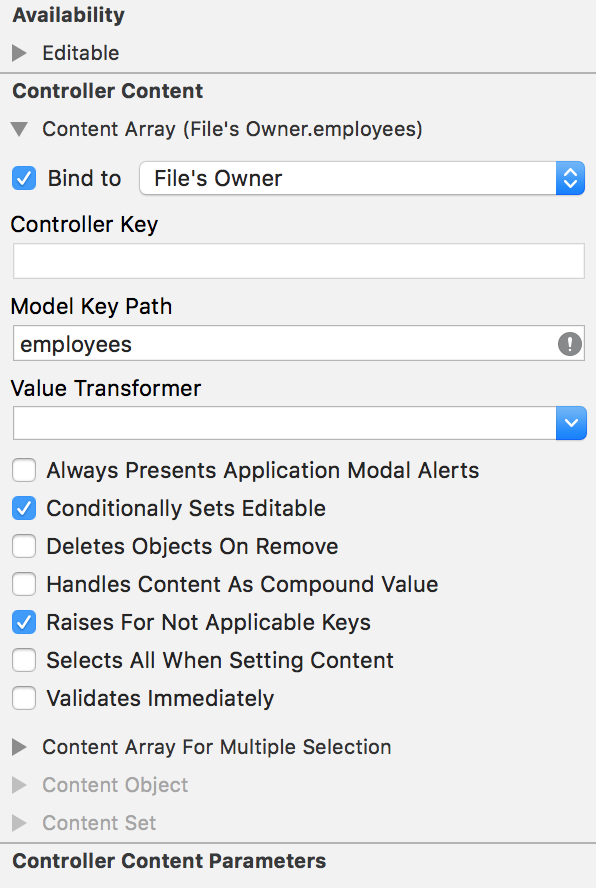
Now the little grey exclamation mark means that Xcode cannot resolve the entered keypath.
The debugger says that this class is not key value coding-compliant for the key text.
命令行报的错误为:
2018-08-07 00:53:44.810844+0800 RaiseMan[33049:2022883] [<RaiseMan.Document 0x6000000c3f70> valueForUndefinedKey:]: this class is not key value coding-compliant for the key employees.
修复方法:
class Document: NSDocument {
    @objc dynamic var employees: [Employee] = []
    // ...
}
@objcmeans you want your Swift code (class, method, property, etc.) to be visible from Objective-C.dynamicmeans you want to use Objective-C dynamic dispatch.
3. [copyWithZone:]: unrecognized selector sent to instance
详细错误信息:
2018-09-12 21:46:59.056535+0800 RanchForecast[15781:7159803] -[RanchForecast.Course copyWithZone:]: unrecognized selector sent to instance 0x60800025d400
根据错误描述,RanchForecast.Course class 缺少 copyWithZone 方法,所以按以下方法实现了一个
func copy(with zone: NSZone? = nil) -> Any {
    return Course(title: title, url: url, nextStartDate: nextStartDate)
}
运行结果依然错误,错误描述也一样。再想想,copyWithZone 为 NSCopying 协议需要的方法,实现协议时,需要继承自协议, 编译成功。
class Course: NSObject, NSCopying {
    ...

    func copy(with zone: NSZone? = nil) -> Any {
        return Course(title: title, url: url, nextStartDate: nextStartDate)
    }
}
如果你喜欢这篇文章,欢迎赞赏作者以示鼓励