








If you’re taking search, recommendations, or agents to production, you eventually hit the same checkpoint: security review.
When security blocks the knowledge layer, it slows everything down. Teams stay in pilot mode. Ownership gets muddy. “Quick fixes” like bolt-on stacks or partial self-hosting often create new problems, like higher operational burden and a bigger access surface area.
The cost shows up fast. Every week you’re stuck in security review is a week your AI features aren’t in production.
The blocker isn’t performance or features. It’s a single security requirement: no vendor access into your cloud account or cluster. What you need is a path to production that clears that bar without changing your delivery plan.
Pinecone Bring Your Own Cloud (BYOC), available now in public preview for all Enterprise users, brings Pinecone into your AWS, GCP, or Azure account with a zero-access operating model.
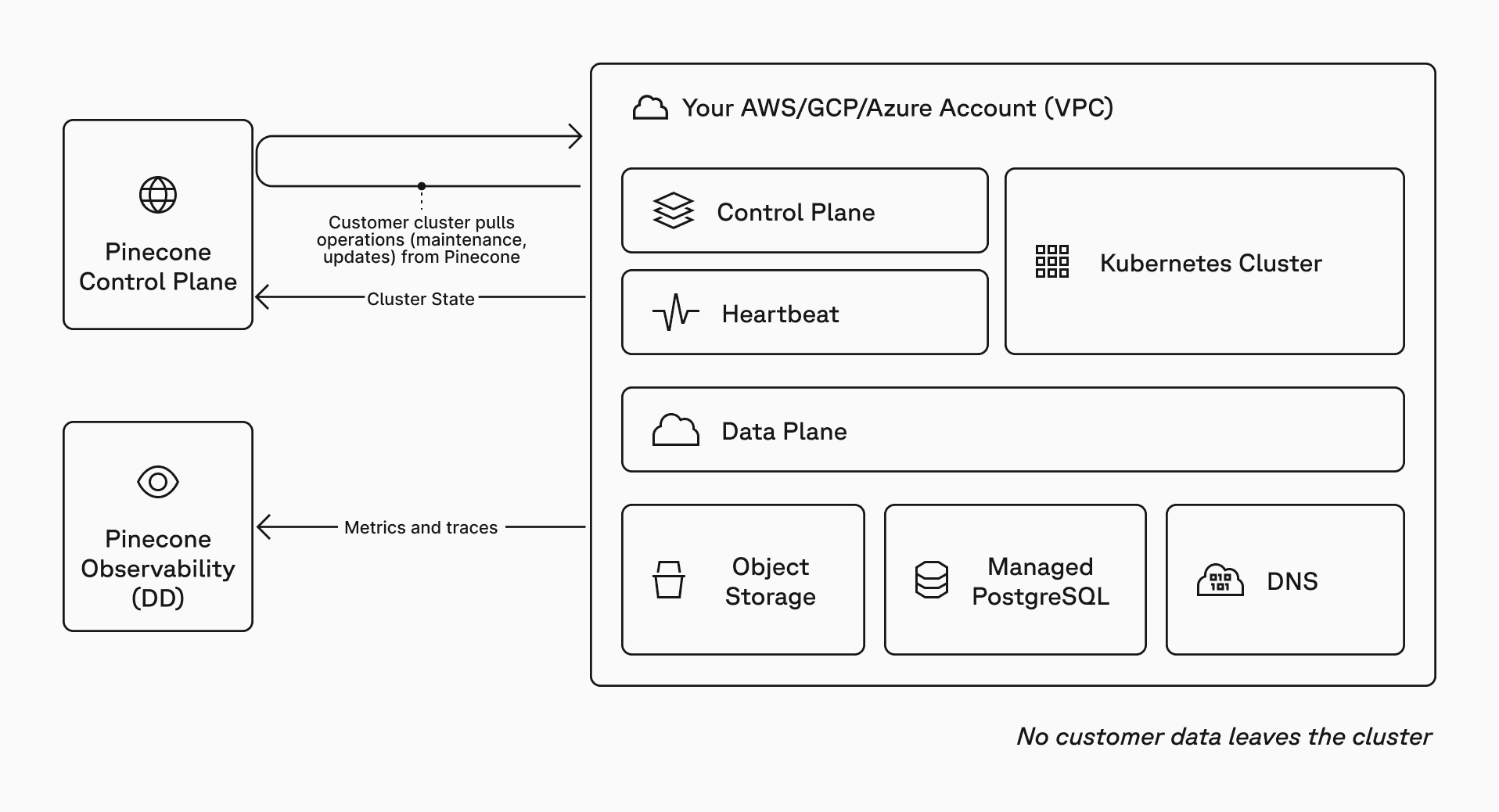
With BYOC, the Pinecone Database’s data plane runs inside your VPC. Your vectors are stored and queried there. Pinecone doesn’t need SSH, VPN, or inbound network access to your cloud account, VPC, Kubernetes cluster, nodes, or workloads. You don’t open inbound firewall ports for Pinecone to operate the system.
You still use the Pinecone control plane (API and console) for index lifecycle, auth, and usage visibility.
With BYOC, you get:
BYOC delivers uncompromising governance and safety for teams with the strictest requirements.
BYOC is Pinecone’s split-plane architecture applied to a zero-access enterprise security posture:
This keeps your data plane inside your security boundary while preserving the control plane experience your teams already use.
When the point is to ship production AI without getting stuck in security review, “keep data in our cloud” is often not enough. The real requirement is usually: no external access paths into production, even for operations.
The usual options create costly failure modes:
BYOC combines managed operations with data plane isolation. You keep the data plane inside your cloud account. Operations execute inside your cluster. Pinecone does not need direct access to your infrastructure.
BYOC is designed around a zero-access boundary. Pinecone does not need interactive access to your infrastructure to operate the data plane.
BYOC separates control plane operations from data plane requests.
Control plane operations – upgrades, scaling, maintenance, etc. – are queued by Pinecone and executed inside your environment using an outbound-only, pull-based model.
Data plane requests are things your apps do every day: upsert, query, fetch, and other index operations. These requests go directly from your clients to the data plane running in your VPC.
For monitoring and support, the cluster sends operational metrics and traces to Pinecone’s observability stack – never vectors, record metadata, and request payloads.
The key point: control plane operations are pulled outbound, and data plane requests are served inside your VPC.
Does not leave your cloud account:
Can leave your cloud account:
BYOC is deployed using a self-serve kit that fits standard platform workflows.
A typical rollout looks like this:
The BYOC deployment step looks like this:
See the BYOC GitHub repository and documentation for more information.
Provisioning creates the data plane environment in your cloud account, including a dedicated VPC and an EKS/GKE/AKS cluster, plus supporting cloud services for storage, system state, and TLS/DNS.
You can choose the network posture that matches your environment:
Control plane operations still work in either mode.
BYOC is available on AWS, GCP, and Azure for Enterprise users in public preview. In this release, BYOC supports:
Some Pinecone capabilities that depend on Pinecone-hosted services outside your cloud account are not yet available in BYOC, such as:
See the BYOC documentation for more information.
BYOC lets you meet the strictest security requirements without giving up managed infrastructure or slowing your path to production. BYOC is self-serve for Enterprise users in public preview. To deploy, start with the setup wizard in the BYOC GitHub repo, then follow the BYOC documentation. If you have any questions or need any assistance, contact your account team or send a request through our contact us form.
此内容由惯性聚合(RSS阅读器)自动聚合整理,仅供阅读参考。 原文来自 — 版权归原作者所有。