










Reading Time: 4 minutes
Apple announced this month the launch of iOS 17, the newest version of iOS, the operating system designed for iPhones. iOS 17 is currently in beta testing, and is set to launch in September 2023, alongside the new iPhones.
From September, iPhone users will see new features for Phone, FaceTime, and Messages, with some minor app improvements and a brand new app coming later in the year for journaling.
What impact will the new iOS 17 have on Apple Podcasts? Read on to find out.
With the launch of iOS 17, there will be enhancements to the current Apple Podcast features, which will also be included in iPadOS 17, macOS 14, WATCHOS 10 and tvOS 17.
Let’s look at what will be changing with iOS 17 for Apple Podcasts.
Apple has redesigned their Now Playing experience, which will showcase individual episode artwork, plus enhanced controls for managing the Queue.
Listeners can tap the Playing Next button to see what episode is playing next, and this is managed through Apple’s Queue. Listeners can easily add an episode to the Queue, tap the More menu (..), or press and hold on an episode, and then you can tap Add to Queue.
When adding a new episode, Playing Next will show listeners a new Queue section, where you can reorder and clear episodes. If you have listened to everything that has been added to the Queue, Apple Podcasts will continue to play episodes in Up Next.
In Playing Next, listeners can also see chapters in episodes, which now displays the duration of each chapter and how much time is left.
Podcasters have more opportunities to showcase their individual episode artwork. Apple Podcasts will now display episode artwork on the new Now Playing screen, Queue, the Lock Screen, Control Center, show and episode pages and within Up Next in Listen Now. Artwork will also be displayed through link previews in other apps such as Messages, Mail, and social media platforms.
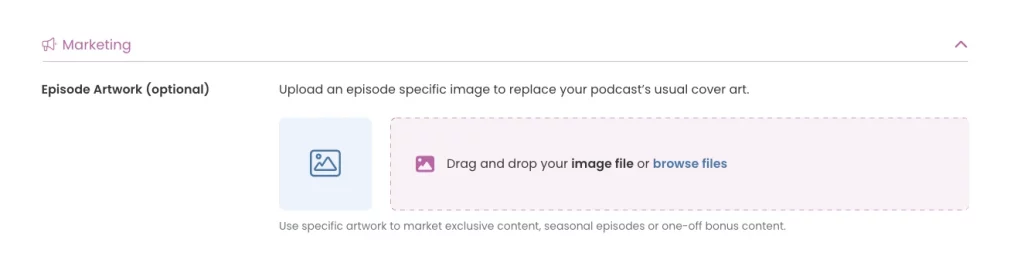
Adding individual episode artwork with Captivate is easy. In Episodes, which is under Content Management, click Publish New Episode. Scroll down to Marketing, and upload an episode specific image to replace your podcast’s usual cover art, which is great for marketing exclusive content, seasonal episodes or one-off bonus content. You can also add individual episode artwork to episodes that are already published, just make sure to hit Update Episode before exiting the screen.
When you’re ready for the episode to go live hit Publish Episode, and that individual episode artwork will be distributed to Apple Podcasts (and other directories) to display in their app for that particular episode.
iOS 17 makes it easier for listeners to search for podcasts with new filters for Top Results, Shows, Episodes, and Channels. In the search results, listeners will get more information including how much time is remaining for an episode they’re currently listening to, and whether an episode has been saved to the Library.
Pro tip – Double tap the Search tab, and this immediately brings the search bar into focus, so you can start typing.
Do a search for some terms for which you’d expect your podcast to be shown, if you can’t see yourself there, do some investigation. Look at the shows that are there, and how they differ from you, and make changes. For example, look at what words they’re using in their title, or the categories they’re using.
Listeners will be able to connect eligible subscriptions to top apps on the App Store with Apple Podcasts to access new shows and other benefits. These include (but are not limited to) leading global news apps including Bloomberg, The Economist, The Times etc, plus health and fitness apps including Calm. Apple Podcasts will automatically recognize these App Store subscriptions, and add the corresponding channel or show to a listeners Library.
Apple Music and Apple News will also launch brand new audio experiences on Apple Podcasts, such as subscribers to Apple Music will be able to listen to the entire catalogue of award-winning, commercial-free Apple Music radio shows. Apple News subscribers will be able to listen to professionally narrated audio stories from the world’s leading magazines and newspapers.
There will be other additional enhancements for example a new design for episodes, shows and channels, which make it easier for listeners to preview, play and follow podcasts. There will also be bug fixes and performance improvements. Podcasters also won’t have to wait as long for their published shows to be displayed, and listeners can enjoy more consistent playback syncing between devices.
For Captivate podcasters, these updates won’t make any big changes to how you are currently managing your podcast. However, it’s always good to be aware of any changes that apps, such as Apple Podcasts, are doing to their platforms.
Keep on uploading your episodes to Captivate, and we’ll continue distributing to Apple Podcasts, alongside the other directories e.g. Spotify, Amazon Music etc.
Apple Podcasts will be showcasing individual episode artwork in more places on the app, which is great for your brand, marketing and recognition. If this has been something on your to-do list for a while, the iOS 17 upgrade may be the last nudge you need to start doing it.
If you can’t wait until September to have a nosey at the new features, a developer beta is available to Apple Developer Program members. A public beta will be available to users in July.
Sarah is Captivate's SEO manager. She has over 10 years experience in digital marketing both in house and agency side, but specialises in SEO both from a content and technical aspect. She is also a podcaster and has four successful podcast shows under her belt including The SEO SAS Podcast, The Lipsticks Podcast, Women in Tech SEO Podcast and The SEO Mindset Podcast. When she is not working her 9-5 job or podcasting, Sarah is also a speaker and trainer both in SEO and podcasting.
此内容由惯性聚合(RSS阅读器)自动聚合整理,仅供阅读参考。 原文来自 — 版权归原作者所有。
