

惯性聚合 高效追踪和阅读你感兴趣的博客、新闻、科技资讯
阅读原文 在惯性聚合中打开

推荐订阅源

T
Threatpost
Exploit-DB.com RSS Feed
S
Security Affairs
N
News and Events Feed by Topic
T
Tenable Blog
P
Proofpoint News Feed
W
WeLiveSecurity
Simon Willison's Weblog
Google DeepMind News
C
CERT Recently Published Vulnerability Notes
Help Net Security
Help Net Security
I
Intezer
T
Threat Research - Cisco Blogs
S
Secure Thoughts
C
Cyber Attacks, Cyber Crime and Cyber Security
L
Lohrmann on Cybersecurity
AWS News Blog
AWS News Blog
Google Online Security Blog
cs.AI updates on arXiv.org
Know Your Adversary
Know Your Adversary
Project Zero
Project Zero
The Hacker News
The Hacker News
Security Archives - TechRepublic
T
Tor Project blog
N
News | PayPal Newsroom
cs.CL updates on arXiv.org
Hacker News - Newest:
Hacker News - Newest: "LLM"
A
Arctic Wolf
Forbes - Security
Forbes - Security
O
OpenAI News
K
KPMG report finds enterprise disconnect between AI and its ROI | CIO
Security Latest
Security Latest
P
Palo Alto Networks Blog
S
Schneier on Security
S
Securelist
C
Cybersecurity and Infrastructure Security Agency CISA
H
Heimdal Security Blog
V
Vulnerabilities – Threatpost
www.infosecurity-magazine.com
博客园_首页
T
Troy Hunt's Blog
Latest news
Latest news
Recent Announcements
MyScale Blog
MyScale Blog
人人都是产品经理
人人都是产品经理
L
LINUX DO - 热门话题
M
MIT News - Artificial intelligence
N
Netflix TechBlog - Medium
V
Visual Studio Blog
H
Hacker News: Front Page

Captivate Unlimited Podcast Hosting & Analytics

Apple Video Podcasting: Best Practices to Get The Most From The New Tech Apple Video Podcasting, powered by HLS: what is it and what does it mean for your podcast? Captivate Announced as Day One Launch Partner for Apple’s New HLS Video Release Introducing Captivate Assistant: The Most Useful AI Podcasting Assistant Yet; Grow Your Audience AND Save Time! 3 Low-Effort Ways to Promote Your Podcast (and Grow Listeners) this Autumn Captivate Unveils Ad Marketplace, Online Podcast Recording Platform and Integrated Audio Editing Tools Captivate Launches New Podcast Submission Process for Apple Podcasts Captivate Releases Sync V3 Make Money Podcasting: How to Successfully Monetize With Podcast Sponsorship And Advertisements Make Money Podcasting: How to Monetize Your Podcast Through Listener Donations World First: Captivate Podcast Hosting Platform Achieves IAB Tech Lab Podcast Measurement 2.2 Certification 8 Quick Ways to Build A Community Using Your Podcast GarageBand vs Audacity for Podcasting: Pros, Cons and Similarities Video: GarageBand For Podcasters - Tutorial, Tips and Tricks - Captivate Unlimited Podcast Hosting & Analytics 7 Common Podcast Sponsorship Mistakes – Plus How to Avoid & Fix Them! 12 Best Podcast Logos & Artwork Examples (That Actually Engage Listeners) Video: Podcast Logos vs Cover Art (Roles and Differences Explained!) - Captivate Unlimited Podcast Hosting & Analytics Video: How to Write a Podcast Script (And 5 Reasons Yours Doesn't Work!) - Captivate Unlimited Podcast Hosting & Analytics How to Write the Perfect Podcast Intro Script: Hook and Engage Listeners Video: How Podcasters Make Money (PLUS 5 Reasons You Don’t) - Captivate Unlimited Podcast Hosting & Analytics Is Apple Podcasts Free for Podcasters? Plus 8 Easy Steps to Upload your Podcast to Apple Ultimate Podcast Production Guide 2024 – How to Successfully Produce a Podcast How to Write a Perfect Podcast Episode Summary – Plus Tips, Benefits & Examples Changing Podcast Host Without Losing Subscribers, Listeners PLUS How to Move Your Analytics 80 Best Engaging & Interesting Podcast Interview Questions for Guests Captivate Launches Support For Apple Podcasts Subscriptions Spotify Launches 2023 Wrapped for Podcasters What is a Podcast? Plus 10 Reasons You Should Start One Today! What are Podcast Chapters? How do they Improve Listener Retention? YouTube Launches Its RSS Upload Tool for Podcasts – What Does This Mean for Podcasters? Podcast Branding 2024 Guide: How to Build a Podcast Brand & Benefits 43 Engaging Podcast Topics & Ideas Based on Show Format or Type – Including Examples 9 Best Ways to Promote a Podcast on Social Media – Plus FAQs Answered Podcast Downloads 2024 Guide: What is Good & How to Get More? Podcast Categories 2024 Guide – Get Discovered on Spotify, Apple and More How to Get on Podcasts – Plus Nailing your Pitch and Guest Interview How to Create Engaging and Powerful Podcast Taglines 2024 – Plus Examples Google Podcasts to be Discontinued in 2024 – Time to Say Goodbye How to Host Engaging and Powerful Podcast Interviews with Your Guests MP3 vs WAV – What is the Best File Format for Podcasts? How Much Money Do Podcasters Make in 2024? Plus Examples & How To Do It How to Record a Podcast Remotely 2024 Guide – Remote Podcast Setup How to Use Podcasts for Marketing and Branding Podcast Headphones 2023 Guide – 6 Best Headphones for Podcasting Podcast Equipment Essentials and Setup for Beginners and any Budget – Plus Advanced Extras How to Analyze and Track your Podcast Analytics Formats & Types of Podcast Explained – 10 Examples Plus Pros and Cons Demystifying Podcast Advertising: Ultimate Guide – Plus Tips for Podcasters to get Advertisers How to Publish a Podcast to Spotify, Apple Podcasts and Any Directory – Where to Upload & Distribute Podcast RSS Feeds 101: A Beginner’s Guide – What They Are & How They Work What are the best podcast apps? Both free and paid! Podcast Keyword Strategy: How to Uncover High-Impact Keywords to Boost Your Reach Podcast Calls to Action (CTAs): Converting Listeners into Engaged Fans Apple Launches iOS 17 – New Features for Apple Podcasts & Podcasters How to Start & Build a Podcast with No Audience and From Scratch – (Tips & Examples) Planning Podcast Episodes 2023 Guide – Templates, Outlines & Format Tips Patreon Alternatives – Best Podcast Subscription Platforms (is Apple Podcast Subscriptions the Best?) Make Money with Podcast Subscriptions & One-Off Donations Easily with Captivate The Easiest Way to Start a Video Podcast (& Why You Shouldn’t Wait) How to Start or Move your Podcast to YouTube – 5 Easy Tips Podcast Networks Explained – Everything You Need to Know! [2024 Guide] What is Podcast Hosting? Everything You Need to Know! YouTube Music for Podcasts: Boost Your Discoverability Today with New Features How to Find the Ideal Podcast Episode Length for Your Show Podcasting 2.0 Explained: RSS Enhancements for the Independent Podcaster How to Optimize Your Podcast Guest Appearance for Search Grow Your Audience Using a Podcast Avatar and 13 Other Techniques 4 Main Reasons Stopping Podcasters from Launching – Which Blocker is Stopping You? How to Edit and Record a Podcast in GarageBand Best Podcast Voice Tips and Advice by Voice Coach and Podcaster Nic Redman Making Your Podcast Hosting Even Better Value Best Podcast Tips & Advice from Podcasters 2022/23 for International Podcast Day How to Write the Perfect Podcast Script (plus Examples & Templates) Captivate are Platinum Sponsors of the APVA Awards 13 Best Podcast Recording Software 2023 (including remote) – Reviewed by Podcasters We Interviewed 11 Attendees about The Podcast Show 2022 Podcast Show 2022 Roundup – Interview with Captivate’s MD Mark Asquith Descript for Podcasters Tutorial: Everything you need to know Facebook Is Stopping Podcast Services – Why & What To Do Next? In-Depth Review of Alitu for Podcasters – How it makes recording and editing easier Captivate Supports Podchaser’s #Reviews4Good April 2022 – Raising Money for #ChefsForUkraine 2021 A Year in Review: Your Big Podcast Achievements and ours! What is Dynamic Ad & Content Insertion in Podcasting? Video: Captivate's AMIE Dynamic Ad Insertion Technology for Podcasters [Overview] - Captivate Unlimited Podcast Hosting & Analytics Recommended Podcasting Tools & Resources Video: How to Use the Free Podcast Guest Booking & Interview Management System - Captivate Unlimited Podcast Hosting & Analytics Free Interview Management & Guest Booking Platform for Podcasters Captivate Shareable Podcast Player V2 is Here! Introducing Cross-Promotional Feed Drops & Network Features for Every Captivate Podcaster Video: How to Grow Your Podcast with Captivate Growth Labs - Captivate Unlimited Podcast Hosting & Analytics Learn How to Grow & Monetize Your Podcast with Captivate Growth Labs Video: Get Listed on Apple Podcasts, Spotify + More - Captivate Unlimited Podcast Hosting & Analytics Video: How to Publish an Episode: Captivate Podcast Hosting Tutorial - Captivate Unlimited Podcast Hosting & Analytics Video: Dashboard Overview | Captivate Podcast Hosting Tutorial - Captivate Unlimited Podcast Hosting & Analytics Video: How to Create A Podcast | Captivate Podcast Hosting Tutorial - Captivate Unlimited Podcast Hosting & Analytics Captivate 2.0: A New Look, New Features and New Podcasting Possibilities! Podcast Intro & Outro – How to Make Yours Ear-Grabbing Podcast PLUS 4 Real-Life Examples! Write an Engaging Podcast Description that Turns Scrollers into Listeners (Plus Examples) How to Podcast on YouTube: The 3 Biggest Mistakes to Avoid Want to Be a Better Podcaster? Listen to These 13 Podcasts About Podcasting
Captivate 2.5: Upgraded UI and Brand New Features to Make Your Podcast Even More Successful
Ben Dodd · 2024-07-16 · via Captivate Unlimited Podcast Hosting & Analytics

Reading Time: 5 minutes

Podcasting has never been more intuitive than with Captivate and now, life just got even better for you, the busy podcaster.

We’re all podcasters at Captivate: we’re obsessed with it, spending all our free time using Captivate ourselves for our own podcasts. That, plus feedback and ideas from our highly-engaged and passionate community, means we know exactly how to improve it as a platform for serious, growth-focused podcasters like you.

So we’ve done that. Again.

Watch our live reveal video here:

What’s changed in Captivate 2.5’s dashboard refresh?

  • With 2.5, we’ve overhauled our UI to give it an even more sleek, modern and intuitive look, making it easier than ever for you to navigate through all our time and money-saving tools. 
  • We’ve introduced a whole load of new network features, including new enhanced networks and organisational networks, as well as sub-networks. More on all of those below.
  • We’ve updated our roles and permissions system, giving you even more control over who can do what to your podcasts, at show level and at network level.

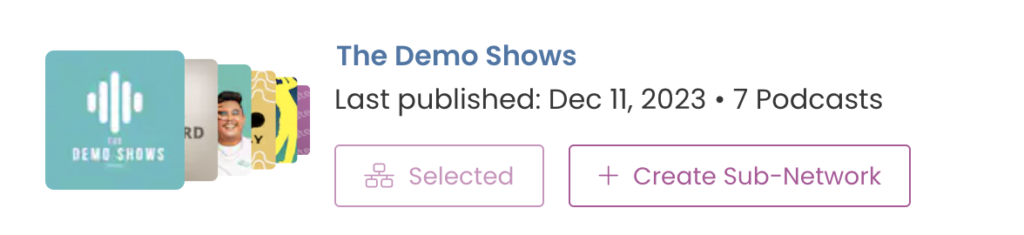
It’s not just a visual refresh, though: we’ve removed the limit on how many networks you can create – you can now have as many networks and sub-networks as you want, forever. (Remember that to host your clients, you’ll need to be on the business plan, though – fair is fair!)
Unlimited networks for all Captivate podcasters

We’ve removed our network limit entirely for everyone who uses Captivate. You can create as many separate networks as you want, and you now have far more granular control over every aspect of all of them.

This is just another way we’re delivering the most value possible to our podcasters at all times.
Introducing sub-networks and unprecedented network control 

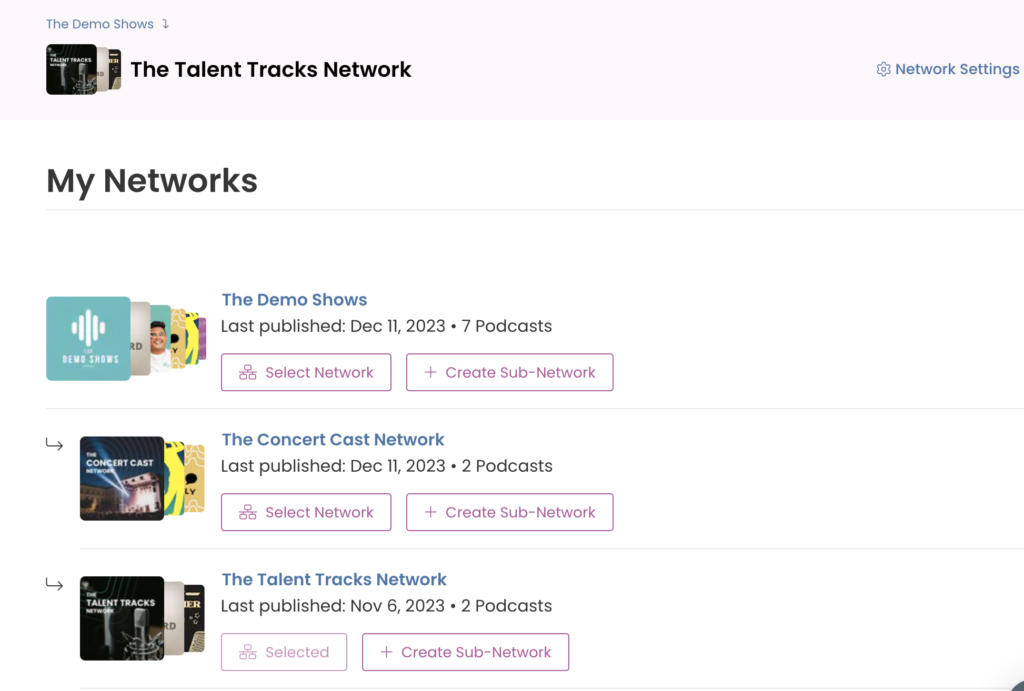
Subnetworks are brand new with Captivate 2.5. These can be created within any top-level network, and allow you to split podcasts into more specific groups while keeping them within the same organization. 

Managing podcasts within networks is as simple as it always has been – only now, you can select a subnetwork for your podcasts as well.

Let’s look at an example of how you’d use them. 

Top Level Network: Captivate Media Network

  • Subnetwork 1: Captivate Sports
    – Captivate Golf
    – Captivate Football 
  • Subnetwork 2: Captivate News
    – Headlines roundup
    – Daily Politics show
  • Subnetwork 3: Captivate Movies
    – Review show
    – Superhero talk

When you’re adding a new network team member to your network, you’ve got granular control of which subnetworks they’ll be added to. If you create a new subnetwork, they’ll automatically be added to that, so you don’t have to manually add all of your team members again.
Simpler, easier permissions and roles

Adding a new team member to your podcast

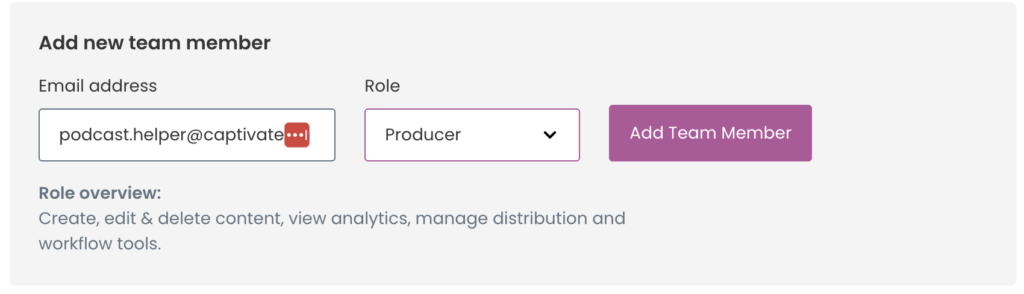
When you add a new team member to a podcast or a network, you now choose a role for them – this could be anything from Administrator to View Only. 

Each role comes with a predetermined set of permissions, meaning all you have to do is select which one is most applicable to the new team member to control their level of access.

If you’re adding a team member to a network, you can select different permission levels for them at network level and podcast level – they could be View-Only for your organizational network, but able to publish and edit episodes at show level.

Designer’s corner: how we approached Captivate’s 2.5 dashboard upgrade?

Hey podcasters, Garry here. I’m the Head of Design at Captivate and I wanted to give you a few words on some of the UX and UI changes we’ve implemented in this dashboard 2.5 release.

New navigation

First of all, and the most obvious change, is the main left-hand navigation, which has seen a couple of fundamental upgrades. When we first launched Captivate our feature set wasn’t as sizeable as it is today so we needed a way to organise the navigation that works on two levels:
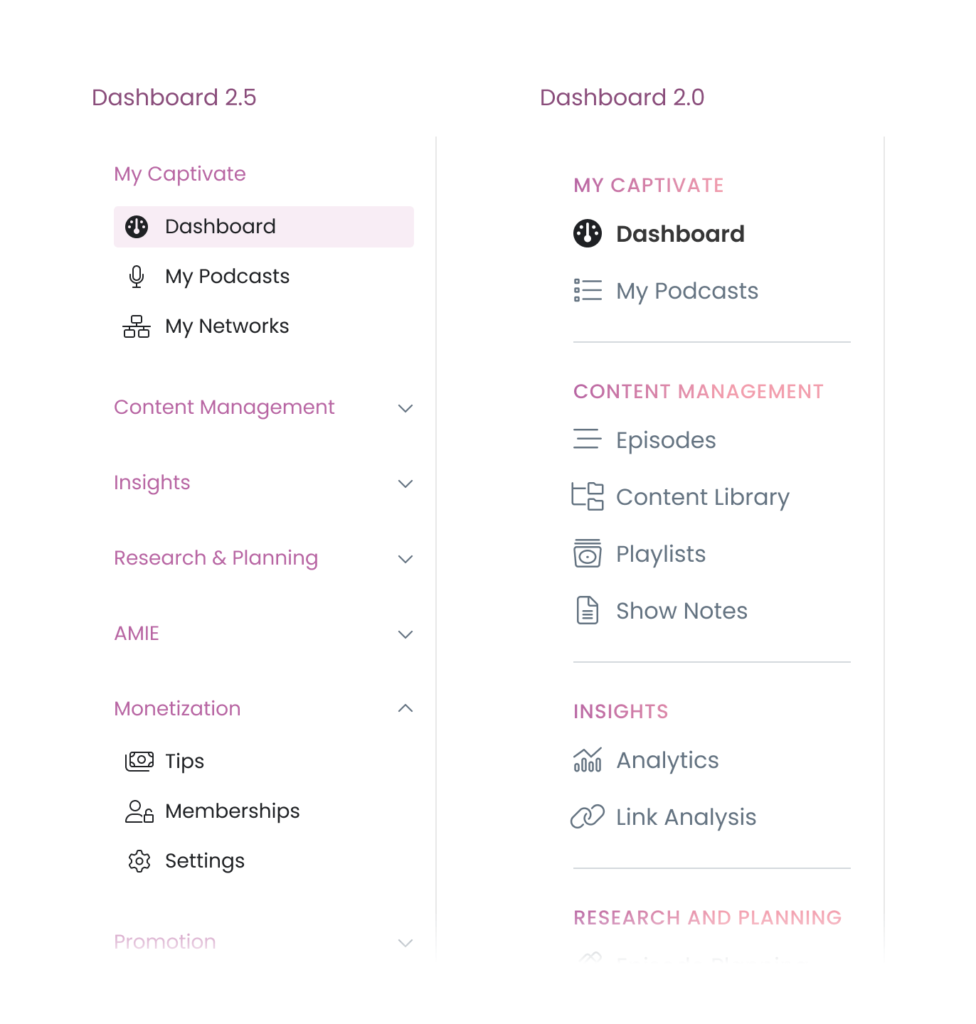
  1. A visually concise, neater view for new and existing users. We reduced the font size from 16px down to 14px to allow more sections to be visible while still maintaining legibility. We also improved the active state with a new pink background and heavier weighted icon so it’s clearer where you are throughout the dashboard.
  2. Customisation for users who access features regularly. We’ve implemented expandable/collapsable sections which makes it much easier to get to the features you frequently use while keeping the ones you don’t out of view, removing visual clutter.
A comparison of the main Captivate nav from Captivate 2.0 to 2.5
The new main navigation – easier to manage and customise

Updated Top-Level Components

Another notable change is how your dashboard is framed. We’ve kept the hierarchy the same with your account level options at the very top and then whatever show (or network) you’re working in at the top of the main content area and, like the navigation, the dashboard homepage has had a design update to make things more consistent with some of the newer additions in this release, including:

  • A new Current Podcast/Network component with a new Create New button so you can get straight to the thing you want to do. We engineered this component to be adaptable based on your working context: at default, it displays your top-level details and links then as you scroll, it shrinks so you can focus on the details of your current task, super handy for pages like publishing a new episode.
  • Clearer page titles
  • Sub-section titles with icons for clearer sections throughout each page
  • Refreshed analytics sections with new +/- percentage values
  • Refreshed Latest Episodes and Upcoming cards for easier reading at a glance

Additionally in this same area, with the launch of Sub-Networks, we needed a way to show additional and/or contextual options to users who use and manage networks, while also showing a visual distinction between them. With the use of icons and colour, moving between and managing regular networks and sub-networks is clear and simple plus viewing regular podcast shows also looks great now, too!

Network Team Management

Regarding your podcast networks, we’ve reworked how you and your team manage them. Launching Sub-Networks necessitated an easier path to getting your team members in and with the correct permissions assigned so now you can assign a role at both network and podcast levels.
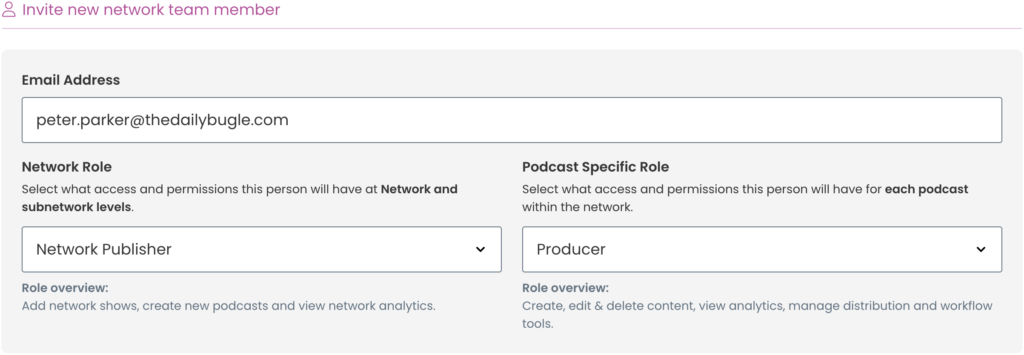
The new method for adding team members to your network
Assigning both network and podcast roles when assigning new network team members

Adding and managing team members to your podcast is also now a breeze: assign roles to new team members and change roles easily for existing members.

How to assign roles to your team members
Easily and quickly assign roles to podcast team members

Managing network and podcast team members, on the whole, is now more straightforward and quicker to manage.

Contextual Fly-Out Panels

One of our mantras at Captivate has always been “How do we save creators time so they can concentrate on making content?” Through experience as podcasters ourselves and lots of iteration, we arrive at the same conclusion: less friction at macro tasks = incrementally saved time.

With that in mind, we wanted a way for users to complete quick tasks or manage settings without having to click around various pages and sections. Enter stage right – Contextual Fly-Out Panels.
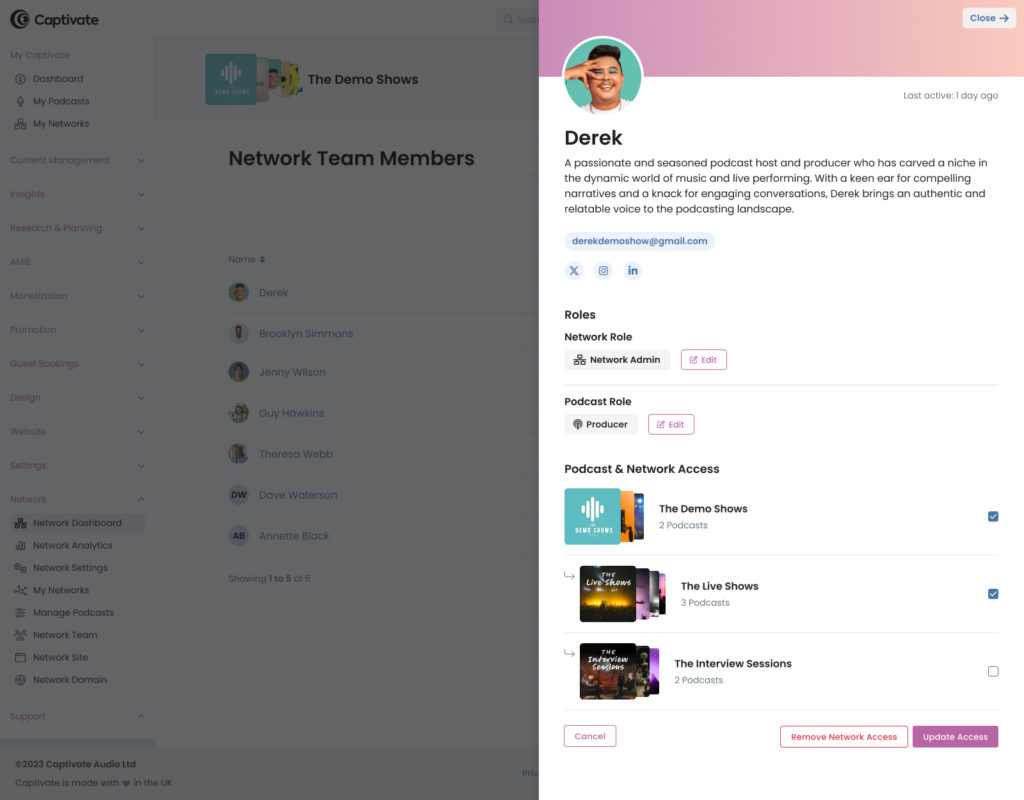
The brand new contextual fly-out panels
The new fly-out menu for quick access team and podcast management

You’ll see these throughout the dashboard to manage things like Network Team Members, Podcasts within Networks and Sub-Networks etc. They will also make appearances in other areas in future updates launching soon to provide quicker access to the information you need.

Another article we think you'd like...

Reading Time: 2 minutes Captivate & DAX US partner on a huge new monetization suite!

Wrapping Up

These UI updates & additions, along with a collection of other smaller visual refreshes, are a continuation of our commitment as designers, developers and podcasters to make Captivate not only the leader in helping podcasters grow their podcasts but also making that journey as frictionless as possible. As always, one of my main goals is to get our UI out of the way so you can get to creating content.

We’ll be building on this release to progress other sections of the dashboard so look out for release 2.6 onwards. I would love any feedback on this release so please get in touch or let me know on X – @garryaylott. Thanks!

Ben Dodd

Ben is a content writer and podcast support expert for Captivate, and has been with the team since 2021. He has a first-class degree in Journalism, and uses these skills to help new and veteran podcasters alike level up their content: reviewing tech, crafting product guides and sharing cutting edge podcasting news. Ben is always on hand to help Captivate podcasters with anything they run into, from when they first import their show to advanced questions like how to grow your audience or where to start with monetization. He loves what he does, and is committed to helping podcasters grow their show using Captivate. He’s always been a podcast fan - current favourites include Steven West’s ‘Philosophize This’ and Bob Mortimer’s ‘Athletico Mince’.