



惯性聚合 高效追踪和阅读你感兴趣的博客、新闻、科技资讯
阅读原文 在惯性聚合中打开

推荐订阅源

A
Arctic Wolf
T
Tenable Blog
T
Troy Hunt's Blog
Exploit-DB.com RSS Feed
P
Privacy & Cybersecurity Law Blog
NISL@THU
NISL@THU
Application and Cybersecurity Blog
H
Hacker News: Front Page
S
Secure Thoughts
AWS News Blog
AWS News Blog
L
LINUX DO - 最新话题
D
Darknet – Hacking Tools, Hacker News & Cyber Security
M
MIT News - Artificial intelligence
T
Tor Project blog
S
Schneier on Security
PCI Perspectives
PCI Perspectives
OSCHINA 社区最新新闻
OSCHINA 社区最新新闻
美团技术团队
Google DeepMind News
V
Visual Studio Blog
爱范儿
爱范儿
Google DeepMind News
Cyberwarzone
Cyberwarzone
T
The Exploit Database - CXSecurity.com
罗磊的独立博客
T
Threat Research - Cisco Blogs
Recent Commits to openclaw:main
V
V2EX
C
CXSECURITY Database RSS Feed - CXSecurity.com
Stack Overflow Blog
Stack Overflow Blog
freeCodeCamp Programming Tutorials: Python, JavaScript, Git & More
G
GRAHAM CLULEY
L
LINUX DO - 热门话题
D
Docker
J
Java Code Geeks
GbyAI
GbyAI
H
Heimdal Security Blog
The Hacker News
The Hacker News
MongoDB | Blog
MongoDB | Blog
V
Vulnerabilities – Threatpost
T
Tailwind CSS Blog
Cloudbric
Cloudbric
TaoSecurity Blog
TaoSecurity Blog
C
CERT Recently Published Vulnerability Notes
Y
Y Combinator Blog
Recorded Future
Recorded Future
Cisco Talos Blog
Cisco Talos Blog
T
Threatpost
The Register - Security
Hacker News - Newest:
Hacker News - Newest: "LLM"

博客园 - Stanley.Luo

CentOS 7+nginx+PHP+php-fpm Linux 的系统目录介绍 C++与Java,C#的异同(一):值,地址,引用 Loom工具类:Unity3D巧妙处理多线程 3Dmax 创建物体 3DMax 常用快捷键 HTC Vive 与Leap Motion 出现位置错误的问题 Groovy与Gradle在Android中的应用 VR的UI、UX设计原则 为什么带网格(mesh)的模型添加了刚体Rigidbody和MeshCollider,还是会从地板穿过去? Mecanim动画模型规范 Mecanim动画系统 制作流程 HTC Vive 体验的折腾经历 OpenGLES 2.0 可编程渲染管线 【VR视频播放】解决Unity模型贴图反转的问题 Lua语言的特别之处 Unity3D 的摄像机 iptables 的使用 CentOS安装Nginx
3DMax 物体选择方法
Stanley.Luo · 2016-10-30 · via 博客园 - Stanley.Luo

全选: Ctrl + A, 取消选择:Ctrl +D

加选:ctrl+鼠标左键;减选:alt+鼠标

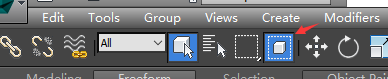
窗口与交叉:下面红框内的右边的按钮, 是切换两种模式:

选择模式一:只要选框碰到物体边缘, 就可选中

选择模式二:只有选框碰到物体全部, 才能选中
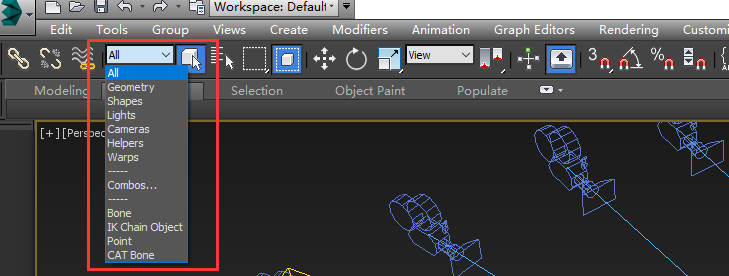
按类型选择:
按颜色选择

菜单:Edit->Select By->Color

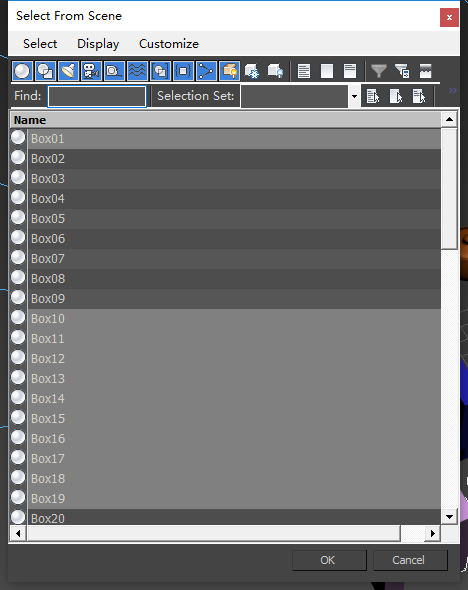
 按名称选择:

H键:
选择集:

选择过的东西, 可以创建一个集合,给他们命名,保存下来。(不过在Max 2014貌似有问题, 点击选择集就崩溃了)

选择重合额物体:

多次点选