



惯性聚合 高效追踪和阅读你感兴趣的博客、新闻、科技资讯
阅读原文 在惯性聚合中打开

推荐订阅源

G
Google Developers Blog
T
Troy Hunt's Blog
博客园 - 【当耐特】
N
Netflix TechBlog - Medium
V
V2EX
I
InfoQ
量子位
Hugging Face - Blog
Hugging Face - Blog
The Register - Security
J
Java Code Geeks
V
Visual Studio Blog
cs.AI updates on arXiv.org
S
Security @ Cisco Blogs
爱范儿
爱范儿
Hacker News: Ask HN
Hacker News: Ask HN
Recent Commits to openclaw:main
B
Blog
Apple Machine Learning Research
V2EX - 技术
V2EX - 技术
罗磊的独立博客
S
Security Affairs
钛媒体:引领未来商业与生活新知
钛媒体:引领未来商业与生活新知
IT之家
IT之家
O
OpenAI News
W
WeLiveSecurity
奇客Solidot–传递最新科技情报
奇客Solidot–传递最新科技情报
GbyAI
GbyAI
The Hacker News
The Hacker News
Attack and Defense Labs
D
Darknet – Hacking Tools, Hacker News & Cyber Security
Microsoft Azure Blog
F
Fortinet All Blogs
Schneier on Security
雷峰网
雷峰网
Scott Helme
Scott Helme
B
Blog RSS Feed
有赞技术团队
有赞技术团队
Recent Announcements
L
LangChain Blog
OSCHINA 社区最新新闻
OSCHINA 社区最新新闻
Y
Y Combinator Blog
Help Net Security
Help Net Security
NISL@THU
NISL@THU
A
About on SuperTechFans
L
LINUX DO - 最新话题
博客园 - 司徒正美
博客园 - 聂微东
博客园 - 三生石上(FineUI控件)
Spread Privacy
Spread Privacy
P
Proofpoint News Feed

AWS News Blog

AWS Weekly Roundup: One-click Lambda setup prompt, OpenAI GPT-5.6 models on Bedrock, and more (July 20, 2026) | Amazon Web Services Amazon SQS turns 20: Two decades of reliable messaging at scale | Amazon Web Services AWS Weekly Roundup: AWS Builder Center at 1 year, Network Scanning in Security Hub, Loom for AWS, and more (July 13, 2026) | Amazon Web Services AWS Weekly Roundup: Claude Sonnet 5 on AWS, Amazon WorkSpaces for AI agents, AWS service availability updates, and more (July 6, 2026) | Amazon Web Services Upgrade Amazon EKS clusters with confidence using Kubernetes version rollbacks | Amazon Web Services Accelerate your infrastructure deployments by up to 4x with AWS CloudFormation Express mode | Amazon Web Services Amazon EC2 C9g and C9gd instances powered by AWS Graviton5 processors are now available | Amazon Web Services AWS Weekly Roundup, Agentic CX designer for Amazon Connect Customer, EC2 AMI Watermarks, Open Governance for MySQL, and more (June 29, 2026) | Amazon Web Services Run isolated sandboxes with full lifecycle control: AWS Lambda introduces MicroVMs | Amazon Web Services AWS Weekly Roundup: NY Summit recap, Local Zone in Hanoi, Grok 4.3 in Bedrock, price reductions, and more (June 22, 2026) | Amazon Web Services Announcing Amazon EC2 G7 instances accelerated by NVIDIA RTX PRO 4500 Blackwell Server Edition GPUs | Amazon Web Services Amazon ECS introduces new high-resolution metrics for faster service auto scaling | Amazon Web Services Top announcements of the AWS Summit in New York, 2026 | Amazon Web Services Introducing Amazon Bedrock Managed Knowledge Base for faster, more accurate enterprise AI applications | Amazon Web Services Announcing Web Search on Amazon Bedrock AgentCore: Ground your AI agents in current, accurate web knowledge | Amazon Web Services Proactively reduce tech debt autonomously with AWS Transform – continuous modernization (preview) | Amazon Web Services AWS DevOps Agent adds release management capabilities to assess code changes before production (preview) | Amazon Web Services AWS Security Agent adds threat modeling, Kiro power and Claude Code plugin, and more | Amazon Web Services Amazon S3 annotations: attach rich, queryable context directly to your objects | Amazon Web Services AWS WAF adds AI traffic monetization capability to help content owners charge AI bots for content access | Amazon Web Services AWS Weekly Roundup: AWS FinOps Agent in preview, Gemma 4 on Bedrock, Kiro Pro Max, and more (June 15, 2026) | Amazon Web Services Now available: Amazon EC2 M9g and M9gd instances powered by new AWS Graviton5 processors | Amazon Web Services Anthropic Claude Fable 5 on AWS: Mythos-class capabilities with built-in safeguards now available | Amazon Web Services AWS Weekly Roundup: BYOM for Amazon RDS for SQL Server, AWS IoT Device SDK for Swift, and more (June 8, 2026) | Amazon Web Services Try the new console experience in Amazon Bedrock, optimized for Anthropic- and OpenAI-compatible APIs | Amazon Web Services Improve your application resilience with Amazon Cognito multi-Region replication | Amazon Web Services Get started with OpenAI GPT-5.5, GPT-5.4 models, and Codex on Amazon Bedrock | Amazon Web Services AWS Weekly Roundup: Claude Opus 4.8 on AWS, Aurora MySQL with Kiro Powers, and more (June 1, 2026) | Amazon Web Services Introducing the next generation of AWS Resilience Hub for generative AI-based SRE resilience journey | Amazon Web Services Introducing the next generation of Amazon OpenSearch Serverless for building your agentic AI applications | Amazon Web Services Meet Our Newest AWS Heroes – May 2026 | Amazon Web Services AWS Weekly Roundup: AWS Local Zones in Istanbul, open-source ExtendDB, Kiro Web, and more (May 25, 2026) | Amazon Web Services AWS Weekly Roundup: AWS Transform at 1 year, Claude Platform on AWS, EC2 M3 Ultra Mac instances, and more (May 18, 2026) | Amazon Web Services Amazon Bedrock introduces new advanced prompt optimization and migration tool | Amazon Web Services Amazon Redshift introduces AWS Graviton-based RG instances with an integrated data lake query engine | Amazon Web Services AWS Weekly Roundup: Amazon Bedrock AgentCore payments, Agent Toolkit for AWS, and more (May 11, 2026) | Amazon Web Services The AWS MCP Server is now generally available | Amazon Web Services Modernize your workflows: Amazon WorkSpaces now gives AI agents their own desktop (preview) | Amazon Web Services AWS Weekly Roundup: What’s Next with AWS 2026, Amazon Quick, OpenAI partnership, and more (May 4, 2026) | Amazon Web Services Top announcements of the What’s Next with AWS, 2026 | Amazon Web Services AWS Weekly Roundup: Anthropic & Meta partnership, AWS Lambda S3 Files, Amazon Bedrock AgentCore CLI, and more (April 27, 2026) | Amazon Web Services AWS Weekly Roundup: Claude Opus 4.7 in Amazon Bedrock, AWS Interconnect GA, and more (April 20, 2026) | Amazon Web Services Introducing Anthropic’s Claude Opus 4.7 model in Amazon Bedrock | Amazon Web Services AWS Interconnect is now generally available, with a new option to simplify last-mile connectivity | Amazon Web Services AWS Weekly Roundup: Claude Mythos Preview in Amazon Bedrock, AWS Agent Registry, and more (April 13, 2026) | Amazon Web Services Launching S3 Files, making S3 buckets accessible as file systems | Amazon Web Services AWS Weekly Roundup: AWS DevOps Agent & Security Agent GA, Product Lifecycle updates, and more (April 6, 2026) | Amazon Web Services Amazon Bedrock Guardrails supports cross-account safeguards with centralized control and management | Amazon Web Services Announcing managed daemon support for Amazon ECS Managed Instances | Amazon Web Services Announcing the AWS Sustainability console: Programmatic access, configurable CSV reports, and Scope 1–3 reporting in one place | Amazon Web Services AWS Weekly Roundup: AWS AI/ML Scholars program, Agent Plugin for AWS Serverless, and more (March 30, 2026) | Amazon Web Services Customize your AWS Management Console experience with visual settings including account color, region and service visibility | Amazon Web Services Announcing Amazon Aurora PostgreSQL serverless database creation in seconds | Amazon Web Services AWS Weekly Roundup: NVIDIA Nemotron 3 Super on Amazon Bedrock, Nova Forge SDK, Amazon Corretto 26, and more (March 23, 2026) | Amazon Web Services 20 years in the AWS Cloud – how time flies! | Amazon Web Services Our First 2026 AWS Heroes Cohort Is Here! | Amazon Web Services AWS Weekly Roundup: Amazon S3 turns 20, Amazon Route 53 Global Resolver general availability, and more (March 16, 2026) | Amazon Web Services Twenty years of Amazon S3 and building what’s next | Amazon Web Services Introducing account regional namespaces for Amazon S3 general purpose buckets | Amazon Web Services AWS Weekly Roundup: Amazon Connect Health, Bedrock AgentCore Policy, GameDay Europe, and more (March 9, 2026) | Amazon Web Services Introducing OpenClaw on Amazon Lightsail to run your autonomous private AI agents | Amazon Web Services AWS Weekly Roundup: OpenAI partnership, AWS Elemental Inference, Strands Labs, and more (March 2, 2026) | Amazon Web Services AWS Security Hub Extended offers full-stack enterprise security with curated partner solutions | Amazon Web Services Transform live video for mobile audiences with AWS Elemental Inference | Amazon Web Services AWS Weekly Roundup: Claude Sonnet 4.6 in Amazon Bedrock, Kiro in GovCloud Regions, new Agent Plugins, and more (February 23, 2026) | Amazon Web Services
Automate public TLS certificate issuance with ACME support in AWS Certificate Manager | Amazon Web Services
Sébastien St · 2026-07-01 · via AWS News Blog

AWS News Blog

Voiced by Polly

If you manage TLS certificates for your applications, you know the challenge: certificates expire, and when they do, your customers see errors or your service goes down. As certificate validity periods get shorter (the Certification Authority (CA)/Browser Forum mandates reduced maximum validity to 100 days starting March 2027, and to 47 days by 2029), manual renewal processes become untenable. You need automation.

Automatic Certificate Management Environment (ACME) is an open protocol for requesting, renewing, and revoking TLS certificates without human intervention. It’s the same protocol behind Let’s Encrypt, and it’s supported by dozens of clients across every platform.

Today we’re announcing ACME support for public certificates in AWS Certificate Manager (ACM). ACM now provides a fully managed ACME server endpoint that works with any ACMEv2-compatible client, such as Certbot, cert-manager for Kubernetes, acme.sh, or any other client you already use. You can issue public TLS certificates from Amazon Trust Services through the standard ACME protocol.

Before today, if you wanted automated certificate management using the ACME protocol, you relied on external certificate authorities alongside ACM, leading to a fragmented visibility experience. Some certificates lived in ACM, others were managed externally with no central dashboard. PKI administrators had limited ability to control who could request certificates or which domains were allowed.

With ACME support in ACM, you can now set up one or more managed ACME endpoint that allows you to centrally manage and monitor ACME certificate usage across your organization.

As a PKI administrator, you get centralized controls that go beyond basic certificate issuance. You can bind IAM roles to ACME accounts for fine-grained access control over which domains each client can request. You can define domain scopes at the endpoint level to enforce organization-wide policies. And you get centralized monitoring and visibility in the same place: AWS CloudTrail logs every certificate request for auditability, Amazon CloudWatch tracks operational metrics, and ACM sends expiry notifications when certificates are approaching renewal. Using ACM, your PKI team can search all certificates, whether issued through the ACM console, an API call, or ACME.

How it works
To get started, you first set up a dedicated ACME endpoint, configure authorization controls using External Account Binding (EAB), validate which domains the endpoint can issue certificates for, and point your existing ACME clients to the new endpoint.

The domain validation step is important: it separates who can set up certificate issuance from who can request certificates. The PKI administrator validates domains once at the endpoint level, using DNS credentials that stay with the admin. Application owners who need certificates never touch DNS. They register with an EAB credential, and the endpoint enforces which domains and scopes they’re allowed to request. This means you can distribute certificate automation broadly across your organization without distributing DNS keys along with it.

I start this demo from the ACME certificates page in the AWS Certificate Manager console.
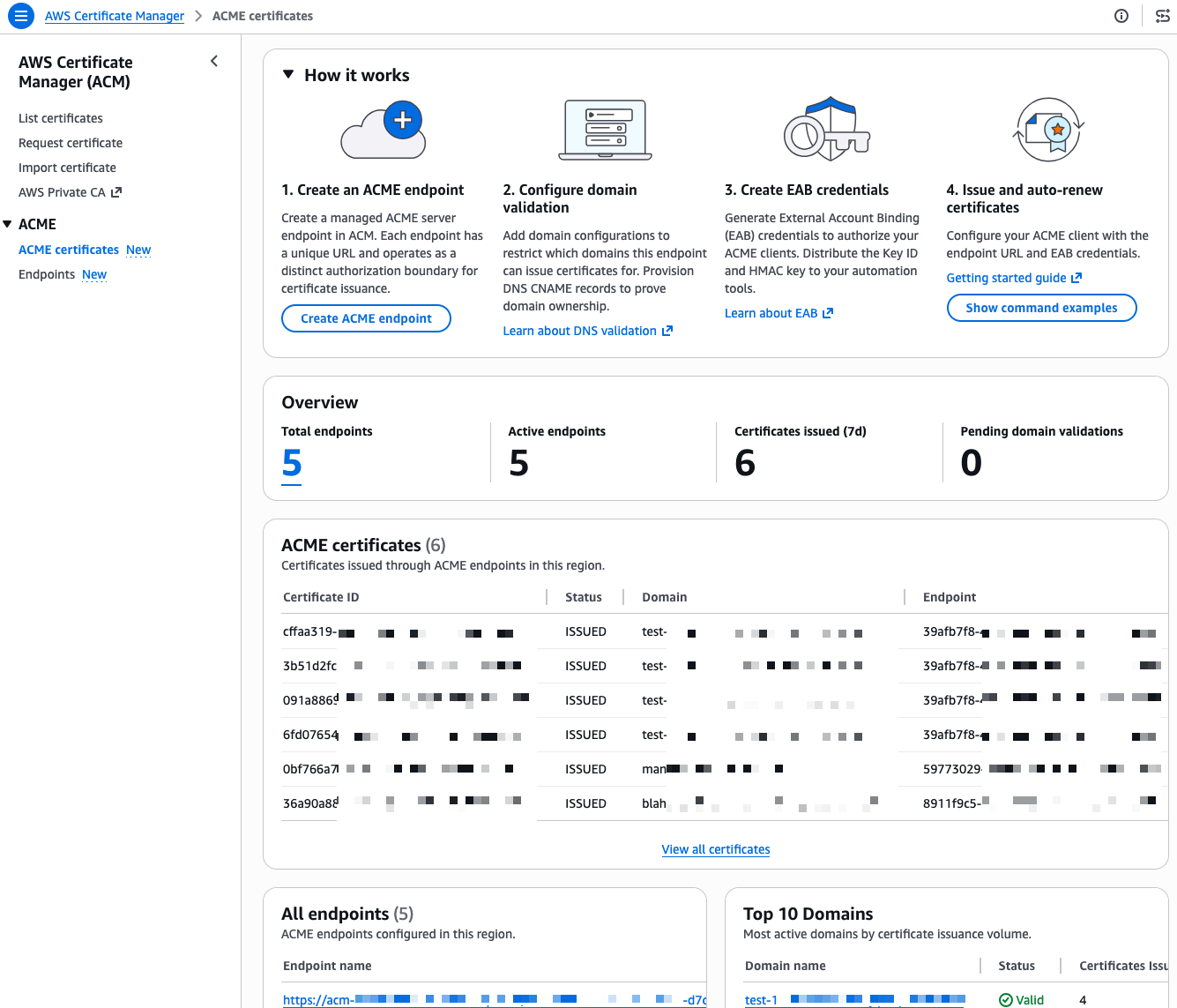
ACME Console

I already have a few endpoints and certificates in this account, I walk you through creating a new one from scratch. First, I select Create ACME endpoint.
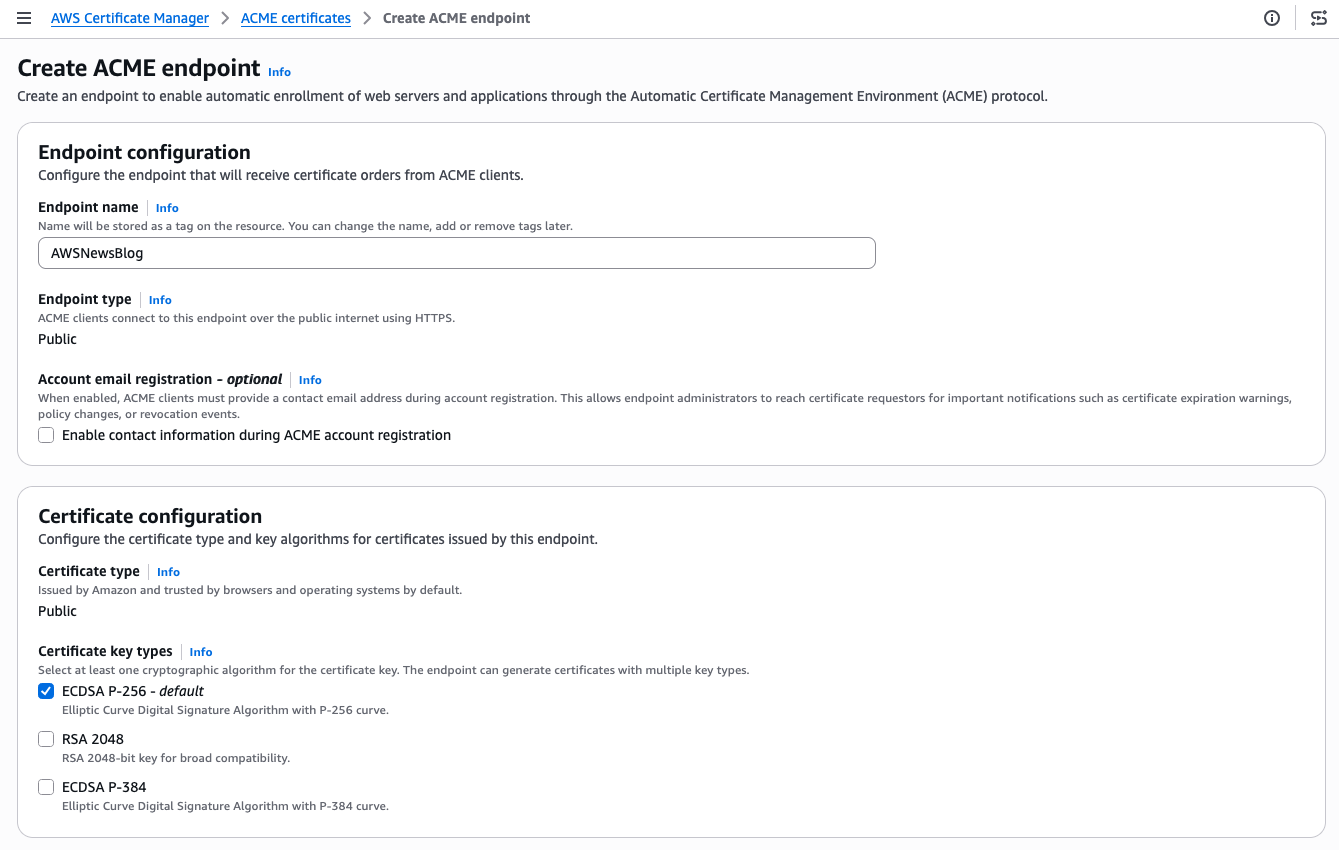
ACME - Ceeate endpoint 1

I give my endpoint a name. The Endpoint type is Public. ACME clients will connect over the public internet. The Certificate type is Public. The certificate will be issued by Amazon Trust Services and trusted by browsers and operating systems by default. For the certificate key type, I keep the default ECDSA P-256. RSA 2048 and ECDSA P-384 are also available if your clients require them.
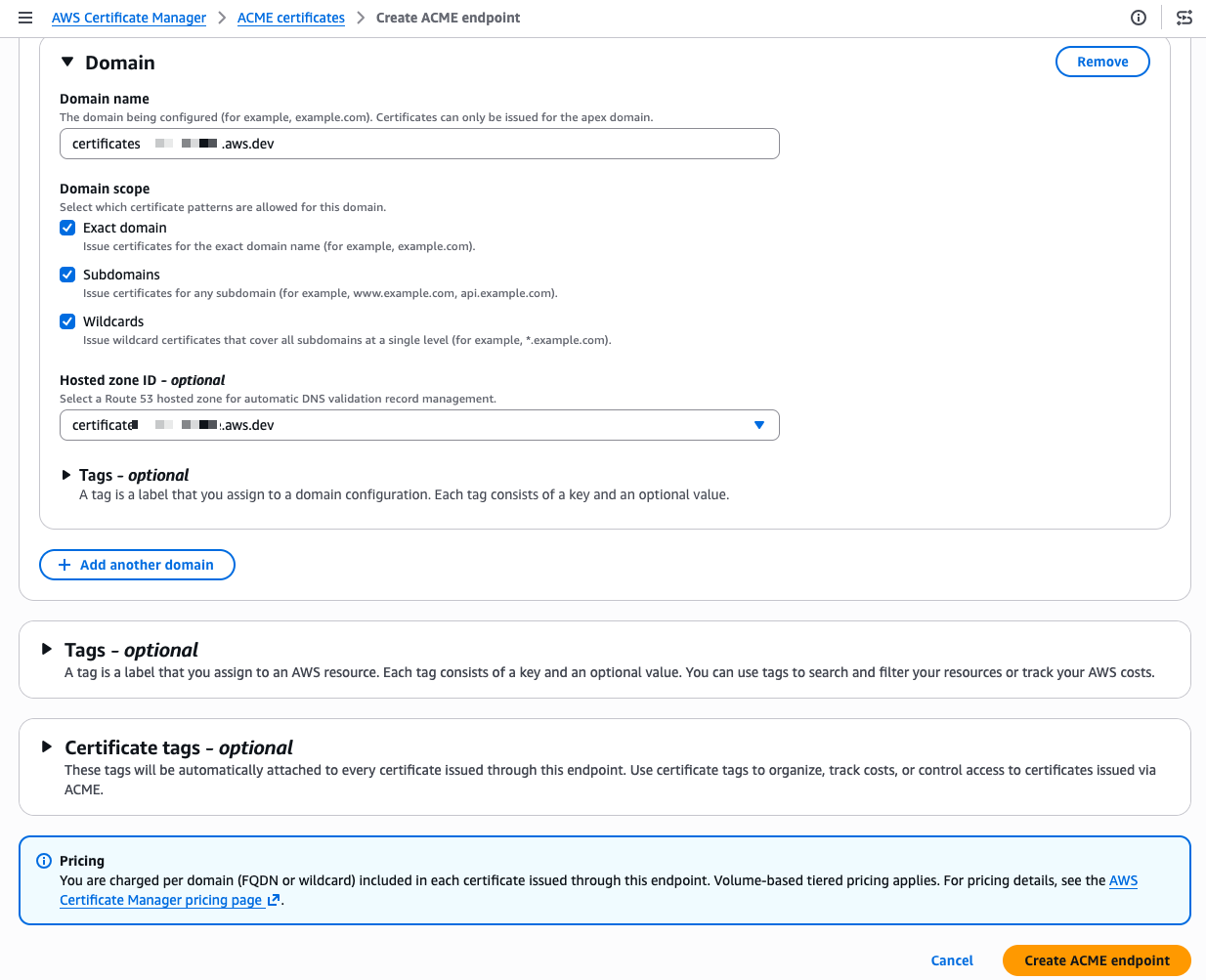
ACME - Ceeate endpoint 2

Scrolling down, I configure the domain. I enter my domain name and select the domain scope. The scope controls exactly what certificate patterns your ACME clients are allowed to request for this domain. If I check only Exact domain, clients can only request certificates for that specific domain name. Adding Subdomains allows certificates for any subdomain (for example, api.example.com or dev.example.com). Adding Wildcards allows wildcard certificates (*.example.com). By leaving a scope unchecked, you prevent any client using this endpoint from requesting that type of certificate, even if their ACME request is otherwise valid. For a production endpoint, you might enable only Exact domain and Subdomains while leaving Wildcards unchecked to enforce a stricter security posture.

I also select my Amazon Route 53 hosted zone from the drop down menu. ACM then automatically creates the DNS CNAME records needed for domain validation, so I don’t have to do it manually. When my domain is hosted outside of Route 53, I manually create the provided CNAME record at my DNS provider instead. This is a meaningful difference from typical ACME setups where each client handles its own domain verification independently.

These centralized controls give PKI administrators a single place to authenticate domains, restrict which certificate types (ECDSA or RSA) clients can request, and further limit wildcard issuance. Having these governance capabilities built in means you don’t need to purchase a separate certificate lifecycle management product or invest in building a custom policy layer yourself, both of which come at significant cost and operational overhead.

I select Create ACME endpoint
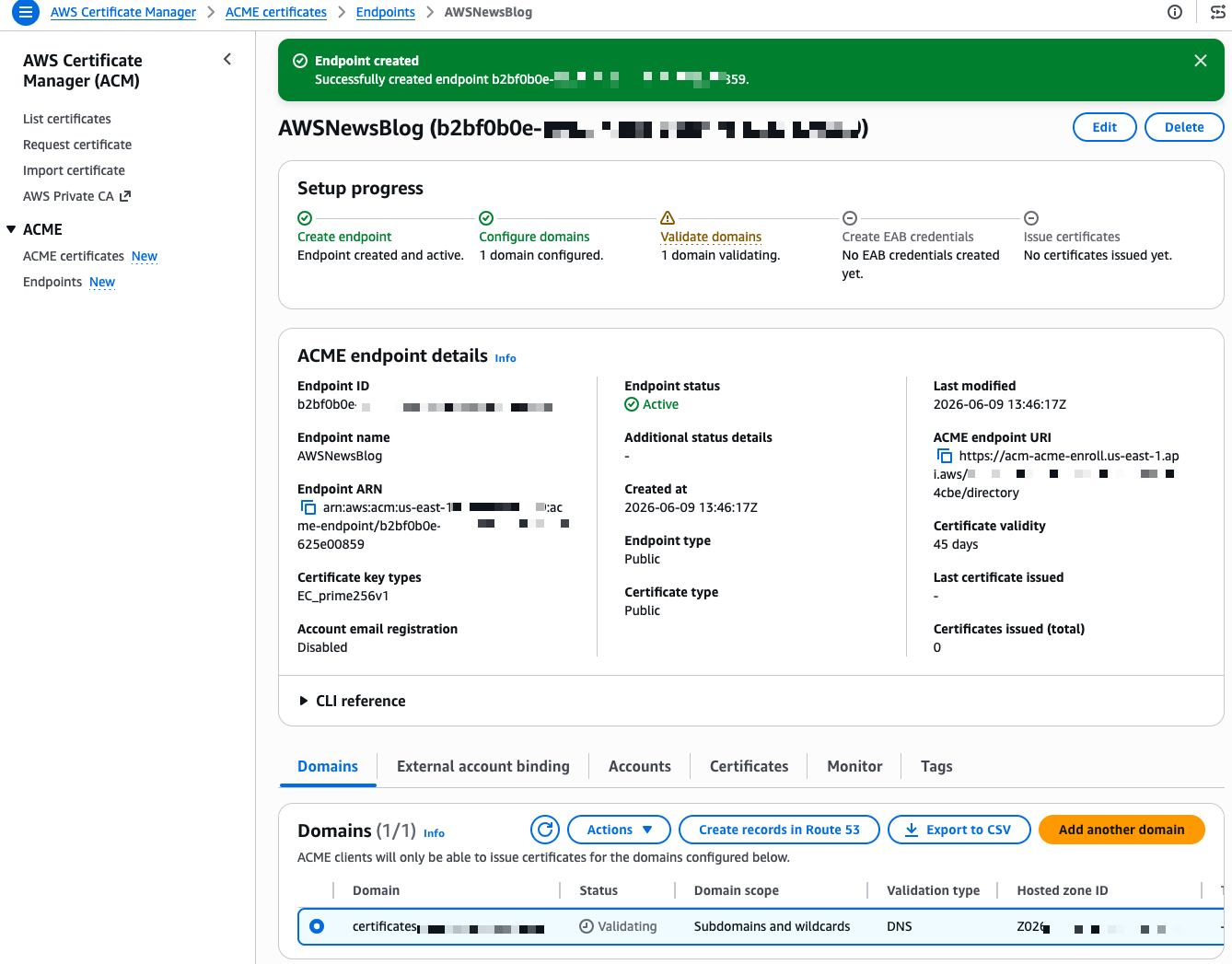
ACME - DNS configuration

After a few seconds, the endpoint is created. The console shows a Setup progress tracker with the next steps. My domain shows a “Validating” status. The validation method is DNS validation, where ACM verifies that you control the domain by checking for a specific CNAME record. Because I selected my Route 53 hosted zone during creation, I select Create records in Route 53 to let ACM handle the DNS validation automatically.
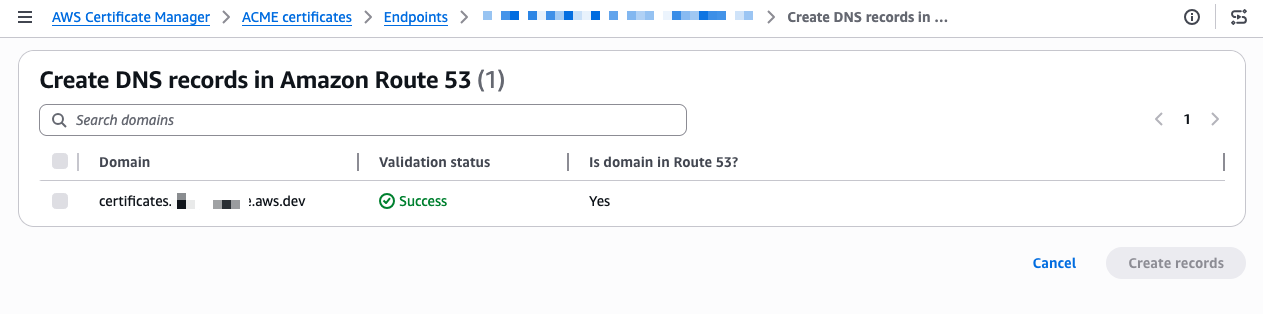
ACME - DNS successThe validation completes in a few seconds and the status changes to Success.
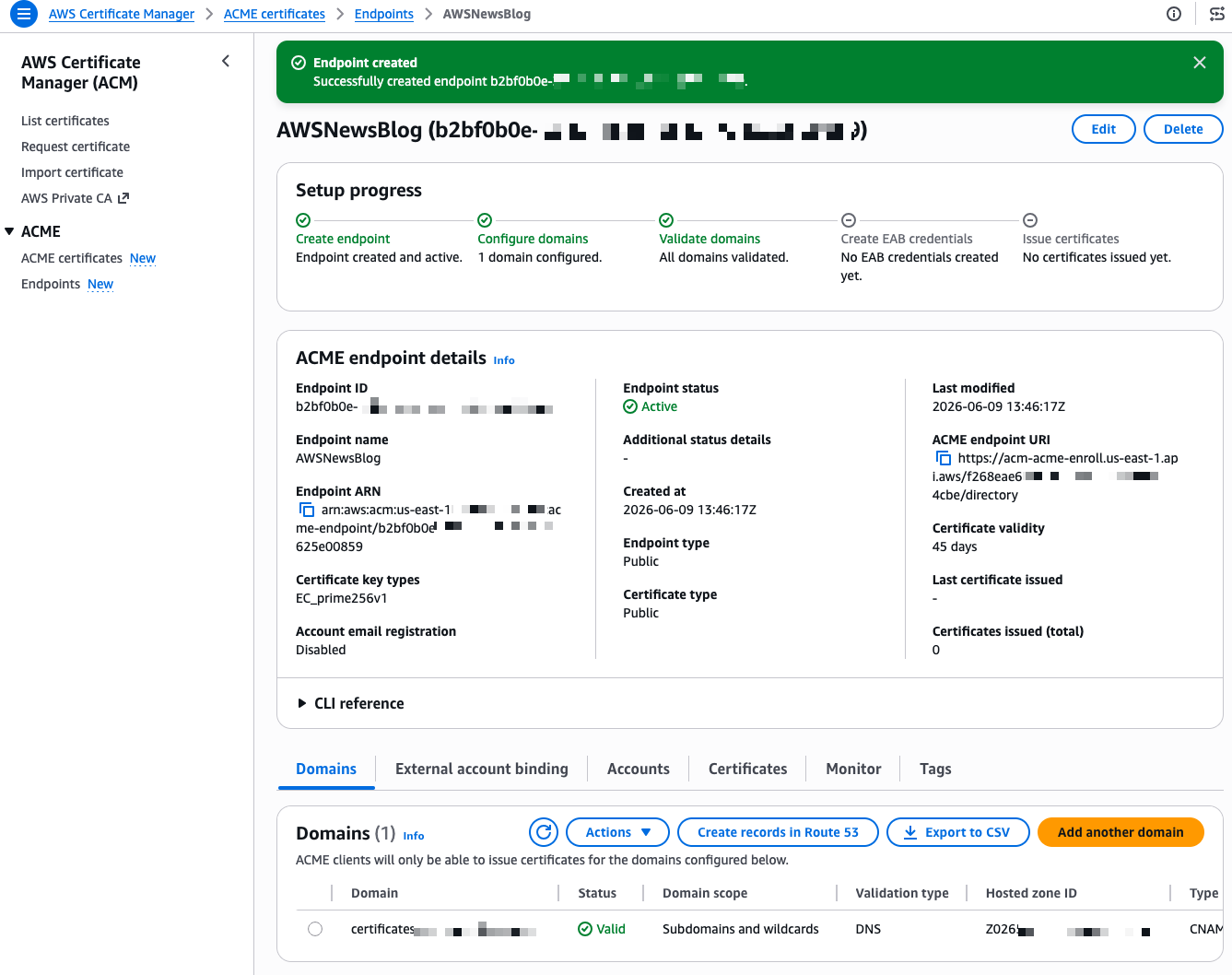
ACME - External Account Binding 1

Now I need to create External Account Binding (EAB) credentials. EAB credentials are a key identifier and HMAC key pair that lets your ACME client register an account with the ACME server. Once registered, the client generates its own asymmetric key pair, which is then used to authenticate all subsequent certificate requests. On the endpoint details page, I select the External account binding tab, then select Create EAB. I give the credential a name and optionally set an expiration time, ideally no longer than needed to complete client registration.
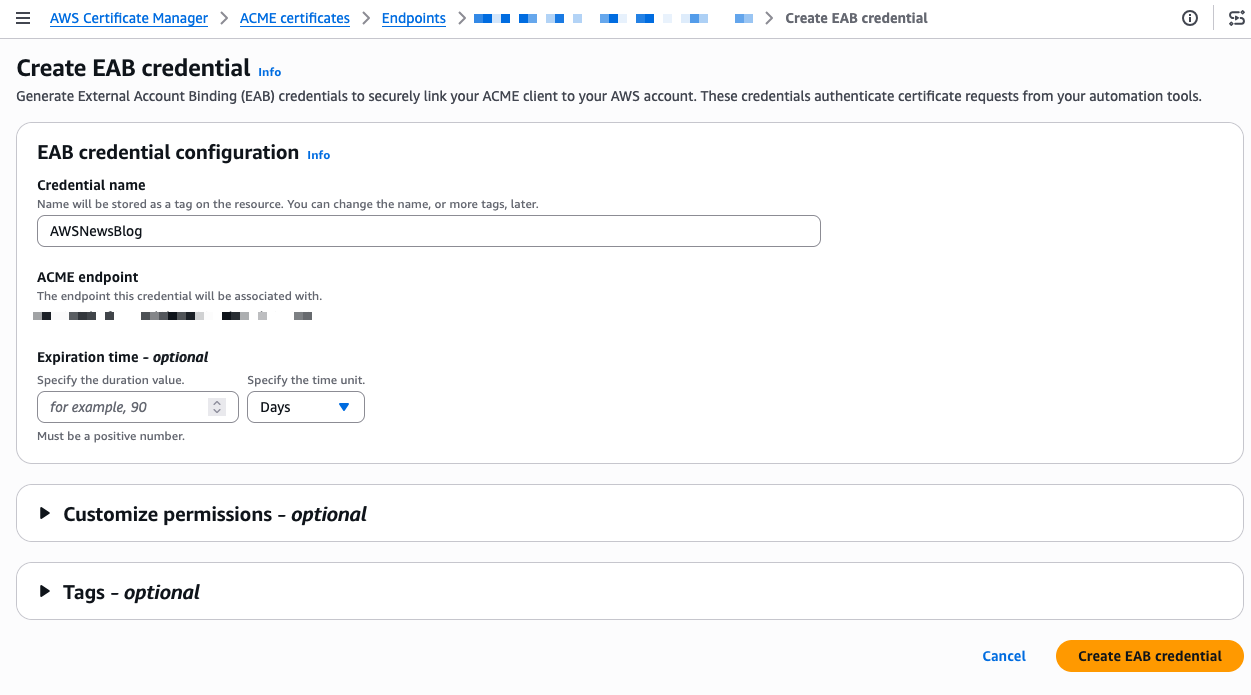
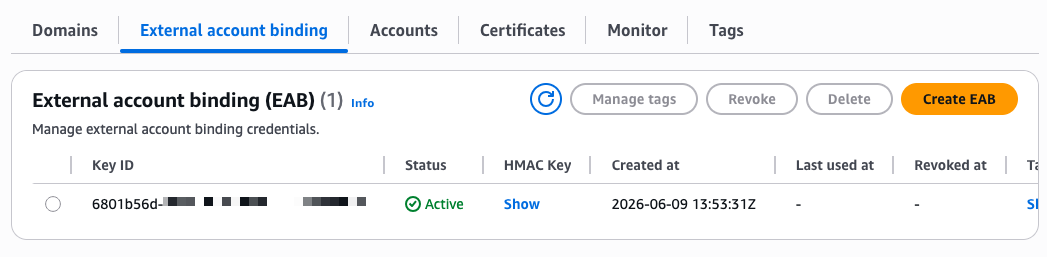
ACME - External Account Binding 2

ACME - end of configuration - show key

After I select Create EAB credential, the console shows the Key ID and HMAC Key. I note these values because I need them to configure my ACME client. The setup progress now shows four green checkmarks.
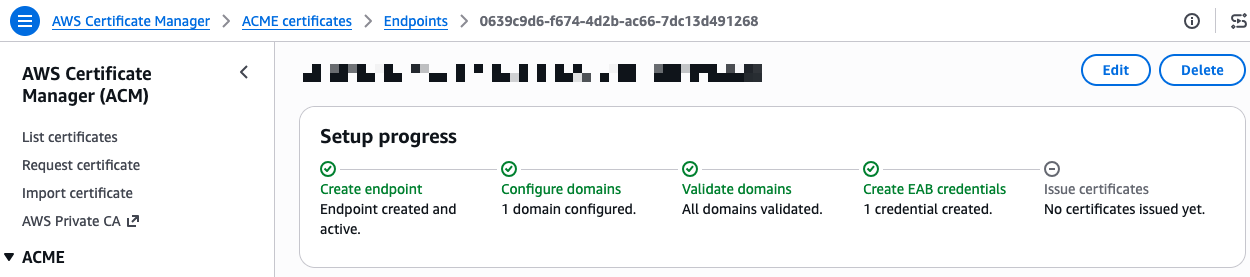
ACME - end of configuration - success

I’m ready to request a certificate. On the endpoint details page, I expand the CLI reference section. The console provides ready-to-use command examples for both Certbot and acme.sh. I copy the Certbot command and run it inside a container using the certbot/certbot image.

certbot certonly --standalone --non-interactive --agree-tos \
    --email <EMAIL> \
    --server https://acm-acme-enroll.us-east-1.api.aws/<ENDPOINT_ID>/directory \
    --eab-kid <EAB_KID> \
    --eab-hmac-key <EAB_HMAC_KEY> \
    --issuance-timeout <ISSUANCE_TIMEOUT> \
    -d <DOMAIN>

I replace the placeholders with my endpoint URL, EAB credentials, and domain name. The --eab-kid and --eab-hmac-key arguments are how Certbot registers with your ACME endpoint using the External Account Binding credentials I generated earlier. Each ACME client has its own syntax for this step, so check your client’s documentation for the exact flags.

Certbot contacts the ACME endpoint and returns a valid certificate signed by Amazon Trust Services.
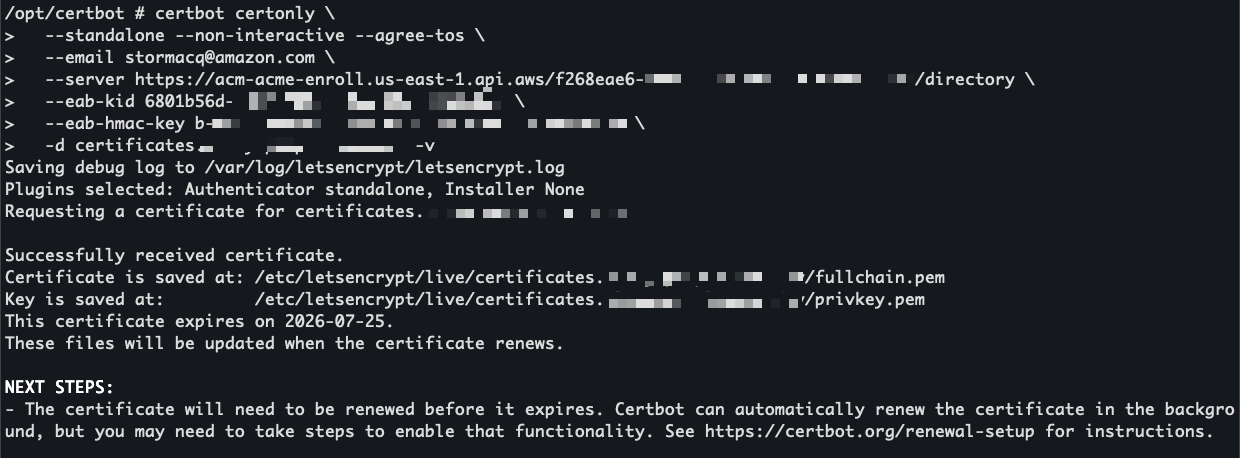
Certbot to obtain a certificate through ACME

I use openssl to view the certificate before installing it.
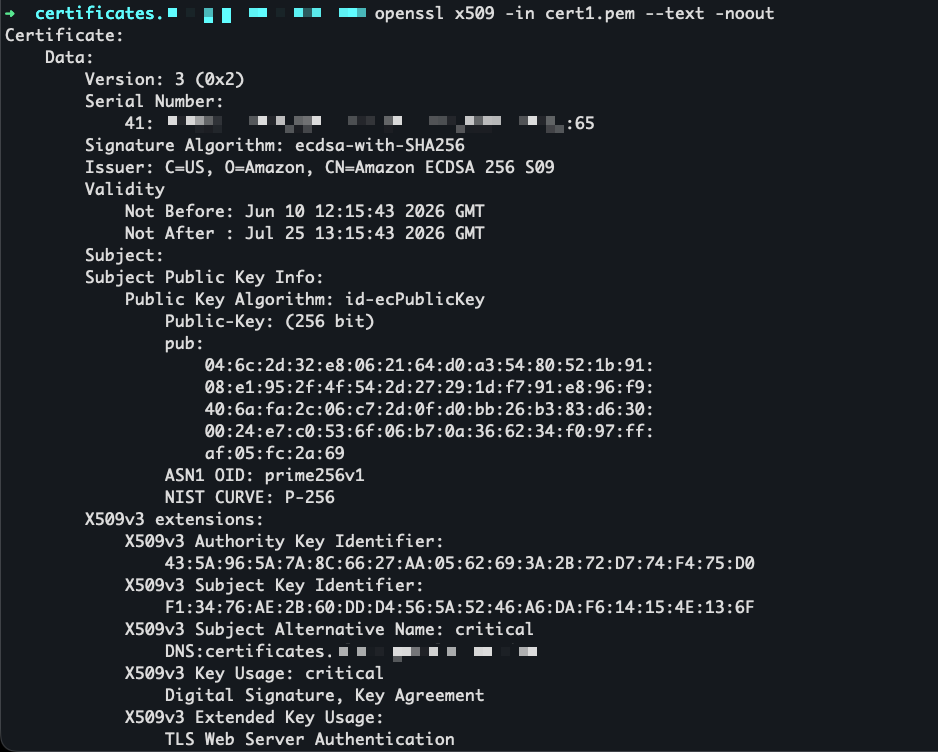
openssl to view the certificate

The certificate is now visible in the ACM console under the ACME certificates tab, alongside any certificates issued through the console or API.
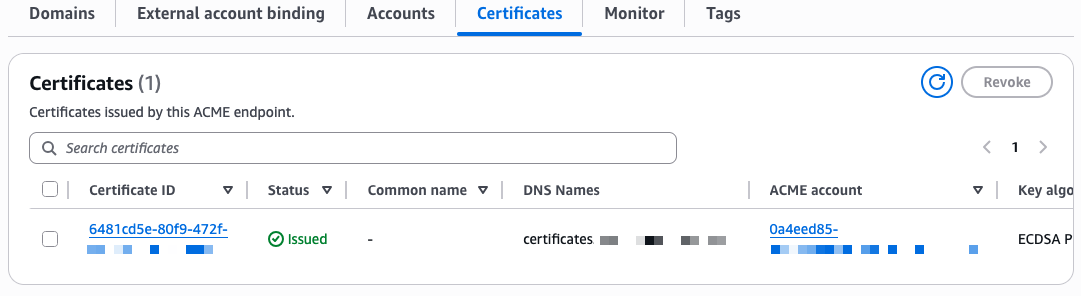
Certoficate view in the ACME console

Availability and pricing
ACME support in AWS Certificate Manager is available today in all commercial AWS Regions and will be available in AWS GovCloud (US), the China Regions, and the AWS European Sovereign Cloud partitions at a later date.

Pricing is per domain included in each certificate at the time of issuance, with a different price for fully qualified domain names and wildcards. Volume tiers are calculated based on total domain occurrences across all certificates issued per month in your AWS account. For details, see the ACM pricing page.

To get started, visit the ACM section on the AWS console or read the documentation.

— seb