惯性聚合 高效追踪和阅读你感兴趣的博客、新闻、科技资讯
阅读原文 在惯性聚合中打开

推荐订阅源

博客园 - 【当耐特】
Help Net Security
Help Net Security
P
Proofpoint News Feed
J
Java Code Geeks
爱范儿
爱范儿
Last Week in AI
Last Week in AI
钛媒体:引领未来商业与生活新知
钛媒体:引领未来商业与生活新知
F
Full Disclosure
Google DeepMind News
H
Help Net Security
G
Google Developers Blog
Jina AI
Jina AI
Vercel News
Vercel News
cs.AI updates on arXiv.org
L
Lohrmann on Cybersecurity
S
Schneier on Security
Microsoft Azure Blog
IT之家
IT之家
Security Archives - TechRepublic
阮一峰的网络日志
阮一峰的网络日志
N
News and Events Feed by Topic
GbyAI
GbyAI
B
Blog
O
OpenAI News
博客园_首页
Cisco Talos Blog
Cisco Talos Blog
K
KPMG report finds enterprise disconnect between AI and its ROI | CIO
Hacker News: Ask HN
Hacker News: Ask HN
TaoSecurity Blog
TaoSecurity Blog
腾讯CDC
MongoDB | Blog
MongoDB | Blog
M
MIT News - Artificial intelligence
C
Cybersecurity and Infrastructure Security Agency CISA
Cyberwarzone
Cyberwarzone
Webroot Blog
Webroot Blog
Simon Willison's Weblog
Y
Y Combinator Blog
C
Cisco Blogs
A
Arctic Wolf
CTFtime.org: upcoming CTF events
T
The Exploit Database - CXSecurity.com
Security Latest
Security Latest
AI
AI
W
WeLiveSecurity
aimingoo的专栏
aimingoo的专栏
The Register - Security
Project Zero
Project Zero
H
Hackread – Cybersecurity News, Data Breaches, AI and More
N
Netflix TechBlog - Medium
Blog — PlanetScale
Blog — PlanetScale

博客园 - 不可以

Framework 各版本比较对 用xperf查看系统启动过程 从程序集中读取流信息 fiddler 学习笔记 .net 拷贝方法 IPhone 应用程序管理 Subversion配置安装 使用Windows Live Writer写博客 xml操作学习 Oracle学习 windbg学习 在博客园添加Web Live Messenger对话框 java调用C#写的com组件 配置文件加入智能提示(Intellisense)功能 让相同的winform程序只启动一个 用户中心 - 博客园 用户中心 - 博客园 可以自由控制fileupload文本框与命令按钮之间的距离 去除左边数字行号工具
在无IIS下用SharpDevelop进行Asp.net 开发
不可以 · 2011-06-03 · via 博客园 - 不可以

1. 安装SharpDevelop

    2011-06-03_172423

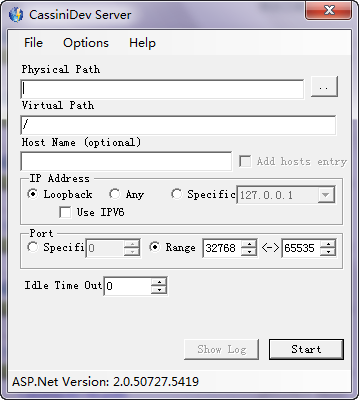
2.  安装CassiniDev

     image

3. 配置工程(工程-〉工程选项-〉调试)

    image

1)在start external中选择SharpDevelop_3.2.0.5698\CassiniDev 3.5.1.8-4.1.0.8 release\deploy\Debug\CassiniDev.exe

2)命令行参数:/port:8088 /path:"${ProjectDir}"

4.调试-〉运行(F5)
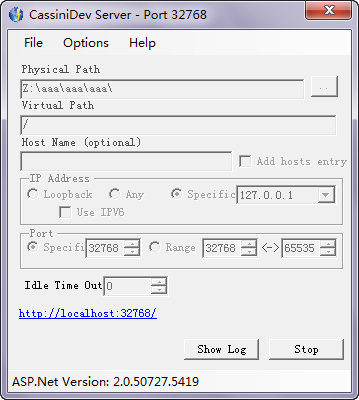
  image