


惯性聚合 高效追踪和阅读你感兴趣的博客、新闻、科技资讯
阅读原文 在惯性聚合中打开

推荐订阅源

博客园 - 叶小钗
云风的 BLOG
云风的 BLOG
G
Google Developers Blog
S
SegmentFault 最新的问题
罗磊的独立博客
Hugging Face - Blog
Hugging Face - Blog
美团技术团队
爱范儿
爱范儿
博客园 - 三生石上(FineUI控件)
H
Hackread – Cybersecurity News, Data Breaches, AI and More
D
DataBreaches.Net
F
Fortinet All Blogs
TaoSecurity Blog
TaoSecurity Blog
D
Docker
C
Cybersecurity and Infrastructure Security Agency CISA
K
Kaspersky official blog
宝玉的分享
宝玉的分享
腾讯CDC
Google Online Security Blog
Recorded Future
Recorded Future
T
The Exploit Database - CXSecurity.com
T
The Blog of Author Tim Ferriss
V
V2EX
S
Securelist
K
KPMG report finds enterprise disconnect between AI and its ROI | CIO
C
CERT Recently Published Vulnerability Notes
A
Arctic Wolf
Scott Helme
Scott Helme
L
LINUX DO - 热门话题
Y
Y Combinator Blog
P
Proofpoint News Feed
T
Tor Project blog
AWS News Blog
AWS News Blog
cs.CV updates on arXiv.org
The Last Watchdog
The Last Watchdog
博客园 - 聂微东
T
Threat Research - Cisco Blogs
B
Blog
Attack and Defense Labs
L
Lohrmann on Cybersecurity
C
CXSECURITY Database RSS Feed - CXSecurity.com
阮一峰的网络日志
阮一峰的网络日志
cs.AI updates on arXiv.org
IT之家
IT之家
N
News and Events Feed by Topic
博客园 - 司徒正美
H
Help Net Security
C
Cisco Blogs
C
Check Point Blog
S
Secure Thoughts

博客园 - 不可以

Framework 各版本比较对 用xperf查看系统启动过程 在无IIS下用SharpDevelop进行Asp.net 开发 从程序集中读取流信息 .net 拷贝方法 IPhone 应用程序管理 Subversion配置安装 使用Windows Live Writer写博客 xml操作学习 Oracle学习 windbg学习 在博客园添加Web Live Messenger对话框 java调用C#写的com组件 配置文件加入智能提示(Intellisense)功能 让相同的winform程序只启动一个 用户中心 - 博客园 用户中心 - 博客园 可以自由控制fileupload文本框与命令按钮之间的距离 去除左边数字行号工具
fiddler 学习笔记
不可以 · 2009-12-26 · via 博客园 - 不可以

1.视频教程

2.WinDiff 文本比较工具 

  将其复制到fiddler的安装目录下

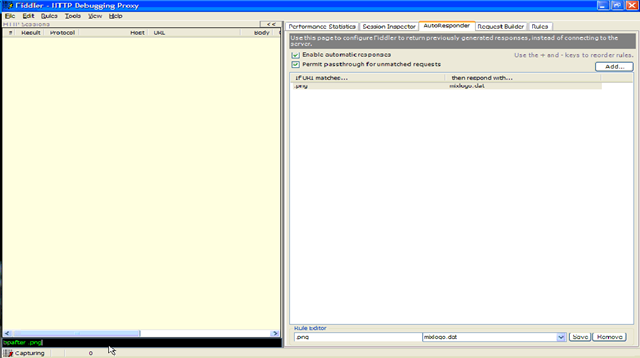
3.在捕获输入框中输入bpafter命令,可以使返回命令处于编辑状态
image

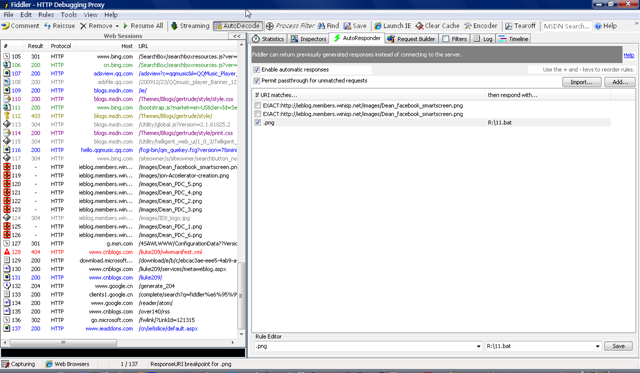
例如:bpafter .png就可以使所有png图片都处于编辑状态,其状态栏显示ResponseURI breadpoint for .png
image

4.修改返回值

1).可以在Inspectors->run to completion->选择你想保存的另一张图片

2).修改所有png图片

    autoresponser->enable automatic responses 打上勾

    add中添加规则或者在最下方自己输入规则

5.bpu: 设置断点,返回页面将在断点处停止

6.help:显示帮助信息页面