



The below tutorial helps explain the code-behind model and project structure of pages built within VS 2005 Web Application Projects. Please make sure that you have already completed Tutorial 1: Building Your First Web Application Project before reviewing this one.
ASP.NET Pages in a VS 2003 web project have two files associated with them -- one is a .aspx file that contains the html and declarative server control markup, and the other is a .cs "code-behind" file that contains the UI logic for the page:
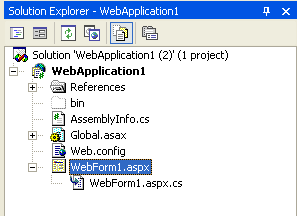
Control markup declarations are defined within the .aspx file itself. For example:

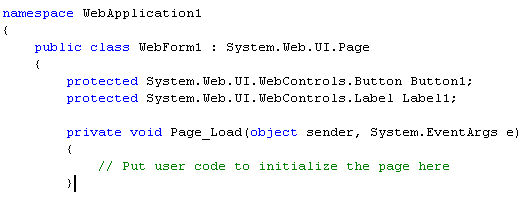
And corresponding protected field declarations are added in the .cs code-behind class that match the name and type of controls defined within the .aspx file. For example:

ASP.NET does the work of wiring up a reference from this code-behind field declaration to point to the declared control in the .aspx file at runtime. Developers can then program directly against this control within their code-behind file.
VS 2003 automatically adds/updates these protected control field declarations at the top of the code-behind file (these are updated everytime a developer switches into WYSIWYG design-view):
VS 2003 also then maintains a hidden region block inside the code-behind of tool-generated code to register event-handlers and keep them in sync with the design-surface:
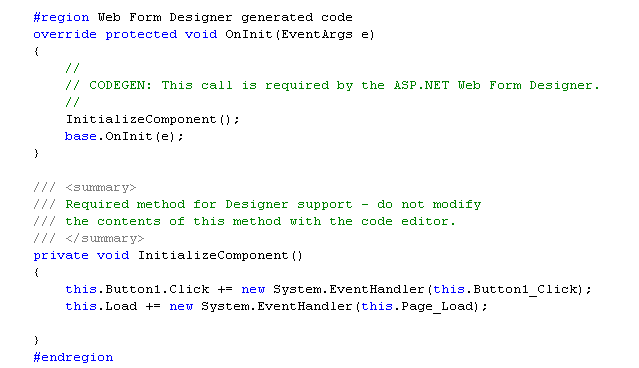
There are two common complaints/problems with this:
1) VS 2003 is adding/deleting code in the same file where the developer is authoring their own code -- and accidental conflicts/mistakes do end up happening (for example: some code that the developer writes can sometimes get modified or deleted by VS). The tool-generated hidden block above is also a little "messy" for some people's tastes.
2) The control-declarations are only updated when a developer using VS 2003 activates the WYSIWYG page designer. If a developer is only using the source-editor to customize the page, they will not get control updates, and will instead have to add these control declarations manually (which is a pain).
VS 2005 uses a code-behind model conceptually the same as VS 2003. Specifically, each .aspx page continues to inherit from a code-behind class that contains protected control field references for each control in the .aspx page:

What is different between VS 2003 and VS 2005 is that Visual Studio no longer injects its tool-specific wire-up code in the developer's code-behind file. Instead, it takes advantage of a new language feature in C# and VB called "partial types" (or partial classes) to split the code-behind implementation across two files. One of these partial class files is the developer-owned code-behind file that contains developer-written event-handlers and code for the page. The other partial class file is then a tool-generated/maintained file that contains the protected control field declarations and the other design-time code that Visual Studio requires. The benefit of splitting them out into two separate files at design-time is that it ensures that the code that VS creates and maintains never interferes (or deletes) code that a developer writes. At compile-time, these files are compiled together and generate a single code-behind class.
With the VS 2005 Web Application project model, the design-time partial class is generated and persisted on disk by VS 2005. This new design-time partial-class file has the filename naming pattern: PageName.aspx.designer.cs. If you expand any new page created within your VS 2005 Web Application project, you can see this file listed under the associated Page.aspx file along with the developer-owned code-behind file:
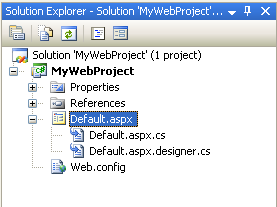
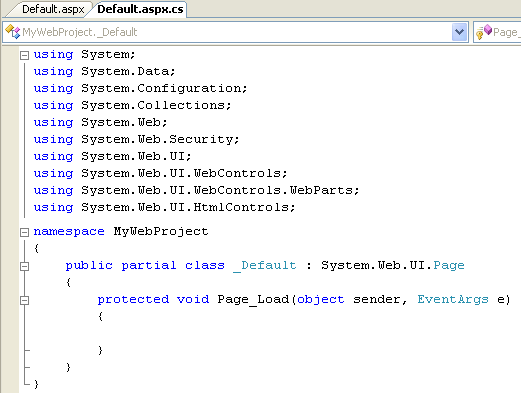
If you open up the code-behind file of the page (Default.aspx.cs), you'll then see the code-behind logic of the page -- which contains all of the code and event handlers that a developer writes (and no tool-generated "code-spit" content -- which means it stays very clean):
If you open the Default.aspx.designer.cs file, you'll then see the design-time code of the page -- which contains the field declarations for controls within the .aspx page, and will also contain validation code for designer-generated event-handlers:
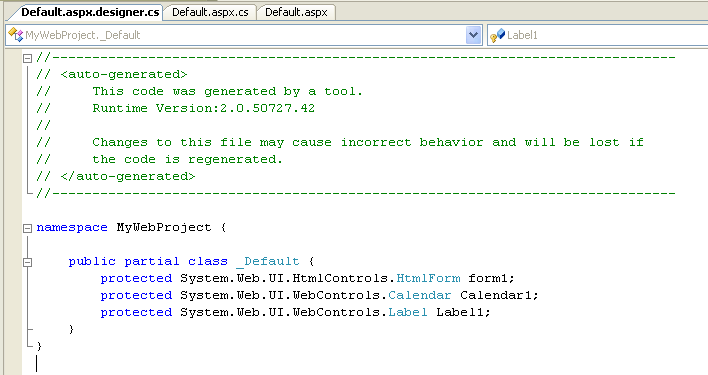
Because the MyWebProject._Default class is marked as "partial" in both of the above two files, the compiler will merge them into a single generated class at compile-time. This means that any variable, method or field generated in the default.aspx.designer.cs file can be used from the default.aspx.cs code-behind file (just as if it was declared in the code-behind file itself). For example, within the Page_Load event handler we could easily add the below code that uses the "Label1" and "Calendar1" control:
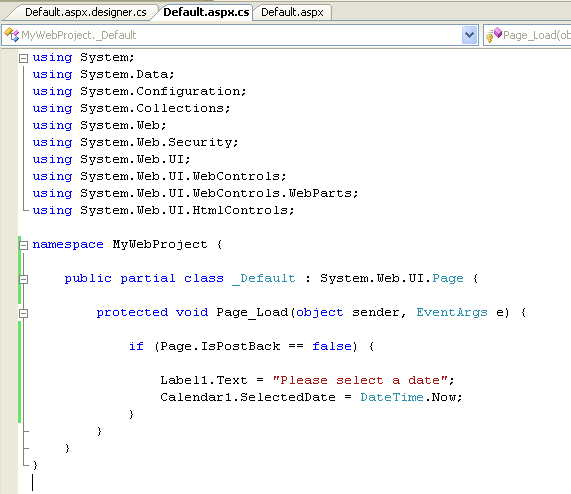
This will compile clean and run just fine -- because the "Label1" and "Calendar1" field references have been defined within the default.aspx.designer.cs file.
When you do a build inside a VS 2005 Web Application project, all pages, user-controls, master pages (and their associated code-behind files+design-time generated files), along with all other standalone classes within the project are compiled into a single assembly. This is the same behavior as with VS 2003.
In the final release of the VS 2005 Web Application Project download, the .designer.cs files for code-behind pages/controls/master-pages will be automatically updated and maintained by Visual Studio 2005 as you make changes to their associated .aspx, .ascx, and .master files. This will not require developers to activate the appropriate page in the WYSIWYG page designer (which is what VS 2003 requires today) -- it will also work when using the HTML source editor to make changes.
In the first preview release of the VS 2005 Web Application Project download, however, the feature support to automatically update .designer.cs files is not yet implemented. Appropriate .designer.cs files are generated when you add new pages, but you will be required to manually add and update the control declarations contained within them to get intellisense and compilation support within your code-behind files.
In a future refresh of the download, these additions/updates will happen automatically and you will no longer need to open/modify the .designer.cs file at all.
此内容由惯性聚合(RSS阅读器)自动聚合整理,仅供阅读参考。 原文来自 — 版权归原作者所有。