







Threat actors are initiating cross-tenant Microsoft Teams communications while impersonating IT or helpdesk personnel to socially engineer users into granting remote desktop access. After access is established through Quick Assist or similar remote support tools, attackers often execute trusted vendor-signed applications alongside attacker-supplied modules to enable malicious code execution.
This access pathway might be used to perform credential-backed lateral movement using native administrative protocols such as Windows Remote Management (WinRM), allowing threat actors to pivot toward high-value assets including domain controllers. In observed intrusions, follow-on commercial remote management software and data transfer utilities such as Rclone were used to expand access across the enterprise environment and stage business-relevant information for transfer to external cloud storage. This intrusion chain relies heavily on legitimate applications and administrative protocols, allowing threat actors to blend into expected enterprise activity during multiple intrusion phases.
Threat actors are increasingly abusing external Microsoft Teams collaboration to impersonate IT or helpdesk personnel and convince users to grant remote assistance access. From this initial foothold, attackers can leverage trusted tools and native administrative protocols to move laterally across the enterprise and stage sensitive data for exfiltration—often blending into routine IT support activity throughout the intrusion lifecycle. Microsoft Defender provides correlated visibility across identity, endpoint, and collaboration telemetry to help detect and disrupt this user‑initiated access pathway before it escalates into broader compromise.
By abusing enterprise collaboration workflows instead of traditional email‑based phishing channels, attackers may initiate contact through applications such as Microsoft Teams in a way that appears consistent with routine IT support interactions. While Teams includes built‑in security features such as external‑sender labeling and Accept/Block prompts, this attack chain relies on convincing users to bypass those warnings and voluntarily grant remote access through legitimate support tools.
In observed intrusions, risk is introduced not by external messaging alone, but when a user approves follow‑on actions — such as launching a remote assistance session — that result in interactive system access.
An approved external Teams interaction might enable threat actors to:
In the campaign, lateral movement and follow-on tooling installation occurred shortly after initial access, increasing the risk of enterprise-wide persistence and targeted data exfiltration. As each environment is different and with potential handoff to different threat actors, stages might differ if not outright bypassed.
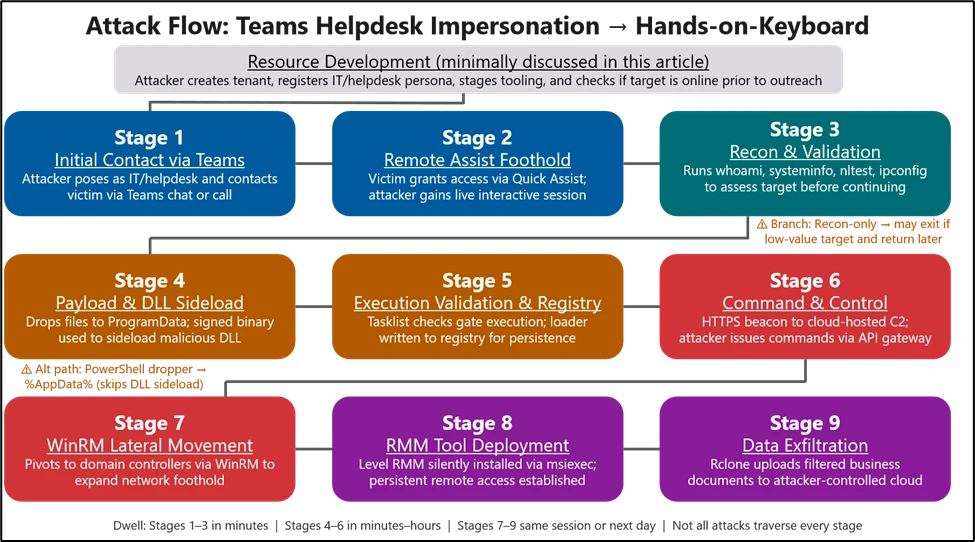
The intrusion begins with abuse of external collaboration features in Microsoft Teams, where an attacker operating from a separate tenant initiates contact while impersonating internal support personnel as a means to social engineer the user. Because interaction occurs within an enterprise collaboration platform rather than through traditional email‑based phishing vectors, it might bypass initial user skepticism associated with unsolicited external communication. Security features protecting Teams users are detailed here, for reference. It’s important to note that this attack relies on users willfully ignoring or overlooking security notices and other protection features. The lure varies and might include “Microsoft Security Update”, “Spam Filter Update”, “Account Verification” but the objective is constant: convince the user to ignore warnings and external contact flags, launch a remote management session, and accept elevation. Voice phishing (vishing) is sometimes layered to increase trust or compliance if they don’t replace the messaging altogether.
Timing matters. We regularly see a “ChatCreated” event to indicate a first contact situation, followed by suspicious chats or vishing, remote management, and other events t that commonly produce alerts to include mailbombing or URL click alerts. All of these can be correlated by account and chat thread information in your Defender hunting environment.
Teams security warnings:
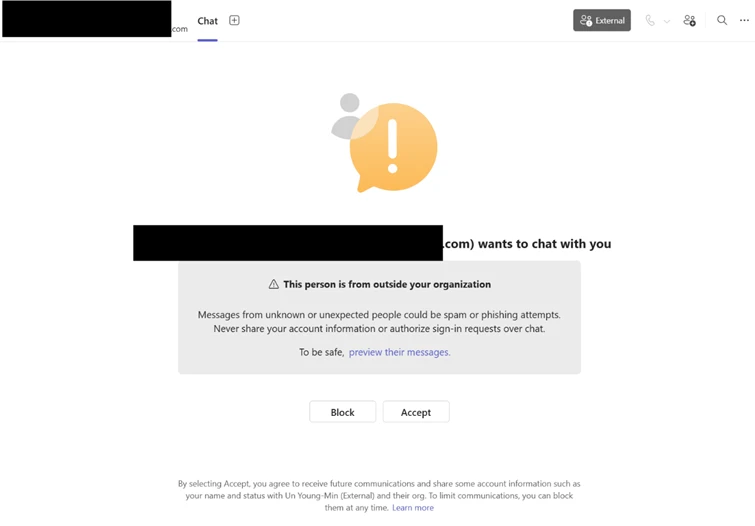
External Accept/Block screens provide notice to users about First Contact events, which prompt the user to inspect the sender’s identity before accepting:
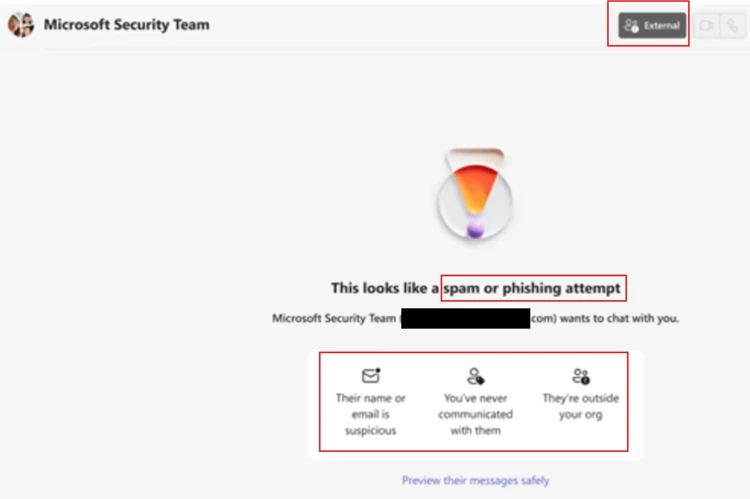
Higher confidence warnings alert the user of spam or phishing attempts on first contact:
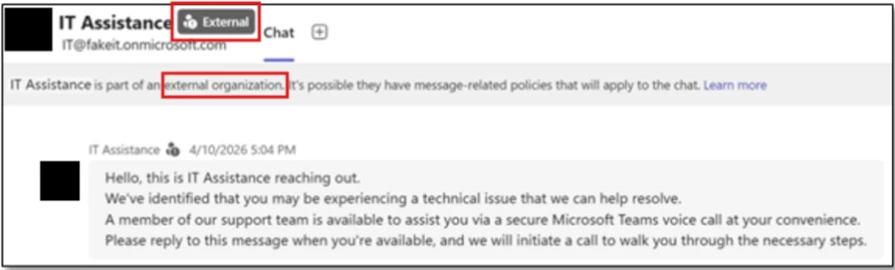
External warnings notify users that they are communicating with a tenant/organization other than their own and should be treated with scrutiny:
Message warnings alert the user on the risk in clicking the URL:

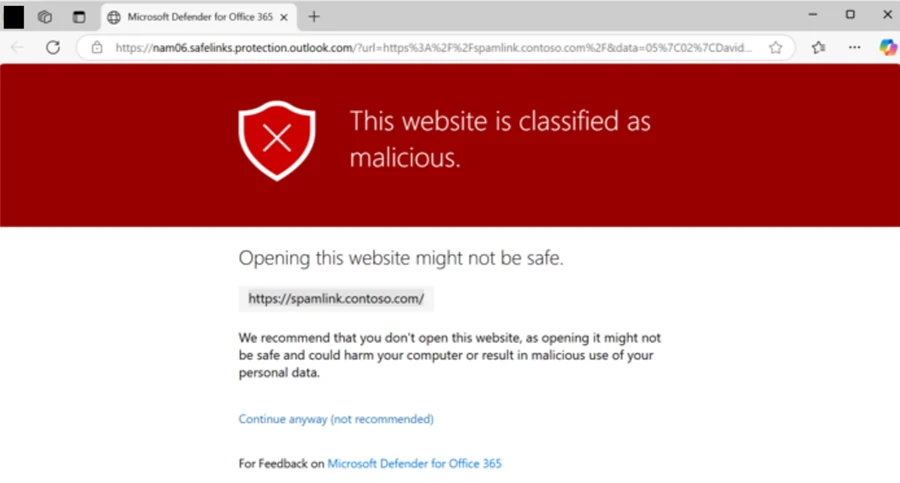
Safe Links for time-of-click protection warns users when URLs from Teams chat messages are malicious:
Zero-hour Auto Purge (ZAP) can remove messages that were flagged as malicious after they have been sent:

It’s important to note that the attacker often does not send the URL over a Teams message. Instead, they will navigate to it while on the endpoint during a remote management session. Therefore, the best security is user education on understanding the importance of not ignoring external flags for new helpdesk contacts. See “User education” in the “Defend, harden, and educate (Controls to deploy now)” section for further advice.
With user consent obtained through social engineering, the attacker gains interactive control of the device using remote support tools such as Quick Assist. This access typically results in the launch of QuickAssist.exe, followed by the display of standard Windows elevation prompts through Consent.exe as the attacker is guided through approval steps.
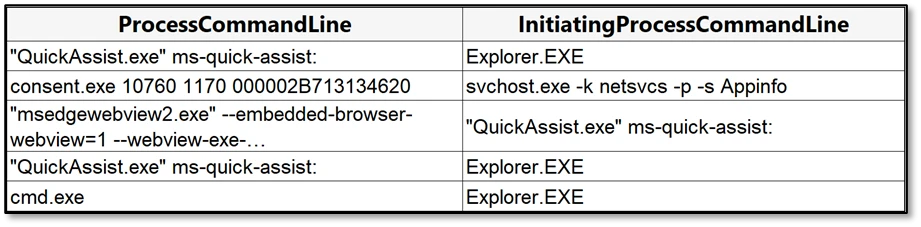
From the user’s perspective, the attacker convinces them to open Quick Assist, enter a short key, the follow all prompts and approvals to grant access.
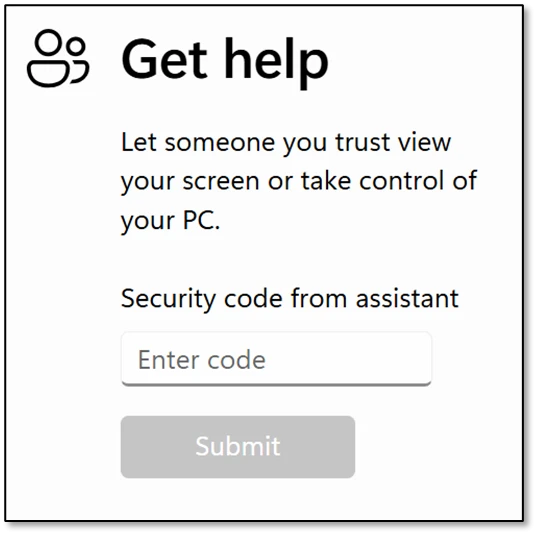
This step is often completed in under a minute. The urgency and interactivity are the signal: a remote‑assist process tree followed immediately by “cmd.exe” or PowerShell on the same desktop.
Immediately after establishing control through Quick Assist, the attacker typically spends the first 30–120 seconds assessing their level of access and understanding the compromised environment. This is often reflected by a brief surge of cmd.exe activity, used to verify user context and privilege levels, gather basic system information such as host identity and operating system details, and confirm domain affiliation. In parallel, the attacker might query registry values to determine OS build and edition, while also performing quick network reconnaissance to evaluate connectivity, reachability, and potential opportunities for lateral movement.
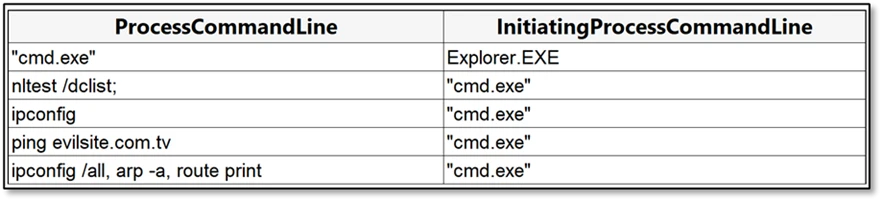
On systems with limited privileges—such as kiosks, VDI, or non-corp-joined devices—actors might pause without deploying payloads, leaving only brief reconnaissance activity. They often return later when access improves or pivot to other targets within the same tenant.
Once remote access is established, the intrusion transitions from user‑assisted interaction to preparing the environment for persistent execution. At this point, attackers introduce a small staging bundle onto disk using either archive‑based deployment or short‑lived scripting activity.
After access is established, attackers stage payloads in locations such as ProgramData and execute them using DLL side‑loading through trusted signed applications. This includes:
Allowing attacker‑supplied modules to run under a trusted execution context from non‑standard paths.
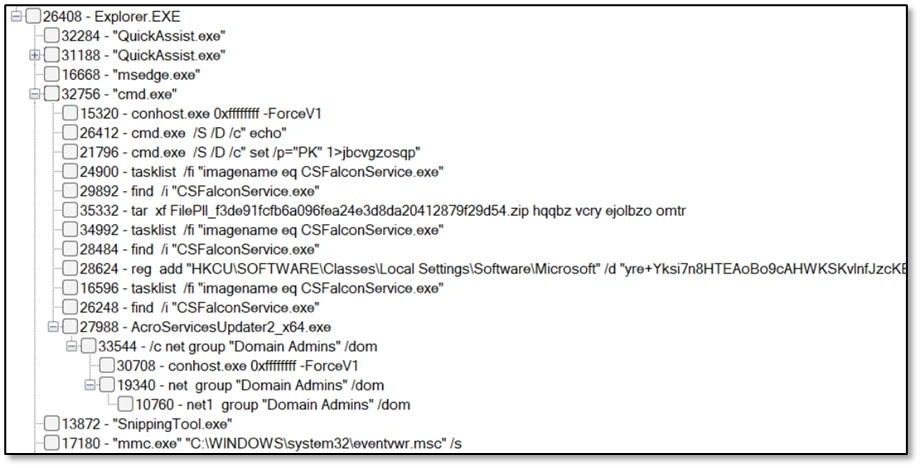
Following payload delivery, the attacker performs runtime checks to validate host conditions before execution. A large encoded value is then written to a user‑context registry location, serving as a staging container for encrypted configuration data to be retrieved later at runtime.

In this stage, a sideloaded module acting as an intermediary loader decrypts staged registry data in memory to reconstruct execution and C2 configuration without writing files to disk. This behavior aligns with intrusion frameworks such as Havoc, which externalize encrypted configuration to registry storage, allowing trusted sideloaded components to dynamically recover execution context and maintain operational continuity across restarts or remediation events.
Microsoft Defender for Endpoint may detect this activity as:
Attack surface reduction rules and Windows Defender Application Control policies can be used to restrict execution pathways commonly leveraged for sideloaded module activation.
Following successful execution of the sideloaded component, the updater‑themed process AcroServicesUpdater2_x64.exe began initiating outbound HTTPS connections over TCP port 443 to externally hosted infrastructure.
Unlike expected application update workflows which are typically restricted to known vendor services these connections were directed toward dynamically hosted cloud‑backed endpoints and unknown external domains. This behavior indicates remote attacker‑controlled infrastructure rather than legitimate update mechanisms.
Establishing outbound encrypted communications in this manner enables compromised processes to operate as beaconing implants, allowing adversaries to remotely retrieve instructions and maintain control within the affected environment while blending command traffic into routine HTTPS activity. The use of cloud‑hosted hosting layers further reduces infrastructure visibility and improves the attacker’s ability to modify or rotate communication endpoints without altering the deployed payload.
This activity marks the transition from local execution to externally directed command‑and‑control — enabling subsequent stages of discovery and movement inside the enterprise network.
Shortly after external communications were established, the compromised process began initiating internal remote management connections over WinRM (TCP 5985) toward additional domain‑joined systems within the enterprise environment.
Microsoft Defender may surface these activities as multi‑device incidents reflecting credential‑backed lateral movement initiated from a user‑context remote session.
Analysis of WinRM activity indicates that the threat actor used native Windows remote execution to pivot from the initially compromised endpoint toward high‑value infrastructure assets, including identity and domain management systems such as domain controllers. Use of WinRM from a non‑administrative application suggests credential‑backed lateral movement directed by an external operator, enabling remote command execution, interaction with domain infrastructure, and deployment of additional tooling onto targeted hosts.
Targeting identity‑centric infrastructure at this stage reflects a shift from initial foothold to broader enterprise control and persistence. Notably, this internal pivot preceded the remote deployment of additional access tooling in later stages, indicating that attacker‑controlled WinRM sessions were subsequently leveraged to extend sustained access across
Protocol: “HTTP”
Entity Type: “IP”
Ip: <IP Address>
Target: “http://host.domain.local:5985/wsman”
RequestUserAgent: “Microsoft WinRM Client”
Subsequent activity revealed the remote installation of an additional management platform across compromised hosts using Windows Installer (msiexec.exe). This introduced an alternate control channel independent of the original intrusion components, reducing reliance on the initial implant and enabling sustained access through standard administrative mechanisms. As a result, attackers could maintain persistent remote control even if earlier payloads were disrupted or removed.

Actors used the file‑synchronization tool Rclone to transfer data from internal network locations to an external cloud storage service. File‑type exclusions in the transfer parameters suggest a targeted effort to exfiltrate business‑relevant documents while minimizing transfer size and detection risk.

Microsoft Defender might detect this activity as possible data exfiltration involving uncommon synchronization tooling.
| Family / Product | Protection | Reference documents |
| Microsoft Teams | Review external collaboration policies and ensure users receive clear external sender notifications when interacting with cross‑tenant contacts. Consider device‑ or identity‑based access requirements prior to granting remote support sessions. | https://learn.microsoft.com/en-us/microsoftteams/trusted-organizations-external-meetings-chat and https://learn.microsoft.com/en-us/defender-office-365/mdo-support-teams-about |
| Microsoft Defender for Office 365 | Enable Safe Links for Teams conversations with time-of-click verification, and ensure zero-hour auto purge (ZAP) is active to retroactively quarantine weaponized messages. | https://learn.microsoft.com/en-us/defender-office-365/safe-links-about |
| Microsoft Defender for Endpoint | Disable or restrict remote management tools to authorized roles, enable standard ASR rules in block mode, and apply WDAC to prevent DLL sideloading from ProgramData and AppData paths used by these actors. | https://learn.microsoft.com/en-us/defender-endpoint/attack-surface-reduction-rules-reference |
| Microsoft Entra ID | Enforce Conditional Access requiring MFA and compliant devices for administrative roles, restrict WinRM to authorized management workstations, and monitor for Rclone or similar synchronization utilities used for data exfiltration via hunting or custom alerts tuned to your environment. | https://learn.microsoft.com/en-us/entra/identity/conditional-access/overview and https://learn.microsoft.com/en-us/defender-xdr/advanced-hunting-overview and https://learn.microsoft.com/en-us/defender-xdr/custom-detections-overview |
| Network Controls | Enable network protection to block implant C2 beaconing to poor-reputation and newly registered domains, and alert on registry modifications to ASEP locations by non-installer processes. Hunting and custom detections tuned to your environment will assist in detecting network threats. | https://learn.microsoft.com/en-us/defender-endpoint/network-protection |
| Education | The attackers will often initiate Teams calls with their targets to talk them through completing actions that result in machine compromise. It may be useful to establish a verbal authentication code between IT Helpdesk and employees: a key phrase that an attacker is unlikely to know. Inform employees how IT Helpdesk would normally reach out to them: which medium(s) of communication? Email, Teams, Phone calls, etc. What identifiers would those IT Helpdesk contacts have? Domain names, aliases, phone numbers, etc. Show example images of your Helpdesk vs. an attacker impersonating them over your communication medium. Show examples of how to identify external versus internal Teams communications, block screens, message and call reporting, as well as how to identify a display name vs. the real caller’s name and domain. Inform employees that URLs shared by an external Helpdesk account leading to Safe Links warnings about malicious websites are extremely suspicious. They should report the message as phish and contact your security team. If they receive any URLs from IT Helpdesk that involve going to a webpage for security updates or spam mailbox cleanings, then they should report that to your security team. Treat unsolicited and unexpected external contact from IT Helpdesk as inherently suspicious. | Disrupting threats targeting Microsoft Teams | Microsoft Security Blog |
| Family / Product | Protection in addition to detections. | Reference Documents |
| AI driven detection & attack disruption | When Defender detects credential‑backed WinRM lateral movement following a Quick Assist session, Automatic Attack Disruption can suspend the originating user session and contain the users prior to domain‑controller interaction — limiting lateral movement before your SOC engages. Look for incidents tagged “Attack Disruption” in your queue. | https://learn.microsoft.com/en-us/defender-xdr/automatic-attack-disruption and https://learn.microsoft.com/en-us/defender-xdr/configure-attack-disruption |
| Cross-family / product incident correlation | Teams/MDO, Entra ID, and MDE signals are automatically correlated into unified incidents. This entire attack chain surfaces as one multi-stage incident — not dozens of disconnected alerts. Review “Multi-stage” incidents for the full story. | https://learn.microsoft.com/en-us/defender-xdr/incident-queue |
| Threat analytics and continuous tuning | Threat analytics reports for these TTPs include exposure assessments and mitigations for your environment. Detection logic is continuously updated to reflect evolving tradecraft. Check your Threat Analytics dashboard for reports tagged to these Storm actors. | https://learn.microsoft.com/en-us/defender-xdr/threat-analytics |
| Teams external message accept/block controls | When an external user initiates contact, Teams presents the recipient with a message preview and an explicit Accept or Block prompt before any conversation begins. Blocking prevents future messages and hides your presence status from that sender. | https://learn.microsoft.com/en-us/microsoftteams/teams-security-best-practices-for-safer-messaging |
| Security recommendations | Following security recommendations can help in improving the security posture of the org. Apply UAC restrictions to local accounts on network logonsSafe DLL Search ModeEnable Network ProtectionDisable ‘Allow Basic authentication’ for WinRM Client/Service | https://learn.microsoft.com/en-us/defender-vulnerability-management/tvm-security-recommendation |
Microsoft Defender provides pre-breach and post-breach coverage for this campaign, supported by the generic and specific alerts listed below.
| Tactic | Observed activity | Microsoft Defender coverage |
| Initial Access | The actor initiates a cross‑tenant Teams chat or call from an often newly created tenant using an IT/Help‑Desk persona | Microsoft Defender for Office 365 – Microsoft Teams chat initiated by a suspicious external user – IT Support Teams Voice phishing following mail bombing activity – A user clicked through to a potentially malicious URL. – A potentially malicious URL click was detected. Microsoft Defender for Endpoint – Possible initial access from an emerging threat |
| Execution | The attacker gains interactive control via remote management tools to include Quick Assist. | Microsoft Defender for Endpoint – Suspicious activity using Quick Assist – Uncommon remote access software – Remote monitoring and management software suspicious activity Microsoft Defender Antivirus |
| Lateral Movement | Attacker pivots via WinRM to target highvalue assets (e.g., domain controllers). | Microsoft Defender for Endpoint – Suspicious sign-in activity – Potential human-operated malicious activity – Hands-on-keyboard attack involving multiple devices |
| Persistence | Runtime environment validated and encoded loader state stored within user registry. | Microsoft Defender for Endpoint – Suspicious registry modification |
| Defense Evasion & Privilege Escalation | DLL Side-Loading (e.g., AcroServicesUpdater2_x64.exe, ADNotificationManager.exe, or DlpUserAgent.exe) | Microsoft Defender for Endpoint – An executable file loaded an unexpected DLL file Microsoft Defender Antivirus |
| Command & Control | The implant or sideloaded host typically beacons over HTTPS | Microsoft Defender for Endpoint – Connection to a custom network indicator – A file or network connection related to a ransomware-linked emerging threat activity group detected |
| Data Exfiltration | Widely available file‑synchronization utility Rclone to systematically transfer data | Microsoft Defender for Endpoint – Possible data exfiltration |
| Multi-tactic | Many alerts span across multiple tactics or stages of an attack and cover many platforms. | Microsoft Defender (All) – Multi-stage incident involving Execution – Remote management event after suspected Microsoft Teams IT support phishing – An Office application ran suspicious commands |
Security teams can use the advanced hunting capabilities in Microsoft Defender XDR to proactively look for indicators of exploitation.
A. Teams → RMM correlation
let _timeFrame = 30m;
// Teams message signal
let _teams =
    MessageEvents
    | where Timestamp > ago(14d)
    //| where SenderDisplayName contains "add keyword"
    //          or SenderDisplayName contains "add keyword"
    | extend Recipient = parse_json(RecipientDetails)
    | mv-expand Recipient
    | extend VictimAccountObjectId = tostring(Recipient.RecipientObjectId),
             VictimRecipientDisplayName = tostring(Recipient.RecipientUserDisplayName)
    | project
        TTime = Timestamp,
        SenderEmailAddress,
        SenderDisplayName,
        VictimRecipientDisplayName,
        VictimAccountObjectId;
// RMM launches on endpoint side
let _rmm =
    DeviceProcessEvents
    | where Timestamp > ago(14d)
    | where FileName in~ ("QuickAssist.exe", "AnyDesk.exe", "TeamViewer.exe")
    | extend VictimAccountObjectId = tostring(InitiatingProcessAccountObjectId)
    | project
        DeviceName,
        QTime = Timestamp,
        RmmTool = FileName,
        VictimAccountObjectId;
_teams
| where isnotempty(VictimAccountObjectId)
| join kind=inner _rmm on VictimAccountObjectId
| where isnotempty(DeviceName)
| where QTime between ((TTime) .. (TTime +(_timeFrame)))
| project DeviceName, SenderEmailAddress, SenderDisplayName, VictimRecipientDisplayName, VictimAccountObjectId, TTime, QTime, RmmTool
| order by QTime desc
B. Execution
DeviceProcessEvents
| where Timestamp > ago(7d)
| where InitiatingProcessFileName =~ "cmd.exe"
| where FileName =~ "cmd.exe"
| where ProcessCommandLine has_all ("/S /D /c", "\" set /p=\"PK\"", "1>")
C. ZIP → ProgramData service path → signed host sideload
let _timeFrame = 10m;
let _armOrDevice =
    DeviceFileEvents
    | where Timestamp > ago(14d)
    | where FolderPath has_any (
        "C:\\ProgramData\\Adobe\\ARM\\",
        "C:\\ProgramData\\Microsoft\\DeviceSync\\",
        "D:\\ProgramData\\Adobe\\ARM\\",
        "D:\\ProgramData\\Microsoft\\DeviceSync\\")
      and ActionType in ("FileCreated","FileRenamed")
    | project DeviceName, First=Timestamp, FileName;
let _hostRun =
    DeviceProcessEvents
    | where Timestamp > ago(14d)
    | where FileName in~ ("AcroServicesUpdater2_x64.exe","DlpUserAgent.exe","ADNotificationManager.exe")
    | project DeviceName, Run=Timestamp, Host=FileName;
_armOrDevice
| join kind=inner _hostRun on DeviceName
| where Run between (First .. (First+(_timeFrame)))
| summarize First=min(First), Run=min(Run), Files=make_set(FileName, 10) by DeviceName, Host
| order by Run desc
D. PowerShell → high‑risk TLD → writes %AppData%/Roaming EXE
let _timeFrame = 5m;
let _psNet = DeviceNetworkEvents
| where Timestamp > ago(14d)
| where InitiatingProcessFileName in~ ("powershell.exe","pwsh.exe")
| where RemoteUrl matches regex @"(?i)\.(top|xyz|zip|click)$"
| project DeviceName, NetTime=Timestamp, RemoteUrl, RemoteIP;
let _exeWrite = DeviceFileEvents
| where Timestamp > ago(14d)
| where FolderPath has @"\AppData\Roaming\" and FileName endswith ".exe"
| project DeviceName, WTime=Timestamp, FileName, FolderPath, SHA256;
_psNet
| join kind=inner _exeWrite on DeviceName
| where WTime between (NetTime .. (NetTime+(_timeFrame)))
| project DeviceName, NetTime, RemoteUrl, RemoteIP, WTime, FileName, FolderPath, SHA256
| order by WTime desc
E. Registry breadcrumbs / ASEP anomalies
DeviceRegistryEvents
| where Timestamp > ago(30d)
| where RegistryKey has @"\SOFTWARE\Classes\Local Settings\Software\Microsoft"
| where RegistryValueName in~ ("UCID","UFID","XJ01","XJ02","UXMP")
| project Timestamp, DeviceName, ActionType, RegistryKey, RegistryValueName, PreviousRegistryValueData, InitiatingProcessFileName
| order by Timestamp desc
F. Non‑browser process → API‑Gateway → internal AD protocols
let _timeFrame = 10m;
let _net1 =
    DeviceNetworkEvents
    | where Timestamp > ago(14d)
    | where RemoteUrl has ".execute-api."
    | where InitiatingProcessFileName !in~ ("chrome.exe","msedge.exe","firefox.exe")
    | project DeviceName,
              Proc=InitiatingProcessFileName,
              OutTime=Timestamp,
              RemoteUrl,
              RemoteIP;
let _net2 =
    DeviceNetworkEvents
    | where Timestamp > ago(14d)
    | where RemotePort in (135,389,445,636)
    | project DeviceName,
              Proc=InitiatingProcessFileName,
              InTime=Timestamp,
              RemoteIP,
              RemotePort;
_net1
| join kind=inner _net2 on DeviceName, Proc
| where InTime between (OutTime .. (OutTime+(_timeFrame)))
| project DeviceName, Proc, OutTime, RemoteUrl, InTime, RemotePort
| order by InTime desc
G. PowerShell history deletion
DeviceFileEvents
| where Timestamp > ago(14d)
| where FileName =~ "ConsoleHost_history.txt" and ActionType == "FileDeleted"
| project Timestamp, DeviceName, InitiatingProcessFileName, InitiatingProcessCommandLine, FolderPath
| order by Timestamp desc
H. Reconnaissance burst (cmd / PowerShell)
DeviceProcessEvents
| where Timestamp > ago(14d)
| where FileName in~ ("cmd.exe","powershell.exe","pwsh.exe")
| where ProcessCommandLine has_any (
    "whoami", "whoami /all", "whoami /groups", "whoami /priv",
    "hostname", "systeminfo", "ver", "wmic os get",
    "reg query HKLM\\SOFTWARE\\Microsoft\\Windows NT\\CurrentVersion",
    "query user", "net user", "nltest", "ipconfig /all", "arp -a", "route print",
    "dir", "icacls"
)
| project Timestamp, DeviceName, FileName, InitiatingProcessFileName, ProcessCommandLine
| summarize eventCount = count(), FileNames = make_set(FileName), InitiatingProcessFileNames = make_set(InitiatingProcessFileName), ProcessCommandLines = make_set(ProcessCommandLine, 5) by DeviceName
| where eventCount > 2
I. Data Exfil
DeviceProcessEvents
| where Timestamp > ago(2d)
| where FileName =~ "rclone.exe" or ProcessVersionInfoOriginalFileName =~ "rclone.exe"
| where ProcessCommandLine has_all ("copy ", "--config rclone_uploader.conf", "--transfers 16", "--checkers 16", "--buffer-size 64M", "--max-age=3y", "--exclude *.mdf")
J. Quick Assist–anchored recon (no staging writes within 10 minutes)
let _reconWindow = 10m; // common within 1-5 minutes
let _stageWindow = 15m; // common 1-2 minutes after recon, or less
// Anchor on RMM
let _rmm =
    DeviceProcessEvents
    | where Timestamp > ago(14d)
    | where FileName in~ ("QuickAssist.exe", "AnyDesk.exe", "TeamViewer.exe")
    | project DeviceName, RMMTime=Timestamp;
// Recon commands within X minutes of RMM start (targeted list)
let _recon =
    DeviceProcessEvents
    | where Timestamp > ago(14d)
    | where FileName in~ ("cmd.exe","powershell.exe","pwsh.exe")
    | where ProcessCommandLine has_any (
        "whoami", "hostname", "systeminfo", "ver", "wmic os get",
        "reg query HKLM\\SOFTWARE\\Microsoft\\Windows NT\\CurrentVersion",
        "query user", "net user", "nltest", "ipconfig /all", "arp -a", "route print",
        "dir", "icacls"
    )
    | project DeviceName, ReconTime=Timestamp, ReconCmd=ProcessCommandLine, ReconProc=FileName;
// Suspect staging writes (ZIP/EXE/DLL)
let _staging =
    DeviceFileEvents
    | where Timestamp > ago(14d)
    | where ActionType in ("FileCreated","FileRenamed")
    | where FileName matches regex @"(?i).*\\.(zip|exe|dll)$"
    | project DeviceName, STime=Timestamp, StageFile=FileName, StagePath=FolderPath;
// Correlate RMM + recon, then exclude cases with staging writes in the next X minutes
let _rmmRecon =
    _rmm
    | join kind=inner _recon on DeviceName
    | where ReconTime between (RMMTime .. (RMMTime+(_reconWindow)))
    | project DeviceName, RMMTime, ReconTime, ReconProc, ReconCmd;
_rmmRecon
| join kind=leftouter _staging on DeviceName
| extend HasStagingInWindow = iff(STime between (RMMTime .. (RMMTime+(_stageWindow))), 1, 0)
| summarize HasStagingInWindow=max(HasStagingInWindow) by DeviceName, RMMTime, ReconTime, ReconProc, ReconCmd
| where HasStagingInWindow == 0
| project DeviceName, RMMTime, ReconTime, ReconProc, ReconCmd
K. Sample Correlation Query Between Chat, First Contact, and Alerts
Note. Please modify or tune for your specific environment.

let _timeFrame = 30m;      // Tune: how long after the Teams event to look for matching alerts
let _huntingWindow = 4d;   // Tune: broader lookback increases coverage but also cost
// Seed Teams message activity and normalize the victim/join fields you want to carry forward
let _teams = materialize (
    MessageEvents
    | where Timestamp > ago(_huntingWindow)
    | extend Recipient = parse_json(RecipientDetails)
    // Optional tuning: add sender/name/content filters here first to reduce volume early
    //| where SenderDisplayName contains "add keyword"
    //          or SenderDisplayName contains "add keyword"
    // add other hunting terms
    | mv-expand Recipient
    | extend VictimAccountObjectId = tostring(Recipient.RecipientObjectId),
             VictimUPN = tostring(Recipient.RecipientSmtpAddress)
    | project
        TTime = Timestamp,
        SenderUPN = SenderEmailAddress,
        SenderDisplayName,
        VictimUPN,
        VictimAccountObjectId,
        ChatThreadId = ThreadId
);
// Distinct key sets used to prefilter downstream tables before joining
let _VictimAccountObjectId = materialize(
    _teams
    | where isnotempty(VictimAccountObjectId)
    | distinct VictimAccountObjectId
);
let _VictimUPN = materialize(
    _teams
    | where isnotempty(VictimUPN)
    | distinct VictimUPN
);
let _ChatThreadId = materialize(
    _teams
    | where isnotempty(ChatThreadId)
    | distinct ChatThreadId
);
// Find first-seen chat creation events for the chat threads already present in _teams
// Tune: add more CloudAppEvents filters here if you want to narrow to external / one-on-one / specific chat types
let _firstContact = materialize(
    CloudAppEvents
    | where Timestamp > ago(_huntingWindow)
    | where Application has "Teams"
    | where ActionType == "ChatCreated"
    | extend Raw = todynamic(RawEventData)
    | extend ChatThreadId = tostring(Raw.ChatThreadId)
    | where isnotempty(ChatThreadId)
    | join kind=innerunique (_ChatThreadId) on ChatThreadId
    | summarize FCTime = min(Timestamp) by ChatThreadId
);
// Alert branch 1: match by victim object ID
// Usually the cleanest identity join if the field is populated consistently
let _alerts_by_oid = materialize(
    AlertEvidence
    | where Timestamp > ago(_huntingWindow)
    | where AccountObjectId in (_VictimAccountObjectId)
    | project
        ATime = Timestamp,
        AlertId,
        Title,
        AccountName,
        AccountObjectId,
        AccountUpn = "",
        SourceId = "",
        ChatThreadId = ""
);
// Alert branch 2: match by victim UPN
// Useful when ObjectId is missing or alert evidence is only populated with UPN
let _alerts_by_upn = materialize(
    AlertEvidence
    | where Timestamp > ago(_huntingWindow)
    | where AccountUpn in (_VictimUPN)
    | project
        ATime = Timestamp,
        AlertId,
        Title,
        AccountName,
        AccountObjectId,
        AccountUpn,
        SourceId = "",
        ChatThreadId = ""
);
// Alert branch 3: match by chat thread ID
// Tune: this is typically the most expensive branch because it inspects AdditionalFields
let _alerts_by_thread = materialize(
    AlertEvidence
    | where Timestamp > ago(_huntingWindow)
    | where AdditionalFields has_any (_ChatThreadId)
    | extend AdditionalFields = todynamic(AdditionalFields)
    | extend
        SourceId = tostring(AdditionalFields.SourceId),
        ChatThreadIdRaw = tostring(AdditionalFields.ChatThreadId)
    | extend ChatThreadId = coalesce(
        ChatThreadIdRaw,
        extract(@"/(?:chats|channels|conversations|spaces)/([^/]+)/", 1, SourceId)
    )
    | where isnotempty(ChatThreadId)
    | join kind=innerunique (_ChatThreadId) on ChatThreadId
    | project
        ATime = Timestamp,
        AlertId,
        Title,
        AccountName,
        AccountObjectId,
        AccountUpn = "",
        SourceId,
        ChatThreadId
);
//
// add branch 4 to corrilate with host events
//
// Add first-contact context back onto the Teams seed set
let _teams_fc = materialize(
    _teams
    | join kind=leftouter _firstContact on ChatThreadId
    | extend FirstContact = isnotnull(FCTime)
);
// Join path 1: Teams victim object ID -> alert AccountObjectId
let _matches_oid =
    _teams_fc
    | where isnotempty(VictimAccountObjectId)
    | join hint.strategy=broadcast kind=leftouter (
        _alerts_by_oid
    ) on $left.VictimAccountObjectId == $right.AccountObjectId
    // Time bound keeps only alerts near the Teams activity; widen/narrow _timeFrame to tune sensitivity
    | where isnull(ATime) or ATime between (TTime .. TTime + _timeFrame)
    | extend MatchType = "ObjectId";
// Join path 2: Teams victim UPN -> alert AccountUpn
let _matches_upn =
    _teams_fc
    | where isnotempty(VictimUPN)
    | join hint.strategy=broadcast kind=leftouter (
        _alerts_by_upn
    ) on $left.VictimUPN == $right.AccountUpn
    | where isnull(ATime) or ATime between (TTime .. TTime + _timeFrame)
    | extend MatchType = "VictimUPN";
// Join path 3: Teams chat thread -> alert chat thread
let _matches_thread =
    _teams_fc
    | where isnotempty(ChatThreadId)
    | join hint.strategy=broadcast kind=leftouter (
        _alerts_by_thread
    ) on ChatThreadId
    | where isnull(ATime) or ATime between (TTime .. TTime + _timeFrame)
    | extend MatchType = "ChatThreadId";
//
// add branch 4 for host events
//
// Merge all match paths and collapse multiple alert hits per Teams event into one row
union _matches_oid, _matches_upn, _matches_thread
| summarize
    AlertTitles = make_set(Title, 50),
    AlertIds = make_set(AlertId, 50),
    MatchTypes = make_set(MatchType, 10),
    FirstAlertTime = min(ATime)
    by
        TTime,
        SenderUPN,
        SenderDisplayName,
        VictimUPN,
        VictimAccountObjectId,
        ChatThreadId,
Protecting your organization from collaboration‑based impersonation attacks as demonstrated throughout this intrusion chain, cross‑tenant helpdesk impersonation campaigns rely less on platform exploitation and more on persuading users to initiate trusted remote access workflows within legitimate enterprise collaboration tools such as Microsoft Teams.
Organizations should treat any unsolicited external support contact as inherently suspicious and implement layered defenses that limit credential‑backed remote sessions, enforce Conditional Access with MFA and compliant device requirements, and restrict the use of administrative protocols such as WinRM to authorized management workstations. At the endpoint and identity layers, enabling Attack Surface Reduction (ASR) rules, Zero‑hour Auto Purge (ZAP), Safe Links for Teams messages, and network protection can reduce opportunities for sideloaded execution and outbound command‑and‑control activity that blend into routine HTTPS traffic.
Finally, organizations should reinforce user education—such as establishing internal helpdesk authentication phrases and training employees to verify external tenant indicators—to prevent adversaries from converting legitimate collaboration workflows into attacker‑guided remote access and staged data exfiltration pathways.
This research is provided by Microsoft Defender Security Research with contributions from Jesse Birch, Sagar Patil, Balaji Venkatesh S (DEX), Eric Hopper, Charu Puhazholi, and other members of Microsoft Threat Intelligence.
Review our documentation to learn more about our real-time protection capabilities and see how to enable them within your organization.
此内容由惯性聚合(RSS阅读器)自动聚合整理,仅供阅读参考。 原文来自 — 版权归原作者所有。