









Phishing campaigns continue to improve sophistication and refinement in blending social engineering, delivery and hosting infrastructure, and authentication abuse to remain effective against evolving security controls. A large-scale credential theft campaign observed by Microsoft Defender Research exemplifies this trend, using code of conduct-themed lures, a multi-step attack chain, and legitimate email services to distribute fully authenticated messages from attacker-controlled domains.
The campaign targeted tens of thousands of users, primarily in the United States, and directed them through several stages of CAPTCHA and intermediate staging pages designed to reinforce legitimacy while filtering out automated defenses. The lures in this campaign used polished, enterprise-style HTML templates with structured layouts and preemptive authenticity statements, making them appear more credible than typical phishing emails and increasing their plausibility as legitimate internal communications. Because the messages contained concerning accusations and repeated time-bound action prompts, the campaign created a sense of urgency and pressure to act.
The attack chain ultimately led to a legitimate sign-in experience that was part of an adversary‑in‑the‑middle (AiTM) phishing flow, which allowed the attackers to proxy the authentication session and capture authentication tokens that could provide immediate account access. Unlike traditional credential harvesting, AiTM attacks intercept authentication traffic in real time, bypassing non-phishing-resistant multifactor authentication (MFA).
In this blog, we’re sharing our analysis of this campaign’s lures, infrastructure, and techniques. Organizations can defend against financial fraud initiated through phishing emails by educating users about phishing lures, investing in advanced anti-phishing solutions like Microsoft Defender for Office 365 and configuring essential email security settings, and encouraging users to employ web browsers that support SmartScreen. Organizations can also enable network protection, which lets Windows use SmartScreen as a host-based web proxy.
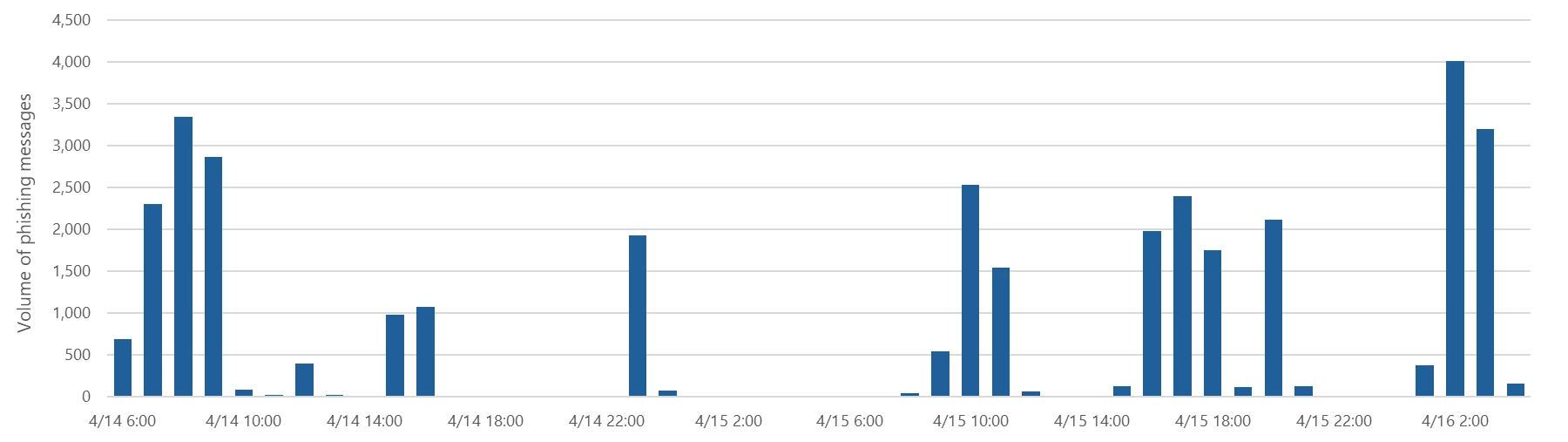
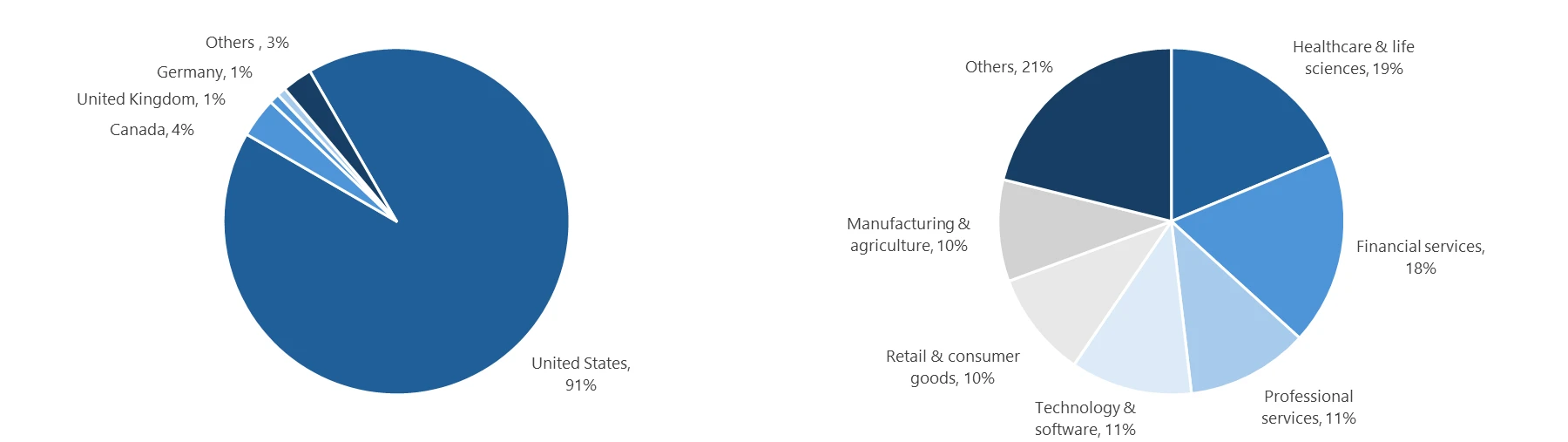
Between April 14 and 16, 2026, the Microsoft Defender Research team observed a series of sophisticated phishing campaigns targeting more than 35,000 users across over 13,000 organizations in 26 countries, with majority of targets located in the United States (92%). The campaign did not focus on a single vertical but instead impacted a broad range of industries, most notably Healthcare & life sciences (19%), Financial services (18%), Professional services (11%), and Technology & software (11%). Messages were distributed in multiple distinct waves between 06:51 UTC on April 14 and 03:54 UTC on April 16.
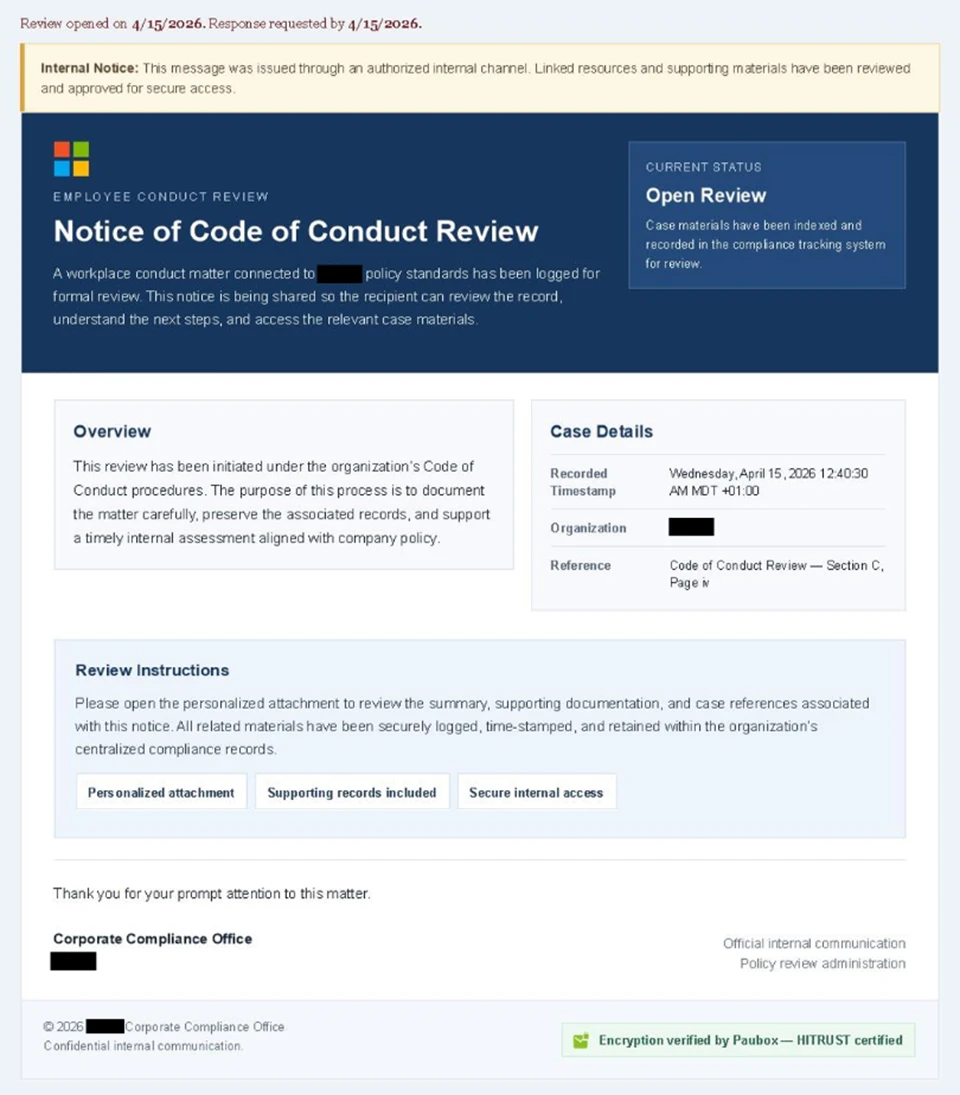
Emails in this campaign posed as internal compliance or regulatory communications, using display names such as “Internal Regulatory COC”, “Workforce Communications”, and “Team Conduct Report”. Subject lines included “Internal case log issued under conduct policy” and “Reminder: employer opened a non-compliance case log”.
Message bodies claimed that a “code of conduct review” had been initiated, referenced organization-specific names embedded within the text, and instructed recipients to “open the personalized attachment” to review case materials. At the top of each message, a notice stated that the message had been “issued through an authorized internal channel” and that links and attachments had been “reviewed and approved for secure access”, reinforcing the email’s purported legitimacy. To further support the confidentiality of the supposed review, the end of each message contained a green banner stating that the contents had been encrypted using Paubox, a legitimate service associated with HIPAA-compliant communications.
Analysis of the sending infrastructure indicated that the campaign emails were sent using a legitime email delivery service, likely originating from a cloud-hosted Windows virtual machine. The messages were sent from multiple sender addresses using domains that are likely attacker-controlled.
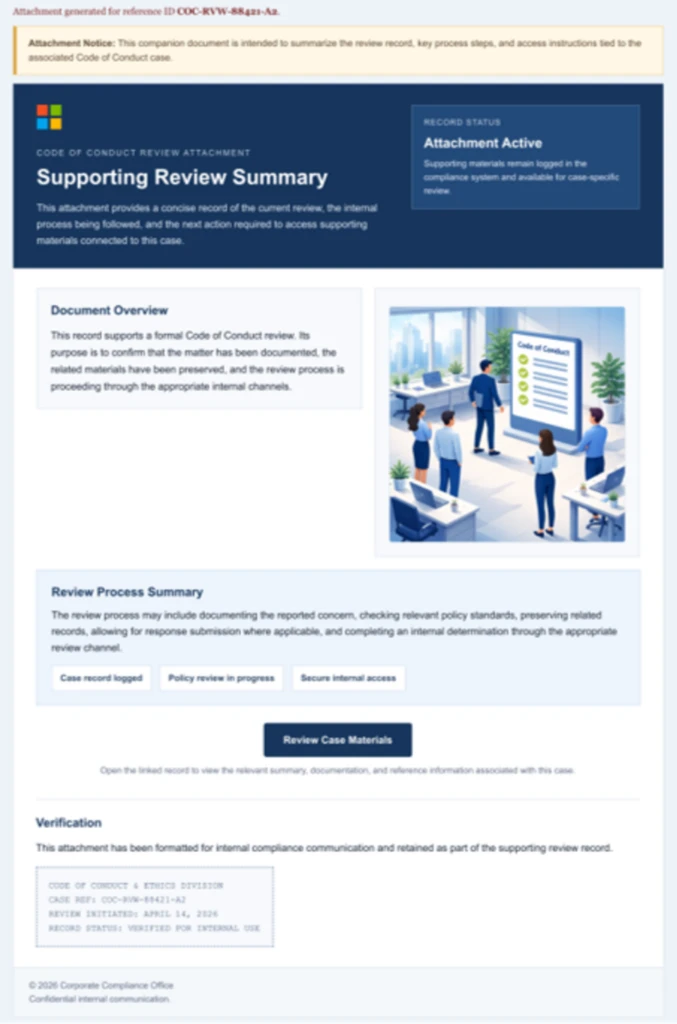
Each campaign email included a PDF attachment with filenames such as Awareness Case Log File – Tuesday 14th, April 2026.pdf and Disciplinary Action – Employee Device Handling Case.pdf. The attachment provided additional context about the supposed conduct review, including a summary of the review process and instructions for accessing supporting documentation. Recipients were directed to click a “Review Case Materials” link within the PDF, which initiated the credential harvesting flow.
When clicked, users were initially directed to one of two attacker-controlled domains (for example, acceptable-use-policy-calendly[.]de or compliance-protectionoutlook[.]de). These landing pages displayed a Cloudflare CAPTCHA, presented as a mechanism to validate that the user was coming “from a valid session”. This CAPTCHA likely served as a gating mechanism to impede automated analysis and sandbox detonation.
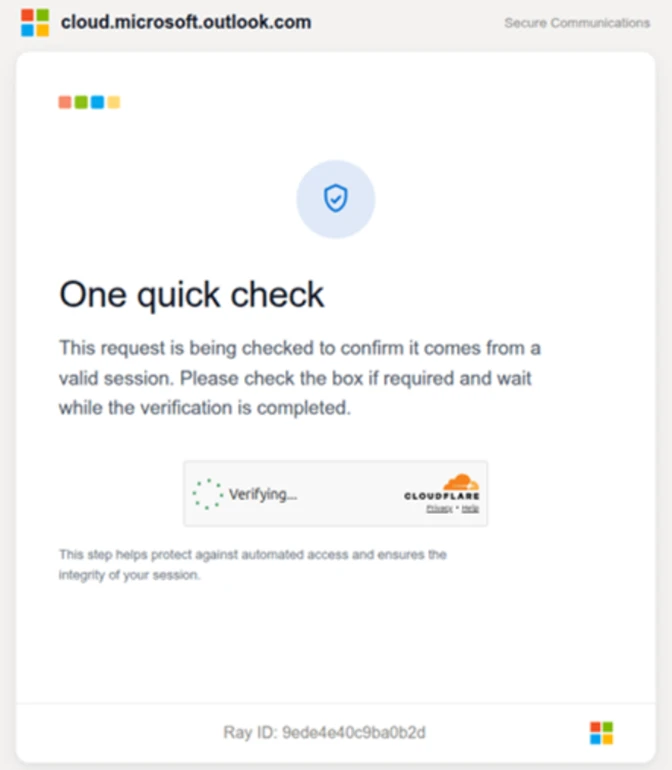
After completing the CAPTCHA, users were redirected to an intermediate site designed to prepare them for the final stage of the attack. This page informed users that the requested documentation was encrypted and required account authentication. While this stage of the attack has several hallmarks of device code phishing, we were only able to confirm the AITM portion of the attack chain.
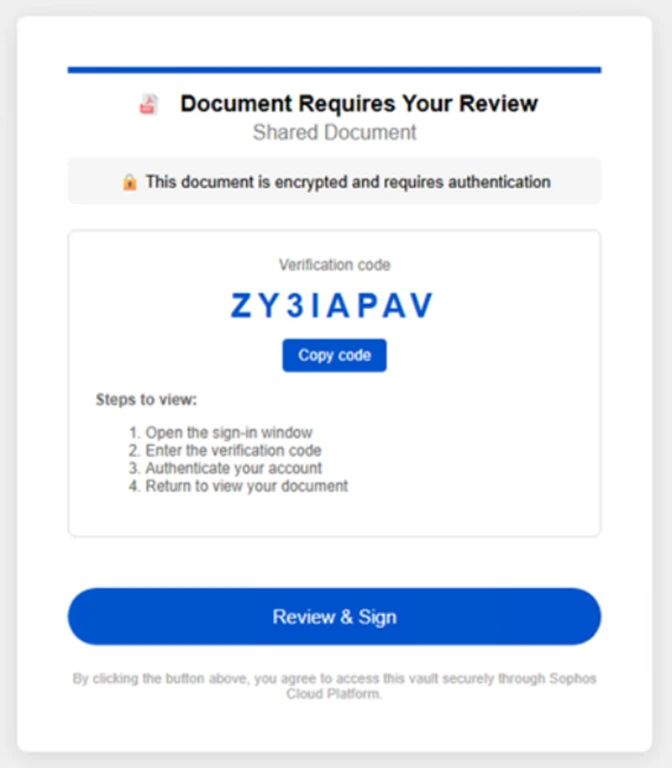
After clicking the provided “Review & Sign” button, users were presented with a sign-in prompt requesting their email address.
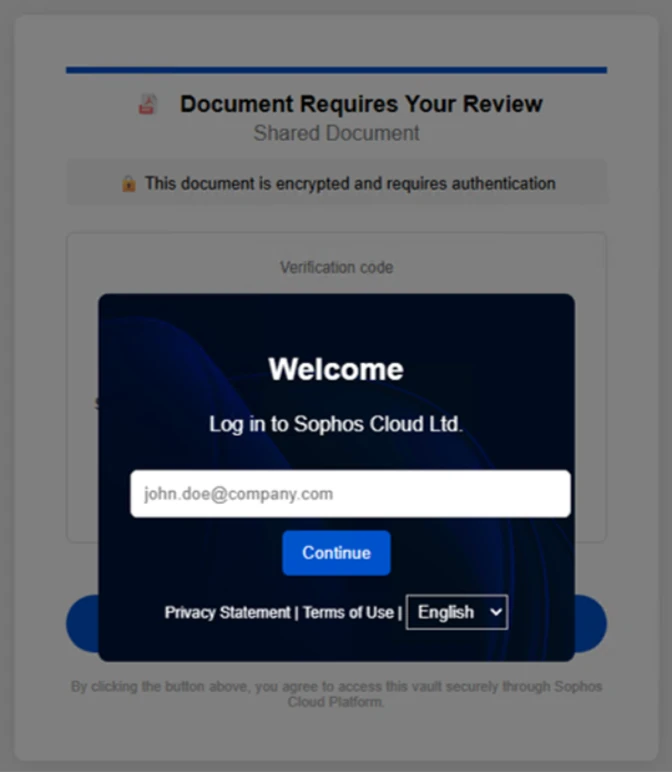
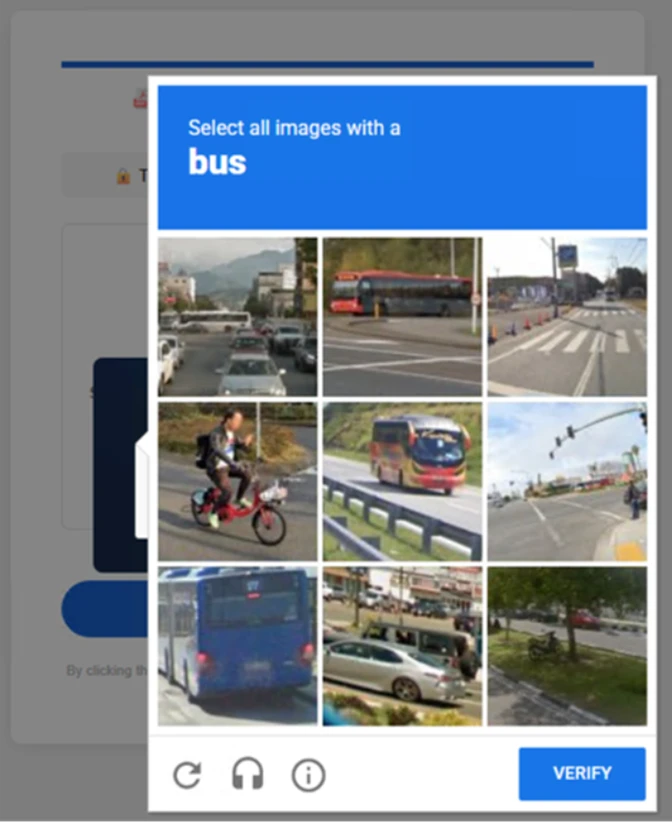
After submission, users were required to complete a second CAPTCHA involving image selection.
Once these steps were completed, users were shown a message indicating that verification was successful and that their “case” was being prepared.
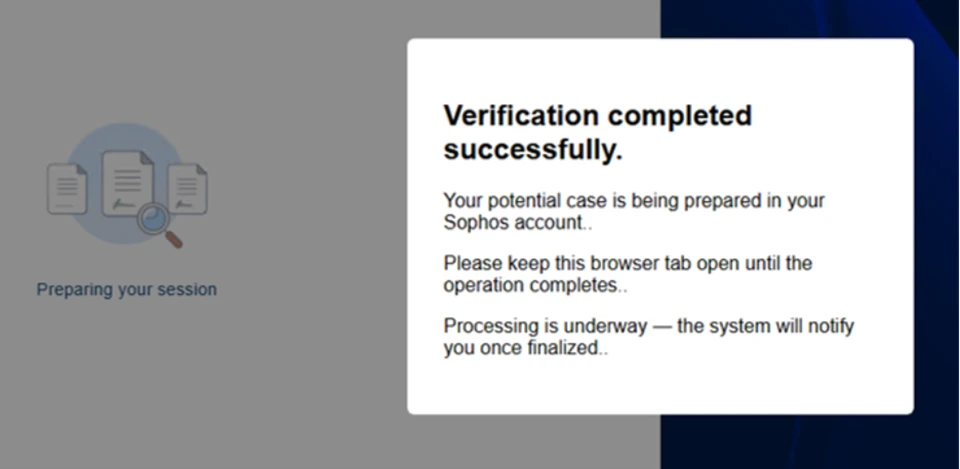
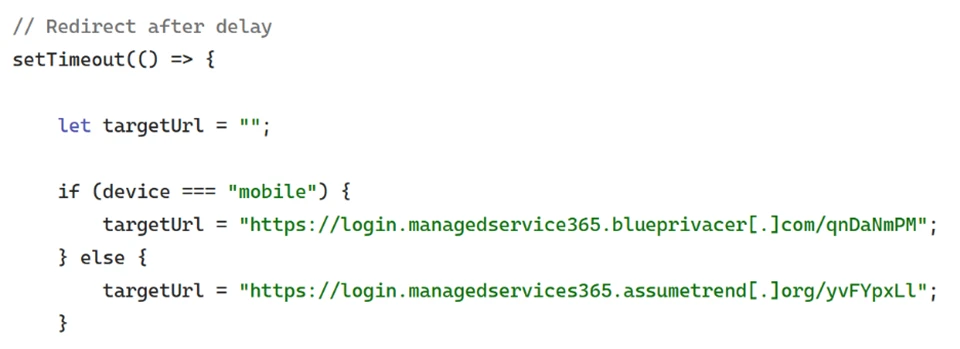
Following these steps, users were redirected to a third site hosting the final stage of the attack. Analysis of the underlying code indicates that the final destination varied depending on whether the user accessed the workflow from a mobile device or a desktop system.
On the final page, users were informed that all materials related to their code of conduct review had been “securely logged”, “time-stamped”, and “maintained within the organization’s centralized compliance tracking system”. They were then prompted to schedule a time to discuss the case, which required signing in to their account.
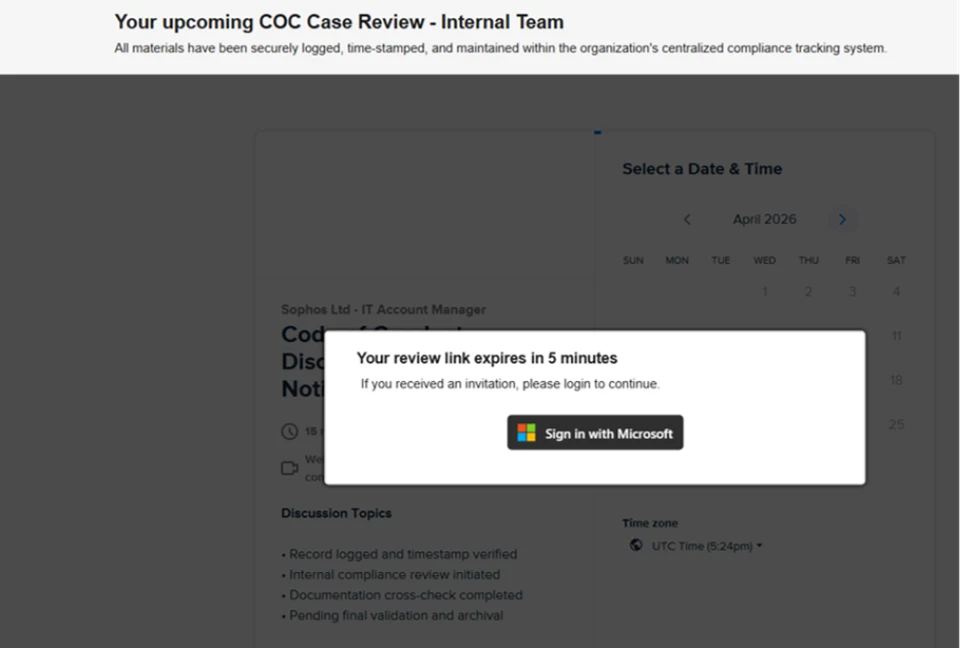
Selecting the “Sign in with Microsoft” option redirected users to a Microsoft authentication page, initiating an AiTM session hijacking flow designed to capture authentication tokens and compromise user accounts.
Microsoft recommends the following mitigations to reduce the impact of this threat. Check the recommendations card for the deployment status of monitored mitigations.
Microsoft Defender customers can refer to the list of applicable detections below. Microsoft Defender coordinates detection, prevention, investigation, and response across endpoints, identities, email, apps to provide integrated protection against attacks like the threat discussed in this blog.
| Tactic | Observed activity | Microsoft Defender coverage |
| Initial access | Phishing emails | Microsoft Defender for Office 365 – A potentially malicious URL click was detected – A user clicked through to a potentially malicious URL – Suspicious email sending patterns detected – Email messages containing malicious URL removed after delivery – Email messages removed after delivery – Email reported by user as malware or phish |
| Persistence | Threat actors sign in with stolen valid entities | Microsoft Entra ID Protection – Anomalous Token – Unfamiliar sign-in properties – Unfamiliar sign-in properties for session cookies Microsoft Defender for Cloud Apps |
Microsoft Security Copilot is embedded in Microsoft Defender and provides security teams with AI-powered capabilities to summarize incidents, analyze files and scripts, summarize identities, use guided responses, and generate device summaries, hunting queries, and incident reports.
Customers can also deploy AI agents, including the following Microsoft Security Copilot agents, to perform security tasks efficiently:
Security Copilot is also available as a standalone experience where customers can perform specific security-related tasks, such as incident investigation, user analysis, and vulnerability impact assessment. In addition, Security Copilot offers developer scenarios that allow customers to build, test, publish, and integrate AI agents and plugins to meet unique security needs.
Microsoft Defender XDR customers can use the following threat analytics reports in the Defender portal (requires license for at least one Defender XDR product) to get the most up-to-date information about the threat actor, malicious activity, and techniques discussed in this blog. These reports provide the intelligence, protection information, and recommended actions to prevent, mitigate, or respond to associated threats found in customer environments.
Microsoft Security Copilot customers can also use the Microsoft Security Copilot integration in Microsoft Defender Threat Intelligence, either in the Security Copilot standalone portal or in the embedded experience in the Microsoft Defender portal to get more information about this threat actor.
Microsoft Defender XDR customers can run the following advanced hunting queries to find related activity in their networks:
Campaign emails by sender address
The following query identifies emails associated with this campaign using a message’s sending email address.
EmailEvents
| where SenderMailFromAddress in (" cocpostmaster@cocinternal.com "," nationaladmin@gadellinet.com ","
nationalintegrity@harteprn.com”,” m365premiumcommunications@cocinternal.com”,” documentviewer@na.businesshellosign.de”)
| Indicator | Type | Description | First seen | Last seen |
| compliance-protectionoutlook[.]de | Domain | Domain hosting malicious campaign content | 2026-04-14 | 2026-04-16 |
| acceptable-use-policy-calendly[.]de | Domain | Domain hosting malicious campaign content | 2026-04-14 | 2026-04-16 |
| cocinternal[.]com | Domain | Domain hosting sender email address | 2026-04-14 | 2026-04-16 |
| Gadellinet[.]com | Domain | Domain hosting sender email address | 2026-04-14 | 2026-04-16 |
| Harteprn[.]com | Domain | Domain hosting sender email address | 2026-04-14 | 2026-04-16 |
| Cocpostmaster[@]cocinternal.com | Email address | Email address used to send campaign emails | 2026-04-14 | 2026-04-16 |
| Nationaladmin[@]gadellinet.com | Email address | Email address used to send campaign emails | 2026-04-14 | 2026-04-16 |
| Nationalintegrity[@]harteprn.com | Email address | Email address used to send campaign emails | 2026-04-14 | 2026-04-16 |
| M365premiumcommunications[@]cocinternal.com | Email address | Email address used to send campaign emails | 2026-04-14 | 2026-04-16 |
| Documentviewer[@]na.businesshellosign.de | Email address | Email address used to send campaign emails | 2026-04-14 | 2026-04-16 |
| Awareness Case Log File – Monday 13th, April 2026.pdf | Filename | Name of PDF attachment containing phishing link | 2026-04-14 | 2026-04-14 |
| Awareness Case Log File – Tuesday 14th, April 2026.pdf | Filename | Name of PDF attachment containing phishing link | 2026-04-15 | 2026-04-15 |
| Awareness Case Log File – Wednesday 15th, April 2026.pdf | Filename | Name of PDF attachment containing phishing link | 2026-04-16 | 2026-04-16 |
| 5DB1ECBBB2C90C51D81BDA138D4300B90EA5EB2885CCE1BD921D692214AECBC6 | SHA-256 | File hash of campaign PDF attachment | 2026-04-14 | 2026-04-16 |
| B5A3346082AC566B4494E6175F1CD9873B64ABE6C902DB49BD4E8088876C9EAD | SHA-256 | File hash of campaign PDF attachment | 2026-04-14 | 2026-04-16 |
| 11420D6D693BF8B19195E6B98FEDD03B9BCBC770B6988BC64CB788BFABE1A49D | SHA-256 | File hash of campaign PDF attachment | 2026-04-14 | 2026-04-16 |
For the latest security research from the Microsoft Threat Intelligence community, check out the Microsoft Threat Intelligence Blog.
To get notified about new publications and to join discussions on social media, follow us on LinkedIn, X (formerly Twitter), and Bluesky.
To hear stories and insights from the Microsoft Threat Intelligence community about the ever-evolving threat landscape, listen to the Microsoft Threat Intelligence podcast.
此内容由惯性聚合(RSS阅读器)自动聚合整理,仅供阅读参考。 原文来自 — 版权归原作者所有。