


惯性聚合 高效追踪和阅读你感兴趣的博客、新闻、科技资讯
阅读原文 在惯性聚合中打开

推荐订阅源

IT之家
IT之家
H
Help Net Security
GbyAI
GbyAI
博客园_首页
G
Google Developers Blog
Microsoft Security Blog
博客园 - 【当耐特】
月光博客
月光博客
美团技术团队
B
Blog RSS Feed
博客园 - 三生石上(FineUI控件)
WordPress大学
WordPress大学
博客园 - 叶小钗
有赞技术团队
有赞技术团队
T
The Blog of Author Tim Ferriss
Engineering at Meta
Engineering at Meta
Google DeepMind News
Y
Y Combinator Blog
宝玉的分享
宝玉的分享
Microsoft Azure Blog
罗磊的独立博客
云风的 BLOG
云风的 BLOG
Cyber Security Advisories - MS-ISAC
P
Proofpoint News Feed

Help Net Security

ChatGPT advanced account security adds passkeys and hardware keys Week in review: High-severity LPE vulnerability in the Linux kernel, cPanel 0-day exploited for months Automating Pentest Delivery: A Step-by-Step Guide - PlexTrac Open-source privacy proxy masks PII before prompts reach external AI services Shadow AI risks deepen as 31% of users get no employer training Identity is the control plane for distributed infrastructure AI traffic is getting bigger, louder, and less predictable New infosec products of the month: April 2026 cPanel zero-day exploited for months before patch release (CVE-2026-41940) Cisco releases open-source toolkit for verifying AI model lineage Met Police face criticism for using AI to spy on their own officers Nine-year-old Linux kernel flaw enables reliable local privilege escalation (CVE-2026-31431) Hacker with a special interest in breaching sports institutions ends behind bars - Help Net Security IP Fabric MCP server adds governance and control to enterprise AIOps workflows - Help Net Security Aqua Compass MCP server enables real-time investigation and containment of runtime threats - Help Net Security Google brings instant email verification to Android, no OTP needed - Help Net Security If cyber espionage via HDMI worries you, NCSC built a device to stop it - Help Net Security Apple fixes iPhone bug that let FBI retrieve deleted Signal messages(CVE-2026-28950) - Help Net Security GopherWhisper APT group hides command and control traffic in Slack and Discord - Help Net Security OpenAI tackles a bad habit people have when interacting with AI - Help Net Security A year in, Zoom's CISO reflects on balancing security and business - Help Net Security Scenario: Open-source framework for automated AI app red-teaming - Help Net Security GDPR works, but only where someone enforces it - Help Net Security Ransomware, fraud, and lawsuits drive cyber insurance claims to new peaks - Help Net Security Google’s Workspace Intelligence promises privacy while running on your data - Help Net Security Cyberattack on French government agency triggers phishing alert - Help Net Security Claude Mythos finds 271 Firefox flaws, Mozilla believes zero-days are numbered - Help Net Security Prove Identity Platform connects verification, authentication, and fraud prevention - Help Net Security New Mirai variants target routers and DVRs in parallel campaigns - Help Net Security Acronis GenAI Protection gives MSPs control over AI usage and data risks - Help Net Security
Microsoft's workplace check-in via Wi-Fi tracks who's in ...
Anamarija Pogorelec · 2026-06-15 · via Help Net Security

Microsoft is rolling out workplace check-in via Wi-Fi for Teams and Microsoft Places. Connect to your office network and your in-office presence updates automatically, no manual status change needed.

Microsoft says the signal isn’t stored as location history, and that you can configure your own settings. Here’s the catch. Your employer enables the feature at the tenant level, and you only control how it’s used on your end. Privacy advocates and labor groups have already flagged that gap.
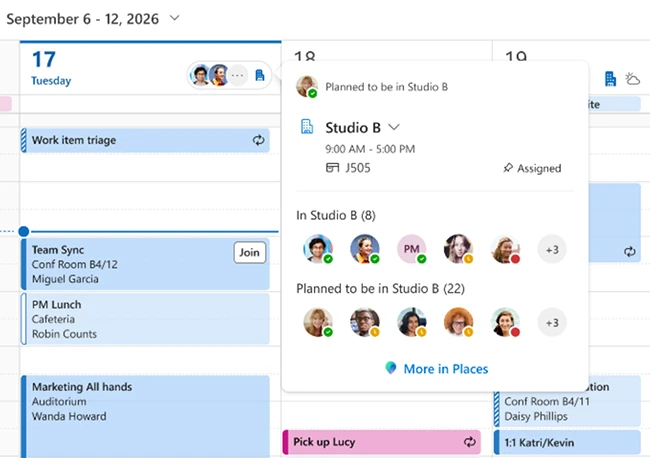
microsoft workplace check-in

How Wi-Fi workplace check-in works

When enabled by the organization and the employee, workplace check-in via Wi-Fi can automatically update a user’s work location when their device connects to a configured workplace network. Employees can manage workplace check-in, presence sharing, and location permissions through their settings. They can also manually set or override their work location.

Microsoft says workplace presence is an in-the-moment signal that indicates where someone is working, such as in the office or remotely, and is not stored as historical data. The feature does not track or retain employees’ movements or location history. At least for now.

“It applies only to workplace contexts. The signal is generated when a device connects to configured corporate office networks through the Teams client and does not extend beyond those environments. If a device is not connected to a configured workplace network, the user’s location is shown as ‘Remote’,” Brennan McReynolds, Product Lead at Microsoft Places, explained.

Workplace check-in and presence sharing are separate decisions. In Microsoft Places, Teams, and Outlook, coworkers can see whether someone is working from the office or remotely and, in some cases, whether they are currently at a workplace. Employees can choose whether to share this information with others when working from the office.