






最近需要将ffmpeg移植到mips架构上,现将移植的过程记录如下,供自己以后记忆参考.
1.ffmpeg交叉编译
./configure \
--prefix=$(pwd)/output \
--enable-cross-compile --arch=mips --target-os=linux \
--cross-prefix=mips-linux-gnu- --cc=mips-linux-gnu-gcc-7.2.0 \
--disable-everything \
--disable-autodetect \
--enable-avdevice \
--enable-avfilter \
--disable-msa \
--disable-debug \
--disable-protocols --enable-protocol=file \
--disable-demuxers --enable-demuxer=mov \
--disable-muxers --enable-muxer=mp4 --enable-muxer=mov \
--disable-decoders --enable-decoder=pcm_alaw --enable-decoder=h264 --enable-decoder=mpeg4 \
--disable-encoders --enable-encoder=pcm_s16le \
--disable-bsfs --enable-bsf=h264_mp4toannexb \
--enable-static --enable-shared \
--disable-programs --enable-ffmpeg \
--extra-cflags=-muclibc --extra-cxxflags=-muclibc \
--enable-small
2.发现编译链接后异常

后修改编译配置,正常通过
./configure \
--prefix=$(pwd)/output \
--enable-cross-compile --arch=mips --target-os=linux \
--cross-prefix=mips-linux-gnu- --cc=mips-linux-gnu-gcc \
--disable-mipsdsp --disable-mipsdspr2 --disable-mips32r2 --disable-mipsfpu --disable-mips64r2 --disable-mips32r6  \
--disable-everything \
--disable-autodetect \
--enable-avdevice \
--enable-avfilter \
--disable-msa \
--disable-debug \
--disable-protocols --enable-protocol=file \
--disable-demuxers --enable-demuxer=mov \
--disable-muxers --enable-muxer=mp4 --enable-muxer=mov \
--disable-decoders  --enable-decoder=pcm_s16le --enable-decoder=pcm_alaw --enable-decoder=h264  --enable-decoder=mpeg4 \
--disable-encoders --enable-encoder=pcm_s16le \
--disable-bsfs --enable-bsf=h264_mp4toannexb \
--enable-static --disable-shared \
--disable-programs --enable-ffmpeg \
--extra-cflags=-muclibc --extra-cxxflags=-muclibc \
--enable-small
3.经过尝试,现将多余的库排
./configure \
--prefix=$(pwd)/output \
--enable-cross-compile --arch=mips --target-os=linux \
--cross-prefix=mips-linux-gnu- --cc=mips-linux-gnu-gcc \
--disable-mipsdsp --disable-mipsdspr2 --disable-mips32r2 --disable-mipsfpu --disable-mips64r2 --disable-mips32r6  \
--enable-avdevice \
--enable-avfilter \
--disable-msa \
--disable-debug \
--disable-protocols --enable-protocol=file \
--disable-decoders --enable-decoder=pcm_s16le \
--disable-encoders --enable-encoder=pcm_s16le \
--enable-static --disable-shared \
--disable-programs --enable-ffmpeg \
--disable-doc \
--extra-cflags=-muclibc --extra-cxxflags=-muclibc \
--enable-small
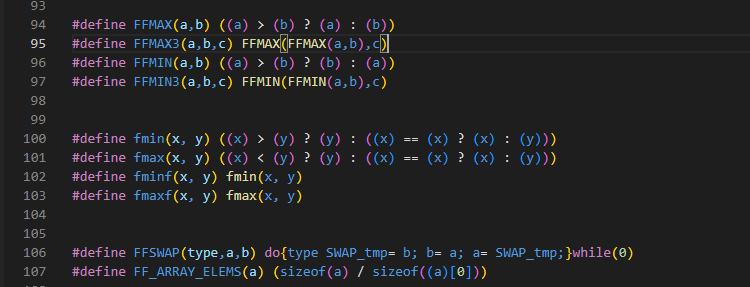
遇到差函数,在commom.h中增加以下函数解决
#define fmin(x, y) ((x) > (y) ? (y) : ((x) == (x) ? (x) : (y)))
#define fmax(x, y) ((x) < (y) ? (y) : ((x) == (x) ? (x) : (y)))
#define fminf(x, y) fmin(x, y)
#define fmaxf(x, y) fmax(x, y)
此内容由惯性聚合(RSS阅读器)自动聚合整理,仅供阅读参考。 原文来自 — 版权归原作者所有。