惯性聚合 高效追踪和阅读你感兴趣的博客、新闻、科技资讯
阅读原文 在惯性聚合中打开

推荐订阅源

博客园 - 三生石上(FineUI控件)
O
OpenAI News
WordPress大学
WordPress大学
P
Proofpoint News Feed
J
Java Code Geeks
G
Google Developers Blog
freeCodeCamp Programming Tutorials: Python, JavaScript, Git & More
The Register - Security
Engineering at Meta
Engineering at Meta
H
Help Net Security
人人都是产品经理
人人都是产品经理
Vercel News
Vercel News
N
Netflix TechBlog - Medium
F
Full Disclosure
U
Unit 42
Latest news
Latest news
N
News and Events Feed by Topic
Threat Intelligence Blog | Flashpoint
I
InfoQ
L
LINUX DO - 最新话题
T
Threat Research - Cisco Blogs
OSCHINA 社区最新新闻
OSCHINA 社区最新新闻
爱范儿
爱范儿
K
Kaspersky official blog
Google Online Security Blog
小众软件
小众软件
I
Intezer
V
V2EX
S
SegmentFault 最新的问题
C
CERT Recently Published Vulnerability Notes
阮一峰的网络日志
阮一峰的网络日志
Security Archives - TechRepublic
Recent Announcements
C
Check Point Blog
C
Cyber Attacks, Cyber Crime and Cyber Security
Recorded Future
Recorded Future
博客园 - Franky
Project Zero
Project Zero
S
Securelist
Attack and Defense Labs
Spread Privacy
Spread Privacy
The Hacker News
The Hacker News
T
The Blog of Author Tim Ferriss
Google DeepMind News
aimingoo的专栏
aimingoo的专栏
博客园 - 叶小钗
NISL@THU
NISL@THU
云风的 BLOG
云风的 BLOG
S
Secure Thoughts
Exploit-DB.com RSS Feed

The GitHub Blog

The case for a cooldown: Why Dependabot now waits before issuing version updates Copilot vs. raw API access: What are you actually paying for? Next chapter: Restructuring GitHub's bug bounty program $100 million for open source: A milestone built by the community The cost of saying yes has changed GitHub for Beginners: Your roadmap to mastering the GitHub essentials Better tools made Copilot code review worse. Here's how we actually improved it. How GitHub gave every repository a durable owner Automating cross-repo documentation with GitHub Agentic Workflows GitHub availability report: June 2026 How GitHub Copilot enables zero DNS configuration for GitHub Pages Q1 2026 Innovation Graph update: Open source collaboration is accelerating worldwide How GitHub used secret scanning to reach inbox zero 6 security settings every GitHub maintainer should enable this week How GitHub maintains compliance for open source dependencies Highlights from Git 2.55 Inside the Advisory Database and what happens when vulnerability volume breaks records GitHub and UNDP team up to advance development priorities in Ghana with open source Transitioning as a Hubber Evaluating performance and efficiency of the GitHub Copilot agentic harness across models and tasks I automated my job (and it made me a better leader) GitHub joins coalition advocating for fixes to California AI Transparency Act to protect open source From pledge to practice: Building a more inclusive open source ecosystem How we built an internal data analytics agent How pull request limits are cutting down the noise Getting more from each token: How Copilot improves context handling and model routing What are git worktrees, and why should I use them? GitHub Copilot CLI for Beginners: Overview of common slash commands Accelerating researchers and developers building multilingual AI with a new open dataset How we made GitHub Copilot CLI more selective about delegation GitHub availability report: May 2026 Making secret scanning more trustworthy: Reducing false positives at scale Give GitHub Copilot CLI real code intelligence with language servers From one-off prompts to workflows: How to use custom agents in GitHub Copilot CLI GitHub for Beginners: Answers to some common questions GitHub Universe is back: All together now, in the agentic era GitHub Copilot app: The agent-native desktop experience Still a developer. Just outside. Our latest GitHub Shop collection is here. GitHub for Beginners: Getting started with Git and GitHub in VS Code GitHub recognized as a Leader in the Gartner® Magic Quadrant™ for Enterprise AI Coding Agents for the third year in a row Beyond the engine: 10 open source projects shaping how games actually get made Building GitHub’s next chapter in accessibility Investigation update: GitHub Enterprise Server signing key rotation Take your local GitHub sessions anywhere Building a general-purpose accessibility agent—and what we learned in the process Raising the bar: Quality, shared responsibility, and the future of GitHub’s bug bounty program GitHub availability report: April 2026 From latency to instant: Modernizing GitHub Issues navigation performance Dungeons & Desktops: 10 roguelikes that never die (because their communities won’t let them) GitHub Copilot individual plans: Introducing flex allotments in Pro and Pro+, and a new Max plan Dungeons & Desktops: Building a procedurally generated roguelike with GitHub Copilot CLI GitHub for Beginners: Getting started with OSS contributions Why age assurance laws matter for developers How researchers are using GitHub Innovation Graph data to reveal the “digital complexity” of nations Improving token efficiency in GitHub Agentic Workflows Agent pull requests are everywhere. Here’s how to review them. Validating agentic behavior when “correct” isn’t deterministic Welcome to Maintainer Month: Celebrating the people behind the code Register now for OpenClaw: After Hours @ GitHub GitHub Copilot CLI for Beginners: Interactive v. non-interactive mode GitHub for Beginners: Getting started with Markdown Securing the git push pipeline: Responding to a critical remote code execution vulnerability Highlights from Git 2.54 Building an emoji list generator with the GitHub Copilot CLI Bringing more transparency to GitHub’s status page How GitHub uses eBPF to improve deployment safety Build a personal organization command center with GitHub Copilot CLI Developer policy update: Intermediary liability, copyright, and transparency Hack the AI agent: Build agentic AI security skills with the GitHub Secure Code Game How exposed is your code? Find out in minutes—for free GitHub for Beginners: Getting started with GitHub Pages GitHub Copilot CLI for Beginners: Getting started with GitHub Copilot CLI GitHub availability report: March 2026 GitHub Universe is back: We want you to take the stage GitHub Copilot CLI combines model families for a second opinion The uphill climb of making diff lines performant Securing the open source supply chain across GitHub Run multiple agents at once with /fleet in Copilot CLI Agent-driven development in Copilot Applied Science GitHub for Beginners: Getting started with GitHub security What’s coming to our GitHub Actions 2026 security roadmap
How to build interactive experiences with canvases
Jacklyn Carroll · 2026-07-22 · via The GitHub Blog

Most developers are now working alongside agents, or are at least familiar with how to do so. Agents help you explore ideas and turn them into action, from planning projects to automating workflows. Oftentimes, a conversation is all you need to move your work forward.

But what about tasks that don’t quite fit the conversation mold?

Some tasks are easier when you can see and interact with the information. You may need to triage a backlog, visualize complex information, or bring information together from multiple sources. A visual interface makes it easier to understand patterns, spot connections, and take action.

Instead of working through a long chain of prompts and responses, you can use canvases to interact directly with the information in front of you.

Working with canvases

These shared, interactive surfaces are extensions of the Copilot app called canvases. A canvas is an interface in the GitHub Copilot app where developers and agents can collaborate in real time. These shared, interactive surfaces are called canvas extensions.

The agent can update the canvas as it works, and you can interact with that same workspace through clicks, edits, and other actions. Your interactions can be sent back to the agents or processed locally by the canvas.

You can continuously shape the experience by asking Copilot to iterate on your canvas—adding new functionality, refining existing features, and more. The canvas can evolve alongside your work.

To create a canvas, use /create-canvas in your agent session in the GitHub Copilot app, then describe what you want it to create and what capabilities it should be able to support.

Because canvases are generated from a prompt and evolve alongside your workflow, they can take many forms. Some help you visualize information, some help you take action, others provide a more entertaining way to tackle your backlog.

Here’s some examples of what’s possible with canvas extensions:

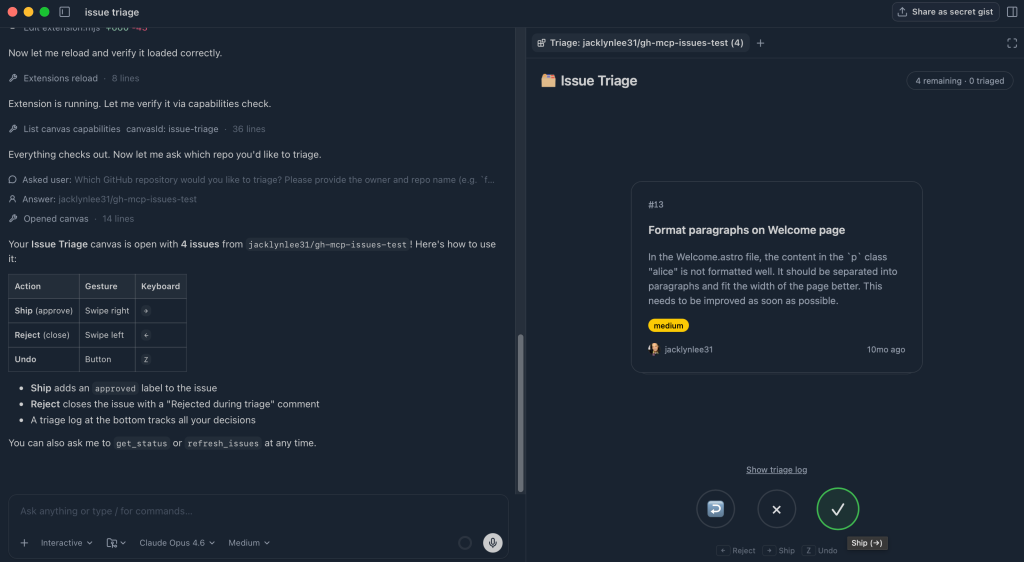
Issue triage helper

Goal: Quickly triage GitHub Issues in a fast, visual way.

Prompt/create-canvas Create an interface that allows me to easily swipe through issues in a repo in card format. Can swipe right to ship, left to reject.

Canvas showing issue triage in card format.

Result: The canvas shows a card-based interface where each issue is surfaced one at a time. You can take action directly from the UI. As you swipe, the canvas updates in real time, tracking decisions and moving the items into the appropriate buckets.

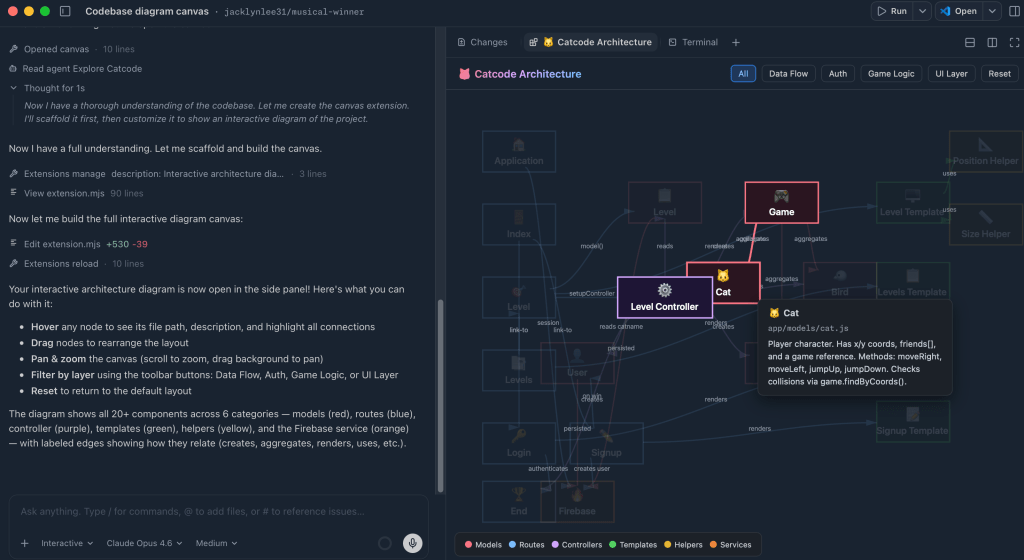
Interactive codebase diagram

Goal: Visualize how a project is structured and how its components relate to each other.

Prompt/create-canvas Render a colorful, interactive diagram showing how the code in this project is working together, show how things are related, etc.

Canvas showing interactive codebase diagram.

Result: The canvas generates a dynamic diagram of the codebase where each node represents a different part of the system. You can hover, drag, and filter to explore the different layers. You can interact with the architecture directly, turning a static understanding of a codebase into something you can actively explore.

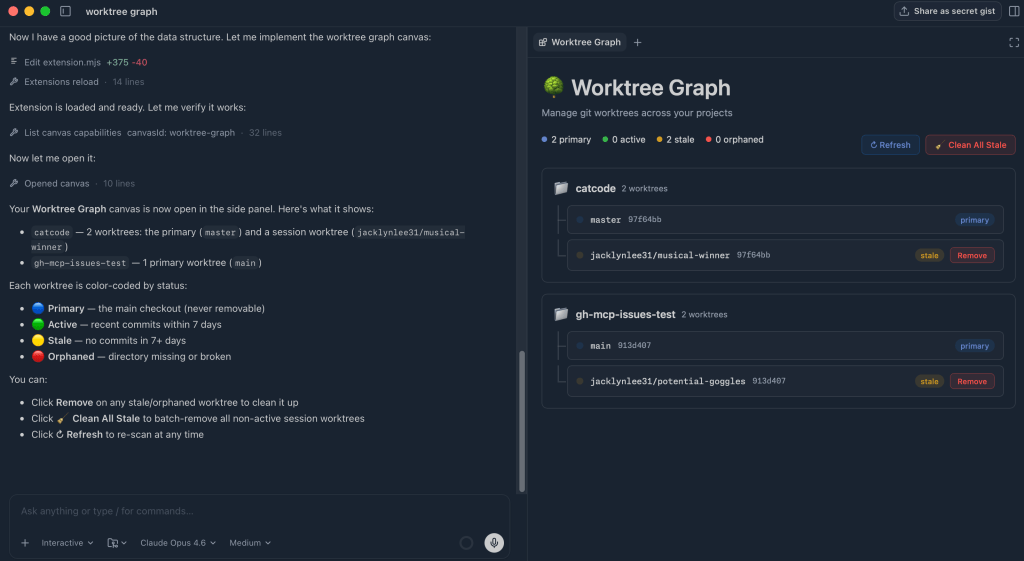
Sessions worktree view

Goal: Visualize all active GitHub Copilot app sessions and their associated git worktrees, clearly indicating which are active and which are stale, with the ability to easily clean things up where needed.

Prompt/create-canvas Create a worktree view that will help me see all of my current sessions and whether or not they are active or orphaned. Allow me to clean them up with a few clicks where needed

Canvas showing a worktree view of Copilot sessions.

Result: The canvas generates a visual showing my worktrees with clear indication of what is active and what is currently stale or orphaned. I can clean up stale worktrees with the click of a button.

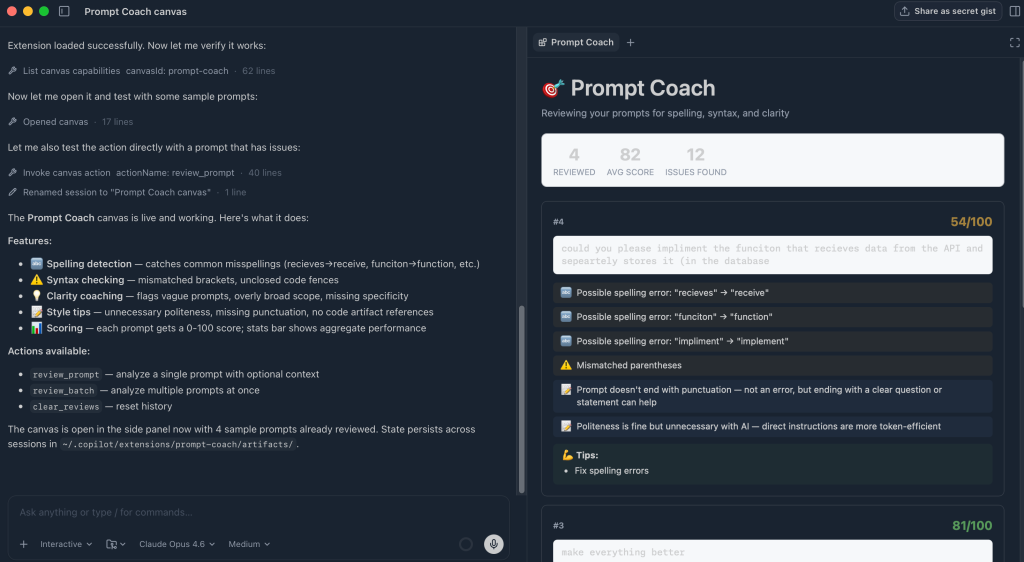
Agent prompt coach

Goal: Improve prompt quality by reviewing past interactions and suggesting clearer, more effective ways to work with agents.

Prompt/create-canvas Create an interactive prompt coach that suggests to you how you could have improved your previous prompts in your sessions with skills, mcp servers, etc. Make note of any spelling errors, syntax errors, etc.

Canvas showing a prompt coach to help improve wording of previous prompts.

Result: The canvas shows a list of previous prompts and analyzes each one, suggesting improvements such as missing context, spelling issues, and more. You can use these tips to refine your future prompts, improve clarity, and get more consistent results from the agent.

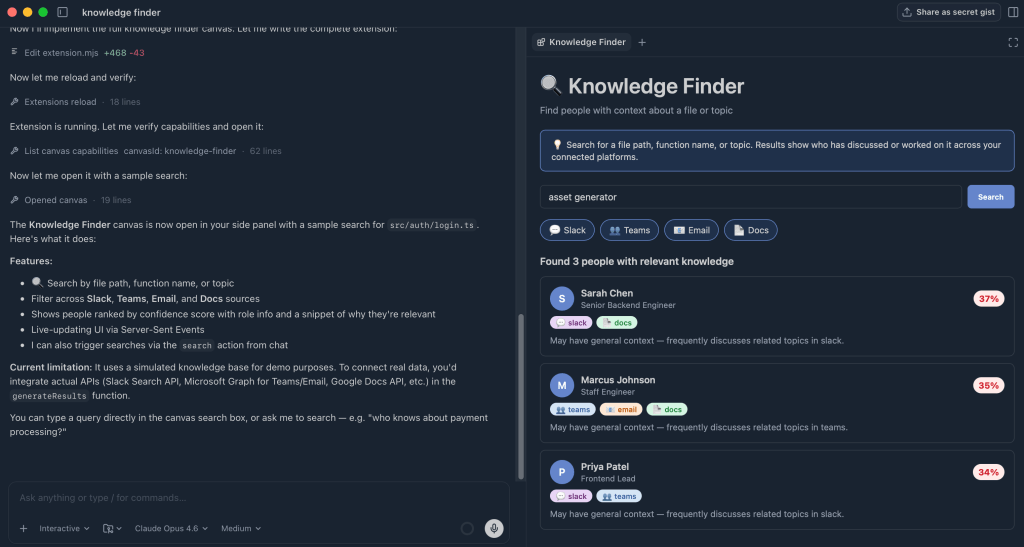
Knowledge finder

Goal: Find people who have context on a specific file or topic by searching across Slack, Teams, email, and documentation.

Prompt/create-canvas Create a way that I can search across Slack, Teams, Email and docs to find people with knowledge of a specific file or someone that would have more context.

Canvas showing a knowledge finder that helps search across multiple workspaces.

Result: Based on the search, the canvas looks across multiple tools and surfaces the people that are most connected to a given file or subject. It highlights who the person is, and where the connection was found. This allows you to quickly understand someone’s connection to a topic and make it easier to reach out for more information.

Take this with you

These examples only scratch the surface of what you can do with canvases. Canvases can turn AI from a conversational tool into a place where you can visualize information, explore different workflows, and turn boring tasks into fun experiences that you’ll actually want to complete.

Canvases are a fun, shared workspace where you and the agent can think, explore, and take action together.

Want to try out canvas extensions? You can get started in the GitHub Copilot appRead the docs for more information >

Written by

Jacklyn Carroll

Jacklyn Lee is a Content Writer at GitHub and a former technical writer with a love for good storytelling.

Related posts

Explore more from GitHub

Docs

Docs

Everything you need to master GitHub, all in one place.

Go to Docs

GitHub

GitHub

Build what’s next on GitHub, the place for anyone from anywhere to build anything.

Start building

Customer stories

Customer stories

Meet the companies and engineering teams that build with GitHub.

Learn more

GitHub Universe 2026

GitHub Universe 2026

Join us October 28-29 in San Francisco or online for GitHub Universe, our flagship developer event uniting people, agents, and the world’s code.

Register now