








Follow us on LinkedIn, X, Bluesky
Release date: April 22, 2026
Downloads: Windows: x64 Arm64 | Mac: Universal Intel silicon | Linux: deb rpm tarball Arm snap
Welcome to the 1.117 release of Visual Studio Code. This release adds new capabilities for Copilot Enterprise and Business users and further improves the agent experience in VS Code. Here are the highlights for this release:
BYOK for Business and Enterprise: Connect your own API keys for preferred or specialized models directly in VS Code chat.
Incremental chat rendering: Experience more fluid streaming of chat responses.
Terminal improvements: Launch Copilot CLI from any terminal profile.
Happy Coding!
Teams often need specific models for compliance, performance, or cost reasons, but switching between tools to use them slows developers down. Bring your own language model key (BYOK) lets Copilot Business and Enterprise users connect their own API keys for providers like OpenRouter, Ollama, Google, OpenAI, and more, so they can use those models directly in VS Code chat.
By default, BYOK is enabled and administrators can disable it with the Bring Your Own Language Model Key policy in the Copilot policy settings on GitHub.com. This gives administrators control over which model providers are available to their organization while keeping developers in their existing workflow.
After the policy is enabled, organization members can add models from built-in providers or install language model provider extensions.
Chat responses feel more fluid and natural with incremental rendering, which streams content block-by-block with optional animations as tokens arrive. Instead of the default timer-based rendering, this experimental approach renders each block as it becomes ready, reducing the perceived wait time for longer responses.
Configure incremental response rendering with the following settings:
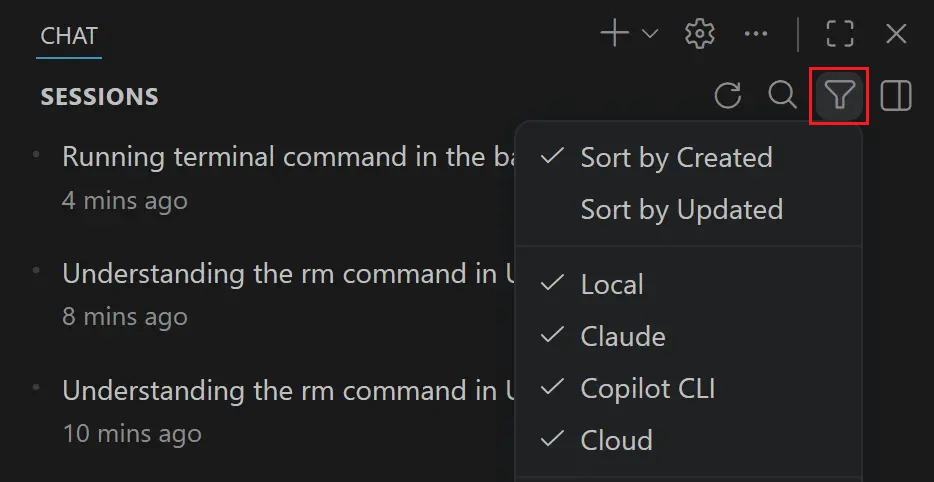
true.none, fade, rise, blur, scale, slide, reveal. Default: fade.off, word, paragraph. Default: word.When you accumulate many agent sessions, finding the right one can be difficult. The Agent Sessions view supports sorting sessions by when they were created or last updated, so you can quickly pick up where you left off.
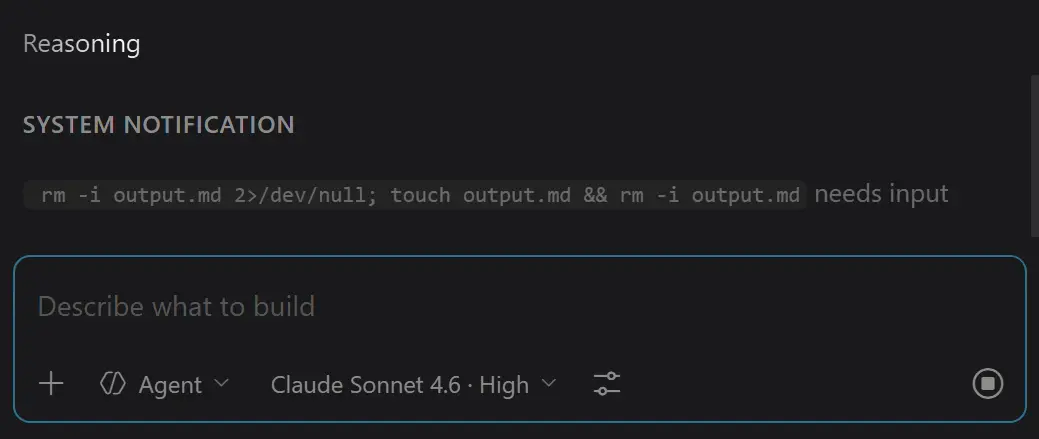
When an agent runs a long-running terminal command in the background, it can be easy to lose track of its progress. These commands now surface as System notifications in the chat response, so you can monitor their status without switching to the terminal.
Note: The Visual Studio Code Agents app is currently in preview and only available when installing VS Code Insiders.
The Visual Studio Code Agents app is a companion app that ships alongside VS Code Insiders, providing a focused, agent-native environment where you can run parallel sessions across repos, review diffs inline, and iterate on multi-step coding tasks. Introduced in 1.115, the app continues to evolve based on feedback.
Updates in this release:
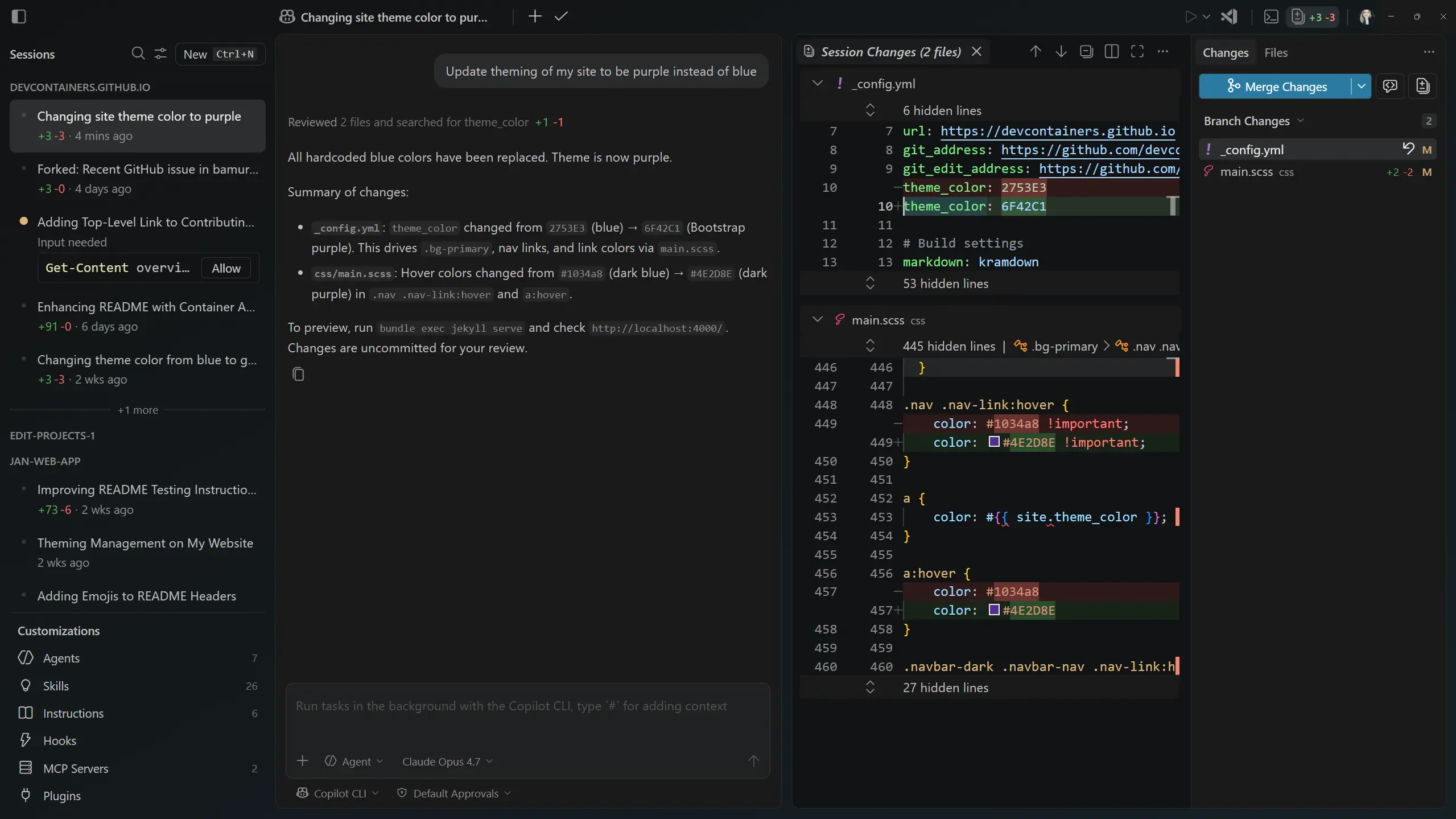
As in previous releases, you can open the app via the same methods:
The Copilot CLI terminal profile can now be launched from the terminal panel, even when your default terminal profile is set to a non-default shell, such as fish on macOS or Linux, or Git Bash on Windows.
Previously, selecting GitHub Copilot CLI from the terminal profile picker in this configuration produced a No terminal profile options provided for id 'copilot-cli' error and the terminal failed to start.
Agent CLIs like Copilot CLI, Claude Code, and Gemini CLI typically run as node processes, which meant the terminal title showed a generic node label. This made it hard to tell which agent was running in each terminal. The terminal now detects these agent CLIs as a distinct shell type and uses the OSC title sequence emitted by the CLI as the terminal title, so each terminal clearly identifies the agent it is hosting.
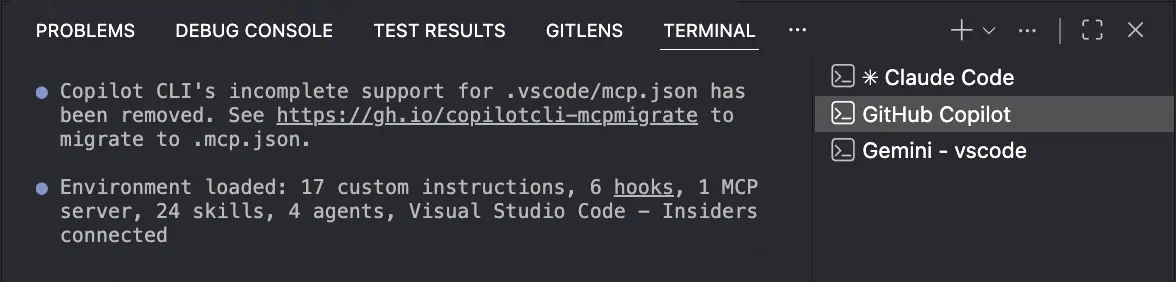
The improved detection covers Copilot CLI, Claude Code, and Gemini CLI on macOS, Linux, and Windows. Codex is not yet detected on macOS because it does not currently emit an OSC title sequence. This behavior is enabled by default and can be toggled with the terminal.integrated.tabs.allowAgentCliTitle setting.
This release includes the TypeScript 6.0.3 recovery release. This minor update fixes a few import bugs and regressions.
Contributions to our issue tracking:
Contributions to vscode:
We really appreciate people trying our new features as soon as they are ready, so check back here often and learn what's new.
If you'd like to read release notes for previous VS Code versions, go to Updates on code.visualstudio.com.
此内容由惯性聚合(RSS阅读器)自动聚合整理,仅供阅读参考。 原文来自 — 版权归原作者所有。