惯性聚合 高效追踪和阅读你感兴趣的博客、新闻、科技资讯
阅读原文 在惯性聚合中打开

推荐订阅源

D
DataBreaches.Net
SecWiki News
SecWiki News
博客园_首页
人人都是产品经理
人人都是产品经理
博客园 - 聂微东
P
Palo Alto Networks Blog
V
Vulnerabilities – Threatpost
Project Zero
Project Zero
WordPress大学
WordPress大学
NISL@THU
NISL@THU
酷 壳 – CoolShell
酷 壳 – CoolShell
P
Privacy & Cybersecurity Law Blog
Jina AI
Jina AI
AWS News Blog
AWS News Blog
Scott Helme
Scott Helme
Martin Fowler
Martin Fowler
C
Cybersecurity and Infrastructure Security Agency CISA
Forbes - Security
Forbes - Security
H
Heimdal Security Blog
小众软件
小众软件
I
Intezer
A
Arctic Wolf
奇客Solidot–传递最新科技情报
奇客Solidot–传递最新科技情报
K
KPMG report finds enterprise disconnect between AI and its ROI | CIO
O
OpenAI News
S
Security Affairs
阮一峰的网络日志
阮一峰的网络日志
Latest news
Latest news
G
GRAHAM CLULEY
Blog — PlanetScale
Blog — PlanetScale
J
Java Code Geeks
N
News and Events Feed by Topic
cs.CL updates on arXiv.org
V2EX - 技术
V2EX - 技术
Stack Overflow Blog
Stack Overflow Blog
www.infosecurity-magazine.com
L
LINUX DO - 最新话题
博客园 - Franky
P
Proofpoint News Feed
aimingoo的专栏
aimingoo的专栏
博客园 - 司徒正美
P
Proofpoint News Feed
S
Secure Thoughts
Google DeepMind News
Microsoft Security Blog
T
The Exploit Database - CXSecurity.com
让小产品的独立变现更简单 - ezindie.com
C
CXSECURITY Database RSS Feed - CXSecurity.com
F
Full Disclosure
Security Latest
Security Latest

Mapping the <mark>Internet</mark> on Netlas: Comprehensive Internet-Wide Scanning & OSINT Platform

Weaponized RMM: Hunting the Adversary Abuse of Remote Monitoring Tools Device Code Phishing: Technical Analysis and Proactive Hunting via Netlas Discovering Data Exposure with Netlas Telegram Bot API Abuse - Netlas Blog Using OWASP Amass with Netlas Module - Netlas Blog How we hunt C2 infrastructure at RST Cloud using Netlas - Netlas Blog Using Uncover with Netlas.io module - Netlas Blog Netlas Updates Terms and API & Data License Agreement - Netlas Blog Top 10 Hacking Devices for Ethical Hackers in 2026 - Netlas Blog Inside ClickFix: How Fake Prompts Took Over the Web Top 10 Critical Threat Actors to Watch in 2026: Ransomware, APTs & Defensive Strategies - Netlas Blog Bug Bounty 101 - A Complete Bug Bounty Roadmap for Beginners (2026) - Netlas Blog Supply Chain Attack - How Attackers Weaponize Software Supply Chains - Netlas Blog The Evolution of C2: Centralized to On-Chain - Netlas Blog From Starlink to Star Wars - The Real Cyber Threats in Space - Netlas Blog LLM Vulnerabilities: Why AI Models Are the Next Big Attack Surface - Netlas Blog When AI Turns Criminal: Deepfakes, Voice-Cloning & LLM Malware - Netlas Blog Zero-Click Exploits - Netlas Blog When Patches Fail: An Analysis of Patch Bypass and Incomplete Security - Netlas Blog I Analysed Over 3 Million Exposed Databases Using Netlas - Netlas Blog Post-Quantum Now: From AES & RSA to ML-KEM Hybrids - Netlas Blog Bug Bounty 101: Top 10 Reconnaissance Tools - Netlas Blog Mapping Dark Web Infrastructure - Netlas Blog Top Vibe-Coding Security Risks - Netlas Blog From Chaos to Control: Kanvas Incident Management Tool - Netlas Blog Bug Bounty 101: The Best Courses to Get Started in 2025 - Netlas Blog I, Robot + NIST AI RMF = Complete Guide on Preventing Robot Rebellion - Netlas Blog The $1.5B Bybit Hack & How OSINT Led to Its Attribution - Netlas Blog Hannibal Stealer: A Deep Technical Analysis - Netlas Blog Proactive Threat Hunting: Techniques to Identify Malicious Infrastructure - Netlas Blog The Pyramid of Pain: Beyond the Basics - Netlas Blog SOCMINT: Intelligence in the Social Media Era - Netlas Blog Hannibal Stealer vs. Browser Security - Netlas Blog The Largest Data Breach Ever? How Hackers Stole 16 Billion Credentials - Netlas Blog DNS Cache Poisoning – Is It Still Relevant? - Netlas Blog Modern Cybercrime: Who’s Behind It and Who’s Stopping It - Netlas Blog AI-Driven Attack Surface Discovery - Netlas Blog Netlas vs Urlscan: Tools Comparison - Netlas Blog Track Adversary Infrastructure Challenge 2025 Recap - Netlas Blog What is Threat Intelligence - Netlas Blog Netlas vs IPinfo: Tools Comparison - Netlas Blog Best Nmap Alternatives - Netlas Blog Whois History: How to Check the Domain Owner History - Netlas Blog Top WHOIS & RDAP Tools for Fast IP Address Lookup - Netlas Blog ASN Lookup Explained: Tools, Methods & Insights - Netlas Blog How to Detect CVEs Using Nmap Vulnerability Scan Scripts - Netlas Blog Nmap Cheat Sheet: Top 10 Scan Techiques - Netlas Blog Netlas vs ZoomEye: Platforms Comparison - Netlas Blog Top 6 Most Widely Used Port Scanners in Cybersecurity - Netlas Blog FAQ: Understanding Root DNS Servers and the Root Zone - Netlas Blog Domain Recon: Must-Know Tools for Security Professionals - Netlas Blog DNS History: Exploring Domains Past by Inspecting DNS Trails - Netlas Blog DNSSEC: Should You Use It? An Expert’s View on the Pros, Cons, and When to Implement - Netlas Blog Which DNS Servers Offer the Best Balance of Speed, Security, and Privacy? - Netlas Blog theHarvester: a Classic Open Source Intelligence Tool - Netlas Blog - Netlas Blog Top 15 OSINT Tools for Expert Intelligence Gathering - Netlas Blog A Deep Dive into the Open Web Application Security Project Top 10 Vulnerabilities - Netlas Blog Using Subfinder with Netlas Module - Netlas Blog Netlas Chrome and Firefox Extensions - Netlas Blog Netlas vs Censys: Platforms Comparison - Netlas Blog OSINT in Cybersecurity: Exploring Its Spectrum and Tech - Netlas Blog Best Honeypots for Detecting Network Threats - Netlas Blog Using Maltego with Netlas Module - Netlas Blog Using TLDFinder with Netlas - Netlas Blog Netlas vs Fofa: Platforms Comparison - Netlas Blog Netlas vs Shodan: Platforms Comparison - Netlas Blog Google Dorking in Cybersecurity - Netlas Blog 7 Tools for Web Penetration Testing - Netlas Blog Using DNS History in Cybersecurity - Netlas Blog Mastering Online Camera Searches - Netlas Blog Best Attack Surface Visualization Tools - Netlas Blog Complete Guide on Attack Surface Discovery - Netlas Blog How to find unprotected databases with Netlas.io: Chapter 2 - Netlas Blog
Using theHarvester with Netlas - Netlas Blog
Vyacheslav Makhrov · 2024-12-27 · via Mapping the <mark>Internet</mark> on Netlas: Comprehensive Internet-Wide Scanning & OSINT Platform

theHarvester is a free, open-source tool designed for gathering open-source intelligence (OSINT) from various online sources. Its functionality has been significantly enhanced with the integration of the Netlas API. This combination allows users to collect not only general information about a company but also detailed data about its network infrastructure.

In this article, we’ll explore the technical aspects of using theHarvester, including installation steps, key commands, and practical examples when used in conjunction with Netlas.

Installation

Installing the tool is quite straightforward. There are four main methods:

  • Option 1: Kali
  • Option 2: Virtualenv
  • Option 3: Docker
  • Option 4: From Source

Each installation method is thoroughly detailed on theHarvester GitHub page: Installation Guide. For this article, we will use one of the latest versions of Kali Linux, which comes with theHarvester pre-installed.

To check if theHarvester is installed on your system, run the following command:

If the tool is installed, this command will display the usage help documentation for theHarvester. The next picture shows the result of the command.
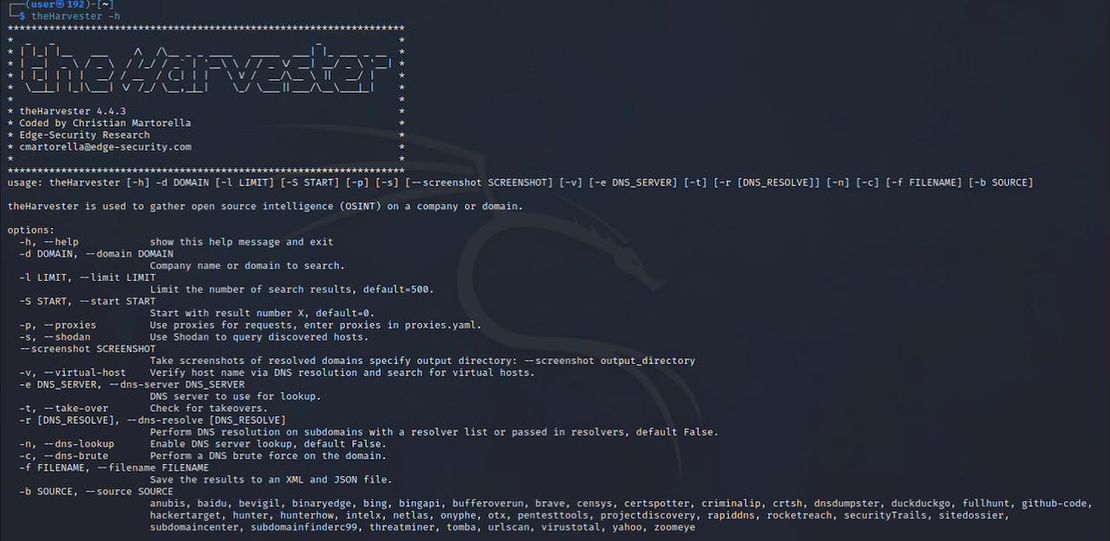
Harvester Help

What is Netlas API?

The Netlas API is an application programming interface that allows other tools and applications, such as theHarvester, to interact with Netlas’s extensive data collections. These datasets contain information on millions of network devices worldwide.

What is stored in Netlas Database?

  • IP Addresses: Ranges of IP addresses belonging to various organizations.
  • Hosts: Information about network-connected hosts (e.g., operating systems, open ports).
  • DNS Records: DNS records associated with domains and IP addresses.
  • Whois Data: Whois information containing details about domain owners and their contact information.
  • Certificates: Information about SSL/TLS certificates linked to domains.

Connecting the Netlas API to theHarvester

To connect the Netlas API to theHarvester, follow these steps:

  1. Obtain a Netlas API Key:

    • Register: Sign up on the Netlas platform.
    • Retrieve Your Key: Go to your profile and copy the API key.
  2. Configuring theHarvester

    To set up the Netlas API key, locate the api-keys.yaml configuration file. If theHarvester was installed via setup.py or is part of Kali Linux, this file is typically located in /usr/local/etc/theHarvester/. If you cloned the repository from GitHub, it will be in the root directory.
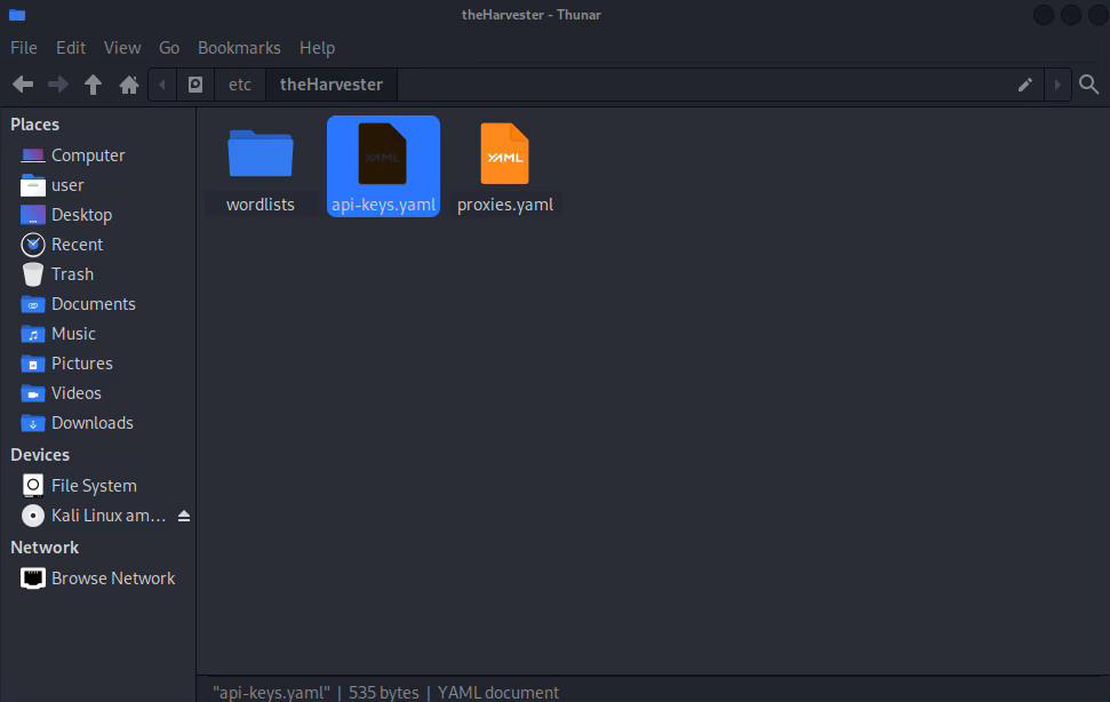
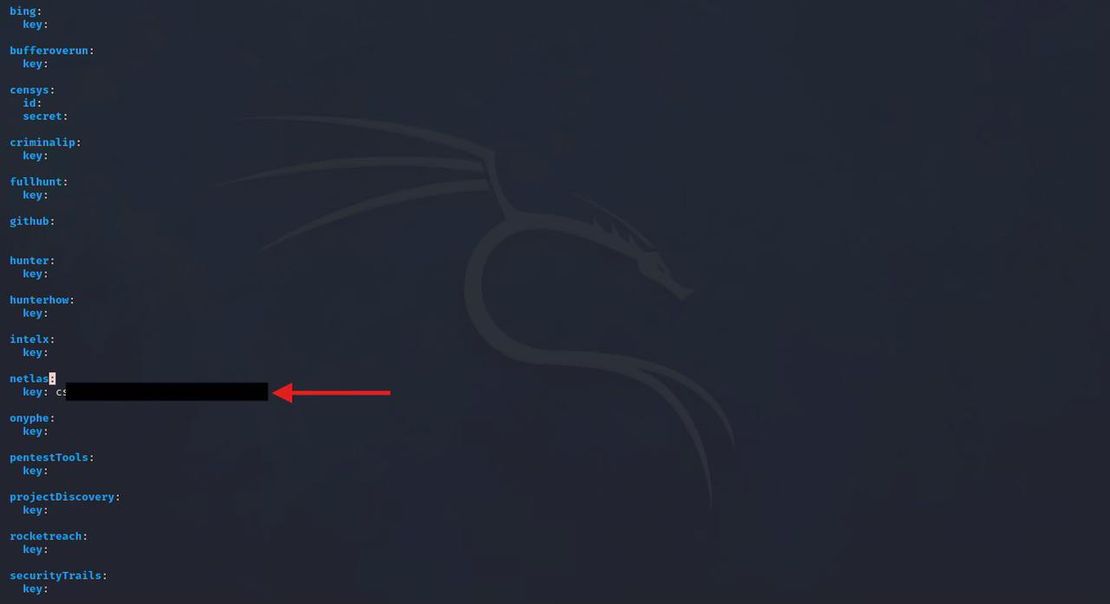
    API Keys file

    • Open the file in a text editor and find the section related to the Netlas API key. Paste the copied key from your Netlas profile.

    API Key Place

Using theHarvester with the Netlas Module

Let’s look at the code that enables theHarvester to interact with the Netlas API:

class SearchNetlas:
    def __init__(self, word, limit: int) -> None:
        self.word = word
        self.totalhosts: list = []
        self.totalips: list = []
        self.key = Core.netlas_key()
        self.limit = limit
        if self.key is None:
            raise MissingKey('netlas')
        self.proxy = False

    async def do_count(self) -> None:
        """Counts the total number of subdomains

        :return: None
        """
        api = f"https://app.netlas.io/api/domains_count/?q=*.{self.word}"
        headers = {'X-API-Key': self.key}
        response = await AsyncFetcher.fetch_all([api], json=True, headers=headers, proxy=self.proxy)
        amount_size = response[0]['count']
        self.limit = amount_size if amount_size < self.limit else self.limit

    async def do_search(self) -> None:
        """Download domains for query 'q' size of 'limit'

        :return: None
        """
        user_agent = Core.get_user_agent()
        url = "https://app.netlas.io/api/domains/download/"

        payload = {
            "q": f"*.{self.word}",
            "fields": ["domain"],
            "source_type": "include",
            "size": self.limit,
            "type": "json",
            "indice": [0]
        }

        headers = {
            'X-API-Key': self.key,
            "User-Agent": user_agent,
        }
        response = await AsyncFetcher.post_fetch(url, data=payload, headers=headers, proxy=self.proxy)
        resp_json = json.loads(response)

        for el in resp_json:
            domain = el["data"]["domain"]
            self.totalhosts.append(domain)

As shown in the integration code, Harvester uses the Netlas API to retrieve domains based on a query. The process begins with the do_count() method, which returns the number of subdomains identified by Netlas. Next, the do_search() method is used to download these subdomains.

The limit parameter plays a critical role in this process, as it determines the maximum number of results that can be returned in a single query. The do_count() method utilizes the count API call, while do_search() relies on the download API call.

A key advantage of the download method is its ability to handle streaming data, allowing users to retrieve results in any quantity. This enables users to access all subdomains identified by Netlas, making it a powerful tool for comprehensive domain analysis.

Usage Example

Let’s explore a command for searching subdomains using the Netlas module:

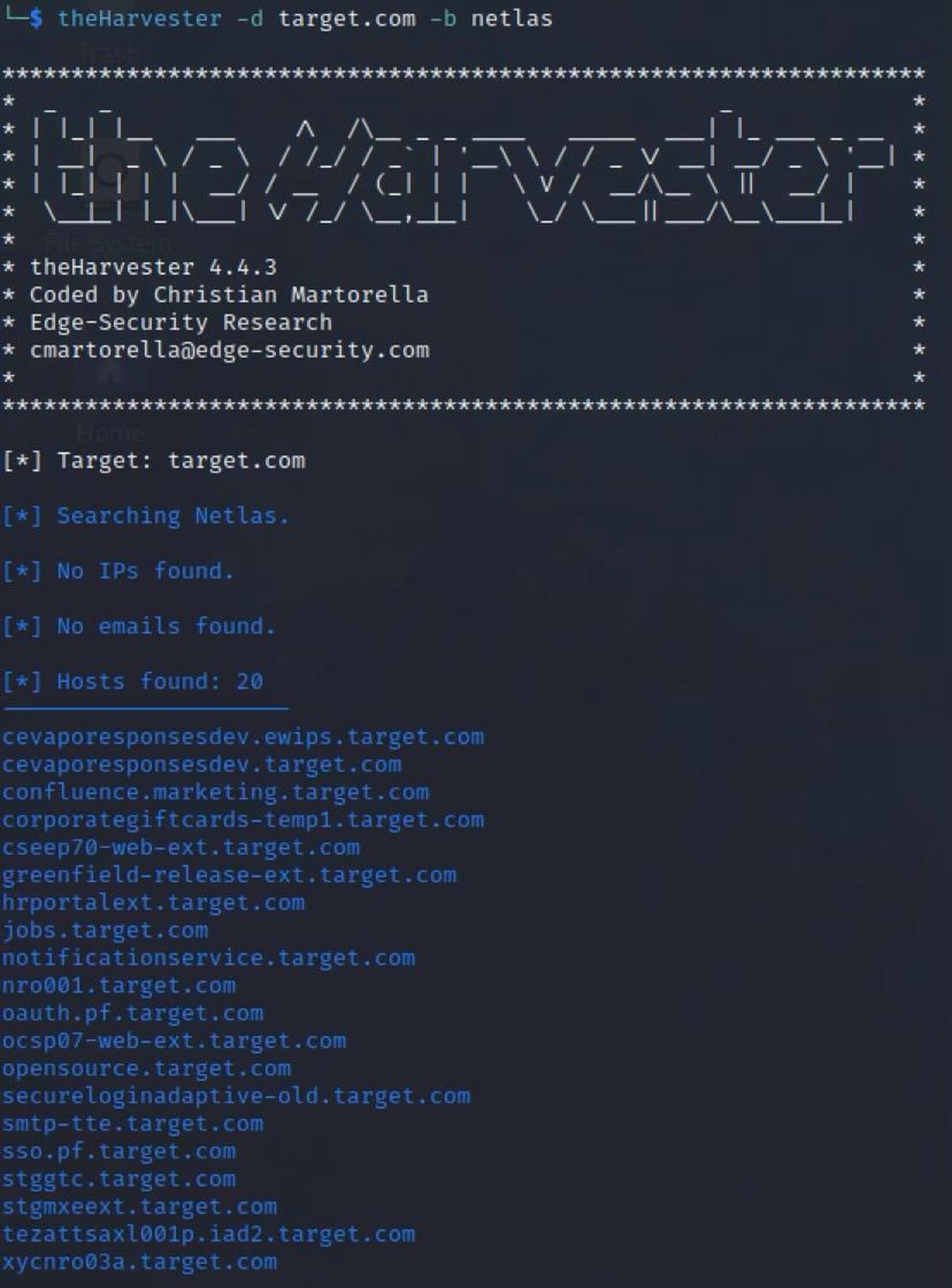
theHarvester -d target.com -b netlas

This command instructs theHarvester to gather open-source information about the web application target.com and its associated subdomains using Netlas as the data source.

Breaking Down the Command:

theHarvester: The tool itself, designed for collecting OSINT data.

-d target.com:

  • -d: Specifies the target domain.
  • target.com: The domain to investigate. This domain is often used as a training ground for penetration testing due to its vulnerable web applications.

-b netlas:

  • -b: Indicates the data source to use.
  • netlas: The specific database from which to pull information.

Here’s command executing results:

Command Result

After running theHarvester -d target.com -b netlas, you can check the search history in your Netlas account to view the query that theHarvester executed:

Netlas History

Conclusion

theHarvester offers extensive coverage across various information sources, including search engines, social networks, and databases. By integrating with the Netlas API, it gains access to detailed data about domain names and network devices, providing deeper insights into infrastructure. Netlas is particularly effective in identifying IoT devices and other network components that might be overlooked by other tools.

Together, theHarvester and the Netlas API form a powerful OSINT toolset, enhancing your ability to conduct thorough research and analysis.

Calendar

Book Your Netlas Demo

Chat with our team to explore how the Netlas platform can support your security research and threat analysis.