





The LDAP protocol is an effective tool for centralized management of account data in a corporate infrastructure.
You can learn more about the LDAP protocol and Microsoft Active Directory in our article.
LDAP-compatible directory services (such as Active Directory, FreeIPA, or 389 Directory Server) support Single Sign-On: users receive a single account which enables them to access all corporate applications. This strategy reduces administrative overhead and improves user experiences.
Such solutions as TrueConf Server and its more advanced version TrueConf Enterprise are frequently used in corporate settings. They provide team messaging and video conferencing capabilities. In this case integration with LDAP directories can also be used. Detailed configuration of the TrueConf messenger is described in the documentation.
One should take into account that sometimes directories may contain service accounts (machine objects) and regular users who do not need access to certain services. TrueConf Server enables administrators to exclude such entries from synchronization. To do it, you should configure various filters to define the group of users who will be synchronized from Active Directory.
To successfully find users, we can use two tools available in LDAP integration settings of TrueConf Server:
- Path (distinguishedName) — the full unique name of an entry in the directory. With DN, you can select a group of users to be added to TrueConf Server (if LDAP integration is already configured on your server, you may skip this step).
- Filter Disabled — this parameter specifies the accounts that are disabled and will not be displayed on your TrueConf Server.
Filtering configuration with the help of DN
To make sure that only certain users can access the features of TrueConf Server, we recommend creating a separate group of objects in the directory service.
You can specify the group to be synchronized in the section Users → LDAP / Active Directory → LDAP Settings.
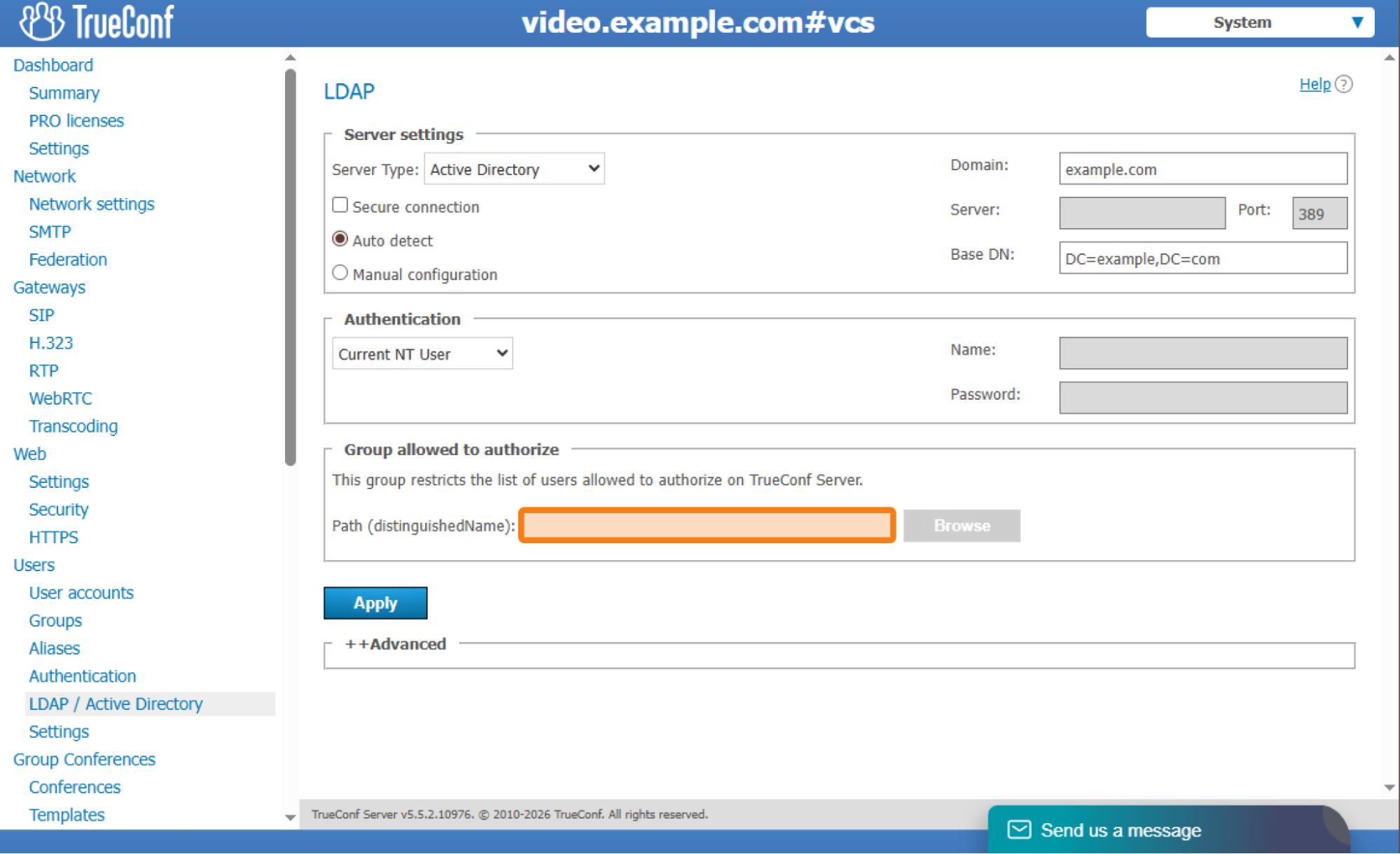
On the opened page, find the Path (distinguishedName) field and enter the parameters based on the data from the table:
| Designation | Explanation | Purpose |
|---|---|---|
| dc | Domain Component | Part of the domain DNS name |
| ou | Organizational Unit | Division, department, group |
| cn | Common Name | General name of an object (person, group, service) |
Based on this DN table, the trueconf_users group in the example.com domain will have the following entry:
cn=trueconf_users,ou=Groups,dc=example,dc=com – AD, FreeIPA / ALD Pro, 389 Directory Server, OpenLDAP
If you are unable to determine the DN of your group, or if your directory tree differs significantly from the one shown here, use the terminal (console) on the machine where the directory service is installed. Run the following commands and you will see a detailed description of the DN for your group:
Get-ADGroup group_name | Select-Object DistinguishedName— AD (run in Windows Powershell)ipa group-show group_name --raw– FreeIPA/ALD Pro (in the Linux console)ldapsearch -x -H ldap://your-ldap-server \ -D "bind_dn" -W \ -b "dc=example,dc=com" \ "(cn=group_name)" dn— for any LDAP server on Windows and Linux
where group_name is the name of your group.
|
1 2 3 4 5 6 7 8 9 10 11 12 13 14 |
ldapsearch -x -H ldap://localhost -D "cn=admin,dc=example,dc=com" -W -b "dc=example,dc=com" "(cn=group_name)" dn Enter LDAP Password: # extended LDIF # LDAPv3 # base <dc=example,dc=com> with scope subtree # filter: (cn=group_name) # requesting: dn # search result search: 2 result: 0 Success # numResponses: 1 |
For more details, please refer to the relevant documentation on directory services.
Once you have successfully connected to a directory service via LDAP, you can select a group by clicking on the Browse button.
Use of a custom filter
Sometimes, a group, whose users need to be synchronized with TrueConf Server, has service accounts that cannot be disabled or moved. In this case you can configure the use of filters on the side of TrueConf Server.
To learn how a filter can be created, refer to the official Active Directory documentation.
You can also use the table constructor below to create a filter. In particular, you can take required parameters from this table and insert your data.
LDAP filter builder
| Filtration | Filter |
|---|---|
| Search for users |
(objectClass=user) – only for AD(objectClass=inetOrgPerson) – only for OpenLDAP
|
| Only active accounts |
(!(userAccountControl:1.2.840.113556.1.4.803:=2)) – only for Active Directory
|
| Member of a specific group |
(memberOf=CN=tcusers,OU=Groups,DC=example,DC=com)
|
| There must be an email address |
(mail=*)
|
| Specific email |
(mail=test@example.com)
|
| The username contains the keyword |
(cn=*test*)
|
The memberOf parameter has to match the group selected for synchronization on the side of TrueConf Server.
For example, here is a filter that will find all active users from the Developers group in Active Directory if their names include the test substring:
|
1 2 3 4 5 6 |
(& (objectClass=user) (cn=*test*) (memberOf=CN=Developers,OU=Groups,DC=example,DC=com) (!(userAccountControl:1.2.840.113556.1.4.803:=2)) ) |
(the filter can also be written in a single line without line breaks)
After the filter has been created, go to Users → LDAP / Active Directory → LDAP Settings, open the Advanced tab, and enter the filter you created earlier, in the Filter Disabled field.
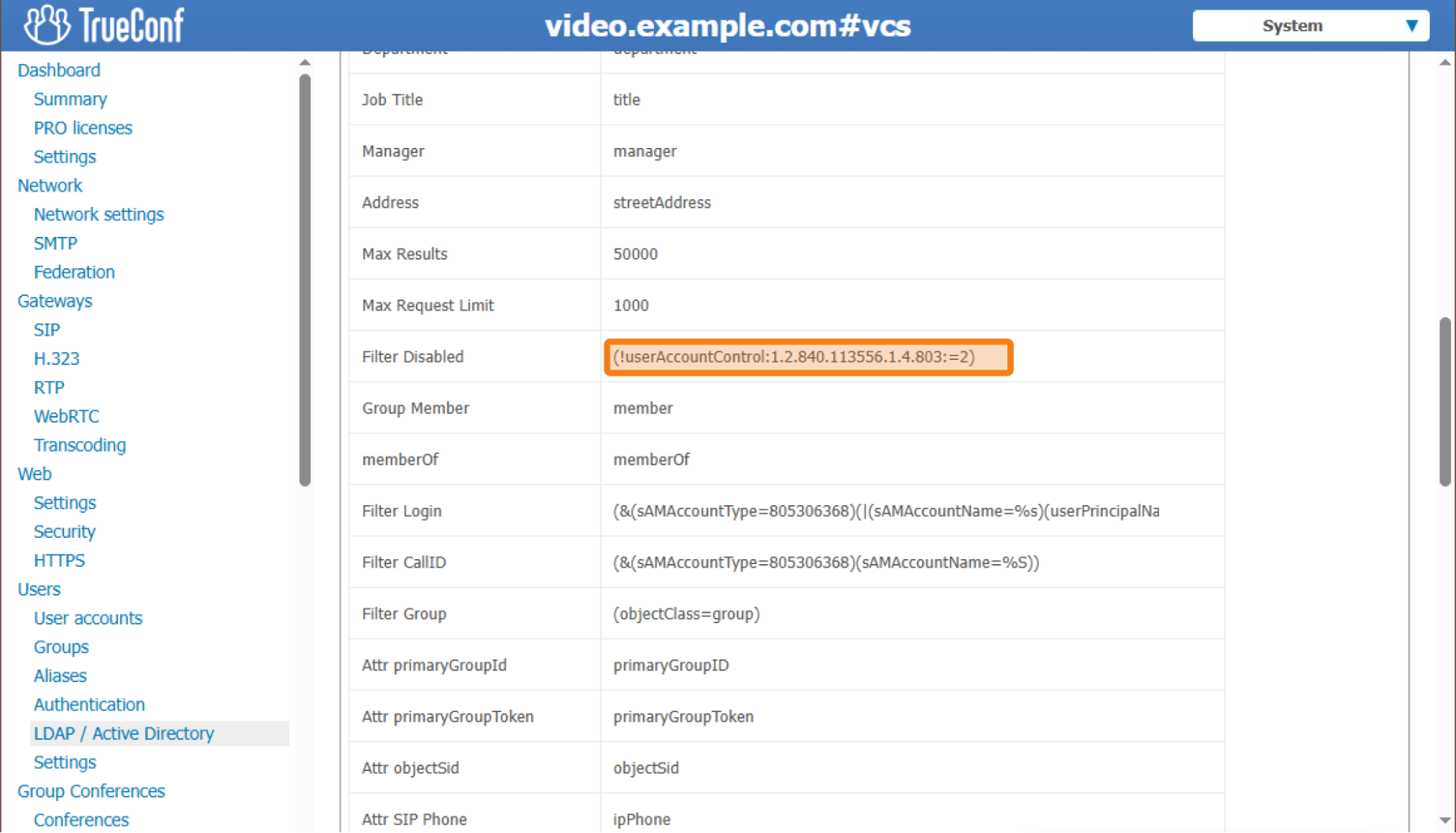
After you apply new settings, only users, who match the specified filter, will be added to the server.
For a better understanding of the topic, we recommend reviewing the documentation provided by your directory service provider.
In addition to the Filter Disabled parameter, there are other parameters such as Filter Login, Filter CallID, and Filter Group. There is no need to change them because they are used to specify which entries in the directory service will be considered a user or group.

Bogdan Pivovarov
Date published: 11.03.2026
4 min.
Contents