








Elastic Cloud Serverless now supports Azure Private Link, generally available (GA) as of August 4, 2026. With this release, you can connect your Azure workloads directly to your Serverless projects over Azure's private network backbone without exposing your Elastic endpoints to the public internet. AWS PrivateLink support shipped in February 2026; Azure is the second cloud provider to reach GA.
What Azure Private Link does
When you associate an Azure Private connection policy with a Serverless project, traffic between your Azure Virtual Network and Elastic travels entirely within Azure's network fabric. The public Elastic endpoints remain resolvable, but once a policy is attached, any request that does not arrive through a matching private endpoint or IP filter is rejected with 403 Forbidden. There is no separate "private endpoint only" toggle; the policy attachment itself enforces the access boundary.
The connection runs through an Azure private endpoint in your VNet. Elastic hosts a Private Link service on our side; you create the private endpoint in your subscription, and Elastic auto-approves it when your VNet is whitelisted by a policy you create. All data — ingestion, search, and Kibana — travels through that private path.
On Azure, a private connection policy is required (not optional). The policy carries the resource IDs of the private endpoints you want to admit, and Elastic uses it to auto-approve connection requests. This differs from AWS, where the policy is optional, and you can approve connections manually.
For the list of supported Azure regions, see Elastic Cloud Serverless regions. Due to a limitation in Azure, Private Link support is not yet available in northeurope region even though Elastic Cloud Serverless is.
How to set it up
The full configuration steps are in the Azure private connectivity documentation. At a high level:
In Azure, create a private endpoint pointing to the Elastic Private Link service for your project.
Update your DNS to resolve the Elastic endpoint hostnames to the private IP of your endpoint.
In Elastic Cloud, create a private connection policy and add the Resource name and Resource ID of your private endpoint. Elastic uses properties.resourceGUID from the Azure resource — the field labeled Resource ID in the Azure portal.
- Optionally, you can associate the policy with your Serverless project in Elastic Cloud Console.
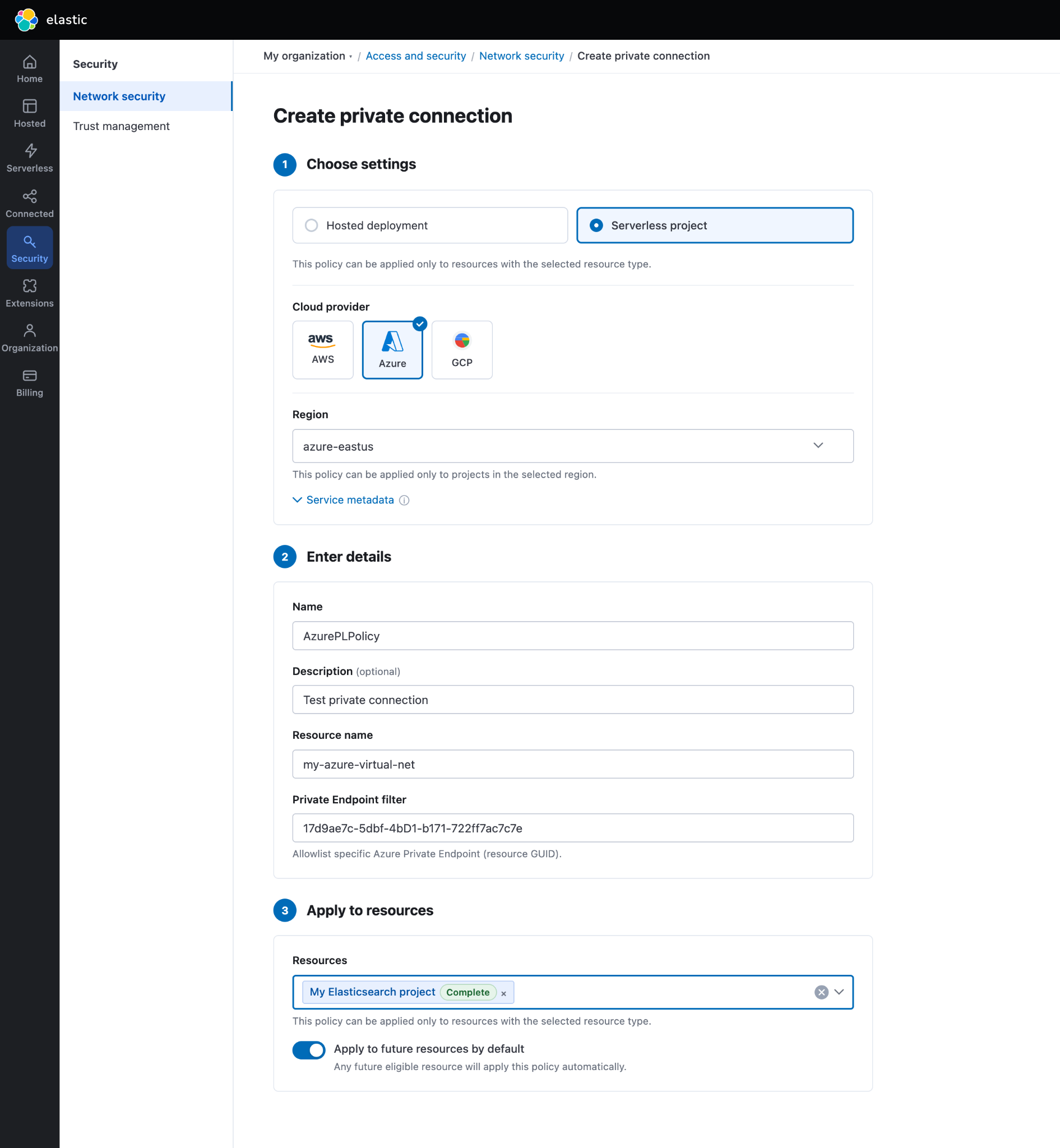
You can create up to 1,024 network security policies per organization with up to 128 sources (private endpoints or IP ranges) per policy. A single policy can be shared across multiple projects.
IP filters and private endpoints can coexist. When you attach both an IP filter policy and a private connection policy to the same project, each incoming request must match at least one attached policy; it does not need to match all of them. Traffic arriving through the private endpoint matches the private connection policy. Traffic arriving from a listed IP range matches the IP filter. Any traffic that matches neither is rejected.
Packaging and availability
Private connectivity for Serverless is included in the following tiers at no additional charge and is effective August 4, 2026:
Observability Serverless projects: require Observability Complete
Security Serverless projects: require Security Analytics Complete
For other project types, such as Elasticsearch Serverless projects, the feature is available with no tier requirement.
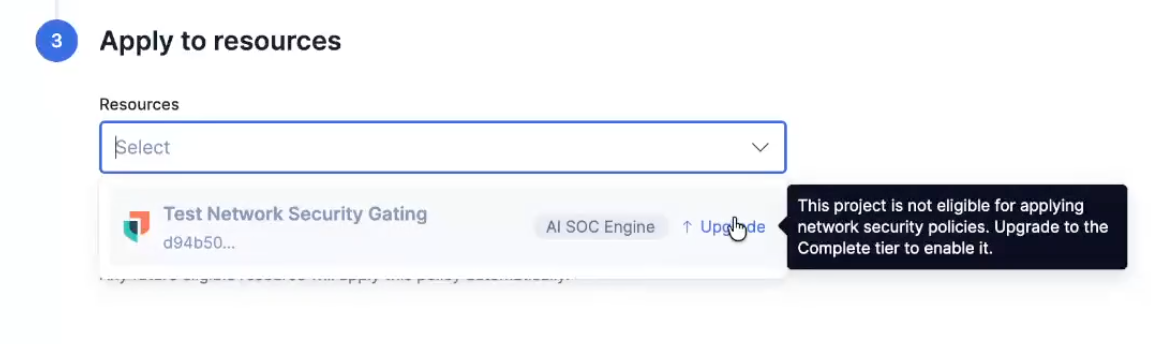
Projects created before August 4, 2026 are grandfathered regardless of tier. Any Serverless project created before that date can use traffic filtering — both private connections and IP filters — without restriction for the project's lifetime. This applies even if the project is not currently using traffic filtering; projects created before the cutoff date can configure it at any time.
If you upgrade an observability or security project to the Complete tier after August 4, the platform automatically applies your default network security policies to the newly eligible project — no manual reconfiguration needed.
Gating is enforced in both the Elastic Cloud Console UI and the API. Projects that do not meet the tier requirement and were created on or after August 4 will not have the option to associate a private connection or IP filter policy.
Private connectivity across cloud providers
Azure Private Link now joins AWS PrivateLink, which has been available for Serverless since February 2026, as part of Elastic's ongoing investment in network security across major cloud providers. For the current list of supported providers and regions, see the private connectivity documentation.
Frequently asked questions
Does Azure Private Link also work for Elastic Cloud Hosted deployments?
Azure Private Link for Hosted deployments has been available via a separate API. This release covers Elastic Cloud Serverless specifically.
Can I use both an IP filter and a Private connection policy on the same project?
Yes. Each request must match at least one attached policy. A private-endpoint connection matches the Private connection policy; traffic from a listed IP range matches the IP filter. Traffic matching neither is rejected.
Is a policy required on Azure to secure a private connection?
Yes, for Azure Private Link, you must create a policy in Elastic Cloud Console and add your private endpoint’s Resource name and Resource ID before Elastic will approve the connection. This differs from AWS, where the policy is optional. Associating the policy with specific projects is optional and only needed if you want to filter the traffic coming from specific private endpoints.
Do I need a separate endpoint per project or per solution type?
One private connection policy referring to your Azure private endpoint can be attached to multiple projects. Each Serverless project has its own private hostname that uses a private connection. See the documentation for the per-endpoint configuration details.
The release and timing of any features or functionality described in this post remain at Elastic's sole discretion. Any features or functionality not currently available may not be delivered on time or at all.