


惯性聚合 高效追踪和阅读你感兴趣的博客、新闻、科技资讯
阅读原文 在惯性聚合中打开

推荐订阅源

P
Palo Alto Networks Blog
Recent Commits to openclaw:main
C
CERT Recently Published Vulnerability Notes
C
Cybersecurity and Infrastructure Security Agency CISA
S
Schneier on Security
S
Securelist
酷 壳 – CoolShell
酷 壳 – CoolShell
C
CXSECURITY Database RSS Feed - CXSecurity.com
Cyberwarzone
Cyberwarzone
Apple Machine Learning Research
S
SegmentFault 最新的问题
cs.CL updates on arXiv.org
GbyAI
GbyAI
Security Latest
Security Latest
Last Week in AI
Last Week in AI
Microsoft Security Blog
云风的 BLOG
云风的 BLOG
Recorded Future
Recorded Future
Webroot Blog
Webroot Blog
cs.AI updates on arXiv.org
TaoSecurity Blog
TaoSecurity Blog
C
Cisco Blogs
博客园 - 【当耐特】
Blog — PlanetScale
Blog — PlanetScale
Hugging Face - Blog
Hugging Face - Blog
B
Blog
Hacker News - Newest:
Hacker News - Newest: "LLM"
cs.CV updates on arXiv.org
Attack and Defense Labs
The Last Watchdog
The Last Watchdog
U
Unit 42
阮一峰的网络日志
阮一峰的网络日志
Project Zero
Project Zero
WordPress大学
WordPress大学
L
LINUX DO - 最新话题
F
Fortinet All Blogs
L
LINUX DO - 热门话题
PCI Perspectives
PCI Perspectives
Simon Willison's Weblog
Threat Intelligence Blog | Flashpoint
MongoDB | Blog
MongoDB | Blog
Latest news
Latest news
P
Proofpoint News Feed
T
Threat Research - Cisco Blogs
The Hacker News
The Hacker News
爱范儿
爱范儿
O
OpenAI News
J
Java Code Geeks
T
The Exploit Database - CXSecurity.com
H
Hackread – Cybersecurity News, Data Breaches, AI and More

Jim Nielsen’s Blog

Podcast Notes: Ed Catmull on David Senra Make It Work vs. Make It Good Podcast Notes: Iain McGilchrist on “The Great Simplification” What’s an Icon in 2026? Family Feud: Mac-assed Mac App Edition Making a Shuffle Button This Page Left Intentionally Blank Notes from Bryan Cantrill’s “Intelligence is not Enough” My Om Malik Story Blogging Can Just Be Stating The Obvious Consistency, But in Excellence Not Appearance Full Page Paralysis Being “Good” at Things Coding Is Designing An Ode to the Exacting Pedantry of Computers Book Notes: “Poor Charlie’s Almanack” Something’s Rotten in the State of macOS Icon Design Building Software Requires Digestion Out With the JS, In With the HTML Collective Speed Is Not the Summation of Individual Speed Hook It Up to the Machine Speed is Not Conducive to Wisdom That’s a Skill Issue Fewer Computers, Fewer Problems: Going Local With Builds & Deployments
Reminder: You Can Stitch Together Lots of Little HTML Pages With Navigations For Interactions
Jim Nielsen · 2026-05-04 · via Jim Nielsen’s Blog

I wrote about building websites with LLMs — (L)ots of (L)ittle ht(M)l page(s) — and I think it’s time for a post-mortem on that approach:

I like it.

I’ve tweaked a few things from that original post but the underlying idea is still the same, which I would describe as:

Avoid in-page interactions that require JavaScript in favor of multi-page navigations that rely on HTML and are enhanced with CSS view transitions (and a dash of JS if/where prudent).

As an example, on my blog I have a “Menu”. It doesn’t “expand” or “slide out” or “pop in” or whatever else you can do with JS. Instead, it navigates to an entirely-new page that is focused on just the menu options of my site.

I say “navigates” because it’s just a link — <a href="/menu/"> — and it functions like a link, but the navigation interaction is enhanced by CSS view transitions.

Have a newer device with a modern browser? Great, you get a nicer effect.

Have an older device, or an older browser, or JS disabled, Et al.? It’ll still work.

If you can follow a link — which is the most fundamental thing a browser can do — it will work.

So how’s it all work under the hood? In essence, all the pages have a link to the menu (except the menu page). When you navigate to the menu, that link is changed to an “X” which “closes” the menu. The closing is still just a link (back to /) but it’s enhanced with JS to actually do a “back” in the browser history. This makes it so “opening/closing” the menu doesn’t add an entry to your browser history.
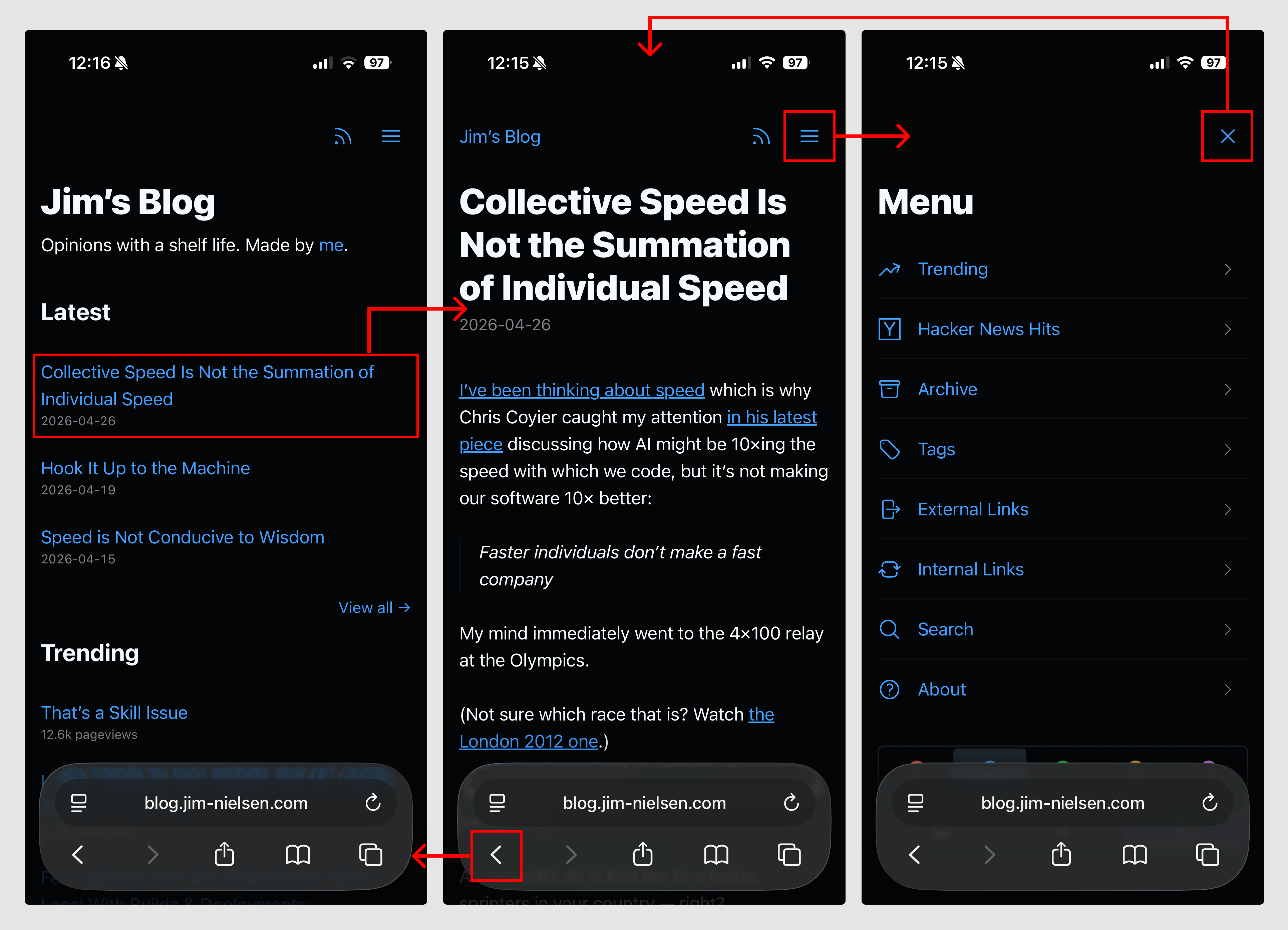
Screenshot of three mobile screenshots of blog.jim-nielsen.com with highlighted sections indicating where navigational clicks can happen and how they link between eachother.

As a simplified example, the code looks like this:

<!-- Normal page -->
<nav>
  <a href="/menu/">
    <svg>...</svg>
  </a>
</nav>

<!-- Menu page -->
<nav>
  <a href="/" onclick="document.referrer ? history.back() : window.location.href = '/'; return false;">
    <svg>...</svg>
  </a>
</nav>

The document.referrer checks whether we came to this page as a navigation (mostly likely from within the blog itself) or via a direct visit (i.e. somebody typed it into the URL bar, unlikely but possible) which is how I suss out whether there’s a meaningful history.back() run or not.

Here’s a video of how it all works, if that’s your thing:

While this solution seems simplistic, it was not a simple thing to arrive at. It required me to spend time thinking about what was essential to navigation, how that interaction could work across multiple pages, and how I could ensure page size stayed small so the interaction was both fast and robust while remaining intuitive to use.

In other words, the approach shaped the design.

Turns out, if you have a website and you think of the browser as a way to navigate documents — rather than a runtime to execute arbitrary code and fetch, compile, and present them — things can be a lot simpler than our tools often prime us to make them.