








jq is an excellent little tool that lives in your terminal and does useful stuff with JSON-data. It’s a potent tool, but handy for the little things as well. For example, if you pipe JSON data to it, it prints it with syntax highlighting by default:
$ cat some-data.json|jq
You can install jq on most systems (brew install jq on a mac with homebrew / chocolatey install jq on windows with chocolatey). This post presents a more advanced jq technique, but if you want to get the basics, you should check out the tutorial.
jq works with any JSON source, but since I’m spending most of my days working with Sanity.io-based backends, I’ll use that as an example. Also because I think it’s immensely cool what we can do with this combination.
Sanity is a backend for structured content and comes with a real-time API, and a query language called GROQ. The CLI tool that lets you query your backend and output the result in the terminal with $ sanity documents query 'GROQ-expression'.
So if you wanted your documents of the type post, you could put $ sanity documents query '*[_type == "post"]'. Or if you just wanted those with a publish date in 2018 it would be $ sanity documents query '*[_type == "post" && publishedAt > "2018-01-01"]'. This query gives you whole documents, but if you just wanted the titles, and publish dates, you’d write: *[_type == "post"]{title, publishedAt}.

You can pick out keys and values from JSON data in jq as well, but today we’re going to use it to transform structured content in an JSON array to a CSV file. Because your boss wants stuff in Excel sheets, right? Sit tight, and let’s dive in!
Let’s say you want a list of your blog entries’ titles, slugs and publish dates in a spread sheet. The whole expression would look like this:
You can copy this and run with it or play with it on jqplay.com, but let’s see what’s going on in the jq-expression:
-r is for --raw-ouput and makes sure that the output is plain old boring text without colors or special formatting.(map(keys) | add | unique) as $cols iterates (map) through the keys in your object and add unique ones to a variable called $cols. In other words, this ends up as your column headers.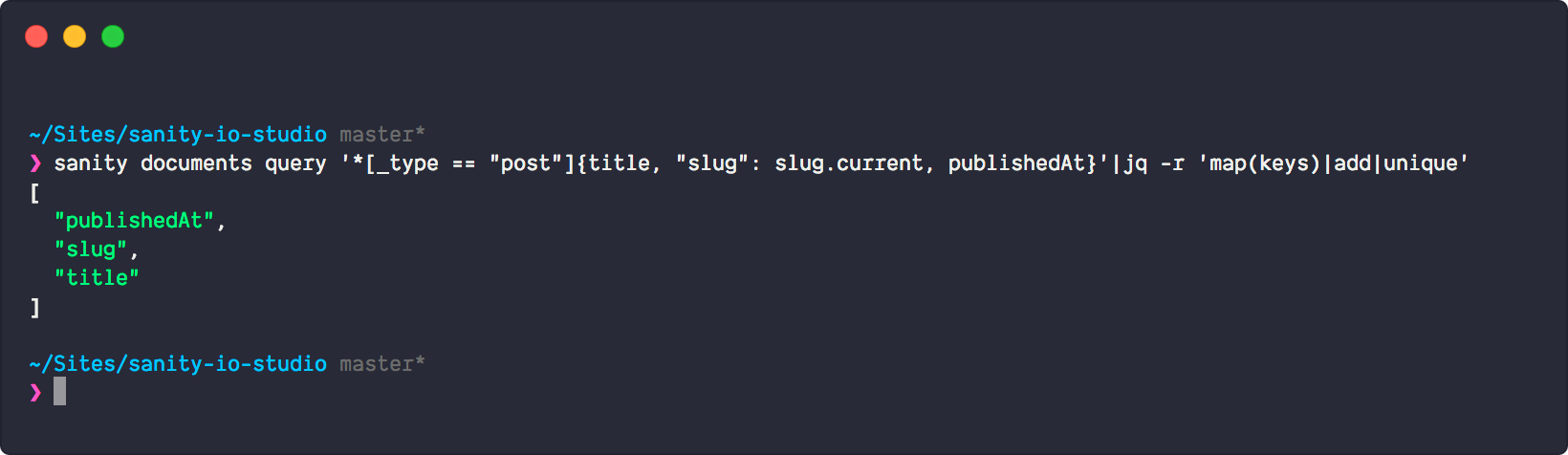
map(. as $row | $cols | map($row[.])) as $rows takes all objects in the outer array, and iterates through all the object keys (title, slug, publishedAt) and appends the values to an array, which gives you an array of arrays with the values, which is what you want when you're transforming JSON into CSV. $cols, $rows[] | @csv puts the column headers first in the array, and then each of the arrays that are transformed to lines by piping them to @csv , which formats the output as… csv.
This command prints out the result in the shell, but if you want to write it directly to a file, you can append > filename.csv to it, or e.g. to the clipboard (pipe it to | pbcopy if your on a mac). Or perhaps you'll do something exiting with the csv in pandas in Python? If you found this useful, we'd love to hear about it!
此内容由惯性聚合(RSS阅读器)自动聚合整理,仅供阅读参考。 原文来自 — 版权归原作者所有。