


惯性聚合 高效追踪和阅读你感兴趣的博客、新闻、科技资讯
阅读原文 在惯性聚合中打开

推荐订阅源

让小产品的独立变现更简单 - ezindie.com
D
Darknet – Hacking Tools, Hacker News & Cyber Security
Schneier on Security
C
Cisco Blogs
Help Net Security
Help Net Security
I
Intezer
Simon Willison's Weblog
Know Your Adversary
Know Your Adversary
Hacker News: Ask HN
Hacker News: Ask HN
Cisco Talos Blog
Cisco Talos Blog
A
Arctic Wolf
cs.AI updates on arXiv.org
WordPress大学
WordPress大学
小众软件
小众软件
Jina AI
Jina AI
量子位
T
Threatpost
Forbes - Security
Forbes - Security
L
LINUX DO - 最新话题
S
Securelist
K
KPMG report finds enterprise disconnect between AI and its ROI | CIO
C
Cyber Attacks, Cyber Crime and Cyber Security
有赞技术团队
有赞技术团队
博客园_首页
T
Threat Research - Cisco Blogs
Threat Intelligence Blog | Flashpoint
T
The Exploit Database - CXSecurity.com
Application and Cybersecurity Blog
Scott Helme
Scott Helme
博客园 - 【当耐特】
IT之家
IT之家
Hugging Face - Blog
Hugging Face - Blog
月光博客
月光博客
钛媒体:引领未来商业与生活新知
钛媒体:引领未来商业与生活新知
大猫的无限游戏
大猫的无限游戏
cs.CL updates on arXiv.org
The Last Watchdog
The Last Watchdog
Attack and Defense Labs
Google DeepMind News
阮一峰的网络日志
阮一峰的网络日志
SecWiki News
SecWiki News
博客园 - 叶小钗
OSCHINA 社区最新新闻
OSCHINA 社区最新新闻
罗磊的独立博客
The Cloudflare Blog
S
Schneier on Security
爱范儿
爱范儿
N
News and Events Feed by Topic
NISL@THU
NISL@THU
freeCodeCamp Programming Tutorials: Python, JavaScript, Git & More

Sanity.io

A Board Game agent built using Sanity Context and Vercel's AI SDK | Sanity Build a prototype with Claude Code that your whole team can edit | Sanity What’s New - May 2026 | Sanity I built a London pub guide with v0 and the Sanity MCP in six hours. Here's what I learned. | Sanity Build a conference concierge with Agent Context and Anthropic | Sanity Build a content-aware Telegram agent with Vercel AI SDK and Chat SDK | Sanity How I used Agent API to generate photos for my family’s recipes | Sanity What’s New April - 2026 | Sanity Better context, better matches: An AI love story (for dogs) | Sanity How to write for an agent | Sanity Content Agent, meet Slack: AI content operations in your workflow | Sanity Structure powers intelligence | Sanity Your agent needs better content. Here's how to give it. | Sanity How to serve content to agents (a field guide) | Sanity Sanity TypeGen GA: Automatic TypeScript types for content and GROQ | Sanity Sanity is now available on the Vercel Marketplace | Sanity The logo soup problem (and how to solve it) | Sanity Content Releases: From scattered updates to coordinated publishing | Sanity What's New - February 2026 | Sanity How we solved the agent memory problem | Sanity v0 Builder Challenge: The winners | Sanity Introducing: Sanity Agent Skills | Sanity Content Agent: Days of work in one conversation | Sanity Our Sanity Values | Sanity Open Source Pledge 2025: Stepping up when it matters | Sanity v0 builder challenge: $3000 in prizes | Sanity Why AI Breaks Without Structured Content Operations | Sanity What’s New January - 2026 | Sanity BFCM 2025: What teams built when infrastructure stopped being the problem | Sanity How AI shaped holiday shopping and what it means for content in 2026 | Sanity Sanity Studio v5: Embracing React 19 | Sanity You’ll need a CMS eventually. Let your agent set it up. | Sanity “You should never build a CMS” | Sanity AI Content Operations: A 30-Day Implementation Guide | Sanity What’s New December - 2025 | Sanity Scheduled Drafts: Stop manually publishing content at midnight | Sanity What’s New November - 2025 | Sanity Everything *[NYC] 2025 recap: A day of AI, Content Operations, and Culture | Sanity Clankers and content operations | Sanity Content Agent: AI that understands your structured content is here | Sanity Why design-driven content modeling creates technical debt, not velocity | Sanity What's New October - 2025 | Sanity From studio to inbox: How Kevin Green eliminated email campaign friction | Sanity The content editor's guide to content operations [E-commerce edition] | Sanity styled-components maintenance mode: A 40% faster fork | Sanity From zero code to a live website in 7 hours (thanks, Cursor!) | Sanity First attempt will be 95% garbage: A staff engineer's 6-week journey with Claude Code | Sanity Internationalization is more than translating words | Sanity What's New - September 2025 | Sanity We just deleted our 35k-member community Slack | Sanity What's New - August 2025 | Sanity The engineer's guide to content operations [E-commerce edition] | Sanity SEO for AI: Evolving from Web Pages to the Content Lake | Sanity What's New - July 2025 | Sanity Sanity Studio v4: A major version bump for a minor reason | Sanity What's New - June 2025 | Sanity Dashboard and Insights: Your New Content HQ | Sanity Canvas: AI-accelerated, context-aware, freeform authoring | Sanity Agent Actions: AI building blocks for structured content | Sanity Functions: Life beyond pressing publish | Sanity A new era for content applications with Sanity App SDK | Sanity The end of CMS era and our $85M Series C. | Sanity What's New – May 2025 | Sanity Introducing the Sanity Model Context Protocol (MCP) server | Sanity What's New – April 2025 | Sanity Pushing all the envelopes with ambitious content | Sanity Self-hosting is only free if your time is worth nothing | Sanity Content that lasts: Scaling beyond your frontend | Sanity The Live Content API is now Generally Available | Sanity The future beyond AI chat bots | Sanity Learning the new skill of working with AI | Sanity What's New - March 2025 | Sanity Give it in plain text: Making your content AI-Ready | Sanity No More 'DO NOT PUBLISH': Introducing Content Releases | Sanity React in 2025, what's next? | Sanity The final boss of front-end: block editors | Sanity Introducing Sanity for Startups | Sanity A block content editor that loves you back | Sanity A Black Friday Snooze Fest: Massive Traffic, No Drama | Sanity How to make a recipe site that scales well | Sanity The Sanity Winter Release 2024 | Sanity AVIF Arrives, Sanity’s Promise Fulfilled | Sanity Sanity joins the Open Source Pledge | Sanity Your content is now Live by default | Sanity Begin Team to Join Sanity | Sanity Sanity Digest - September '24 Edition | Sanity Sanity partners with Google. Now live on the Google Cloud Marketplace. | Sanity Sanity Digest - August ‘24 Edition | Sanity Now playing: the latest Mux Video Input plugin for Sanity | Sanity Community Digest - June ‘24 Edition | Sanity Community Digest - May ‘24 Edition | Sanity Guide to Sanity's newest product announcements | Sanity AI and Content Creation: A Leader's Guide | Sanity Of course, you should be able to type your content quickly! | Sanity New to AI Assist: translation, reference suggestions, image generation | Sanity Speak the language of your editors: Sanity Studio UI localization | Sanity Introducing the new Sanity Growth plan to serve collaborative teams | Sanity Presentation: Work faster than ever with structured content | Sanity Goodbye Feedback Frenzy, Hello Sanity Studio Comments! | Sanity Easing into the App Router with the Sanity Toolkit for Next.js | Sanity
Moving the Mux blog to the JAMstack | Sanity
Dylan Jhaveri · 2020-03-27 · via Sanity.io

This is a post from Dylan from Mux. Mux is a company that provides APIs for video. Mux recently migrated their blog to Sanity and started using Sanity as a headless CMS for their marketing website.

A couple of months ago we finished the process of moving the Mux Blog to Sanity. Here’s a walkthrough of how we did that and the decisions that were made along the way. Some code snippets are included and a full deep dive can be found in this guide.

Before this project, the Mux blog was hosted and deployed separately from mux.com. The blog was powered by an old version of Ghost. Our marketing site (mux.com) is a Gatsby site that uses gatsby-source-filesystem to create some pages from markdown and gatsby-source-airtable to pull in some data from Airtable.

Gatsby is an open-source framework that roughly works like this:

  1. Pull in data from arbitrary 3rd party data-sources at build time.
  2. Write your pages as normal React components.
  3. When you deploy, Gatsby “builds” your site by precompiling all your pages so that each page serves static HTML while also preserving all the interactive functionality in your react components.
  4. Gatsby also automatically code-splits your pages so that each page only loads the HTML, CSS, and Javascript that is needed.

Overall, Gatsby works pretty well for our marketing site. It isn’t without it’s quirks and issues (particularly when venturing off the happy path and into the 3rd party ecosystem), but overall we’ve been really happy with it.

Our blog, however, was not on Gatsby. It was hosted separately on Ghost. The big issues we ran into were:

  1. Difficult to customize the look and feel: Since we were using a Ghost theme, not only was the design of the blog different from the design of the rest of our marketing website. But it was an entirely different application with a different structure, hosting and deploy process.
  2. One author per post: Blog posts in our old system were only allowed to have one author. In reality, some of our posts are written by multiple people on our team and we wanted to highlight that by showing multiple authors on a post.
  3. We want categories, not tags: We’re not a big fan of having a lot of arbitrary “tags” for a blog post. Having loosely-defined tags was a bit messy and resulted in duplicate tags with slightly different names and general confusion for authors when deciding what tags to apply to a post. We prefer a defined set of about 7 categories with each blog post falling into just one category.

After coming up with the requirements and creating a design that we felt good about, we then had to figure out the implementation details. We knew that we wanted to use some form of a headless CMS that we could pull in as a Gatsby source into the existing build process for our marketing site. At the time we were making this migration, we had about 130 blog posts that needed to be migrated to the new CMS. The migration would have to be with scripts, and we would have to make sure that our old blog posts migrate cleanly.

Choosing a Headless CMS

We ended up choosing Sanity as our headless CMS. We loved that Sanity felt like a developer product. Calling Sanity a headless CMS sells it short from what it really is. It’s more like a structured, real-time database. The CMS part is all open source and in your control for how you want things to work. The way to think about it is that Sanity provides a real-time database and some low-level primitives to define your data model. From there, you build your own CMS.

We wanted to set ourselves up with a headless CMS that could be  used beyond just the blog and could also create a variety of pages on mux.com and allow us to move existing content like the video glossary.

Plus, Sanity already has a mux plugin that works great for uploading, transcoding and delivering videos with Mux.

Defining our schema

The first step for migrating the blog was to define the schema. We ended up with types for post (a blog post) and teamMember. A post could have one or more teamMembers or authors. We went with “teamMember” instead of “author” because we also wanted this same collection of records to be used for the mux team page.

Next, was to go through all the existing blog posts and figure out the list of features we needed to support in the body of a post. I ended up with 11 custom types (things like muxCta, youtubeEmbed, images) and a custom annotation for footnotes.

Encouraging images for posts (but not requiring)

We wanted to encourage blog authors to add cover images to blog posts. Cover images are handy for sharing on social media and for the design of the list page and the page for the individual posts. However, we didn’t want to be so strict as to require an image for every post.

We found a solution to make a “soft requirement” for images on blog posts. We added a boolean field called 'imageNotRequired`. By default images are required, but in the UI there is a switch where the blog author can override the requirement and create a post without an image. This felt like the right kind of subtle nudge to encourage images without being too restrictive.
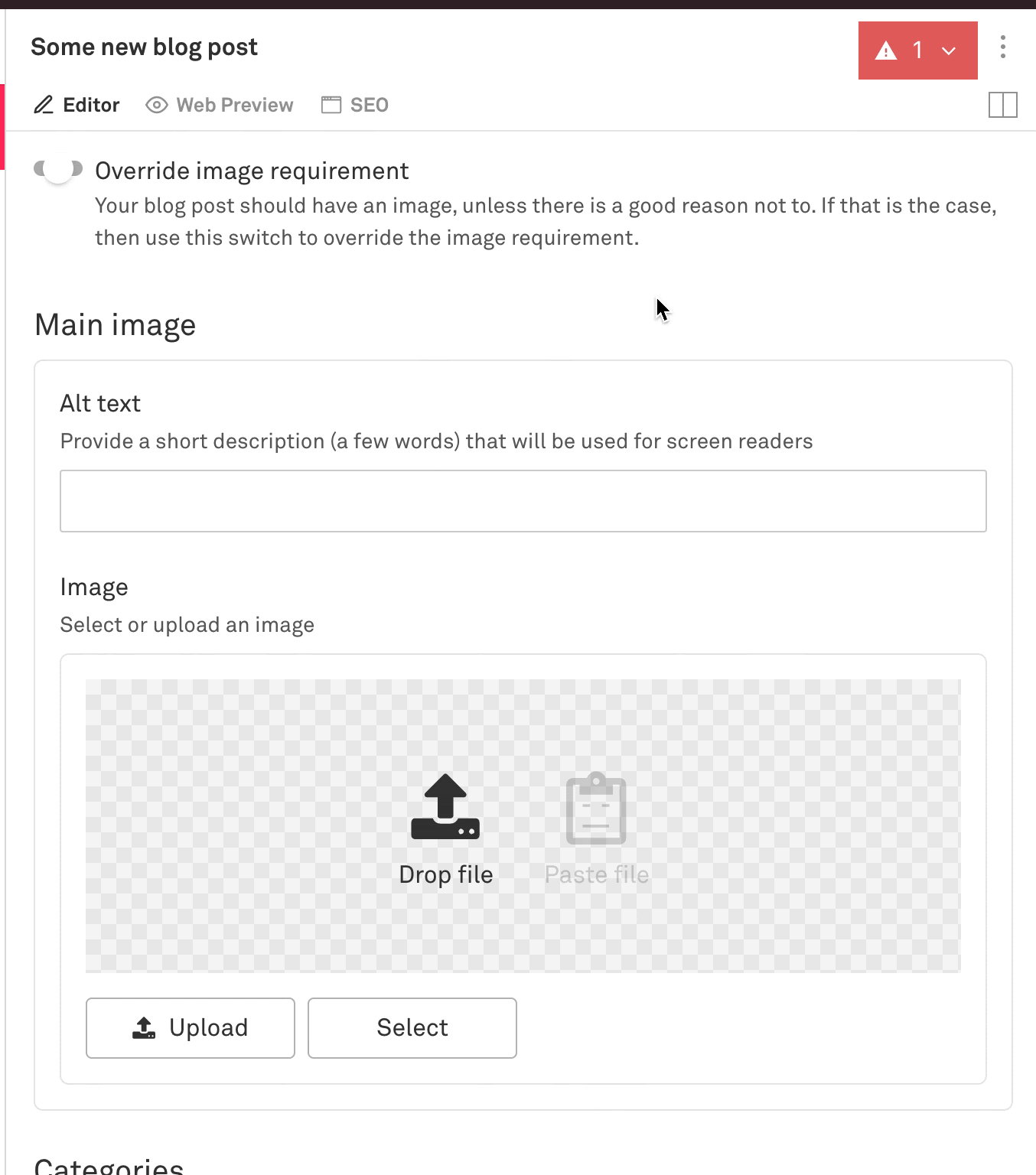
Alt text image validation with override

This is what the schema is for post.js and how we did that:


Migrating old posts

After defining the schema for the blog posts and team members I checked out gatsby-source-sanity and made sure that worked in the build process for our Gatsby site. No surprises there, it worked the way I was familiar with other Gatsby sources working. The only minor issue I ran into was how to use @sanity/image-url when I don’t have access to a sanityClient instance.

Nex was the most time-intensive work — scripting the import process to bring posts from our old system into the new Sanity system. I have written about it in depth here in this guide.

Roughly the process was:

  1. Write an import script that processed posts from the old system and generated a .ndjson file that I could use with a command like this: sanity dataset import sanity-import.ndjson production --replace
  2. Import a batch of posts (5 or 10)
  3. Add or edit Sanity queries in my gatsby app
  4. Check the batch I imported, check if the data is structured as I expect and that the styling looks right
  5. Fix bugs in the import script
  6. Fix styling bugs
  7. Repeat with a new batch of posts

Our team’s new workflow

  1. Draft content in Google Docs. We’ve tried other tools but Google Docs still seems like the best option for sharing drafts internally and soliciting feedback from the rest of the company. More specifically, the ability to “suggest” edits and add inline comments is all seamless. No need to create another account, everyone on our team is logged into the company G Suite so this works great. We hope that one day we can compose, draft and publish all in one place, but for now we draft in Google Docs.
  2. After collecting feedback, the author will copy the draft from Google Docs into Sanity. This is a bit of a manual process. The basic text formatting and links copy and paste pretty cleanly, but then adding things like images, code blocks and other custom data structures is a manual process.
  3. Share the Gatsby Preview link internally so folks at the company can view the final draft the way it will look on production. This is an opportunity to get a final round of feedback before publishing.
  4. When ready, click publish! Sanity will send a webhook that builds and deploys the new production version of the marketing site.


If you want to chat more about video or Sanity you can find me on Twitter @dylanjha or check out more of our writing on the Mux blog (powered by Sanity).