惯性聚合 高效追踪和阅读你感兴趣的博客、新闻、科技资讯
阅读原文 在惯性聚合中打开

推荐订阅源

U
Unit 42
Blog — PlanetScale
Blog — PlanetScale
H
Help Net Security
The GitHub Blog
The GitHub Blog
博客园 - Franky
酷 壳 – CoolShell
酷 壳 – CoolShell
Recent Announcements
量子位
aimingoo的专栏
aimingoo的专栏
大猫的无限游戏
大猫的无限游戏
博客园 - 叶小钗
Microsoft Azure Blog
Martin Fowler
Martin Fowler
Cyber Security Advisories - MS-ISAC
奇客Solidot–传递最新科技情报
奇客Solidot–传递最新科技情报
A
About on SuperTechFans
T
Tailwind CSS Blog
V
V2EX
OSCHINA 社区最新新闻
OSCHINA 社区最新新闻
B
Blog
钛媒体:引领未来商业与生活新知
钛媒体:引领未来商业与生活新知
S
SegmentFault 最新的问题
G
Google Developers Blog
M
MIT News - Artificial intelligence

Sanity.io

A Board Game agent built using Sanity Context and Vercel's AI SDK | Sanity Build a prototype with Claude Code that your whole team can edit | Sanity What’s New - May 2026 | Sanity I built a London pub guide with v0 and the Sanity MCP in six hours. Here's what I learned. | Sanity Build a conference concierge with Agent Context and Anthropic | Sanity Build a content-aware Telegram agent with Vercel AI SDK and Chat SDK | Sanity How I used Agent API to generate photos for my family’s recipes | Sanity What’s New April - 2026 | Sanity Better context, better matches: An AI love story (for dogs) | Sanity How to write for an agent | Sanity Content Agent, meet Slack: AI content operations in your workflow | Sanity Structure powers intelligence | Sanity Your agent needs better content. Here's how to give it. | Sanity How to serve content to agents (a field guide) | Sanity Sanity TypeGen GA: Automatic TypeScript types for content and GROQ | Sanity Sanity is now available on the Vercel Marketplace | Sanity The logo soup problem (and how to solve it) | Sanity Content Releases: From scattered updates to coordinated publishing | Sanity What's New - February 2026 | Sanity How we solved the agent memory problem | Sanity v0 Builder Challenge: The winners | Sanity Introducing: Sanity Agent Skills | Sanity Content Agent: Days of work in one conversation | Sanity Our Sanity Values | Sanity Open Source Pledge 2025: Stepping up when it matters | Sanity v0 builder challenge: $3000 in prizes | Sanity Why AI Breaks Without Structured Content Operations | Sanity What’s New January - 2026 | Sanity BFCM 2025: What teams built when infrastructure stopped being the problem | Sanity How AI shaped holiday shopping and what it means for content in 2026 | Sanity
First attempt will be 95% garbage: A staff engineer's 6-w...
Vincent Quigley · 2025-09-02 · via Sanity.io

Until 18 months ago, I wrote every line of code myself. Today, AI writes 80% of my initial implementations while I focus on architecture, review, and steering multiple development threads simultaneously.

This isn't another "AI will change everything" post. This is about the messy reality of integrating AI into production development workflows: what actually works, what wastes your time, and why treating AI like a "junior developer who doesn't learn" became my mental model for success.

The backstory: We run monthly engineering workshops at Sanity where someone presents what they've been experimenting with. Last time was my turn, and I showed how I'd been using Claude Code.

This blog post is from my presentation at our internal workshop (10-min recording below).
My four coding pivots

My approach to solving code problems has pivoted four times in my career:

For the first 5 years, I was reading books and SDK documentation.

Then 12 years of googling for crowd-sourced answers.

It was 18 months of using Cursor for AI-assisted coding

And recently, 6 weeks of using Claude Code for full AI delegation

Each transition happened faster than the last. The shift to Claude Code? That took just hours of use for me to become productive.

How developing with AI actually works (for me)

Here's what my workflow looks like now, stripped of the hype. I use AI mostly "to think with" as I'm working with it towards the code that ends up in production.

It usually takes three attempts

Forget the promise of one-shot perfect code generation. Your job as an engineer is to find the best solution for the problem, not just write a bunch of code.

First attempt (95% garbage rate)

  • Claude builds context about your system
  • You identify the actual challenges
  • The code is usually completely wrong

Then you take the learnings from this attempt and feed it back.

Second attempt (50% garbage rate)

  • Claude understands the nuances
  • You've defined concrete approaches
  • Half the time, it's still unusable

Third attempt (Finally workable)

  • Claude implements something we can iterate on and refine
  • You constantly review and course-correct
  • This becomes your starting point, not your final code

This isn't failure; it's the process! Expecting perfection on attempt one is like expecting a junior developer to nail a complex feature without context.

The context problem (and its solution)

The biggest challenge? AI can't retain learning between sessions (unless you spend the time manually giving it the "memories"). So typically, every conversation starts fresh.

My solutions:

Claude.md Files

Create a project-specific context file with:

  • Architecture decisions
  • Common patterns in your codebase
  • Gotchas and workarounds
  • Links to relevant documentation

Tool Integration

Thanks to MCP integrations, I can now connect my AI to:

  • Linear for ticket context
  • Notion or Canvas for documentation
  • Non-production databases (only with read access!) for data and data structures
  • Your actual codebase (obviously)
  • Github (get useful background context from older PRs)

Without this context, you're explaining the same constraints repeatedly. With it, you start at attempt two instead of attempt one.
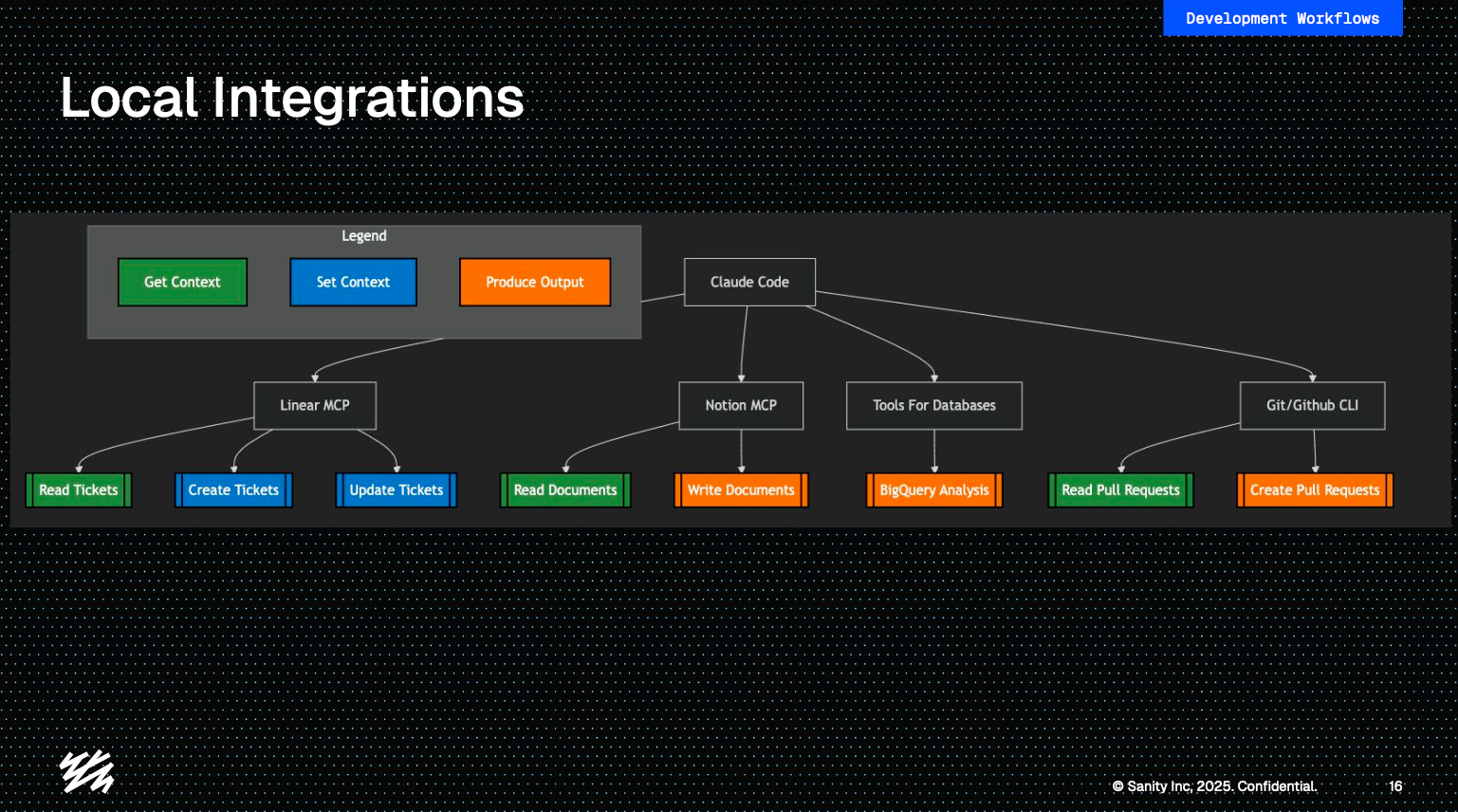
Flowchart of local integrations showing Linear MCP, Claude Code, Notion, databases, and Git/GitHub with actions to read, create, update, or analyze.
How my Claude Code is connected to other tools mainly for gaining context

Managing multiple AI "developers"

I run multiple Claude instances in parallel now, it's like managing a small team of developers who reset their memory each morning.

Key strategies:

  • Never parallelize the same problem space (it's easy to lose track and confuse the different problems you're solving)
  • Track everything in Linear (or whatever project management tool you use)
  • Explicitly mark human-edited code (AI gets confused about what it wrote versus what you modified)

The three-step review process

Writing code is one part of the job, but so is reviewing code. Adopting AI has evolved my code review process as well.

Claude reviews first

  • Catches missing test coverage
  • Finds obvious bugs
  • Suggests improvements

This saves me and my peers time and extra rounds.

I review what matters

At Sanity, our policy is that the engineer is responsible for the code they ship, even if it's AI generated. I want to make sure that I ship:

  • A maintainable codebase
  • Sound architecture decisions
  • Business logic correctness
  • Good integration points

Team reviews normally

  • They rarely know which code is AI-generated
  • Quality bar remains the same

The key take away: I'm more critical of "my code" now because I didn't type out a lot of it. No emotional attachment means better reviews.

Early experiments with background agents

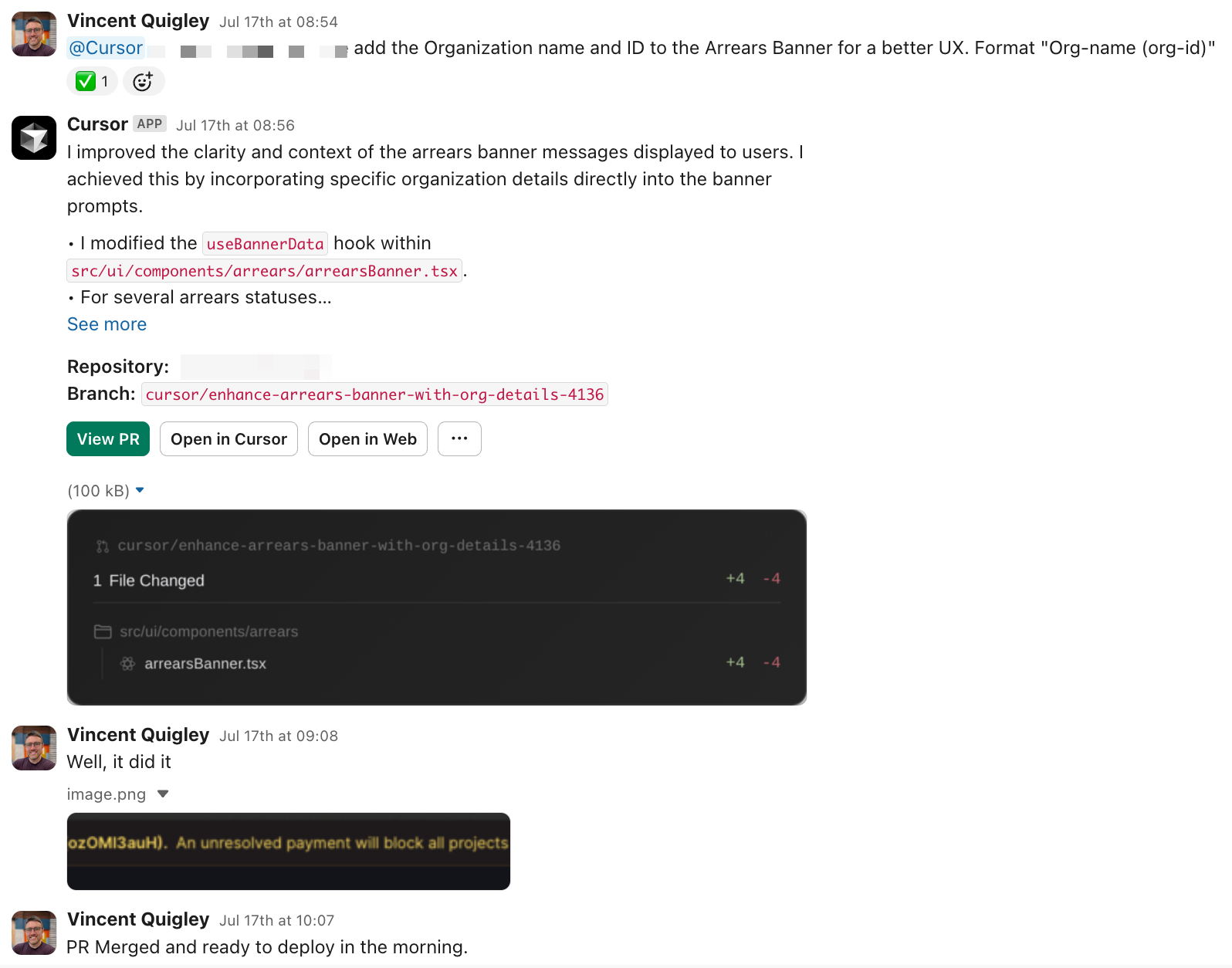
We're testing Slack-triggered agents using Cursor for simple tasks:

  • 2 successes with business logic fixes
  • 1 failure with CSS layouts

Current limitations:

  • No private NPM package access
  • It passes unsigned commits
  • Bypasses normal tracking
A Slack thread where Vincent Quigley shares a pull request that adds organization name and ID to the Arrears Banner. The PR modifies arrearsBanner.tsx, is merged, and Vincent confirms it’s ready to deploy. A screenshot shows the updated banner message: “An unresolved payment will block all projects.”
The Cursor agent works best for simple tasks

But the potential? Imagine agents handling your backlog's small tickets while you sleep. We're actively exploring this at Sanity, sharing learnings across teams as we figure out what works.

The real cost (with numbers)

Let's talk money. My Claude Code usage costs my company not an insignificant percent of what they pay me monthly.

But for that investment:

  • I ship features 2-3x faster
  • I can manage multiple development threads
  • I spend zero time on boilerplate and repetitive code

The ROI is obvious, but budget for $1000-1500/month for a senior engineer going all-in on AI development. It's also reasonable to expect engineers to get more efficient with AI spend as they get good with it, but give them time.

What actually goes wrong

Not everything in AI-assisted development is smooth. Here are the persistent challenges I find myself in:

The learning problem
AI doesn't learn from mistakes. You fix the same misunderstandings repeatedly. Your solution: better documentation and more explicit instructions.

The confidence problem
AI confidently writes broken code claiming that it's great. Always verify, especially for:

  • Complex state management
  • Performance-critical sections
  • Security-sensitive code

The context limit problem
Large codebases overwhelm AI context windows. Break problems into smaller chunks and provide focused context.

The emotional shift from code to problems

The hardest part? Letting go of code ownership. But now I don't care about "my code" anymore; it's just output to review and refine.

This detachment is actually quite liberating!

  • Faster deletion of bad solutions
  • More objective code reviews
  • Zero ego in refactoring

If a better AI tool appears tomorrow, I'll switch immediately. The code isn't precious; the problems we solve are.

What this means for your team (as a tech lead)

If I were to give advice from an engineer's perspective, if you're a technical leader considering AI adoption:

  1. Let your engineers adopt and test different AI solutions: AI-assisted coding is a skill that you have to practice to learn.
  2. Start with your most repetitive tasks: that's where AI shines immediately.
  3. Budget for experimentation: the first month will be messy.
  4. Adjust your review processes: AI code needs different scrutiny.
  5. Document everything: Great context is your efficiency multiplier.

The engineers who adapt to the new AI workflows will find themselves with a new sharp knife in their toolbox: They're becoming orchestrators, handling multiple AI agents while focusing on architecture, review, and complex problem-solving.

Your next steps (as a developer)

Pick one small, well-defined feature. Give AI three attempts at implementing it. Review the output like you're mentoring a junior developer.

That's it. No huge transformation needed, no process overhaul required. Just one feature, three attempts, and a honest review.

The future isn't about AI replacing developers. It's about developers working faster, creating better solutions, and leveraging the best tools available.

👋 Knut from the developer education team here: if you're curious why Sanity makes AI-assisted development particularly effective: it's all code-based configuration. Schemas, workflows, and even the editorial UI are defined in TypeScript, which means AI tools can actually understand and generate the entire stack. No clicking through web UIs to configure things. Here's a course on that specific workflow if you want to go deeper.

And back to our regular programming.