








As an early adopter of database-driven web content management, I sometimes forget what it was like when the kinds of systems I now advocate for were new. So I made a little trip down memory lane to remember how daunting it was in the early days.
My first glimpse into the future was unimpressive. I had been tasked with evaluating some of the new “content management systems” (CMSes) on the market circa 2009 to see if our interactive agency could use them.
We had embraced Dreamweaver templates, but our clients wanted to be able to update their website content faster and more easily. Tools like Blogger and WordPress were being embraced for their no-code way of blogging, opening up the door to no-code ways of managing more types of web content.
After a web search of top CMS products, I installed a few on my computer and tried them out. Instead of seeing a place to slot in text and images on a web page, I was faced with a nearly blank screen and a link to “Add new content.” How did this relate to a website? How was this useful? I decided that a CMS wasn’t for us.
Not long after that, someone excitedly showed us a website they’d built with a CMS that used structured content. They showed how when you add a piece of information in one place in the CMS, it automatically shows up in multiple different places on a website. And with a taxonomy, elements on the web page come together dynamically. I was in awe.
The demo hooked me on the value of separating content from presentation. Suddenly, as a content manager, I could add content to a website without dealing with code or Dreamweaver templates.
To be clear, this was only a precursor to today’s headless CMS and a more modern composable content platform. It was still tied to a single website. However, it used many of the principles that eventually led to the broader adoption of a composable content platform, including the use of structured content, separation of content and presentation, and dynamic listing of content items.
Today, content is more complex and websites are only one place where people look for information. While structured content provides many benefits, it doesn’t provide a 1:1 relationship with any end-user experience. A modern CMS fills the gap to help those of us who need to see “what it looks like.” (Let’s be honest, this is most of us!)
In the composable era, businesses need to think differently to be able to keep up with heightened customer expectations for personalized, contextual experiences across channels, devices, and situations.
The Sanity team recently demonstrated the latest updates and innovations we’ve made to improve the editorial experience.
Content needs to be modular and programmable so that it's quick and easy to adapt to market changes, innovate, launch new things, and deliver more tailored experiences.
My early adoption of a structured content approach means I have high expectations for tools that create, manage, and publish content. You don’t have to be an early adopter to enjoy these benefits. In fact, if you are just starting to implement structured content, consider yourself lucky that today’s technology is built for that.
Sure, I am biased, as I work for Sanity, but I came to the company for a reason. After using Sanity, seeing what problems our customers have solved with the product, and being part of thoughtful discussions about improving the work lives of CMS users, my expectations are higher than ever for a CMS.
These features help me keep my content structured appropriately while making content management easier.
Content types are containers for storing content with a common structure and purpose. When considering the meaning and subject of the content itself, it becomes a resource—a digital stand-in for the thing itself—rather than a representation. For example, a product rather than a product landing page.
Content types are the heart of structured content. They are unique based on the context in which they are created. I’d much rather have a blank canvas to set up content types than have to hack what is already there based on a generic, preconceived notion of what types of content I’ll have.
Not only should I be able to specify each content type based on my content model, but I should be able to define the fields to meet the needs of my content strategy and operations. Treating content as data is essential to be able to deliver personalized content to any channel or device from a single source of truth.
That means I should be able to create custom fields without limitations on hierarchy with programmable validations and functions. This might mean that I have to rely on a developer to create them for me, but I’m willing to give up short-term control for long-term effectiveness.
I want content to be connected. That means the content types need to be able to reference each other. This creates explicit relationships that computers can understand to mean “this instance of the thing I’m creating connects to that instance of another type of thing.”
For example, when creating an event session, I want to specify people as speakers. The event session and speakers are different content types. I can manage that information separately and connect them without re-creating the content.
This kind of connection comes with some content management complexity. So I also want my CMS to tell me when I’m about to break a connection by unpublishing or deleting a piece of content.
Sometimes content is a longer, narrative chunk that seems like it can’t be divided into smaller chunks without losing the flow. Think about the body of an article or blog post. We can't always anticipate how long the text will be or what assets or references we’ll want to include.
It is tempting to fall back to the comfort of a “what you see is what you get” (WYSIWYG) editor in this case. Since I don’t want to mess with any layout or visual design decisions, I’d rather have a rich text editor that allows me to chunk the content into blocks. And those blocks should be stored as JSON rather than HTML so it is still structured and reusable.
"Blocks" isn't just descriptive; it's now a technical term. A block is an individual front-end component that displays data. Blocks allow users to edit their content without needing to write code. Like physical blocks, digital blocks can be assembled over and over to form different things.
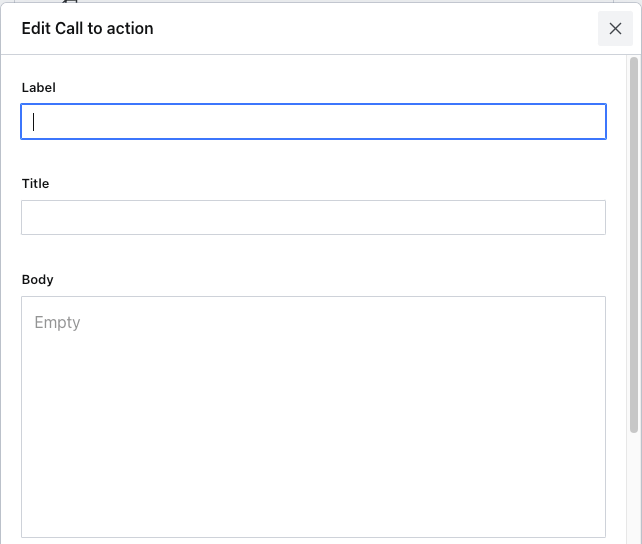
This is how we keep structure in our long-form content. While there is a standard set of blocks, we can also create custom blocks. These blocks provide a way for content creators to maintain consistency and flexibility.
While we often talk about the user experience of websites, apps, and products, we tend to give far less attention to the editorial experience of the CMS. Since content is the heart of that end-user experience, it is essential that the tool people use to create and manage content is set up to fit their unique needs.
Every organization’s content operations are a bit different. And I expect to be able to configure my CMS to fit our processes for creating, publishing, and maintaining content.
That means it should be easy to create and find content items. I need a good internal search to locate a specific content item and the ability to navigate to a particular content type and its instances.
Content types are often ordered alphabetically by default. But what if the content we most often create or review is Testimonials, which would be near the end of that list? I should be able to determine the order of content types in the initial listing. Groupings and list order are important aspects of usability.
Any content technology likely has dozens or even hundreds of users who should not be treated equally. I expect to be able to create custom user roles to control settings and permission to access, edit, and publish content as granularly as possible—at least at the content type level, but preferably down to the field level.
I also want to set workflow rules by content type. Some content types require a lot of approvals while others can be published right away. Take a press release as an example. It may need to get sign-off from top executives and then be published instantly by a content manager. On the other hand, a conference manager should be able to add conference speakers as soon as they're confirmed, no additional approvals needed.
For the press release, I may also need to reliably schedule it to go live at midnight Pacific Time, so that I don’t have to wake up in the middle of the night.
The bottom line is that I expect the platform where my team works to work for them. This can only happen if I have the flexibility to change any aspect of the interface to suit our needs.
Images are an important content asset. But there are so many places the same image might appear that a single aspect ratio or resolution doesn’t work. At the same time, I don’t want to have to create several different graphics to accommodate all the ratio sizes.
What I really want is to upload one image asset and have it adjust in size and resolution based on how it needs to look.
Thanks to the pervasiveness of cloud-based software, we've come to expect that multiple people can work on a single document simultaneously.
If I want to make an update to a piece of content right now, and so does my colleague, neither of us should be locked out of the document or lose our changes because we hit save after the other person.
But not every CMS offers the same level of real-time collaboration. For me, this is a non-negotiable feature that allows teams to collaborate quickly and seamlessly.
I also expect to be able to review history and roll back changes granularly. I should be able to see who made a change and when they did it, and I can even revert that individual change. Instead of rolling back a whole document to some previous point in time, I can just be very strategic about the history.
Despite my love for structure behind the scenes, I still want to know what any content component is going to look like when delivered to a particular place. And when the content and design are separate, it can be hard to trust that things will look right in so many places.
That is why I expect live previews of my content—in all the places that content would show up. If I make a change, I want to preview it before it's published. I don’t want to publish an update and wait upwards of 30 minutes to make sure it still looks right.
In fact, I don’t necessarily want to publish that content at all. I just want to see what it looks like as I create or update the content and have confidence that it will look right before publishing across my digital ecosystem. Not only does this give me peace of mind, but it opens up doors to synchronous collaboration with business stakeholders, designers, and developers.
This desire isn’t limited to getting previews of a single webpage. It also includes social media, search engine results pages, and any other place where the content will get displayed.
When I'm making changes to a website, I should be able to start from a webpage (where I can easily see what changes need to be made) and update a specific piece of content directly. I don’t want to comb through a long list of content types and content items to find it in the CMS.
But this can be challenging in a composable CMS. I expect click paths from my website to the exact document and field within my CMS.
Visual editing capabilities provide functionality I used to rely on for quickly updating content when I worked in a traditional CMS.
But knowing that I'm likely using this piece of content in multiple places (it's meant for reuse, after all!) means that I need to be extra careful that the update I'm making doesn't cause it to break or read strangely out of context in any of the other places it's used. So it’s crucial that I have insight into all information in the content type, not just that particular string of text.
While visual editing used to mean “changing text on a webpage,” modern visual editing is more like a transport through the internet directly into the CMS.
Now that I’ve experienced the best of both worlds—structured content that can be used anywhere and being able to jump directly to the CMS from a webpage—I expect to always be able to do that.
Computers should do what they do best so humans can do what they do best. For the parts of content management that are repetitive, I expect artificial intelligence (AI) to help. That includes handling tasks that are more like chores, leaving time for more creativity and helping teams scale.
We can be sure that AI will continue to evolve to support content management and operations. Being able to automatically perform governance tasks—like auditing, updating, and archiving—becomes much easier when the content is broken into its smallest reasonable components. Using a composable platform that integrates or can incorporate new AI tools will be essential in the near future.
We’ve lived with subpar content management systems for too long. It’s time to expect more from the technology we use. It’s time to stop compromising our content needs. When we leave the routine work to computers, we gain precious time to be creative in ways only humans can be.
此内容由惯性聚合(RSS阅读器)自动聚合整理,仅供阅读参考。 原文来自 — 版权归原作者所有。