


惯性聚合 高效追踪和阅读你感兴趣的博客、新闻、科技资讯
阅读原文 在惯性聚合中打开

推荐订阅源

Recent Announcements
freeCodeCamp Programming Tutorials: Python, JavaScript, Git & More
Last Week in AI
Last Week in AI
Scott Helme
Scott Helme
cs.AI updates on arXiv.org
L
LINUX DO - 最新话题
S
Security @ Cisco Blogs
Webroot Blog
Webroot Blog
S
Security Affairs
H
Hacker News: Front Page
TaoSecurity Blog
TaoSecurity Blog
W
WeLiveSecurity
G
GRAHAM CLULEY
T
Tenable Blog
Schneier on Security
S
Securelist
Cyberwarzone
Cyberwarzone
P
Privacy International News Feed
Exploit-DB.com RSS Feed
S
Schneier on Security
Hacker News - Newest:
Hacker News - Newest: "LLM"
Recent Commits to openclaw:main
O
OpenAI News
N
News and Events Feed by Topic
AWS News Blog
AWS News Blog
C
Cisco Blogs
T
Threat Research - Cisco Blogs
S
Secure Thoughts
大猫的无限游戏
大猫的无限游戏
C
Check Point Blog
The GitHub Blog
The GitHub Blog
G
Google Developers Blog
奇客Solidot–传递最新科技情报
奇客Solidot–传递最新科技情报
美团技术团队
Martin Fowler
Martin Fowler
Microsoft Security Blog
L
LangChain Blog
Apple Machine Learning Research
爱范儿
爱范儿
D
DataBreaches.Net
博客园_首页
MyScale Blog
MyScale Blog
博客园 - 叶小钗
博客园 - 三生石上(FineUI控件)
P
Proofpoint News Feed
J
Java Code Geeks
SecWiki News
SecWiki News
P
Palo Alto Networks Blog
Know Your Adversary
Know Your Adversary
cs.CL updates on arXiv.org

Sanity.io

A Board Game agent built using Sanity Context and Vercel's AI SDK | Sanity Build a prototype with Claude Code that your whole team can edit | Sanity What’s New - May 2026 | Sanity I built a London pub guide with v0 and the Sanity MCP in six hours. Here's what I learned. | Sanity Build a conference concierge with Agent Context and Anthropic | Sanity Build a content-aware Telegram agent with Vercel AI SDK and Chat SDK | Sanity How I used Agent API to generate photos for my family’s recipes | Sanity What’s New April - 2026 | Sanity Better context, better matches: An AI love story (for dogs) | Sanity How to write for an agent | Sanity Content Agent, meet Slack: AI content operations in your workflow | Sanity Structure powers intelligence | Sanity Your agent needs better content. Here's how to give it. | Sanity How to serve content to agents (a field guide) | Sanity Sanity TypeGen GA: Automatic TypeScript types for content and GROQ | Sanity Sanity is now available on the Vercel Marketplace | Sanity The logo soup problem (and how to solve it) | Sanity Content Releases: From scattered updates to coordinated publishing | Sanity What's New - February 2026 | Sanity How we solved the agent memory problem | Sanity v0 Builder Challenge: The winners | Sanity Introducing: Sanity Agent Skills | Sanity Content Agent: Days of work in one conversation | Sanity Our Sanity Values | Sanity Open Source Pledge 2025: Stepping up when it matters | Sanity v0 builder challenge: $3000 in prizes | Sanity Why AI Breaks Without Structured Content Operations | Sanity What’s New January - 2026 | Sanity BFCM 2025: What teams built when infrastructure stopped being the problem | Sanity How AI shaped holiday shopping and what it means for content in 2026 | Sanity Sanity Studio v5: Embracing React 19 | Sanity You’ll need a CMS eventually. Let your agent set it up. | Sanity “You should never build a CMS” | Sanity AI Content Operations: A 30-Day Implementation Guide | Sanity What’s New December - 2025 | Sanity Scheduled Drafts: Stop manually publishing content at midnight | Sanity What’s New November - 2025 | Sanity Everything *[NYC] 2025 recap: A day of AI, Content Operations, and Culture | Sanity Clankers and content operations | Sanity Content Agent: AI that understands your structured content is here | Sanity Why design-driven content modeling creates technical debt, not velocity | Sanity What's New October - 2025 | Sanity From studio to inbox: How Kevin Green eliminated email campaign friction | Sanity The content editor's guide to content operations [E-commerce edition] | Sanity styled-components maintenance mode: A 40% faster fork | Sanity From zero code to a live website in 7 hours (thanks, Cursor!) | Sanity First attempt will be 95% garbage: A staff engineer's 6-week journey with Claude Code | Sanity Internationalization is more than translating words | Sanity What's New - September 2025 | Sanity We just deleted our 35k-member community Slack | Sanity What's New - August 2025 | Sanity The engineer's guide to content operations [E-commerce edition] | Sanity SEO for AI: Evolving from Web Pages to the Content Lake | Sanity What's New - July 2025 | Sanity Sanity Studio v4: A major version bump for a minor reason | Sanity What's New - June 2025 | Sanity Dashboard and Insights: Your New Content HQ | Sanity Canvas: AI-accelerated, context-aware, freeform authoring | Sanity Agent Actions: AI building blocks for structured content | Sanity Functions: Life beyond pressing publish | Sanity A new era for content applications with Sanity App SDK | Sanity The end of CMS era and our $85M Series C. | Sanity What's New – May 2025 | Sanity Introducing the Sanity Model Context Protocol (MCP) server | Sanity What's New – April 2025 | Sanity Pushing all the envelopes with ambitious content | Sanity Self-hosting is only free if your time is worth nothing | Sanity Content that lasts: Scaling beyond your frontend | Sanity The Live Content API is now Generally Available | Sanity The future beyond AI chat bots | Sanity Learning the new skill of working with AI | Sanity What's New - March 2025 | Sanity Give it in plain text: Making your content AI-Ready | Sanity No More 'DO NOT PUBLISH': Introducing Content Releases | Sanity React in 2025, what's next? | Sanity The final boss of front-end: block editors | Sanity Introducing Sanity for Startups | Sanity A block content editor that loves you back | Sanity A Black Friday Snooze Fest: Massive Traffic, No Drama | Sanity How to make a recipe site that scales well | Sanity The Sanity Winter Release 2024 | Sanity AVIF Arrives, Sanity’s Promise Fulfilled | Sanity Sanity joins the Open Source Pledge | Sanity Your content is now Live by default | Sanity Begin Team to Join Sanity | Sanity Sanity Digest - September '24 Edition | Sanity Sanity partners with Google. Now live on the Google Cloud Marketplace. | Sanity Sanity Digest - August ‘24 Edition | Sanity Now playing: the latest Mux Video Input plugin for Sanity | Sanity Community Digest - June ‘24 Edition | Sanity Community Digest - May ‘24 Edition | Sanity Guide to Sanity's newest product announcements | Sanity AI and Content Creation: A Leader's Guide | Sanity Of course, you should be able to type your content quickly! | Sanity New to AI Assist: translation, reference suggestions, image generation | Sanity Speak the language of your editors: Sanity Studio UI localization | Sanity Introducing the new Sanity Growth plan to serve collaborative teams | Sanity Presentation: Work faster than ever with structured content | Sanity Goodbye Feedback Frenzy, Hello Sanity Studio Comments! | Sanity Easing into the App Router with the Sanity Toolkit for Next.js | Sanity
Why I chose Sanity as my WordPress alternative | Sanity
Ryan Murray · 2023-04-24 · via Sanity.io

I chose Sanity as my WordPress alternative after significant consideration and a ton of experience in WordPress. In this article, I’ll focus on the developer experience of setting the systems up, as well as the editor experience of working in them, especially when it comes to rich text content.

Who am I, and what do I know about WordPress?

I've been working professionally in WordPress since 2005. Besides teaching video game development at a college for the first few years, my focus has been as a freelance designer, developer, and WordPress consultant.

My company is 3200 Creative (Jamstack presence is 3200.pro) and it consists of myself and my development partner and wife of 15 years. We've built hundreds of WordPress websites. Clients have ranged from small businesses to more established names like Georgetown University, The Grand Canyon, NBC, Reebok, and Berkshire Hathaway. We handle both the initial builds of websites and ongoing support.

After 15 Years, why something other than WordPress?

There was a tipping point with WordPress that led me to look for other options. After 15 years of working almost entirely in WordPress, I was aware it wasn't the best developer experience. However, my clients primarily came from large WordPress companies, so that's where I did my work.

In 2018 it became apparent that it was too much work to do very standard tasks in WordPress. I was also spending the majority of my time fixing WordPress websites.

In late 2018 I started auditing other options. Since the WordPress editor is built on React, I checked out other React framework options. While researching it, I stumbled on the 2018 StackOverflow developer survey.

I felt validated to see that WordPress was the most "dreaded" platform amongst other developers. I also took some pride in working with it for so long. This finding also really emphasized that I wasn't hanging out with the cool kids.

Ironically in the same survey, React was one of the most loved frameworks (WordPress is built on React). While researching different stacks to work with that included React, I found Gatsby.

Eventually, to give clients the ability to add content, I doubled back to using just the WordPress editor, thinking that it should be fine since it's not powering the frontend. The shortcomings that bothered me about WordPress were even more prevalent, and it looked like they would be coming with me to Gatsby (I outline those later).

Serendipitously, that same week I watched a GatsbyJS presentation. At 14 minutes into the presentation, Kyle Matthews (the founder/CEO of Gatsby) opened up Sanity. He showed how quickly Sanity could work with Gatsby to make real-time edits to the website. He seemed smitten, the Sanity Studio looked effortless to use, and it was super fast. I loaded up a starter from Sanity, read some docs, and have been using it ever since.

Fast forward to today:

  • WordPress is still the most "dreaded" platform amongst developers (2020 survey).
  • I still work daily in both WordPress and Sanity. This allows me to compare the two and appreciate the advances in modern web development.
  • Sanity is working beautifully on every site I've completed. No complaints. No problems. It's also fun to build out.

Onto the comparison of WordPress and Sanity

(I'm writing this with the assumption you haven't used WordPress or Sanity.)

Both WordPress and Sanity are systems to manage content built with React. I skipped past calling both CMSs because, in the words of the people who built it, "Sanity is a superset of a headless CMS – because it's more flexible, offers real-time collaboration, and it treats your content (even rich text) as data."

Rather than go through feature comparison, I'm going to go through:

  • What wasn't working in WordPress
  • What fixed this problem using the Sanity Studio (there’s a tl;dr summary for long sections)

Initial installation

WordPress installation

When you install WordPress, you install everything. Posts, pages, image systems, user system, commenting engine, and of course, tons of content tools ranging in complexity. While this may seem attractive at first, this is not beneficial and problematic in a variety of ways as you use WordPress:

  • You either need to become a caretaker of everything you just installed regardless of whether it's a part of your project or dedicate a significant amount of work removing things. I've spent a good portion of my career removing stuff in WordPress.
  • If you are building for someone else or hiring a content editor, you need to find a way to teach them what should and shouldn't be used. While there is the ability to add "content editing only" permissions in WordPress, this doesn't mean they won't find a ton of tools that should be avoided when writing content. Teaching a business owner how to update WordPress content without an entire set of courses is very difficult.
  • When you are done with even a boilerplate WordPress install, a large amount of what you installed will never be used. For example, many businesses prefer not to blog, get comments on their site, or allow people to sign up as users on the site. For the entirety of the time they have their website, these areas of their site sit dormant and are potentially vulnerable if not updated monthly at the very least. It also causes a ton of code bloat.

Once you are up and running with WordPress, it gets hectic, very quick. Here's a screenshot of a client who makes leather bags. When they log in to WordPress, they see the following:
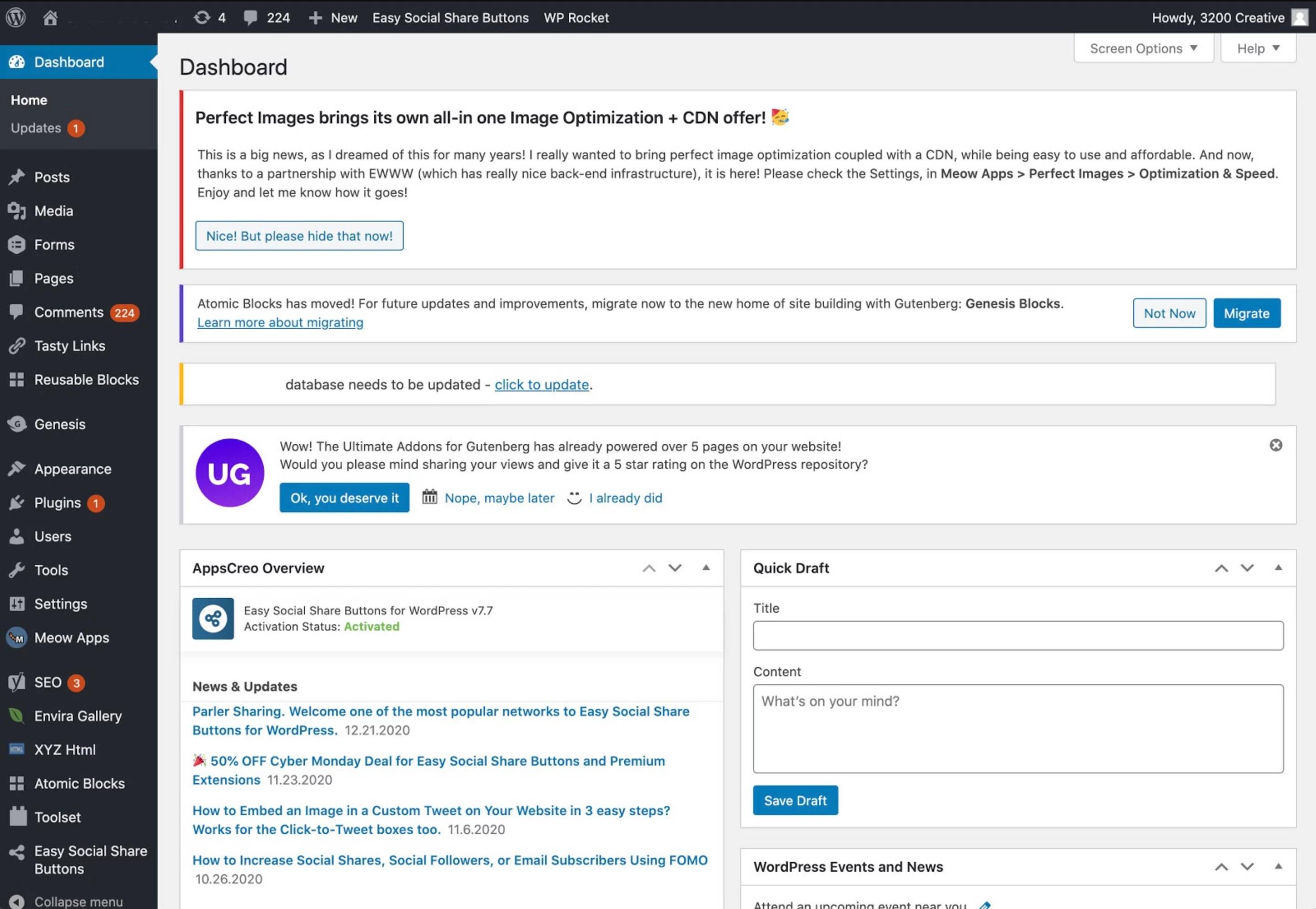
Screenshot of a Wordpress Dashboard

Currently, many of my clients find it so difficult to navigate the editor and update their plugins, they pay me monthly to maintain it and add their content. This defeats the purpose of why they chose a CMS entirely.

tl;dr: WordPress is bloated after even a basic install, gets very messy as you build out a site with it, and is confusing to anyone who doesn’t use it all the time.

Sanity installation

Installation takes less than a minute if you are familiar. Less than five minutes your first time. While you can load up predefined editor templates (Business site, Blog, etc.) You also have the option to start clean. When they say start clean, they aren’t kidding.

Screenshot of an old Sanity installation showing the words "Empty schema"

It's incredible! I can create the dataset and the local development environment super fast. I then decide what to use rather than what I need to remove.

Here's an example of a final Sanity Studio for a custom car shop I build websites for:

Screenshot of a Sanity intallation for a car e-commerce

After installation and while working with content, Sanity can stay clean and simple to navigate while doing a lot of work. Here’s an example of a Sanity Studio that’s doing a fair amount of things at once to populate Sanity’s community. It even includes a section in the studio that showcases the website docs on how to add content to the studio.
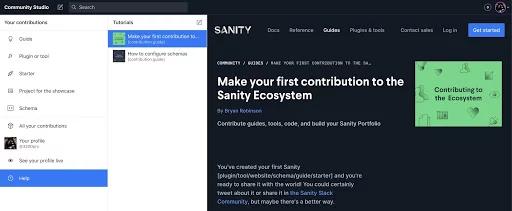
Example of a Sanity Studio

tl;dr: You can start Sanity Studio as a blank canvas CMS. When you are done setting it up, it is very elegant for clients and content editors to navigate.

Content Modeling in WordPress & Sanity

Content modeling has taken more and more of a backseat in recent years. Rather than designing an informational model for your content based on the needs of the project, people are establishing the content model of the project based on pre-built templates. I believe this goes against the grain of good informational design and communication. Sanity allows for a focus on making what is needed vs. what is available.

WordPress needs additional plugins

In WordPress you create Custom Post Types (CPTs). Any beginner tutorial on how to create a CPT in WP will illustrate the complexity involved. To simplify the process, most settle on two plugins used in unison (Advanced Custom Fields and Custom Post Type UI). My personal experience is that this immediately creates a problem. They offer solutions that aren’t directly in line with how WordPress works. They often don’t integrate well with other plugins either. Getting an understanding of how they work is comparable to learning all of WordPress again. So, the option many lean on is downloading a pre-built site/theme and populating it with their content. These also introduce a massive array of scenarios/dependencies that will need to be addressed.

Sanity makes content modeling effortless

The effortlessness of Sanity’s content modeling process makes it very elegant to build exactly what you need. For example, here is a client website I recently wrapped up. It’s a blog that showcases products.

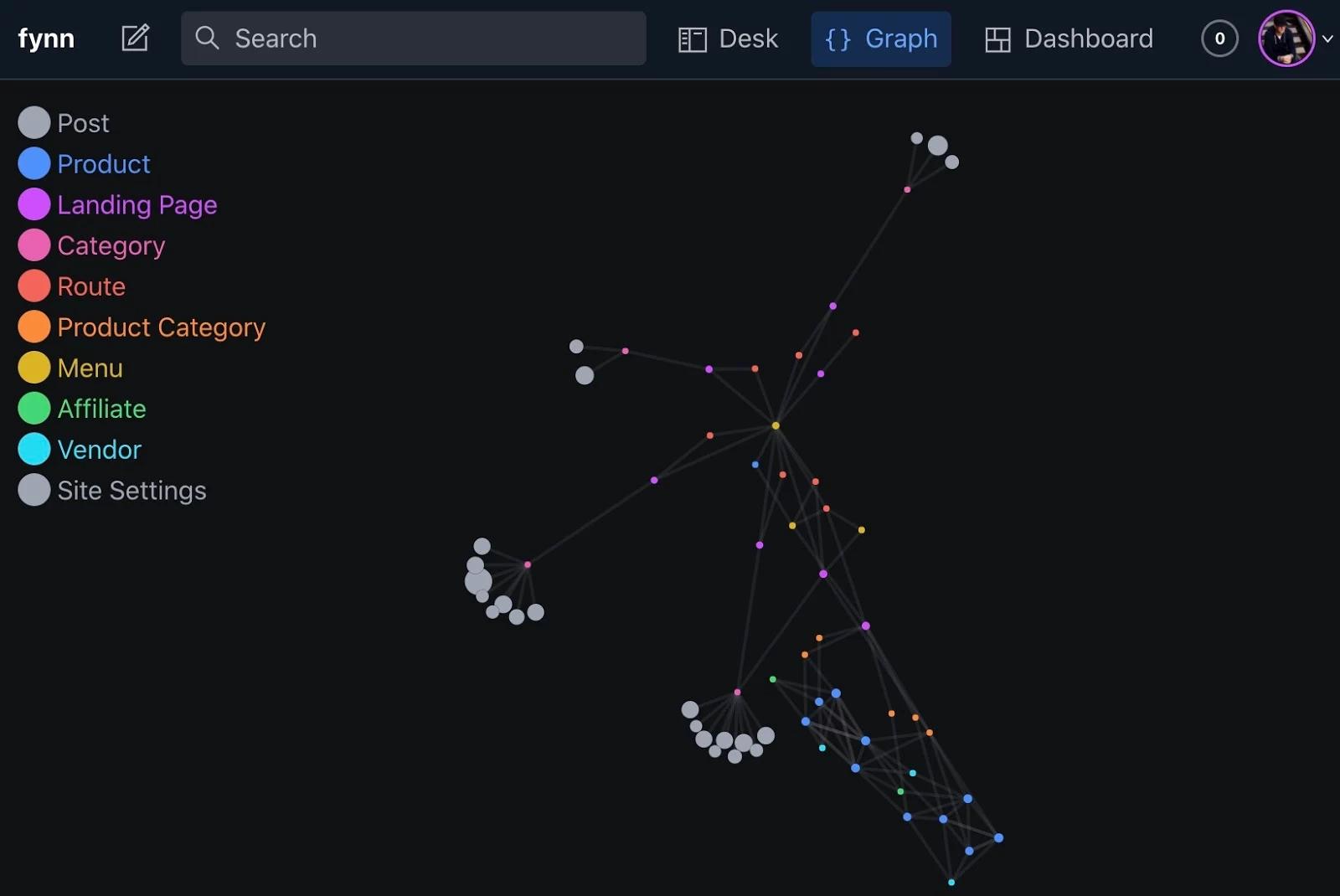
Screenshot showing a Sanity Studio with different types of pages
Screenshot of a graph mapping different page types

To accomplish this in Sanity, you build with Schema Types. Working with Schema Types is a breath of fresh air. Working with the different types of schema takes very little to learn, is well documented, and is very streamlined. Also, reusing them on a project-by-project basis is super fast.

For example: If you wanted to have the ability for the user to create pages on their website, you’d add the following schema type as a "page.js" file:

** The body section of the above includes a rich text editor. We will take a look at how that works in the next section.

tl;dr: In WordPress most model their content to fit the restrictions of the WordPress editor. Sanity lets you model your content to meet the specific needs of your project.

Writing content in Sanity and WordPress

Writing content in WordPress

This section is going to get a bit lengthy because it's been hard for me to deal with. There might be useful things for you to consider if you haven’t worked with the Gutenberg editor before. If you're already aware of its challenges, feel free to skip past.

WordPress has always required some basic understanding of web terminology when writing content. To make this simpler, WordPress recently introduced Gutenberg. This has created two WordPress camps. People that stuck with the 10yr+ old standard editor because they don't want to redevelop, and people that have moved to Gutenberg. Both have unique problems.

Classic Editor: The classic editor requires HTML that is done properly to format pages correctly. If not, it's a garbled mess that often formats incorrectly, and Google dislikes it. Errors that should never happen, like `<img>` tags inside of `<h1>`, is common. Content editors can also do things that shouldn't be done on a website. Like, write an entire paragraph in an H1 tag. It happens a lot.

Gutenberg Editor: While the Gutenberg editor solved the above problems of images in headlines, it's brought on an entirely new suite of errors and complexities.

When an editor starts using the editor, they users are given the following overview of block types upon opening the editor tools:

Typically something is missing in this toolset of options. This always causes the following to occur:

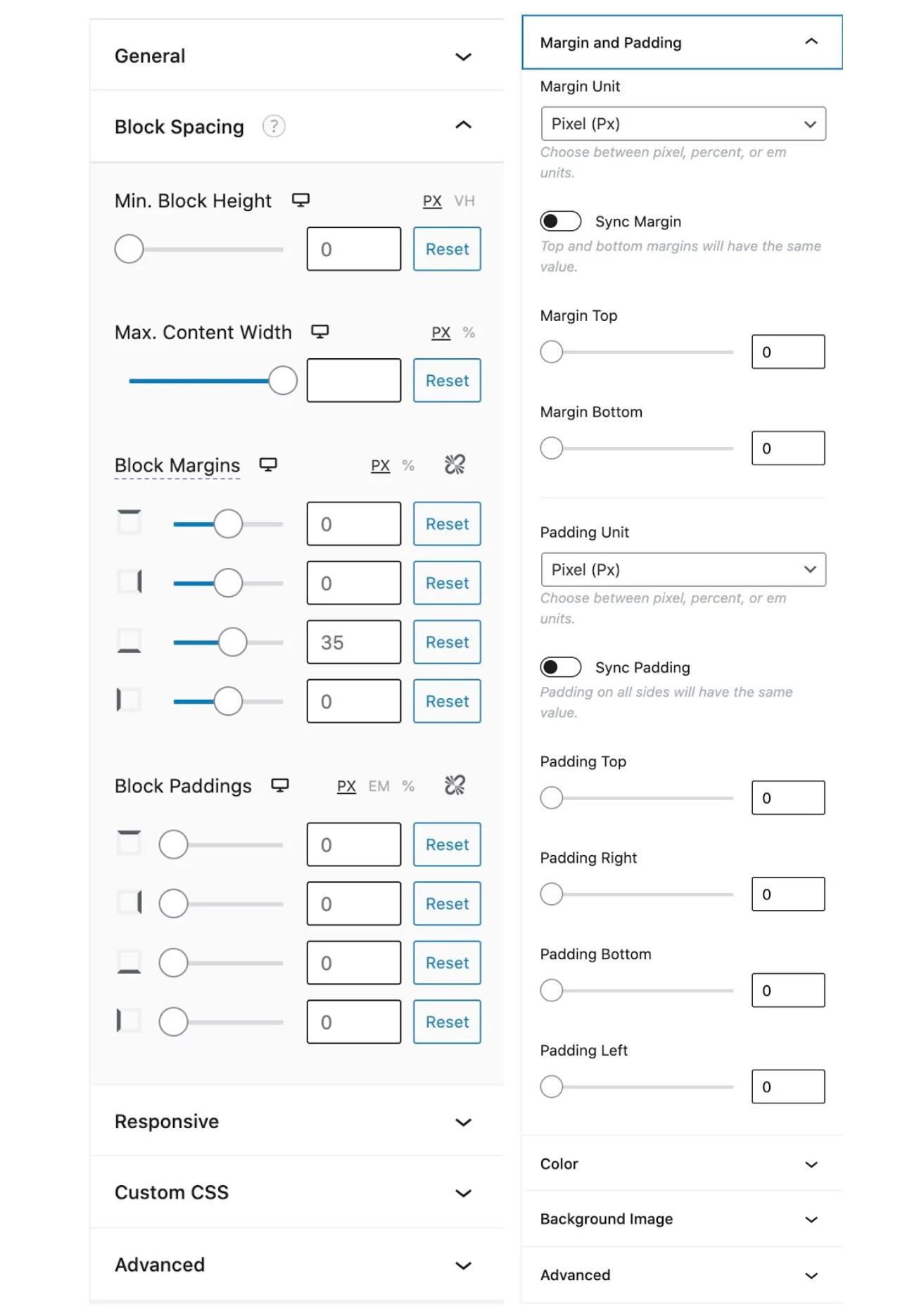
  • The client downloads a library of additional tools. Usually, a free pack of 10-30 tools with the one they need in it.
  • They download several other libraries of options for a few tools missing in the previous pack.
Screenshot of a library of tools downloaded on Wordpress
  • The side effect of having 3 libraries of tools is they end up with 3–4 ways to create a column, image, or button in WordPress. Each varying significantly in the way it was built and how it appears on the website. By no fault of their own, they forget on a page-by-page basis which one they like so they end up with a blend of solutions addressing the same problem.
  • Next, the game of mix-and-match occurs. Trying to blend the packs together. An Advanced Header from one, inside the Accordion of the other. This rarely works and often requires a support request that I can’t fulfill in any reasonable amount of time.
  • When using these tools, each block needs to be styled out independent of the other blocks used throughout the site. This deconstructs a very basic need online I’ve taken for granted since I started using it in 2001: Global CSS.
Screenshot of blog stylings on Wordpress
  • If you do global style everything and skip past the tools settings, the owner of the site or content editor will request the ability to use the tools settings unless they are all removed. This is borderline impossible and negates the majority of the tool’s purpose. It also doesn't remove the code. You are tucking it away.
  • Eventually, the libraries of content editing tools change. I’ve seen many changes without supporting legacy solutions. Often the website owner or editor encounters the following error:
Screenshot of a block recovery option in Wordpress
  • In my experience, the recovery rarely works. Very often the content is deleted entirely and the content writer starts over.
  • In the event a support ticket is opened for the broken content, depending on what plugin developer made the tool determines the likelihood of repair and method to fix it.

tl;dr: Wordpress’s content editing experience is all over the place in 2021. Some people use the old version, others the new version. Regardless of which you use, there is a ton of extra work needed, it is very unstable, and I’ve personally seen a massive increase in the need for ongoing support due to the editor breaking.

Sanity’s editing experience

A unique and fantastic feature of using Sanity is that the content you write can be used anywhere. Since we are comparing it to WordPress, this content will be crafted for HTML. Keep in mind that you could potentially use the same content for print, apps, or IoT devices in the future. This is because it uses Portable Text. Sanity created Portable Text and it is one of the key features that separates Sanity from its competition. Using Portable Text allows data to be used in any human-readable format. This means that:

As a developer, you get to precisely pick what HTML and content formatting tools are used when creating content. If you or a client need a formatting tool that's not there, it can be added in.

As a content writer, you don't have to care about HTML (or any special tags or markup) at all. This is a significant benefit.

There are certain things you shouldn't do when writing content in web HTML. For example, multiple uses of the H1 tag on a page shouldn't happen. With Sanity, whoever creates the Studio can remove the option to use the H1 example entirely in block content.

Even further, with Sanity, you can forget about explaining what H1, H2, H3 are at all. In the screenshot below, I took both H2 and H3 and replaced them with easy to understand options.

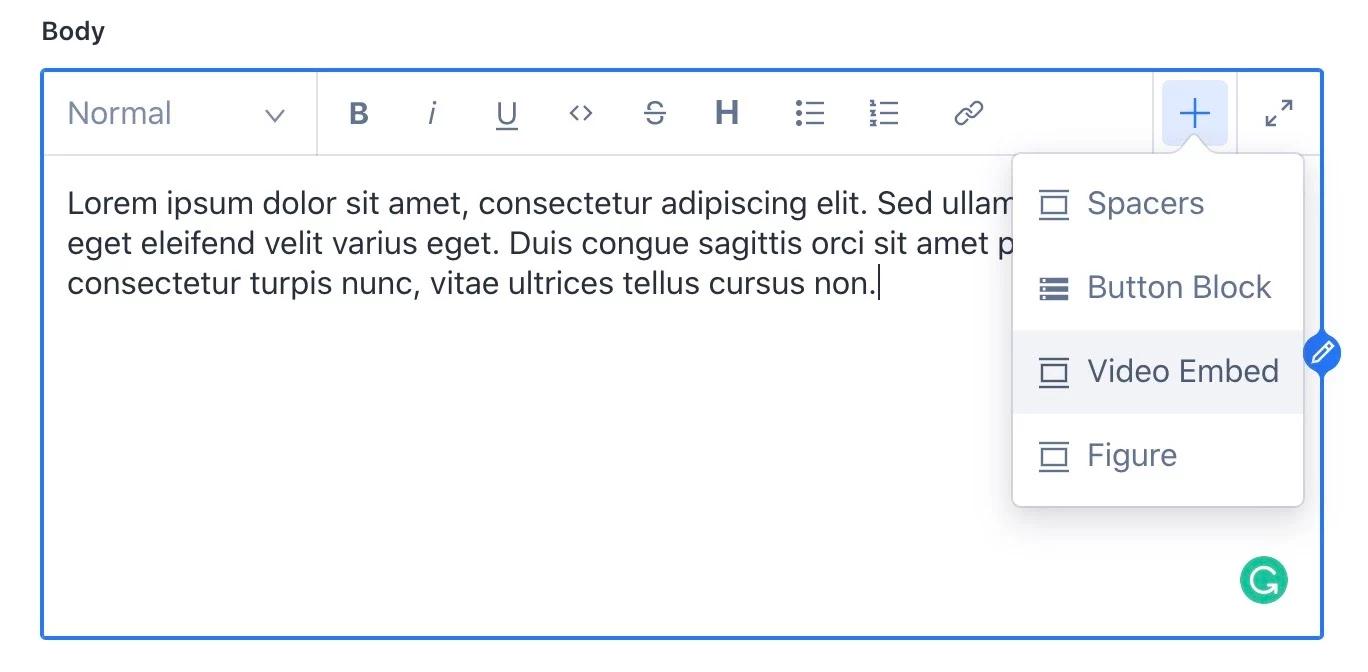
Screenshot of a customized content editor in the Sanity Studio
Screenshot of a Sanity Studio that simplifies adding embedded videos to the content.

While it still ends up as HTML, I can present it in a way that the client will understand. This gives the content editor clarity while still ending up with the same end result. Here’s how the schema type code was edited to make this change to the rich text editor:

This is very straightforward to create and very easy to add other styles in the future. The same goes for content objects. Spacers, images, video embeds, and anything else you could need can be built as individual schema files and imported into the content editor.

tl;dr: Sanity allows you to create the precise content editing experience you need. In the event you need to expand, it’s very quick to do so.

Conclusion

In this article, I’ve addressed the difference between WordPress and Sanity when it comes to the developer experience of installing and maintaining the systems and the editor experience of working in them. There is a lot more to cover, but I’ll stop there for this article.

If you are deciding what system to use for your CMS-needs, I strongly suggest taking the Sanity Studio for a spin. I’m betting it’ll be the next 15 years of my career.

Try Sanity