


惯性聚合 高效追踪和阅读你感兴趣的博客、新闻、科技资讯
阅读原文 在惯性聚合中打开

推荐订阅源

腾讯CDC
IT之家
IT之家
有赞技术团队
有赞技术团队
WordPress大学
WordPress大学
Apple Machine Learning Research
OSCHINA 社区最新新闻
OSCHINA 社区最新新闻
人人都是产品经理
人人都是产品经理
The Cloudflare Blog
钛媒体:引领未来商业与生活新知
钛媒体:引领未来商业与生活新知
freeCodeCamp Programming Tutorials: Python, JavaScript, Git & More
博客园 - 【当耐特】
V
V2EX
Last Week in AI
Last Week in AI
H
Help Net Security
The GitHub Blog
The GitHub Blog
S
SegmentFault 最新的问题
F
Fortinet All Blogs
I
InfoQ
宝玉的分享
宝玉的分享
A
About on SuperTechFans
MongoDB | Blog
MongoDB | Blog
Microsoft Azure Blog
Blog — PlanetScale
Blog — PlanetScale
B
Blog

Sanity.io

A Board Game agent built using Sanity Context and Vercel's AI SDK | Sanity Build a prototype with Claude Code that your whole team can edit | Sanity What’s New - May 2026 | Sanity I built a London pub guide with v0 and the Sanity MCP in six hours. Here's what I learned. | Sanity Build a conference concierge with Agent Context and Anthropic | Sanity Build a content-aware Telegram agent with Vercel AI SDK and Chat SDK | Sanity How I used Agent API to generate photos for my family’s recipes | Sanity What’s New April - 2026 | Sanity Better context, better matches: An AI love story (for dogs) | Sanity How to write for an agent | Sanity Content Agent, meet Slack: AI content operations in your workflow | Sanity Structure powers intelligence | Sanity Your agent needs better content. Here's how to give it. | Sanity How to serve content to agents (a field guide) | Sanity Sanity TypeGen GA: Automatic TypeScript types for content and GROQ | Sanity Sanity is now available on the Vercel Marketplace | Sanity The logo soup problem (and how to solve it) | Sanity Content Releases: From scattered updates to coordinated publishing | Sanity What's New - February 2026 | Sanity How we solved the agent memory problem | Sanity v0 Builder Challenge: The winners | Sanity Introducing: Sanity Agent Skills | Sanity Content Agent: Days of work in one conversation | Sanity Our Sanity Values | Sanity Open Source Pledge 2025: Stepping up when it matters | Sanity v0 builder challenge: $3000 in prizes | Sanity Why AI Breaks Without Structured Content Operations | Sanity What’s New January - 2026 | Sanity BFCM 2025: What teams built when infrastructure stopped being the problem | Sanity How AI shaped holiday shopping and what it means for content in 2026 | Sanity
Plan it out with the new calendar plugin | Sanity
Bryan Robinson · 2020-12-04 · via Sanity.io

This Fall we launched Presence and Review Changes. Editing, writing, and publishing became a team sport and there was no longer a need to copy and paste your content from a planning document into your content platform. It made Sanity Studio a powerful content collaboration space.

Editors also need the ability to plan, schedule, and visualize their content.

With the Content Calendar plugin, you can now glance at a monthly schedule to identify gaps in your plans. When new content is scheduled, it automatically shows in the calendar view and can be rearranged as priorities change.

The Content Calendar for Sanity Studio
The Content Calendar

Add Content Calendar to your Studio

The Content Calendar is just a plugin you can install from npm with the sanity install command.

Once the plugin is installed, it needs to be configured to know what sorts of documents to add to the editorial flow and calendar. To do this, modify the configuration file located at ./config/content-calendar.json. By adding type objects to the array, you can tell the plugin which documents to use and which field on those document types to use as the scheduled date.

For full documentation and details, see the README on GitHub.

Editing and scheduling your content

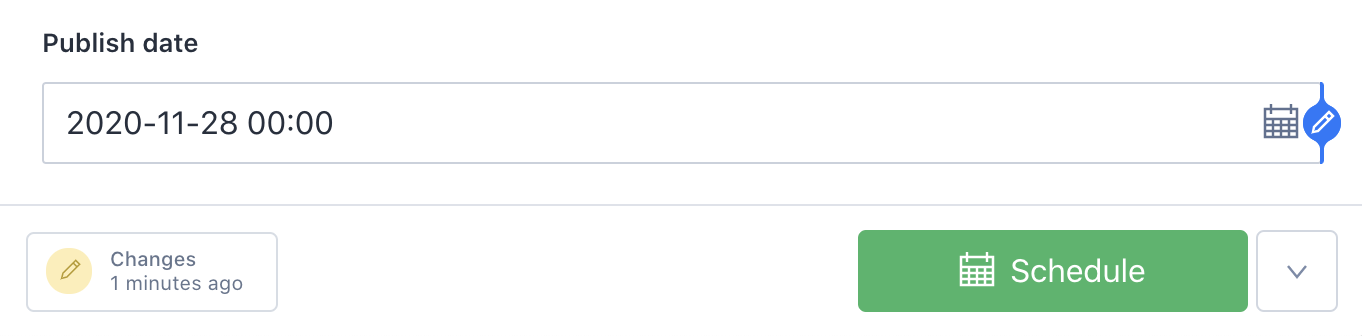
Once the plugin is installed and configured, the Studio will have a new tool in the toolbar and the "Publish" action on the document types you specified will be changed to "Schedule" and "Unschedule" actions when a publishedAt date is set.

"Calendar" tool listed next to the standard "Desk" tool.
Publish date is set and the "publish" button has become "Schedule"

Once content is scheduled, it can be viewed in the calendar. If changes are made to a scheduled post, the post will display as yellow on the calendar view, and show a warning. Simply reschedule the post to publish with new changes.

A full-month calendar view, showing scheduled posts and posts with warnings
A document that has changed since it was scheduled will provide a warning.

How we built this

The Sanity team loves working together on projects big and small. When we come together for our All Hands – whether in person or remote – we love to explore new possibilities in a hackathon setting. This plugin was the result of our most recent internal hackathon. The team consisted of Victoria Bergquist (team lead), Fred Carlsen, Herman Wikner, Jacob Lovenskiold, and Rune Botten.

Interested in more that was built during the hackathon? Check out the Graph View Plugin release to see how your content connects, and stay tuned for more features.