


Web accessibility is about ensuring that everyone can consume content, but just as much about that everyone can create content. Last quarter, we did an accessibility conformance review of Sanity Studio, our content editing tool, to find out what we can improve. In this post, we’ll talk about how we did that, relevant accessibility standards, the role of design systems, and what accessibility means in a real-time and heavily customizable product.
Thanks to decades of work from the disability rights movement and organizations like the W3C’s Web Accessibility Initiative, organizations increasingly put in the effort to make their websites more accessible. For instance, Level Access' 2022 State of Accessibility Report said that 55.6% of organisations verify content accessibility before they publish new assets.
On websites, “accessible” means usable without barriers by anyone, and specificially people with disabilities. But an accessible web is not just about consuming web content: it also means that creating web content works for everyone. This matters to us, as we create a system in which people create content.
Our product Sanity Studio can be used by developers to create editorial experiences. Developers configure content types in JavaScript, which generates an editing interface in which editors can collaborate in real time, with all sorts of out-of-the-box functionality you’d expect from a content management system.
We care about making this editor interface smooth, efficient, and even delightful. It isn't any of those things if accessibility barriers prevent you from pressing a button, knowing whether your post was published, reordering the customer logos on the front page, or adding a link to your rich text. We want Sanity Studio to be a tool without such accessibility barriers.
User experience isn’t the only reason to work towards better accessibility. Worldwide, laws and policies around accessibility get increasingly more stringent, so our clients increasingly expect more accessible experiences, both in our product and in what they create with it. An accessibility mindset is great for innovation, too: keyboards, voice assistants, and dark mode are all features that started as accessibility features first.
For our evaluation, we assessed whether Sanity Studio meets a number of Success Criteria from the Web Content Accessibility Guidelines. To meet a Success Criterion, a website or app needs to have zero ‘violations’ of it. For instance, as soon as there is one instance of insufficient color contrast, the color contrast criterion is marked as ‘not met’.
The process of accessibility evaluation is pretty straightforward and well-documented. Still, when we applied it to Sanity Studio, we did find some things challenging, like the line between web applications and applications that create content, and defining the “scope” check for a product that users can heavily customize.
First off, we considered which accessibility standard to use. People usually evaluate websites and web apps for conformance with the Web Content Accessibility Guidelines (WCAG). But there is a different standard specifically for tools that create web content: the Authoring Tool Accessibility Guidelines (ATAG).
ATAG seemed like the obvious choice. And it has great recommendations relevant to Sanity Studio, including preserving accessibility information when users paste content in editors, accessibility of previews, and accessibility of default templates and components. But we didn’t end up using the ATAG standard for our evaluation
Firstly, Sanity Studio doesn’t technically create ‘web content,’ at least not as WCAG defines it:
content (Web content): information and sensory experience to be communicated to the user by means of a user agent, including code or markup that defines the content’s structure, presentation, and interactions
Web content, in other words, is stuff a browser can render to users, like HTML or a PDF. Sanity Studio stores content as data, broken up into parts that are as small and meaningful as possible. It only becomes HTML (or other web content, like PDF) when someone uses it in a frontend. But at that point, the Studio has no say in it the accessibility of it. Other than that it helps collect all the required accessibility information, e.g. if you create a video field, you would also create a captions field.
Secondly, ATAG doesn’t come with a well-defined evaluation methodology like the WCAG Evaluation Method (WCAG-EM), the most commonly used evaluation methodology, published by the same group that created WCAG. It also doesn’t map to VPAT, a format used to compare accessibility in the US and Europe.
Given the above, we decided to evaluate with WCAG (Level A + AA) and to follow WCAG-EM. We created the WCAG conformance audit with Eleventy WCAG Reporter and, once we had that, used the OpenACR Editor to create a VPAT(-like) report in HTML.
A second challenge was how to go about picking a scope and target URL, a standard part of WCAG-EM. When evaluating a website, you would look at the URL of that website and find sample pages. But, like many web-based applications, Sanity Studio can live wherever customers want to put it: on localhost, on your own URLs, or on our servers. In this case, we decided to go with a Studio that we use for client demonstrations. It was initially designed to showcase common use cases our customers have, which is probably as close to representative as we can get.
We also had to figure out how to incorporate the fact that Sanity is highly and easily customizable. Realistically, most installs are different from all other installs. The easy part was to take things like plugins and starter projects out of scope. Still, in Sanity Studio, you can customize pretty much everything content editors see in the admin interface. From colors to previews to custom input components… we know many of our customers change a lot. When we picked a demo Studio, we went with one that was fairly representative and minimally customized.
Can an organization evaluate its own product? We think it can work, as long as the evaluator can do their work with integrity and without conflicting interests. We want to make an accessible product, so we want to find conformance issues, similar to internal teams testing a product for usability issues, we can review our own product for conformance issues. In our case, it also worked better for timing, and it was an excellent way for me to get more familiar with the product while contributing my previous experience with these types of reviews.
The last challenge to mention is probably that evaluations like this are a snapshot, they represent a current state of accessibility, but the product develops which may introduce new improvements or new bugs. That’s normal—few products and websites never change. To be on top of changes, we want to do both full reviews and feature-specific consultations regularly.
We evaluated a total of 50 Success Criteria (WCAG 2.1, Level A + AA), of which we found Sanity Studio satisfies 36. The evaluation resulted in a list of opportunities to improve accessibility in the Studio, spread over the 14 Success Criteria where we partially meet expectations. None of the issues interfere with the usage of all of Sanity (see 5.2.5 Non-interference). For instance, no keyboard traps were found. Some of the issues were repeats of the same issue in different places. Others seemed to be one-off exceptions to what was executed well throughout (like color contrast), in some instances specific to customizations in the representative sample studio we used for the evaluation.
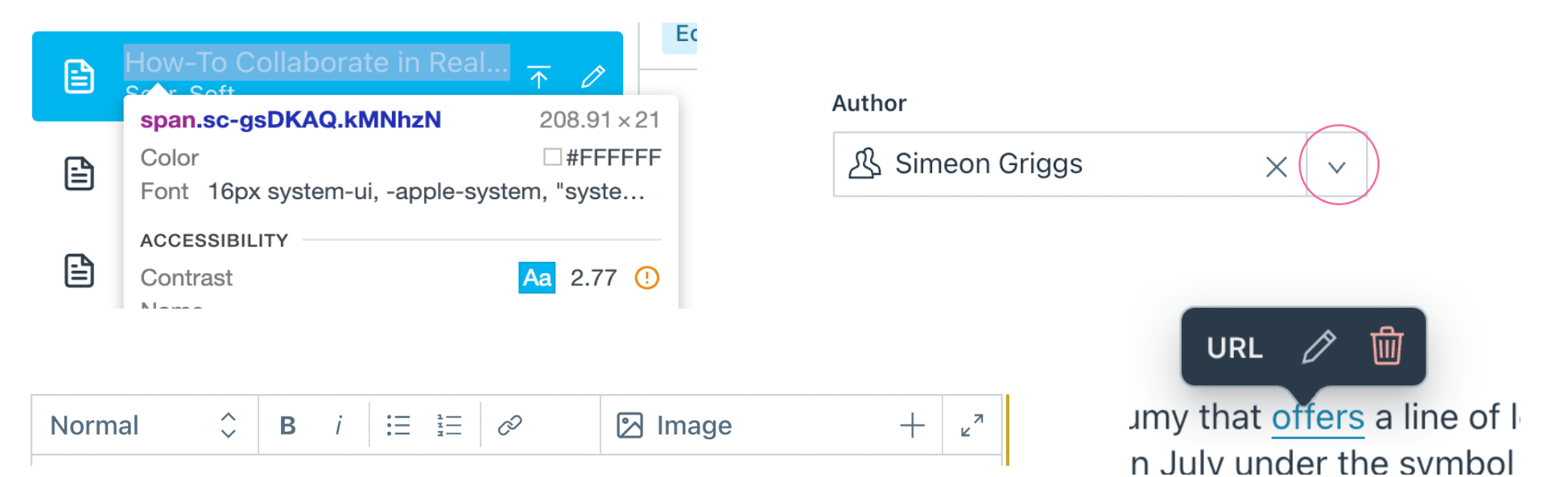
The audit is a first step in establishing a baseline that we can use as a foundation to do better. With the report in place, we now have a reference to consider as we create new features and resolve any bugs in the Studio moving forward. Many of these issues are low-hanging fruit that can be picked off as we make improvements that impact the surfaces affected.
We’re always learning about making our products more accessible. This conformance evaluation is just one part of that process. We also try and research complex components well by following standards and best practices and sometimes test specifics in assistive technologies like screen readers. Taking off our evaluator hats, let’s look at some of this in practice.
When we bundle code and UI into neatly abstracted components, they can be reused. One of the main benefits of reusable components is that they help create a consistent user interface—toolkits like Bootstrap and Material are popular for this reason, and so are organization-specific design systems. Naturally, we have a design system too. It’s called Sanity UI. Eating our own dog food, we decided to refactor Sanity Studio last year to use Sanity UI where possible. It’s also open source (under MIT license), meaning developers can also use it when they customize their studios.
UI component libraries are a great opportunity to save time and effort, but also come with a responsibility to ensure they reinforce the right things . If the component has great accessibility features, they will be repeated wherever the component is used. But if it has accessibility issues, those will be repeated, too. In addition, context is usually the deciding factor. In other words: the accessibility of a component also depends on how and where it is used.
Accessibility specialists rave about standard HTML elements because they give us a lot of accessibility for free. Yes, we can create lots of UI from just scratch these days, but with standard HTML elements, we can leave a lot of details to the browser. For instance, pretty much all buttons in Sanity Studio are button elements, which come with keyboard accessibility and the right semantics baked in. The actual content editing parts of the Studio are often inputs with associated and visible label elements. We save time and achieve broader efficiency by not reinventing the wheel there.
We mentioned customizability earlier, which is a large part of how Sanity Studio is used in the wild. Our customers add their own input types, content previews, and navigational structures to make the editor work for them. Though we can’t control if they do so accessibly, we do try to influence it by making sure the building blocks people encounter are accessible, as well as the skeleton they use those building blocks in. The Sanity documentation recommends using Sanity UI, which has Sanity-themed implementations of accessible design patterns and “accessibility considerations” sections to give in-place advice.
Accessibility is a continuous and iterative process, which started before this full review and will continue after it. With the review completed, we’ve started addressing the report's findings. In parallel, we also work on new features and ensure they are accessible too.
We didn’t cover it in today’s post, but besides the accessibility of the editor, there is also a lot we can do to help editors create more accessible content (see also: part B of ATAG). What to think of preview components that simulate color deficiencies or validation rules that can flag unsemantic markup? We also want to understand better how to make real-time collaboration more accessible and follow the W3C’s work on CTAUR with interest.
We invite other CMSes to conduct a similar analysis and establish a baseline for bettering the accessibility of their products. Our internal teams continue to think about accessibility in designing new features for the studio up front, and our baseline report has become an important reference for our work moving forward. To learn more about the results and read the full report, check out our Accessibility page and let us know what you think!
此内容由惯性聚合(RSS阅读器)自动聚合整理,仅供阅读参考。 原文来自 — 版权归原作者所有。