



惯性聚合 高效追踪和阅读你感兴趣的博客、新闻、科技资讯
阅读原文 在惯性聚合中打开

推荐订阅源

人人都是产品经理
人人都是产品经理
Stack Overflow Blog
Stack Overflow Blog
L
LINUX DO - 最新话题
Google Online Security Blog
Schneier on Security
Spread Privacy
Spread Privacy
www.infosecurity-magazine.com
雷峰网
雷峰网
Google DeepMind News
Microsoft Azure Blog
IT之家
IT之家
V
Vulnerabilities – Threatpost
K
Kaspersky official blog
S
Schneier on Security
B
Blog
The Register - Security
SecWiki News
SecWiki News
Hacker News: Ask HN
Hacker News: Ask HN
cs.AI updates on arXiv.org
S
Security Affairs
T
The Blog of Author Tim Ferriss
G
Google Developers Blog
T
Tenable Blog
P
Proofpoint News Feed
Apple Machine Learning Research
D
DataBreaches.Net
S
Secure Thoughts
Security Latest
Security Latest
H
Heimdal Security Blog
The Hacker News
The Hacker News
O
OpenAI News
AWS News Blog
AWS News Blog
量子位
Exploit-DB.com RSS Feed
腾讯CDC
U
Unit 42
L
Lohrmann on Cybersecurity
cs.CL updates on arXiv.org
L
LangChain Blog
阮一峰的网络日志
阮一峰的网络日志
T
The Exploit Database - CXSecurity.com
NISL@THU
NISL@THU
cs.CV updates on arXiv.org
Application and Cybersecurity Blog
Hugging Face - Blog
Hugging Face - Blog
The Last Watchdog
The Last Watchdog
Recorded Future
Recorded Future
V2EX - 技术
V2EX - 技术
爱范儿
爱范儿
F
Full Disclosure

Sanity.io

A Board Game agent built using Sanity Context and Vercel's AI SDK | Sanity Build a prototype with Claude Code that your whole team can edit | Sanity What’s New - May 2026 | Sanity I built a London pub guide with v0 and the Sanity MCP in six hours. Here's what I learned. | Sanity Build a conference concierge with Agent Context and Anthropic | Sanity Build a content-aware Telegram agent with Vercel AI SDK and Chat SDK | Sanity How I used Agent API to generate photos for my family’s recipes | Sanity What’s New April - 2026 | Sanity How to write for an agent | Sanity Content Agent, meet Slack: AI content operations in your workflow | Sanity Structure powers intelligence | Sanity Your agent needs better content. Here's how to give it. | Sanity How to serve content to agents (a field guide) | Sanity Sanity TypeGen GA: Automatic TypeScript types for content and GROQ | Sanity Sanity is now available on the Vercel Marketplace | Sanity The logo soup problem (and how to solve it) | Sanity Content Releases: From scattered updates to coordinated publishing | Sanity What's New - February 2026 | Sanity How we solved the agent memory problem | Sanity v0 Builder Challenge: The winners | Sanity Introducing: Sanity Agent Skills | Sanity Content Agent: Days of work in one conversation | Sanity Our Sanity Values | Sanity Open Source Pledge 2025: Stepping up when it matters | Sanity v0 builder challenge: $3000 in prizes | Sanity Why AI Breaks Without Structured Content Operations | Sanity What’s New January - 2026 | Sanity BFCM 2025: What teams built when infrastructure stopped being the problem | Sanity How AI shaped holiday shopping and what it means for content in 2026 | Sanity Sanity Studio v5: Embracing React 19 | Sanity You’ll need a CMS eventually. Let your agent set it up. | Sanity “You should never build a CMS” | Sanity AI Content Operations: A 30-Day Implementation Guide | Sanity What’s New December - 2025 | Sanity Scheduled Drafts: Stop manually publishing content at midnight | Sanity What’s New November - 2025 | Sanity Everything *[NYC] 2025 recap: A day of AI, Content Operations, and Culture | Sanity Clankers and content operations | Sanity Content Agent: AI that understands your structured content is here | Sanity Why design-driven content modeling creates technical debt, not velocity | Sanity What's New October - 2025 | Sanity From studio to inbox: How Kevin Green eliminated email campaign friction | Sanity The content editor's guide to content operations [E-commerce edition] | Sanity styled-components maintenance mode: A 40% faster fork | Sanity From zero code to a live website in 7 hours (thanks, Cursor!) | Sanity First attempt will be 95% garbage: A staff engineer's 6-week journey with Claude Code | Sanity Internationalization is more than translating words | Sanity What's New - September 2025 | Sanity We just deleted our 35k-member community Slack | Sanity What's New - August 2025 | Sanity The engineer's guide to content operations [E-commerce edition] | Sanity SEO for AI: Evolving from Web Pages to the Content Lake | Sanity What's New - July 2025 | Sanity Sanity Studio v4: A major version bump for a minor reason | Sanity What's New - June 2025 | Sanity Dashboard and Insights: Your New Content HQ | Sanity Canvas: AI-accelerated, context-aware, freeform authoring | Sanity Agent Actions: AI building blocks for structured content | Sanity Functions: Life beyond pressing publish | Sanity A new era for content applications with Sanity App SDK | Sanity The end of CMS era and our $85M Series C. | Sanity What's New – May 2025 | Sanity Introducing the Sanity Model Context Protocol (MCP) server | Sanity What's New – April 2025 | Sanity Pushing all the envelopes with ambitious content | Sanity Self-hosting is only free if your time is worth nothing | Sanity Content that lasts: Scaling beyond your frontend | Sanity The Live Content API is now Generally Available | Sanity The future beyond AI chat bots | Sanity Learning the new skill of working with AI | Sanity What's New - March 2025 | Sanity Give it in plain text: Making your content AI-Ready | Sanity No More 'DO NOT PUBLISH': Introducing Content Releases | Sanity React in 2025, what's next? | Sanity The final boss of front-end: block editors | Sanity Introducing Sanity for Startups | Sanity A block content editor that loves you back | Sanity A Black Friday Snooze Fest: Massive Traffic, No Drama | Sanity How to make a recipe site that scales well | Sanity The Sanity Winter Release 2024 | Sanity AVIF Arrives, Sanity’s Promise Fulfilled | Sanity Sanity joins the Open Source Pledge | Sanity Your content is now Live by default | Sanity Begin Team to Join Sanity | Sanity Sanity Digest - September '24 Edition | Sanity Sanity partners with Google. Now live on the Google Cloud Marketplace. | Sanity Sanity Digest - August ‘24 Edition | Sanity Now playing: the latest Mux Video Input plugin for Sanity | Sanity Community Digest - June ‘24 Edition | Sanity Community Digest - May ‘24 Edition | Sanity Guide to Sanity's newest product announcements | Sanity AI and Content Creation: A Leader's Guide | Sanity Of course, you should be able to type your content quickly! | Sanity New to AI Assist: translation, reference suggestions, image generation | Sanity Speak the language of your editors: Sanity Studio UI localization | Sanity Introducing the new Sanity Growth plan to serve collaborative teams | Sanity Presentation: Work faster than ever with structured content | Sanity Goodbye Feedback Frenzy, Hello Sanity Studio Comments! | Sanity Easing into the App Router with the Sanity Toolkit for Next.js | Sanity Making website updates easier with structured content | Sanity
Better context, better matches: An AI love story (for dogs) | Sanity
Ken Jones · 2026-04-07 · via Sanity.io

View transcriptClose transcript

Every dog shelter website has the same filters. Size, breed, age. They work, but they don't work the way you actually think about getting a dog.

You don't search for "medium, 2-4 years, terrier mix." You think: "I need a dog that won't terrorize my neighbor's cats and doesn't make me sneeze." That's a vibe, not a filter. Traditional search can't handle it.

So I built Pup Finder: a Next.js app that replaces rigid filters with a single text input where you describe your perfect dog in plain language. AI does the matching, using real structured data from Sanity to find dogs that actually fit.
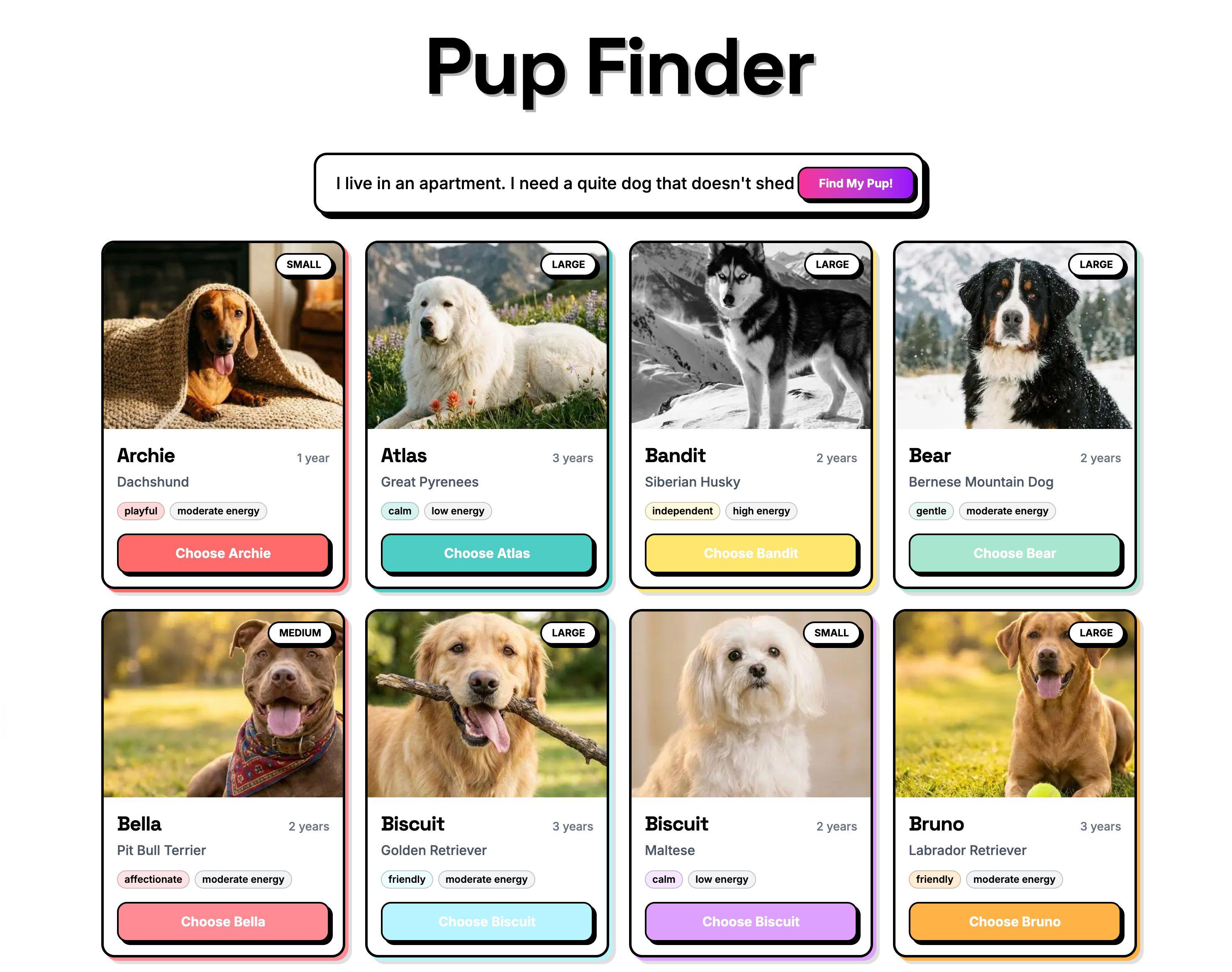
Pup Finder Demo app
Pup Finder - The fictional app created to seriously improve UX

Check out the demo

The whole thing took under an hour. Well, the functional app did. Then I spent another hour nudging pixels because I'm like that.

In this post I'll walk through how I built it, explain why Agent Context is a better fit for structured data than standard RAG, and show you how the AI matching actually works under the hood. The full source code is available at the end.

Why this matters beyond dog adoption

Before we get into the build, let's zoom out. This isn't really about dogs (even though dogs are the best demo subject and I'll die on that hill).

Think about any site with a catalog of things people need to filter through: real estate listings, e-commerce products, insurance plans, podcast episodes, job postings. Traditional filters force users to think in database terms: dropdowns, checkboxes, price ranges. That's not how people actually describe what they want.

Agent Context lets you put AI in front of your Sanity content so users can search the way they naturally think. The AI reads your schema, understands the relationships between fields, and queries your content intelligently. With embeddings enabled, it also supports semantic search — meaning queries can combine real constraints (size == "small") with meaning-based matching (text::semanticSimilarity) in a single GROQ call. Your structured data does the heavy lifting. AI just makes it conversational.

What I used

Here's my setup. Yours doesn't need to match. Pick the tools you're comfortable with.

  • An LLM API key (I used Anthropic, but Agent Context works with any LLM provider)
  • Next.js (App Router) and pnpm
  • A photogenic dog (for testing purposes)

I used Claude Code for the build walkthrough below. The same approach works with Cursor, v0, Lovable, or any AI coding tool that supports MCP and skills.

The tools

Three Sanity AI tools made this come together:

Agent Skills for better code output

Agent Skills are modular instruction sets that teach AI agents Sanity-specific best practices. I installed two: the Agent Toolkit (general Sanity development patterns) and the Agent Context skill (for building agents that query Sanity content). Without these, the coding agent would be guessing at conventions. With them, it reads Sanity's own docs and applies the right patterns from the start.

Sanity MCP server for rapid prototyping

Sanity MCP server connects AI coding agents (Claude Code, Cursor, v0, etc.) to your Sanity workspace. During development, it helped scaffold the schema, generate sample dogs with matching AI-generated images, and wire everything up. If you've used an AI coding tool with Sanity before, you've probably already set this up.

Agent Context for the end-user experience

Agent Context is the star of the show, and it's worth pausing on why.

Most AI-powered search follows the RAG (Retrieval-Augmented Generation) playbook: dump your content into a vector database as flat text, then do similarity search. That's fine when you're matching a question to a help article. But it falls apart when your data has real structure.

Dog adoption data isn't a blog post. A dog has a temperament field set to "calm", a goodWithCats boolean, a hypoallergenic flag, an energyLevel, a size. These are discrete, queryable facts, not paragraphs to fuzzy-match against.

Agent Context gets this. It's a hosted MCP (Model Context Protocol) server that gives your AI agents read-only, schema-aware access to your Sanity dataset. The agent doesn't get a blob of text. It gets your schema, understands every field and relationship, and writes its own GROQ queries to find content that matches real constraints.

This is where it gets interesting. A user doesn't type hypoallergenic == true. They type "I'm allergic to dogs." A user doesn't type size == "small" && energyLevel == "low". They type "I live in a tiny apartment." The AI bridges that gap. It understands that allergies map to the hypoallergenic field, that a tiny apartment means you probably shouldn't adopt a high-energy Great Dane, and writes precise queries against your structured data. Combine that with semantic search through Sanity's embeddings, and you get agents that understand meaning and obey real constraints. The best of both worlds: semantic matching where it helps, structured queries where it matters.

You configure it all in Studio (which document types are visible, instructions for the AI, GROQ filters to scope access) and your content's structure does the rest.

How I built it

Step 1: Install the Sanity MCP server

If you haven't already, set up the Sanity MCP server in your AI coding tool of choice. This connects your agent to your Sanity workspace so it can scaffold schemas, create content, and generate images during development.

This handles most setups automatically. If you need instructions for a specific tool (Cursor, Windsurf, etc.), the MCP server docs have per-tool setup guides.

Step 2: Install the skills

Before writing a single line of code, I gave my coding agent the context it needed:

This is the equivalent of handing a contractor the building codes before they start framing. The Agent Toolkit skill teaches best practices for schema design, GROQ queries, and Studio setup. The Agent Context skill covers how to wire up AI agents that read your Sanity content. Instead of the agent pulling generic patterns from the internet, it reads Sanity's own guidance and applies it correctly.

Step 3: Write the prompt

I wrote a detailed prompt describing what I wanted: a Next.js app with an embedded Sanity Studio, a dog schema with fields covering everything from temperament to coat length, and a UX flow that starts with a grid of dogs and lets users describe their perfect match in plain language. It's not perfect (no prompt ever is on the first try), but it got me 90% of the way there.

Here's a condensed version. The full prompt is in the repo if you want to use it as a starting point, but honestly, make it your own. Half the fun is seeing what the agent does with your weird ideas.

I set Claude Code to plan mode first, so it would map everything out before writing code.
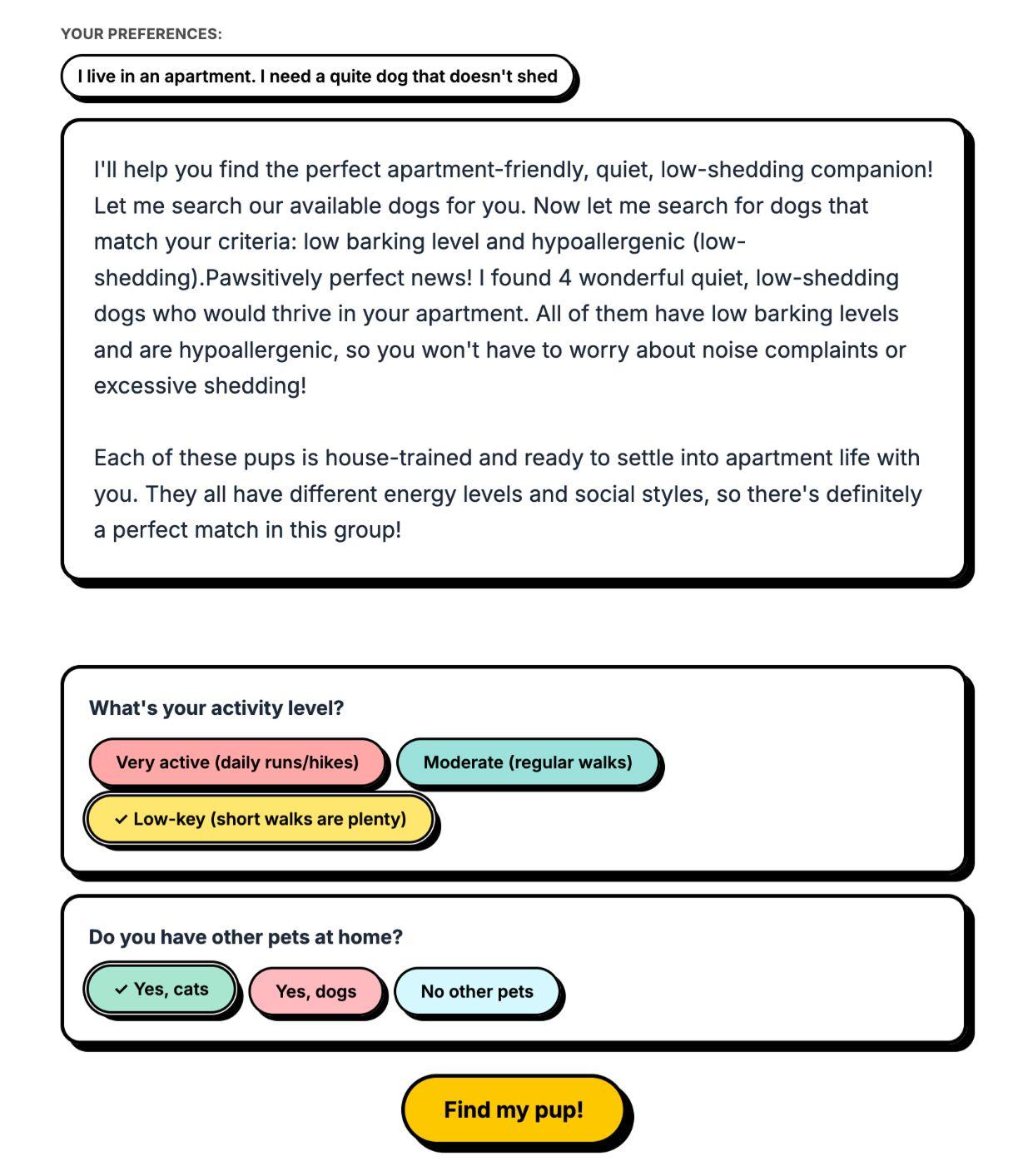
Follow-up questions showcase
AI curated follow-up questions based on which pups are remaining to help effectively choose a dog

Step 4: Let it cook

I reviewed the plan, okayed it, and let it run. The agent:

  • Scaffolded a Next.js project with an embedded Sanity Studio
  • Created the dog schema following Sanity conventions (thanks to the Agent Toolkit skill)
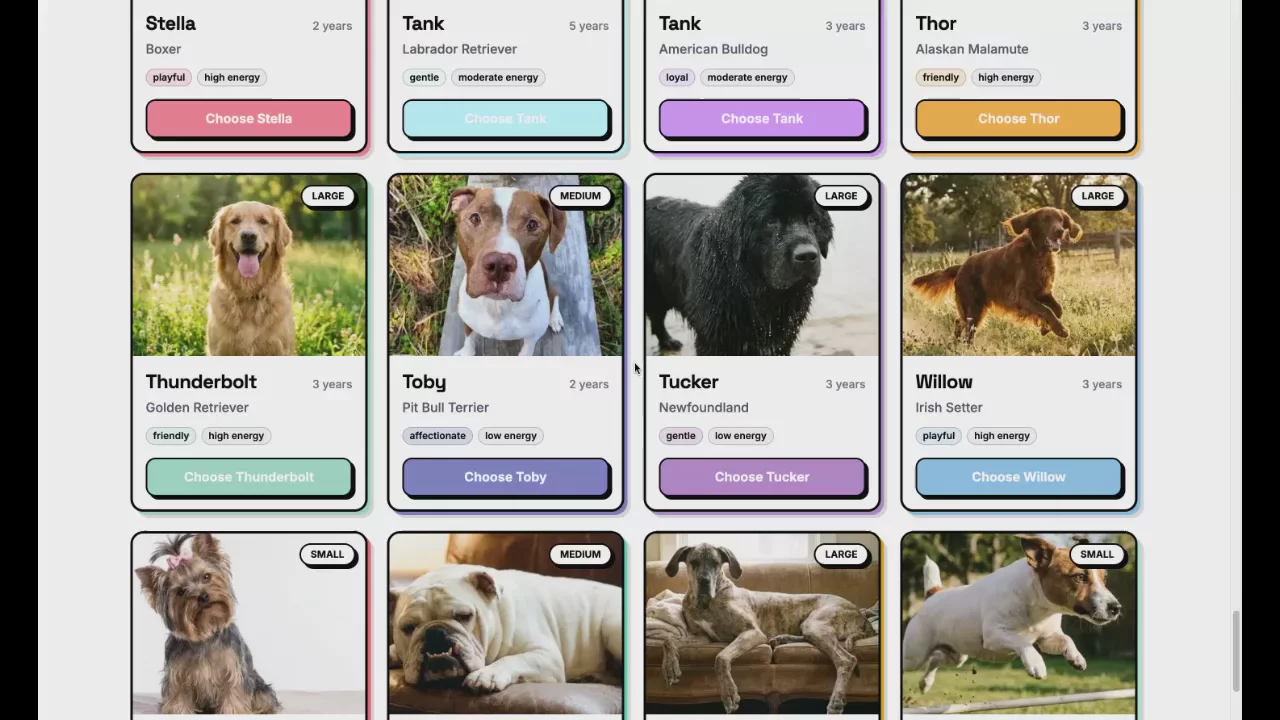
  • Used the Sanity MCP server to create 62 sample dogs with AI-generated images that matched each breed. A Great Dane got a Great Dane photo, a Beagle got a Beagle photo
  • Wired up Agent Context so the app's AI layer could query the Sanity dataset
  • Built the full UI with the matching flow, follow-up questions, and confetti

Most of my iterations after this were UI tweaks: adjusting the layout, changing the number of follow-up questions. The architecture and data layer worked on the first pass.

Step 5: Configure Agent Context

Agent Context comes with a Studio plugin that adds a document type for managing your AI contexts. If your coding agent didn't already set this up, add it to your sanity.config.ts:

With the plugin installed, I navigated to Content > Agent Context in the embedded Studio at /studio and created a new document. This is where you tell AI what it can see and how to behave. The document has a few key fields:

  • Name: a label for this context (e.g. "Dog matching")
  • Instructions: natural language guidance for the AI. What it should help with, what tone to use, any constraints ("Only recommend dogs that are listed as available")
  • Document types: which schema types the AI is allowed to query
  • GROQ filter: an optional filter scoped across all queries (e.g. status == "available" to exclude dogs that have already been adopted)

The important part: I scoped the GROQ filter to only expose dog documents that are ready for adoption. More context isn't always better for AI. An agent that can see your site settings, navigation config, and staff bios alongside your dog listings will make worse decisions, not better ones. Focused context means better answers.

You can create as many Agent Context documents as you need, each scoped to a different use case. A shelter site might have one for dog matching (only adoption-ready dogs), another for a support chatbot (FAQs and policies), and a third for an internal volunteer tool (schedules and shift documents). Same dataset, different lenses.

At the top of the document, the Studio shows an MCP URL. This is the endpoint your app's AI agent connects to, scoped to this context's configuration. I added it to my app's environment variables as AGENT_CONTEXT_URL, published the document, deployed the Studio with npx sanity deploy, and the AI matching was live.

What didn't go well

Two things bit me. One was my fault. The other was... also my fault.

I forgot to deploy my Studio. On my first test, Agent Context couldn't find my schema. That's because it reads your schema from the deployed Studio, not your local dev server. Since Pup Finder uses an embedded Studio, the Sanity MCP server's usual deploy didn't cover it. I needed npx sanity deploy --external to push the embedded Studio to production. Once I did that, everything clicked. If your Agent Context setup isn't working, check this first.

The multi-step UX was fiddly. The flow from search input to follow-up questions to final results has a lot of state transitions, and my prompt didn't describe them well enough. Dogs lingered on screen when they should have cleared, loading states fired at the wrong time, follow-up questions reappeared after being answered. The architecture worked on the first pass, but the UI choreography took a few rounds of nudging. Prompt better than I did and you'll probably skip this part entirely.

How the AI matching works in Pup Finder

Under the hood, the flow is surprisingly simple:

  1. The initial page load fetches all dogs directly via a GROQ query through next-sanity. No AI involved. Just fast, direct data fetching for the grid.
  2. When a user types "I need a calm dog that's good with cats and doesn't shed much," that goes to your LLM of choice (I used Anthropic, but Agent Context is provider-agnostic, any LLM that supports MCP works). The AI agent connects to your Sanity dataset through Agent Context's MCP server.
  3. Agent Context gives the AI three tools: initial_context (compressed schema overview), groq_query (execute queries against your dataset), and schema_explorer (inspect specific types). Three tools. That's it. The AI uses them to understand your data shape and query the right dogs.
  4. If four or more dogs match, the AI generates follow-up questions based on the attributes of the remaining dogs. If half of them are hypoallergenic and half aren't, it'll ask about allergies. If they vary in energy level, it'll ask about your activity level. Not a static list of questions. Dynamic, contextual, and (honestly) kind of delightful to watch in action.
  5. The filtered results come back with a friendly summary explaining why each dog is a good match. Not just "here are 3 dogs" but "Jara is calm, great with cats, and hypoallergenic. She's your best bet."

The AI isn't doing anything magical. It's reading structured data and making intelligent comparisons. Your content in Sanity is already structured and rich with metadata. Agent Context just gives AI a way to reason about it.

From prompt to working app, the whole build took just under an hour: scaffolding, schema, 62 sample dogs with matching AI-generated images, and a full matching UI with confetti (of course). The parts that would normally take the longest (schema design, data generation, wiring up the AI layer) were the parts the tools handled.
Try it yourself

The full source code, prompt, and a dataset export with all 62 dogs are on GitHub. Yes, that includes 62 absurdly adorable AI-generated dog photos. You're welcome.

→ Pup Finder on GitHub

To get it running:

  1. Clone the repo
  2. Install dependencies with pnpm install
  3. Set up your Sanity project and import the sample dataset
  4. Add your Anthropic API key and Sanity tokens to .env
  5. Run pnpm dev and start describing your perfect dog

What to build next

Pup Finder is a demo, but the pattern is real. Anywhere you have structured content that users need to search through, Agent Context can turn rigid filters into natural conversations.

A few ideas to riff on:

  • Real estate: "I want a 3-bedroom with a yard, walkable to schools, under $400k"
  • E-commerce: "I need running shoes for flat feet that work on trails"
  • Job boards: "Remote backend role, Rust or Go, series A startup"
  • Recipe sites: "Quick weeknight dinner, no dairy, feeds four"

The pattern is always the same: structured data in Sanity, Agent Context as the bridge, and AI that lets users search the way they actually think.